Showing posts sorted by relevance for query indexes. Sort by date Show all posts

Monday, July 2, 2012

Overview of Indexes

Overview

Indexes are used to speed up searches. Properly used indexes can greatly increase search speeds, but they can also slow updates and deletes. Whenever the values in the tables change the index must be recreated. This can take resources and time.

Kinds of Indexes

Clustered indexes

A clustered index physically organizes the data by the indexed fields. If it is a character type the records with be ordered A-Z, if numeric 123... etc. Consequently, there can only be one clustered index per table. By Default, the primary key is given a clustered index, but you can override this. Below is an example of creating a table with the social security number used as a clustered index and the primary key as a non clustered index:


CREATE TABLE Employee
(
  EmployeeID INT IDENTITYy(1,1),
  SocialSecurityNumber NCHAR(10) NOT NULL UNIQUE,
  EmployeeName NVARCHARr(255),
  HireDate Date
)

ALTER TABLE Employee
ADD CONSTRAINT pk_Employee 
  PRIMARY KEY NONCLUSTERED(EmployeeID)

CREATE CLUSTERED INDEX ix_SocialSecurity 
     ON Employee (SocialSecurityNumber)


Most indexes are non clustered. Non clustered indexes create a separate structure called a Balanced Tree or B-Tree. Below is an image of a B-Tree Cluster:

Below is the code for creating a non clustered index. "NONCLUSTERED" is optional. The second option is for an index with an included column.


CREATE NONCLUSTERED INDEX ix_EmployeeName ON Employee(EmployeeName)
CREATE NONCLUSTERED INDEX ix_NameDate ON Employee (EmployeeName) 
INCLUDE (HireDate)


Filtered Index

You can create an index which filters for certain conditions:


CREATE NONCLUSTERED INDEX ix_HireDate ON Employee (HireDate) 
WHERE Hiredate IS NOT NULL

Disabling, Rebuilding, and Dropping Indexes.

When loading bulk data or testing sometimes it is necessary to disable an index temporarily. When you are done you can rebuild it. You can also drop an index completely


ALTER INDEX ix_EmployeeName ON Employee DISABLE
ALTER INDEX ix_EmployeeName ON Employee REBUILD

DROP INDEX ix_EmployeeName ON Employee


Forcing an Index

Even if you make an index, the database engine may not use it. Generally it is faster to just sort through the records until a certain threshold (several thousand) records are present. For testing purposes you can force SQL Server to use an index with the following syntax


SELECT * FROM Employee 
WHERE EmployeeName='John Smith' 
ITH (NOLOCK, INDEX(ix_EmployeeName))

Tuesday, July 12, 2011

Indexes

--Indexes
--Clustered -- physically orders the table--by default the
--primary key is a clustered index
--unclustered indexes which form a B-Tree
--unique indexes

Use CommunityAssist

--dropped the primary key and its clustered index
Alter table personAddress
Drop Constraint PK__PersonAd__7CE0EF7203317E3D

--Add a new unclusted primary key
Alter Table PersonAddress
Add Constraint PK_PersonAddress primary key nonclustered(PersonAddressKey)

--create a new unclustered index
Create clustered index Ix_ClusteredLastName on PersonAddress(PersonKey)

--not sure if any change can be seen
Select * From PersonAddress

--creating non clustered indexes
Create index ix_LastName on Person(lastName)
--non clustered index on multiple fields
Create index ix_cityState on PersonAddress(City, [State])

--creating a unique index--fails because non unique data
--in table
Create unique index ix_ContactInfo on PersonContact(ContactInfo)

--disable an index
Alter index ix_LastName on Person Disable

--re-enable and rebuild an index
Alter index ix_LastName on Person Rebuild

--select with forced use of indexes
--generally SQL's query optimizer will ignore
--indexes if the number of table rows is too small
Select Lastname, Firstname, street, city, [State], zip
From Person p with (index (ix_LastName))
inner join PersonAddress pa with (index (Ix_ClusteredLastName))
on p.PersonKey=pa.PersonKey
Where LastName='Smith'

Monday, February 9, 2015

Indexes and Views

--indexes and joins
--clustered indexes, non clustered indexes, unique, filtered

Use Automart

--the syntax is  CREATE [type of Index] [Index Name] ON [Table](Column Name]
--nonclustered is the default. You never have to actually write it
--a nonclustered index creates a B-tree that breakes the data into
--nodes. The search can locate the relevant node in 2 or three steps
--rather than run through thousands of individual rows

Create nonclustered Index ix_LastName on Person(lastName)
--unique indexes ensure that a column is unique. It speeds up searches
--because the server doesn't have to look for duplicated

Create unique index ix_ServiceName on Customer.AutoService(ServiceName)
--a filtered index has a where clause that can "filter" which rows
--in a table are indexed

Create nonclustered index Ix_olderData on Employee.VehicleService (ServiceDate) Where serviceDate > '1/1/2015'

--it is possible to include more than one column in an index
Create nonclustered index ix_employeeLoc on Employee(PersonKey, LocationID)

--primary keys are indexed by default
--but here is the syntax fro how to create one
Create clustered index ix_PersonKey on Person(PersonKey)

--forcing an index. SQL Server will not even create the index structure
--the b-tree for tables under a certain number of rows (27000 or so)
--the following syntax forces the use of the ix_Lastname index
Select Lastname, firstName, email
From Person p with (index(ix_lastName)) --this forces the index
inner join Customer.RegisteredCustomer rc
on rc.PersonKey=p.Personkey
where LastName='Smith'

--Go is used to separate batches. It means basically
--finish everything before starting the next command
Go
--Views--the basic syntax is CREATE VIEW [Name] AS then 
--SQL Statement. Views are basically stored queries
--they are filters. They don't store the actual data.
--The idea of a view is to create a "View" of the database
--for a particular set of users. Human Resources, for instance.
--Some views can be used for updates and inserts but not
--most. To allow updating and inserting the view must
--be transparent. No aliases, not more than one join,
--no calcualted fields. It is probably better to use stored
--procedures rather than views for those tasks
Create View vw_RegisteredCustomers
AS
Select LastName [Last Name]
,FirstName [First Name]
, Email
,LicenseNumber License
,VehicleMake Make
,VehicleYear [Year]
From Person p
inner join Customer.RegisteredCustomer rc
on p.Personkey=rc.PersonKey
inner Join Customer.Vehicle v
on v.PersonKey=p.Personkey

Go
--the order by clause is forbidden in creating views
--but you can order the results of a query using
--a view. Also when Selecting from a view
--you must use the aliases as the column names
Select * From vw_RegisteredCustomers
Where [Last name] = 'Smith'
order by [First Name]


Saturday, August 3, 2013

Query Optimization

Overview

Query optimization is an important administrative task. But it is a difficult and subtle process. It involves extensive testing of various query structures and indexes and comparing the results.

Sql Server has a built in optimazation engine (see below) that usually but not always provides the best execution plan. You can also look at the actual execution plans and compare statistics when running variations of a query. Sql Server also provides the syntax for getting "Hints" when running queries. Finally you can use the Database Tuning Advisor to get suggestions for what indexes to create.


SQL Servers Query Optimization

Sql Server has a built in query optimization engine. Every time a query is run it goes through the following steps:

Parsing makes sure the query is valid SQL. Binding is mostly about name resolution, getting the table and column names. Optimization generates candidate execution paths and determines which has the least cost in cpu and total execution time.

Query optimization is complex and even the best optimizer doesn't get it right all the time. Still most of the time the optimizer does generate the optimal path.


Looking at a query with the execution plan and statistics

Open SQL Server Management Studio.

Start a new Query window

Select the Actual Execution Plan, and the Include Client Statistics from the toolbar

We are going to use Adventure works because it has more records. Our query will focus on the sales and sales details tables, but we will also bring in the Product name from the product table. We will use the dates and salesperson IDs for criteria.

Here is the query:

Use AdventureWorks2012

Select s.SalesOrderID, OrderDate, 
SalesOrderNumber, SalesPersonID,
ORderQty, Name, unitPrice,
 UnitPRiceDiscount
From Sales.SalesOrderHeader s
Inner Join Sales.SalesOrderDetail sd
on s.SalesOrderID=sd.SalesOrderID
inner Join Production.Product p
on p.ProductID=sd.ProductID
Where OrderDate between '2008-1-1' and '2008-1-31'
And SalesPersonID is not null

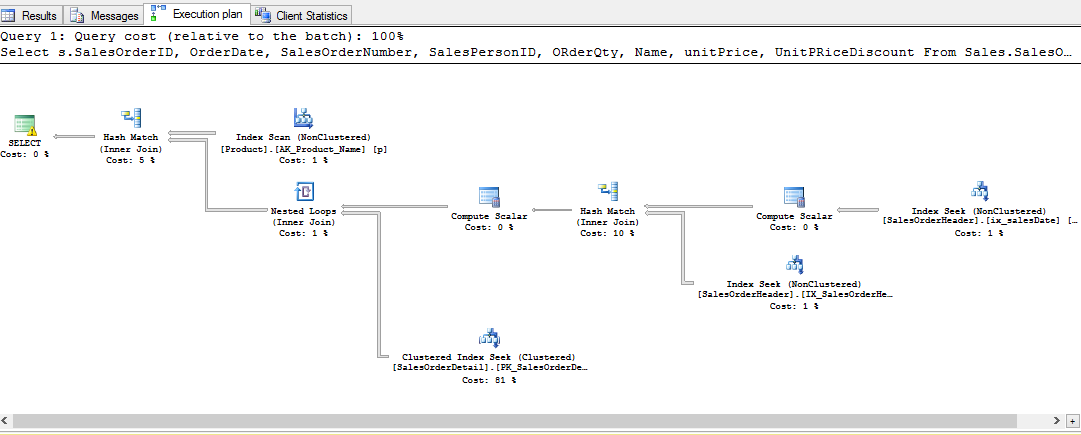
After you run this click the tab Execution plan. You will have the following output

Notice that it suggests a couple of indexes that are missing--in other words should be created, particularly on SalesOrderDate and SalesPersonID. Notice also that the majority of the cost is incurred processing the clustered indexes--which means going row by row through the table.

Next look at the statistics output

Open a second query window. We are going to create part of the suggested index

Create index ix_salesDate on Sales.SalesOrderHeader(OrderDate)

Now go back and rerun the query. Notice the query results include the new index. Now all the cost is in SalesDetail clustered index. This would suggest we should add another index.

Look at the statistics. Notice, interestingly the total cost has actually gone up and many of the indicators are worse.

This suggests that the next step would be to try an index on SalesPersonID and see if that improves the stats.


Query Hints

Query hints are a set of commands that you can add to a query to suggest an execution path. I am only going to show a couple. Query hints start with the Option keyword and have various arguments in parenthesis. The first example is a merge join which suggest executing the Joins as merges. Here is the code. The only change is in the last line.

Select s.SalesOrderID, OrderDate, SalesOrderNumber, SalesPersonID,
ORderQty, Name, unitPrice, UnitPRiceDiscount
From Sales.SalesOrderHeader s
Inner Join Sales.SalesOrderDetail sd
on s.SalesOrderID=sd.SalesOrderID
inner Join Production.Product p
on p.ProductID=sd.ProductID
Where OrderDate between '2008-1-1' and '2008-1-31'
And SalesPersonID is not null
Option (Merge Join)

Notice the change in results and statistics. Notice the change of joins to merge join and the suggestion to create and index.

Here are the statistics

Most of the other query hints are suggestions to the query optimizer. Look at http://msdn.microsoft.com/en-us/library/ms181714.aspx for a complete descriptions.


The DataBase Engine Tuning Advisor

To start the Tuning advisor go to the TOOLS menu in the Sql Server Management Studio. Connect to Localhost.

In the general tab, select "Plain Cache", and check Automart

Click the Tuning Options Tab. Leave everything as default except the time.

In Advanced Options set the max space to 4 mbs or so

Move it ahead 10 minutes or so.

Click start analysis.

The Tuning adviser has no suggestions. (Automart is too small a database to really analyze.) Here is the report:


Useful links:

Query hints

http://msdn.microsoft.com/en-us/library/ms181714.aspx

Overview of query optimization

https://www.simple-talk.com/sql/sql-training/the-sql-server-query-optimizer/
http://sqlblog.com/blogs/paul_white/archive/2012/04/28/query-optimizer-deep-dive-part-1.aspx
http://sqlblog.com/blogs/paul_white/archive/2012/04/28/query-optimizer-deep-dive-part-2.aspx

Advice

http://exacthelp.blogspot.com/2012/04/sql-server-query-optimization-tips.html
http://blogs.lessthandot.com/index.php/DataMgmt/DBAdmin/sql-server-tuning

Database tuning advisor

http://msdn.microsoft.com/en-us/library/ms174202.aspx

Monday, April 29, 2013

Indexes and views

Here is what we did today, but for a more thorough and organized discussion of indexes you can go to this blog entry

--indexes and views

use communityAssist

-- non clustered index
Create nonclustered index ix_lastname on Person(Lastname)

Select * From Person with (index(ix_lastName))
where Lastname='Anderson'

--filtered index
Create index ix_Apartment on personAddress (apartment)
where Apartment is not null

Create unique index ix_uniqueEmail on PersonContact(contactinfo)
where contactTypekey=6

Drop index ix_Apartment on personAddress

Create index ix_location on PersonAddress(City, State, Zip)

Create table Personb
(
 personkey int,
 lastname nvarchar(255),
 firstname nvarchar(255)
)

Insert into Personb(personkey, lastname, firstname)
Select PersonKey, Lastname, firstname from Person

Select * from PersonB

Create clustered index ix_LastNameCluster on PersonB(Lastname)
Drop index ix_lastnameCluster on Personb

Insert into PersonB
Values(60, 'Brady', 'June')

--views
Go

Alter view vw_Donors 
As
Select lastname [Last Name], 
firstname [First Name],  
DonationDate [Date],
DonationAmount [Amount]
From Person p
inner Join Donation d
on p.PersonKey=d.PersonKey


go
Select [Last Name], [First Name], [Date], [Amount]
from vw_Donors

Select * from vw_Donors
where [Date] between '3/1/2010' and '3/31/2010'
order by [Last Name]

I

go
--this creates an updatable view
Create view vw_Person
As
Select lastname, firstname
from person
go
insert into vw_Person(firstname, Lastname)
Values('test', 'test')

Select * from Person

Select * from vw_donors 
where [Last Name]='Mann'
go

--this creates a bad view because the inclusion of contactinfo causes the 
--donation amount to repeat and gives a false sense of how many donations
--each donor has made
Create view vw_BadDonors
As
Select Lastname, firstName, ContactInfo, donationDate, donationamount
From Person p
inner join personContact pc
on p.PersonKey=pc.personkey
inner join Donation d
on p.PersonKey=d.Personkey

select Distinct * From vw_BadDonors where lastname='Mann'

Select sum(Amount) From vw_donors
Select sum(donationAmount) from vw_BadDonors

Thursday, August 11, 2011

Here is the script for the backup and recovery presentation:


-- change recovery model
ALTER DATABASE Automart SET RECOVERY SIMPLE;
--ALTER DATABASE Automart SET RECOVERY BulkLogged;
ALTER DATABASE Automart SET RECOVERY full;

-- create a full backup of Automart
BACKUP DATABASE Automart
TO DISK = 'C:\Users\ITStudent\Documents\Backups\Automart.bak'
with init;

-- create a differential backup of Automart appending to the last full backup
BACKUP DATABASE Automart
TO DISK = 'C:\Users\ITStudent\Documents\Backups\Automart.bak'
with differential;

-- create a backup of the log
use master;
BACKUP LOG Automart
TO disk = 'C:\Users\ITStudent\Documents\Backups\AutomartLog4.bak'
WITH NORECOVERY, NO_TRUNCATE;

create table TestTable
(
ID int identity(1,1) primary key,
MyTimestamp datetime
);

insert into TestTable values
(
GETDATE()
);

use Automart;
select * from TestTable;

-- restore from the full backup
use master;
RESTORE DATABASE Automart
FROM disk = 'C:\Users\ITStudent\Documents\Backups\Automart.bak'
with norecovery, file = 1;

-- restore from the differential backup on file 2
RESTORE DATABASE Automart
FROM disk = 'C:\Users\ITStudent\Documents\Backups\Automart.bak'
with norecovery, file = 2;

-- restore from the differential backup on file 3
RESTORE DATABASE Automart
FROM disk = 'C:\Users\ITStudent\Documents\Backups\Automart.bak'
with norecovery, file = 3;

-- restore from the log
use master;
RESTORE LOG Automart
FROM disk = 'C:\Users\ITStudent\Documents\Backups\AutomartLog.bak'
WITH NORECOVERY;

restore database Automart;


----------------------------------------------------------------------------------------------------------------------------

--############### CREATE A COMPRESSED, MIRRORED, FULL BACKUP ###########--

BACKUP DATABASE Automart
TO DISK = 'C:\Users\Tri\My Documents\Backups\Automart_backup_20110810.bak'
MIRROR TO DISK = 'C:\Users\Tri\My Documents\Backups1\Automart_backup2_20110810.bak'
WITH COMPRESSION, INIT, FORMAT, CHECKSUM, STOP_ON_ERROR
GO
-- MIRROR TO DISK - TO CREATE A COPY OF BACKUP INTO ANOTHER FOLDER
-- WITH COMPRESSION (option) - TO SAVE SPACE

--CREATE A TRANSACTION LOG BACKUP--
USE Automart
GO
--CREATE A TEST TABLE--
create table Test_DataBACKUP
(
ID int identity(1,1) primary key,
BackUpTime datetime
)
--drop table Test_DataBACKUP
INSERT INTO Test_DataBACKUP
VALUES
(
GETDATE()
)
GO

--SELECT * FROM Test_DataBACKUP

BACKUP LOG Automart
TO DISK = 'C:\Users\Tri\My Documents\Backups\Automart_backup_lOG_20110810.trn'
WITH COMPRESSION, INIT, CHECKSUM, STOP_ON_ERROR
GO

--INSERT INTO TEST TABLE AGAIN TO PERFORM A 2ND TRANSACTION LOG BACK UP--
--INSERT STATEMENT--
--THEN--
BACKUP LOG Automart
TO DISK = 'C:\Users\Tri\My Documents\Backups\Automart_backup2_lOG_20110810.trn'
WITH COMPRESSION, INIT, CHECKSUM, STOP_ON_ERROR
GO

-------------- DIFFERENTIAL BACKUPS ---------------
BACKUP DATABASE Automart
TO DISK = 'C:\Users\Tri\My Documents\Backups\Automart_backup_20110810.dif'
MIRROR TO DISK = 'C:\Users\Tri\My Documents\Backups\Automart_backup2_20110810.dif'
WITH DIFFERENTIAL, COMPRESSION, INIT, FORMAT, CHECKSUM, STOP_ON_ERROR
GO

--################## SET THE RECOVERY MODEL #################--
ALTER DATABASE Automart
SET RECOVERY FULL
GO
--Can also check inside Database Properties in Option.

-------RESTORE A FULL BACK UP--------
--First step in restore Process is to back up the tail of the Log--
BACKUP LOG Automart
TO DISK = 'C:\Users\Tri\My Documents\Backups\Automart_backup3_log_20110810.trn'
WITH COMPRESSION, INIT, NO_TRUNCATE
GO

--Have you ever wonder how we manage to back up the transaction log--
--even when every data file for the database no longer exists.--
--As long as the transaction log has not benn damaged, it is possible to back up the log, even in the--
--absence of every data file within the database.

--Now that you have the tail of the log, execute the following code to restore the full backup--
USE master
GO

RESTORE DATABASE Automart
FROM DISK = 'C:\Users\Tri\My Documents\Backups\Automart_backup_20110810.bak'
WITH FILE = 1,
NOUNLOAD, STATS = 10
Go

--#### WITH STANDBY ? ####--

--RESTORE A DIFFERENTIAL BACKUP--
RESTORE DATABASE Automart
FROM DISK = 'C:\Users\Tri\My Documents\Backups\Automart_backup2_20110810.dif'
WITH RECOVERY
GO
-- WITH RECOVERY - RECOVER A DATABASE TO MAKE IT ACCESSIBLE FOR TRANSACTIONS


--RESTORE LOG BACKUP--
RESTORE LOG Automart
FROM DISK = 'C:\Users\Tri\My Documents\Backups\Automart_backup3_log_20110810.trn'
WITH FILE = 1, NORECOVERY, STATS = 10
GO


Here is the script for the presentation of Dynamic management views


--Retrieve Information about Database Objects
SELECT * FROM sys.databases
SELECT * FROM sys.schemas
SELECT * FROM sys.objects
SELECT * FROM sys.tables
SELECT * FROM sys.columns
SELECT * FROM sys.identity_columns
SELECT * FROM sys.foreign_keys
SELECT * FROM sys.foreign_key_columns
SELECT * FROM sys.default_constraints
SELECT * FROM sys.check_constraints
SELECT * FROM sys.indexes
SELECT * FROM sys.index_columns
SELECT * FROM sys.triggers
SELECT * FROM sys.views
SELECT * FROM sys.procedures

--retrive database and object size
SELECT * FROM sys.database_files
SELECT * FROM sys.partitions
SELECT * FROM sys.allocation_units

SELECT object_name(a.object_id), c.name, SUM(rows) rows,
SUM(total_pages) total_pages, SUM(used_pages) used_pages,
SUM(data_pages) data_pages
FROM sys.partitions a INNER JOIN sys.allocation_units b ON a.hobt_id = b.container_id
INNER JOIN sys.indexes c ON a.object_id = c.object_id and a.index_id = c.index_id
GROUP BY object_name(a.object_id), c.name
ORDER BY object_name(a.object_id), c.name

--Retrieve Index Statistics
SELECT * FROM sys.dm_db_index_operational_stats(NULL,NULL,NULL,NULL)
SELECT * FROM sys.dm_db_index_physical_stats(NULL,NULL,NULL,NULL,NULL)
SELECT * FROM sys.dm_db_index_usage_stats


--Determine Indexes to Create
SELECT * FROM sys.dm_db_missing_index_details
SELECT * FROM sys.dm_db_missing_index_group_stats
SELECT * FROM sys.dm_db_missing_index_groups
--Execute the following aggregation script and review the results
SELECT *
FROM (SELECT user_seeks * avg_total_user_cost * (avg_user_impact * 0.01)
AS index_advantage, migs.*
FROM sys.dm_db_missing_index_group_stats migs) AS migs_adv
INNER JOIN sys.dm_db_missing_index_groups AS mig
ON migs_adv.group_handle = mig.index_group_handle
INNER JOIN sys.dm_db_missing_index_details AS mid
ON mig.index_handle = mid.index_handle
ORDER BY migs_adv.index_advantage

--Execute the following code to force an index miss against the AdventureWorks database
SELECT City,PostalCode
FROM Person.Address
WHERE City IN ('Seattle','Atlanta')

SELECT City,PostalCode,AddressLine1
FROM Person.Address
WHERE City = 'Atlanta'

SELECT City,PostalCode,AddressLine1
FROM Person.Address
WHERE City like 'Atlan%'

--Execute the aggregation script again and review the results

SELECT *
FROM (SELECT user_seeks * avg_total_user_cost * (avg_user_impact * 0.01)
AS index_advantage, migs.*
FROM sys.dm_db_missing_index_group_stats migs) AS migs_adv
INNER JOIN sys.dm_db_missing_index_groups AS mig
ON migs_adv.group_handle = mig.index_group_handle
INNER JOIN sys.dm_db_missing_index_details AS mid
ON mig.index_handle = mid.index_handle
ORDER BY migs_adv.index_advantage

--Execute the following script to repeatedly run a SELECT statement and review the new results of the aggregation script
SELECT City,PostalCode,AddressLine1
FROM Person.Address
WHERE City like 'Atlan%'
GO 100

SELECT *
FROM (SELECT user_seeks * avg_total_user_cost * (avg_user_impact * 0.01)
AS index_advantage, migs.*
FROM sys.dm_db_missing_index_group_stats migs) AS migs_adv
INNER JOIN sys.dm_db_missing_index_groups AS mig
ON migs_adv.group_handle = mig.index_group_handle
INNER JOIN sys.dm_db_missing_index_details AS mid
ON mig.index_handle = mid.index_handle
ORDER BY migs_adv.index_advantage

--Determine Execution Statistics

SELECT query_plan, text, *
FROM sys.dm_exec_requests CROSS APPLY sys.dm_exec_query_plan(plan_handle)
CROSS APPLY sys.dm_exec_sql_text(sql_handle)

SELECT City,PostalCode,AddressLine1
FROM Person.Address
WHERE City like 'Atlan%'
GO 100
--Execute the following script to repeatedly run a SELECT statement and review the new results of the aggregation script
SELECT *
FROM (SELECT user_seeks * avg_total_user_cost * (avg_user_impact * 0.01)
AS index_advantage, migs.*
FROM sys.dm_db_missing_index_group_stats migs) AS migs_adv
INNER JOIN sys.dm_db_missing_index_groups AS mig
ON migs_adv.group_handle = mig.index_group_handle
INNER JOIN sys.dm_db_missing_index_details AS mid
ON mig.index_handle = mid.index_handle
ORDER BY migs_adv.index_advantage


Monday, October 17, 2011

Arrays

An array says your book, "represents a fixed number of elements of the same type." An array, for instance can be a set of integers or a set of doubles or strings. The set can be accessed under a single variable name.

You use square brackets [] to signify an array. The following declares an array of integers with 5 elements

int[] myArray=new int[5];

Each element in an array has an index number. We can use these indexes to assign or access values in an array. Indexes always begin with 0

myArray[0]=5;
myArray[1]=12;
myArray[2]=7;
myArray[3]=74;
myArray[4]=9;

Console.WriteLine("The fourth element of the array is {0}",myArray[3]);

Here is another way to declare an array. This declaration declares a string array and assigns the values at the moment when the array is created

string[ ] weekdays =new string[ ]
       {"Monday","Tuesday","Wednesday", "Thursday", "Friday", "Saturday", "Sunday"};

The values are still indexed 0 to 6


Array work naturally with loops. You can easily use a loop to assign values:


for (int i=0; i<size;i++)
{
     Console.WriteLine("Enter an Integer");
     myArray[i]=int.Parse(Console.ReadLine());

}

Arrays can be passed as a parameter to methods and they can be returned by a method.

private void CreateArray()
{
    double[ ] payments = new double[5];
    FillArray(payments, 5);
}

private void FillArray(double[ ] pmts, int size)
{
    int x=0;
   while (x < size)
  {
     Console.WriteLine("Enter Payment Amount");
     pmts[x]=double.Parse(Console.ReadLine());
     x++;
  }
}

Tuesday, July 9, 2013

Indexes

Here is the link to the Power Point

SQL server Indexes

And here is the brief code we did in class with the force index. You have to run the CREATE INDEX on the bottom before you can force the index. remember to click the icon for "Show Actual Execution path" on the tool bar to see the statistics.

Select LicenseNumber as License, 
VehicleMake as Make, 
VehicleYear as [Year], 
LocationName as [Location], 
ServiceDate as [Date], 
ServiceTime as [Time],
ServiceName as [Service],
'$' + Cast(ServicePrice as nvarchar) as [Price],
DiscountPercent, 
TaxPercent,
'$' + Cast(Cast(ServicePrice -(ServicePrice* DiscountPercent) + 
((ServicePrice * DiscountPercent) * TaxPercent) as Decimal(6,2))as 
nvarchar) as ServiceTotal
From Customer.Vehicle  v
inner join Employee.vehicleService vs with (nolock, index (Ix_VehicleServiceVehicleID))
on v.VehicleId=vs.VehicleID
inner join Customer.Location loc
on loc.LocationID=vs.LocationID
inner Join Employee.VehicleServiceDetail vsd
on vs.VehicleServiceID=vsd.VehicleServiceID
inner join Customer.AutoService a
on a.AutoServiceID=vsd.AutoServiceID

go
Create index ix_VehicleServiceVehicleID on Employee.VehicleService(VehicleID)

Wednesday, February 12, 2014

Indexes and Views

Use MagazineSubscription

--adding a column
Alter table Customer
Add Email Nvarchar(255) 

Select * from Customer

--dropping a column
Alter Table Customer
Drop column Email


--drop a foreign key constrain
Alter table MagazineDetail
Drop constraint FK1_MagazineDetails

--use a system table to see foreign keys in current database
Select * from sys.foreign_keys 

--create a table to test default
Create table test
(
 testID int identity(1,1) primary key,
 testState nvarchar(10) default 'finished'
)
--add a column
Alter table test 
add testDate date 

--insert some records
Insert into test (TestDate) Values (GetDate())

Select * from Test

/**********************************
*Indexes and views
***********************************/
Use Automart

--noclustered is optional
Create nonclustered index ix_LastName on Person(LastName)

Drop index [UQ__Register__A9D105341CAB755D] on Customer.RegisteredCustomer

--uique index
Create unique index ix_Email on Customer.RegisteredCustomer(Email)
--filtered index
Create index ix_filtered on Employee.VehicleService(ServiceDate)
Where ServiceDate > '1/1/2012'

--composite index
Create index ix_service on Employee.vehicleService(ServiceDate, ServiceTime)

Create table testtable
(
 testKey int identity,
 TestName nvarchar(255) not null,
 Constraint PK_TestTable  primary key nonclustered(testKey)
)
--clustered index
Create clustered index ix_testname on TestTable(testName)

Insert into testTable(testName)
values('FirstTest'),
('a test'),
('third test')

Insert into testTable(testName)
values('alpha')


Select * from testTable
\--forcing an index
Select LastName, firstName, email, LicenseNumber, VehicleMake, VehicleYear
From Person p with (NoLock, Index(ix_lastName))
inner join customer.RegisteredCustomer rc
on p.Personkey=rc.PersonKey
inner join Customer.Vehicle v
on p.Personkey =v.PersonKey
Where LastName='Smith' 

Go --go seperates batches
--views
Create view vw_Customer
As
Select LastName [Last Name]
, firstName [first Name]
, email Email
, LicenseNumber [License Number]
, VehicleMake Make
, VehicleYear [Year]
From Person p 
inner join customer.RegisteredCustomer rc
on p.Personkey=rc.PersonKey
inner join Customer.Vehicle v
on p.Personkey =v.PersonKey
go
Select * from vw_customer

--using a view
Select [Last Name], Email from vw_Customer
Where [Last Name] ='Smith'
order by Email
go

Create view vw_simple
As
Select * from Person
Order by LastName
--can't order a view

Go
--altering a view
Alter view vw_customer
As
Select LastName [Last Name]
, firstName [first Name]
, email Email
, LicenseNumber [License Number]
, VehicleMake Make
, VehicleYear [Vehicle Year]
From Person p 
inner join customer.RegisteredCustomer rc
on p.Personkey=rc.PersonKey
inner join Customer.Vehicle v
on p.Personkey =v.PersonKey

Thursday, August 4, 2011

Policy Management Report

Policy-Based Management

What is it?
New to SQL Server2008, allows you to define and enforce policies
A policy can force developers to follow certain guidelines.
Here are a couple of examples of policies (we’ll be setting these up in class)
All stored procedures must begin with the letters “Usp”
All tables must have primary keys


Policy management consists of four components:
Target
An object which can be managed.
An example is a stored procedure or a table
Facet
A predefined set of properties that can be managed
Condition
A condition is something that will be evaluated to either True of False. A condition can check one or more statements using and/or.
Using our example from above, all stored procedures must begin with the letters “Usp”.
Policy
A condition to be checked and enforced.


A policy has four evaluation modes:
On Demand
On Demand lets the admin check the policy and receive a list of violations
On Schedule
On Schedule lets the admin schedule the checking of a policy at specific intervals.
On Change - Log Only
On Change - Log makes an entry into the database log every time a change occurs that triggers a violation.
On Change - Prevent
On Change - Prevent prevents a change that would violate the policy.


The following SQL snippet displays a 1 if the table named ‘Person’ has a primary key and nothing if it doesn’t.

select 1
from sys.tables t
inner join sys.indexes i
on i.object_id = t.object_id
where i.is_primary_key = 1
and t.name = 'Person';

The following snippet evaluates to 1 if the table being evaluated has a primary key and to nothing if it doesn’t. This is entered in the field area.

The oprator is =
and the value is 1

The condition therefore returns true if the table being evaluated has a primary key and false if it doesn’t.

ExecuteSql('Numeric','select 1 from sys.tables t inner join sys.indexes i on i.object_id = t.object_id where i.is_primary_key = 1 and t.name = @@ObjectName')

Monday, February 14, 2011

Views and Indexes

Use MagazineSubscription
Go

--simple view
Create view vw_Customer
AS
Select CustLastName as [Last Name]
,CustFirstName as [First Name]
,CustPhone as Phone
From Customer
Go

--stored
Select * from vw_Customer
Order by [Last Name]

Select [Last name], [First Name], Phone
from vw_Customer
Where [Last Name]='Terrance'

--in order to update a view
--on table can't have a join
--cannot have any calculated fields
--

Update vw_Customer
Set [Last Name]='Able'
Where [first Name]='Tina'

Drop view vw_customer
go

Alter View vw_Customer
As
Select CustLastName as [Last Name]
,CustFirstName as [First Name]
,CustAddress as [Address]
,CustCity as City
,CustState as [State]
,CustZipcode as [Zip Code]
,CustPhone as Phone
From Customer


Go
Select * from Subscription
Go
Create view manager.vw_SalesSummary
AS
Select MONTH(SubscriptionStart) as [Month]
,COUNT (SubscriptionID) as [Subscriptions]
,SUM(SubscriptionPrice) as Total
From Subscription s
Inner Join MagazineDetail md
On md.MagDetID=s.MagDetID
Group by MONTH(SubscriptionStart)

Go

Drop view vw_SalesSummary

Create Schema manager

Select * from vw_SalesSummary
Where [Month]=3

--Indexes
--three kinds
--clustered
--non clustered
--unique

Create index ix_LastName on Customer(CustLastName)
Create clustered index ix_LastNameclustered on Customer(CustLastName) --throws error
Create unique index ix_uniquePhone on Customer(CustPhone)

Drop index PK_Customer on Customer

Wednesday, May 4, 2011

Views and Indexes

Use MagazineSubscription

--views and indexes
Go
Create view vw_Subscriptions
AS
Select CustLastName [Last Name],
MagName [Magazine],
SubscriptionStart [Start],
SubscriptionEnd [End],
SubscriptTypeName [Subscription Type],
SubscriptionPrice [Price]
From Customer c
Inner Join Subscription s
on c.CustID=s.CustID
Inner Join MagazineDetail md
on md.MagDetID=s.MagDetID
Inner Join Magazine m
on m.MagID=md.MagID
Inner Join SubscriptionType st
on st.SubscriptTypeID=md.SubscriptTypeID
--

--you can update, insert or delete through a view
--if you have not aliased the fields
--if there are no joins
--if there are no calculated fields or functions

Select * from vw_Subscriptions
Order by [Last Name]

Select * from vw_Subscriptions where Magazine='IT Toys'

Create index ix_LastName on Customer(CustLastName)

Create clustered index ix_cLastName on Customer(CustLastName)

Create unique index ix_cLastName on Customer(CustLastName)

Thursday, October 27, 2011

MultiDimensional Arrays

The simplest multidimensional array is a two dimensional array. You can think of a two dimensional array as a simple sort of table with columns and rows. The first dimension is the number of rows and the second dimension is the number of columns.

Here is an example of a two dimensional string array that keeps track of book titles and authors. It has 3 rows and 2 columns


 string[,] books = new string[3, 2];
           
            books[0, 0] = "War and Peace";
            books[0, 1] = "Tolstoy";
            books[1, 0] = "Lord of the Rings";
            books[1, 1] = "Tolkein";
            books[2, 0] = "Huckleberry Finn";
            books[2, 1] = "Twain";

Here is an example of a two dimensional array with 3 rows and 3 columns. Think of it as containing the height, width and length of a set of boxes

int[,] boxes = new int[3, 3];
            boxes[0, 0] = 4;
            boxes[0, 1] = 2;
            boxes[0, 2] = 3;
            boxes[1, 0] = 2;
            boxes[1, 1] = 2;
            boxes[1, 2] = 1;
            boxes[2, 0] = 3;
            boxes[2, 1] = 2;
            boxes[2, 2] = 5;

It is also possible to have arrays with more than two dimensions. Below is a three dimensional array.

int[, ,] space = new int[2, 2, 2];

            space[0, 0, 0] = 5;
            space[0, 0, 1] = 4;
            space[0, 1, 0] = 3;
            space[0, 1, 1] = 4;
            space[1, 0, 0] = 3;
            space[1, 0, 1] = 6;
            space[1, 1, 0] = 2;
            space[1, 1, 1] = 5;
            space[2, 0, 0] = 3;
            space[2, 0, 1] = 6;
            space[2, 1, 0] = 2;
            space[2, 1, 1] = 5;

Arrays can have more than 3 dimensions, but they rapidly get difficult to manage.

To display a multidimensional array, you access its indexes just as in an one dimensional array. Below is the full program that creates these arrays and displays all but the last one. If you would like a little chalange, you can add code to the display method to display the contents of the 3 dimensional array.


using System;
using System.Collections.Generic;
using System.Linq;
using System.Text;

namespace MultidimensionalArrays
{
    class Program
    {
        static void Main(string[] args)
        {
            Program p = new Program();
            p.Display();
            Console.ReadKey();
        }

        private string[,] TwoDimensionalArray()
        {
            //define two dimensional Array
            //first number is number of rows
            //the second is number of columns
            string[,] books = new string[3, 2];
           
            books[0, 0] = "War and Peace";
            books[0, 1] = "Tolstoy";
            books[1, 0] = "Lord of the Rings";
            books[1, 1] = "Tolkein";
            books[2, 0] = "Huckleberry Finb";
            books[2, 1] = "Twain";

            return books;
        }

        private int[,] Another2DimensionalArray()
        {
            //think of an array that holds
            //the height, width, and length
            //of boxes
            //although it has 3 columns
            //it is still a two dimensional 
            //array
            int[,] boxes = new int[3, 3];
            boxes[0, 0] = 4;
            boxes[0, 1] = 2;
            boxes[0, 2] = 3;
            boxes[1, 0] = 2;
            boxes[1, 1] = 2;
            boxes[1, 2] = 1;
            boxes[2, 0] = 3;
            boxes[2, 1] = 2;
            boxes[2, 2] = 5;

            return boxes;

        }

        private int[, ,] ThreeDimensionalArray()
        {
            //think of 3 dimensionals as a cube
            //you can do more dimensions but it
            //gets beyond absurd
            int[, ,] space = new int[2, 2, 2];

            space[0, 0, 0] = 5;
            space[0, 0, 1] = 4;
            space[0, 1, 0] = 3;
            space[0, 1, 1] = 4;
            space[1, 0, 0] = 3;
            space[1, 0, 1] = 6;
            space[1, 1, 0] = 2;
            space[1, 1, 1] = 5;
            space[2, 0, 0] = 3;
            space[2, 0, 1] = 6;
            space[2, 1, 0] = 2;
            space[2, 1, 1] = 5;

            return space;
        }

        private void Display()
        {
            //you access the values in multidimensional arrays
            //just like regular ones, through their indexes

            string[,] mybooks = TwoDimensionalArray();
            Console.WriteLine("The second book is {0}, by {1}", 
                mybooks[1, 0], mybooks[1, 1]);
            Console.WriteLine("*********************************");
            // the loop below multiplies the contents
            //of the three columns together
            int[,] cubes = Another2DimensionalArray();
            int cubicInches = 0;
            for (int i = 0; i < 3; i++)
            {
                cubicInches = cubes[i, 0] * cubes[i, 1] * cubes[i, 2];
                Console.WriteLine("Box {0}, is {1} cubic inches", i+1, cubicInches);
            }
            Console.WriteLine("*********************************");
           
        }
    }
}

Monday, April 30, 2012

Views and Indexes

--Views and indexes
--View is stored query or filter
--
use CommunityAssist
go

Create View vw_Employee
As
Select LastName [Last Name], 
firstName [First Name], 
HireDate [Hire Date], 
SSNumber [Social Security No.], 
Dependents
From Person p
inner Join Employee e
on p.PersonKey=e.PersonKey
 
go 
Select * from vw_Employee 
--you have to use the aliases as the field names
--when you query a view
--the view helps abstract the database
--users of the view don't know the underlying
--table structure or column names
Select [Last Name], [Social Security No.] From vw_Employee
Where Dependents is not null
go
--another view
--after you create a view if you want to change it
--you must alter it
--also the ORDER  BY clause is forbidden in views
Alter View vw_DonationSummary
AS
Select MONTH(DonationDate) [Month],
Year(DonationDate) [Year], '$' +
cast(SUM(donationAmount) as varchar(7)) [Total]
From Donation
Group by Year(DonationDate), MONTH(donationDate)

Select * from vw_DonationSummary
Where [Year]=2010

--binary tree non clustered index
Create index ix_LastName on Person(LastName)

--a clustered is where table is physically order by the indexed field
create clustered index ix_lastnameClustered on Person(LastName)

--unique and filtered--filtered because of the where clause
--it only applies to the values that meet the condition
--also a index can be on more than one column in a table
--just separate them by commas in the parentheses
Create unique index ix_uniqueEmail on PersonContact(contactinfo)
Where ContactTypeKey = 6

Select * from PersonContact

--will generate an error because it is a duplicate 
Insert into PersonContact(ContactInfo, PersonKey, ContactTypeKey)
Values('lmann@mannco.com', 2,6)

--drops an index
Drop index ix_uniqueEmail on PersonContact

--syntax for forcing an index
Select LastName, firstname from Person with (nolock,index(ix_LastName))

Monday, October 13, 2014

Arrays (Evening)

using System;
using System.Collections.Generic;
using System.Linq;
using System.Text;
using System.Threading.Tasks;

namespace ArrayExamples
{
    class Program
    {
        static void Main(string[] args)
        {
            //an array is a variable can store more than one value
            //this declares a string array that has 4 elements
            //the square brackets [] are the mark of an array
            //rather than just a string variable
            //arrays must always be made new before they
            //can be used
            string[] members =new string[4];
            members[0] = "Rebecca";//arrays values are indexed
            members[1] = "George";//indexes begin at 0
            members[2] = "Karen";
            members[3] = "Joe";

            //you can access the array's members
            //by their index
            Console.WriteLine("the Third member is {0}", members[2]);

            string[] colors;
            Console.WriteLine("How many colors do you want to enter");
            int number = int.Parse(Console.ReadLine());

            //the length of an array can be a variable
            //but the variable must have a value
            //before you declare the array
            colors = new string[number];
            for (int i = 0; i < colors.Length; i++ )
            {
                //prompt the user for the values
                //to store in the array
                //the i is the for loop counter
                //it can substitute as a variable
                //for the array index
                Console.WriteLine("enter Color");
                colors[i] = Console.ReadLine();
            }

            Console.WriteLine("*******************");
            //loop through and write out the array values
            for (int i = 0; i < colors.Length; i++)
            {
                Console.WriteLine(colors[i]);
            }

            //another way to declare an array
            //the literal values are placed betwee
            //curley braces {}
            //you don't have to give the lenth
            //it can figure it out
            string[] dogs = new string[] 
            { "spaniel", "pug", "golden retreiver", "huskey", "Yorkie" };

            //can still access the values by index value
            Console.WriteLine("Choose a number 1 to 5");
            int dog = int.Parse(Console.ReadLine());

            //minus one to adjust for the 0 index
            Console.WriteLine("Your dog is {0}", dogs[dog-1]);

                Console.ReadKey();
        }
    }
}

using System;
using System.Collections.Generic;
using System.Linq;
using System.Text;
using System.Threading.Tasks;

namespace NumberArrays
{
    class Program
    {
        static void Main(string[] args)
        {
            //declare and initialize variables
            int ones = 0, twos = 0, threes = 0, fours = 0;
            //create a random object
            Random rand = new Random();
            //create a new integer array with 50 elements
            int[] numberArray = new int[50];

            // populate array by looping through and 
            //assigning a random number to each index
            for(int i=0;i<numberArray.Length;i++)
            {
                numberArray[i] = rand.Next(1, 5);
            }

            //loop through the array and count
            //how many times each number occurs
            foreach (int i in numberArray)
            {
                if (i == 1) { ones++; }
                else if (i == 2) { twos++; }
                else if (i == 3) { threes++; }
                else { fours++; }
        
            }

            //create an asteric graph
            //for each number
            Console.Write("\nOnes:\t");
            for (int i = 0; i < ones; i++)
            {
                Console.Write("*");
            }

            Console.Write("\nTwos:\t");
            for (int i = 0; i < twos; i++)
            {
                Console.Write("*");
            }

            Console.Write("\nThrees:\t");
            for (int i = 0; i < threes; i++)
            {
                Console.Write("*");
            }

            Console.Write("\nFours:\t");
            for (int i = 0; i < fours; i++)
            {
                Console.Write("*");
            }

            // new array declaration
            int[] numbersArray2 = new int[50];
            for (int i = 0; i < numbersArray2.Length; i++)
            {
                numbersArray2[i] = rand.Next(1, 1000);
            }

            //declare max variable
            int max = 0;
           
            //if the current number is larger than
            //the stored maximum number
            //then make it the maximum
            foreach(int i in numbersArray2)
            {
                if (i > max) { max = i; }
            }

            //or you could just use the built in
            //max function
            int maxb=numbersArray2.Max();

            Console.WriteLine("\nthe max is " + max);

            //*************************
            //here is a two dimensional array
            //as declared it has 3 rows and 2 columns
            string[,] books=new string[3,2];
            books[0, 0] = "The Lord of the Rings";
            books[0, 1] = "Tolkein";
            books[1, 0] = "The Grapes of Wrath";
            books[1, 1] = "Steinbeck";
            books[2, 0] = "The martian chronicles";
            books[2, 1] = "Ray Bradbury";

            Console.WriteLine("Enter an author");
            string author = Console.ReadLine();
            //all of our titles are in the 0 column
            //all our authors are in the 1 column
            for (int i = 0; i < 3; i++)
            {
                //see if the authors match
                //i is the counter for the current row
                //1 is the author column
                if (author.Equals(books[i, 1]))
                {
                    //return the title
                    Console.WriteLine(books[i, 0]);
                }
            }
                Console.ReadKey();
        }
    }
}


Tuesday, June 28, 2011

SQL Server Overview

Database Engine


The database engine is the core service of the SQL Server. It runs as a background service and processes On-Line transaction databases OLTP or On-Line Analytic processes (OLAP). It is what actually manages the databases.

Storage Engine


Controls how data is stored on the disk and how applications can access it.
Some elements of the storage Engine Include:
Database File Groups
Tables, Data types and data storage
indexes
partitions
Internal data architecture
Locking and transaction management
Database Snapshots
Data backup and recovery

Security Subsystem


This subsystem allows you secure the server and its contents.

Some elements are:
Authentication Methods
Service Accounts
Enabling and disabling features
Schema
Principles, securables and permissions
Data Encryption
Code signatures
Auditing
Policy Configuration, management and enforcement

Programming Interfaces


These are elements that let you interact with the server programmically.

These Include among others
SQL
stored procedures
triggers
functions
Database snapshots
Full text

Service Broker


Provides a message queuing system.

SQL Server Agent


Used for scheduling tasks and creating alerts.

Replication


Used to distribute copies of data and keep all the copies sychronized to a master data set. Now can make changes all across the network and have them synchronized.

High Availablity


High availablity refers to keeping the server up and running 24/7. To do this SQL Server uses

Failover
Database Mirroring
Log shipping
Replication

Relational Engine


This is part that controls the relations between tables and objects. For a list of new items look a page 8 in the book, or go online to Microsoft's SQL server Page.

Business Intelligence


These are the tools for Data Warehousing, Data Mining and Analysis.

Integration Services


These services all the user to build and automate complex imports and exports.

Reporting Services


Allows you to create Reports on data in SQL Server and post them to the web or sharepoint sites.

Analysis Services


Data cubes, Data Aggregation, etc.

Monday, February 13, 2012

Indexes and Views

--views

Use CommunityAssist 

Go
If exists
 (Select name from sys.views
  where name='vw_Donors')
Begin
Drop View vw_Donors
end 
Go
--create a view
Create view vw_Donors
As
Select Distinct lastname [Last Name],
Firstname [First Name],
ContactInfo [Email]
From Person p
inner join PersonContact pc
on p.PersonKey=pc.PersonKey
inner join Donation d
on p.PersonKey=d.PersonKey
Where ContactTypeKey=6
Go

--use the view just like a table
Select * from vw_Donors
 where [Last Name] Like 'Mann%' 


--clustered index primary keys have a clustered index by default 

Create index ix_Lastname on Person(LastName)

--Force a query to use an index
Select * from Person with  (index(ix_LastName))

--a filtered index
Create index ix_City on PersonAddress(City)
Where City != 'Seattle'

--a unique index
Create unique index ix_contact on PersonContact(contactInfo)

Wednesday, February 8, 2012

Assignment 8

Views

1. Create a view that shows Employee information. The view should include the employee's first name, last name, hire date and location name. You should alias each column.

2. Create a view that shows all the information about a registered customer. It should include their name, their vehicle licenses and makes and their email.


Indexes

3. Create a non clustered index on LastName in Person

4. Create a non clustered index on the License number in Vehicle

5. Create a non clustered index on AutoServiceID in VehicleServiceDetail

6. Create a non clustered index on ServiceDate in VehicleService

Wednesday, February 10, 2010

Views, Alter tables and Indexes

Here is the stuff on Views and altering tables


Create table test
(
testID int identity(1,1) primary key,
test1 nchar(20) not null unique,
testGrade decimal(10,2),
--Constraint test1_unique unique(test1),
Constraint ck_Grade check(testGrade between 0 and 4)
)

Alter table test
Add Constraint test1_unique unique(test1)

Alter table Test
Add Constraint ck_Grade check(testGrade between 0 and 4)

Insert into Test(test1, testGrade)
Values('stuff', 3.9)

Insert into Test(test1, testGrade)
Values('And more stuff', 3.9)

Alter Table Test
Drop Constraint UQ__test__0BC6C43E

Select * from Test

Delete from test

Drop table test


Create View vw_Subscriptions
As
Select CustLastName as [Last Name],
CustFirstName as [First Name],
Magname as [Magazine],
SubscriptionStart as [Start Date],
SubscriptionEnd as [End Date]
From Customer c
inner join Subscription s
On c.custid=s.custid
inner join MagazineDetail md
on s.magdetID=md.magdetid
inner join Magazine m
on m.magid=md.magid


Select * from vw_subscriptions
Where magazine='IT Toys'
order by [last name]

Select * from vw_Subscriptions
Where custlastname='able'


Create Index ix_lastname on Customer (CustLastName, CustFirstName)

Create unique index ix_unique on Customer(CustPhone)

Drop index ix_unique on Customer

Create clustered index ix_clustered on Customer(CustLastName)

Tuesday, October 25, 2016

Arrays

Here are the first examples

using System;
using System.Collections.Generic;
using System.Linq;
using System.Text;
using System.Threading.Tasks;

namespace ArrayExamples
{
    class Program
    {
        /* overview of arrays*/

        static void Main(string[] args)
        {
            //manually laying out an array
            //Each element has an index number
            //indexes always start with 0
            int[] myArray = new int[5];
            myArray[0] = 1;
            myArray[1] = 3;
            myArray[2] = 14;
            myArray[3] = 12;
            myArray[4] = 8;

            //you can access an array element by its index
            Console.WriteLine("The third element is {0}", myArray[2]);

            int sum = 0;
            //calculating the sum
            for(int i =0; i<myArray.Length;i++)
            {
                Console.WriteLine(myArray[i]);
                sum += myArray[i]; //sum=sum + myArray[i]
            }

            Console.WriteLine("the sum is {0}", sum);
            Console.WriteLine("The average is {0}", (double)sum / myArray.Length);

            //getting the max
            int max = 0;
            for (int i = 0; i < myArray.Length; i++)
            {
                if (myArray[i] > max)
                {
                    max = myArray[i];
                }
            }

            Console.WriteLine("The maximum value is {0}", max);

            //alternate, easier way. C# contains methods
            //for sum, average, minimum and maximum
            Console.WriteLine(myArray.Sum());
            Console.WriteLine(myArray.Average());
            Console.WriteLine(myArray.Max());
            Console.WriteLine(myArray.Min());

            Console.WriteLine("Press any key to exit");
            Console.ReadKey();
        }
    }
}

the second set of examples

using System;
using System.Collections.Generic;
using System.Linq;
using System.Text;
using System.Threading.Tasks;

namespace arrayExamples2
{
    class Program
    {
        /*more array examples */
        static void Main(string[] args)
        {
            //one way to initialize an array
            //string[] teams = new string[5];
            //another way to initialize an array
            string[] teams = { "Seahawks", "Cardinals", "Rams", "Fourty Niners" };

            //loop through the array and output its content
            for(int i = 0; i < teams.Length; i++)
            {
                Console.WriteLine(teams[i]);
            }

            Console.WriteLine();

            //sort the array elements
            Array.Sort(teams);

            for (int i = 0; i  < teams.Length; i++)
            {
                Console.WriteLine(teams[i]);
            }

            //declare but not iniialize an array
            string[] foods;

            
            Console.WriteLine("how many foods do you want to list?");
            int number = int.Parse(Console.ReadLine());

            //initialize an array in
            foods = new string[number];

            for (int i=0;i <foods.Length;i++)
            {
                //add elements to the array dynamically
                Console.WriteLine("Add a food");
                foods[i] = Console.ReadLine();
            }

            // a different kind of loop: it loops
            //through all the objects in a collection
            //of objects in this case strings
            foreach(string s in foods)
            {
                Console.WriteLine(s);
            }

            //a two dimensional array
            string[,] Books = new string[3, 2];
            Books[0, 0] = "Lord of the rings";
            Books[0, 1] = "J.R.R Tolkein";
            Books[1, 0] = "Ulysses";
            Books[1, 1] = "James Joyce";
            Books[2, 0] = "Gravity's Rainbow";
            Books[2, 1] = "Thomas Pinchon";

            Console.WriteLine("Enter a title");
            string title = Console.ReadLine();

            for (int i = 0; i  < 3; i++)
            {
                if (title.Equals(Books[i, 0]))
                {
                    Console.WriteLine(Books[i, 1]);
                }
               
            }


            Console.WriteLine("Press any key to exit");
            Console.ReadKey();
        }
    }
}

peer excercise

using System;
using System.Collections.Generic;
using System.Linq;
using System.Text;
using System.Threading.Tasks;

namespace peerArray
{
    class Program
    {
        static void Main(string[] args)
        {
            int[] myArray = new int[20];
            Random rand = new Random();

            for(int i = 0;i<20;i++)
            {
                myArray[i] = rand.Next(1, 101);
                Console.WriteLine(myArray[i]);
            }

            Console.WriteLine();
            Console.WriteLine("the Max is {0}", myArray.Max());
            Console.WriteLine("the Min is {0}", myArray.Min());

            Console.WriteLine("Press any key to exit");
            Console.ReadKey();
        }
    }
}