Showing posts with label ITC224. Show all posts

Monday, June 24, 2019

Basic xml queries

here are the xml queries from the video.

/****************************
basic xml queries
***********************/

--create a table with an xml data type
Create table xmlTest
(
 xmltestId serial primary key,
 test xml
);

--insert some xml
Insert into xmlTest(test)
values('<person><name>Joe Smith</name><email>js@gmail.com</email><age>34</age></person>'),
('<person><name>Kelly Jones</name><email>kj@gmail.com</email><age>24</age></person>'),
('<person><name>Lila Bard</name><email>lb@gmail.com</email><age>25</age></person>');

Select * from xmltest;

Select xmlelement(name name, test) from xmltest;

--return emails
Select xpath('//email/text()', test) from xmltest;

--return ages
Select xpath('//age/text()', test)from xmltest;

--put xml tags around query results
Select xmlforest(personlastname, personemail)
from person;

 --output a table as xmlf= fragment
Select Table_to_xml('granttype',True, True, '');

--output query results as xml fragment
Select query_to_xml('Select personfirstname, personlastname, positionname
    from person
    join employee using (personkey)
    join employeeposition using (employeekey)
 join jobposition using (positionkey)'
 ,True, True, '') ;

Select table_to_xmlschema('granttype',True, True, '');

Basic JSON queries

Here is the code I used in the video on Basic JSON queries.

/*********************
basic JSON queries 
*********************/

--create a table with Json as a datatype
Create table JsonTest
(
  testID serial primary key,
  test Json
);

--insert some records
Insert into JsonTest(test)
Values('{"testname" : "testOne", "testnumber" : 123, "testdate" :"2019-05-02"}'),
('{"testname" : "testtwo", "testnumber" : 234, "testdate" :"2019-05-08"}'),
('{"testname" : "testthree", "testnumber" : 345, "testdate" :"2019-05-12"}');


--query the value of a field
Select test ->>'testname' as "name" from jsontest;

--creates an array of sorts putting each element on its own row
Select Json_each(test) from Jsontest;

--returns the keys in the Json record
Select Distinct Json_object_keys(test) from jsontest;

--gets tne count of tests
Select count(cast (test ->> 'testnumber' as integer)) from Jsontest;

--returns the results of a query as Json
--double click the results to get a little dialog box
--copy and paste to a text editor to see the full results
with j as
(
 Select personfirstname, personlastname, positionname
    from person
    join employee using (personkey)
    join employeeposition using (employeekey)
 join jobposition using (positionkey)
)
Select json_agg(j) from j;

Sunday, May 26, 2019

Json and XML

Here is the script for sample Json and XML queries

/*********************
basic JSON queries 
*********************/

--create a table with Json as a datatype
Create table JsonTest
(
  testID serial primary key,
  test Json
);

--insert some records
Insert into JsonTest(test)
Values('{"testname" : "testOne", "testnumber" : 123, "testdate" :"2019-05-02"}'),
('{"testname" : "testtwo", "testnumber" : 234, "testdate" :"2019-05-08"}'),
('{"testname" : "testthree", "testnumber" : 345, "testdate" :"2019-05-12"}');


--query the value of a field
Select test ->>'testname' as "name" from jsontest;

--creates an array of sorts putting each element on its own row
Select Json_each(test) from Jsontest;

--returns the keys in the Json record
Select Distinct Json_object_keys(test) from jsontest;

--gets tne count of tests
Select count(cast (test ->> 'testnumber' as integer)) from Jsontest;

--returns the results of a query as Json
--double click the results to get a little dialog box
--copy and paste to a text editor to see the full results
with j as
(
 Select personfirstname, personlastname, positionname
    from person
    join employee using (personkey)
    join employeeposition using (employeekey)
 join jobposition using (positionkey)
)
Select json_agg(j) from j;

/****************************
basic xml queries
***********************/

--create a table with an xml data type
Create table xmlTest
(
 xmltestId serial primary key,
 test xml
);

--insert some xml
Insert into xmlTest(test)
values('<person><name>Joe Smith</name><email>js@gmail.com</email><age>34</age></person>'),
('<person><name>Kelly Jones</name><email>kj@gmail.com</email><age>24</age></person>'),
('<person><name>Lila Bard</name><email>lb@gmail.com</email><age>25</age></person>');

Select * from xmltest;

Select xmlelement(name name, test) from xmltest;

--return emails
Select xpath('//email/text()', test) from xmltest;

--return ages
Select xpath('//age/text()', test)from xmltest;

--put xml tags around query results
Select xmlforest(personlastname, personemail)
from person;

 --output a table as xmlf= fragment
Select Table_to_xml('granttype',True, True, '');

--output query results as xml fragment
Select query_to_xml('Select personfirstname, personlastname, positionname
    from person
    join employee using (personkey)
    join employeeposition using (employeekey)
 join jobposition using (positionkey)'
 ,True, True, '') ;

Select table_to_xmlschema('granttype',True, True, '');

Wednesday, July 18, 2018

Code for MetroAltDW SSIS

--Drop Keys (foreign then primary)
--Remove Data (truncate)
--Insert data
--reapply keys (primary then foreign)

--drop constraints

   Alter table Factschedule
   drop constraint fk_Dimdate

      Alter table Factschedule
   drop constraint fk_schedule

      Alter table Factschedule
   drop constraint fk_DimRoute

      Alter table Factschedule
   drop constraint fk_Dimbus

      Alter table Factschedule
   drop constraint fk_DimEmployee

      Alter table DimEmployee
   drop constraint Pk_DimEmployee

      Alter table DimBus
   drop constraint Pk_DimBus

      Alter table Dimschedule
   drop constraint Pk_Dimschedule

      Alter table DimRoute
   drop constraint PK_DimRoute

      Alter table DimDate
   drop constraint Pk_Dimdate

   Alter table Factschedule
   Drop constraint Pk_FactSchedule
 
 --truncate tables
 truncate table Dimbus
 truncate table dimdate
 truncate table dimEmployee
 Truncate table dimroute
 truncate table dimschedule
 truncate table factschedule


 --reinsert the live data
  Insert into DimEmployee(EmployeeKey, PositionKey, 
   PositionName, EmployeeHireDate, EmployeeHourlyPayRate)
   Select e.EmployeeKey, p.PositionKey, 
   PositionName, EmployeeHireDate, EmployeeHourlyPayRate
   From MetroAlt.dbo.Employee e
   inner join MetroAlt.dbo.EmployeePosition ep
   on e.EmployeeKey=ep.EmployeeKey
   inner join MetroAlt.dbo.Position p
   on p.PositionKey=ep.PositionKey

  Insert into DimBus(BusKey, BusTypeKey, 
  BustypeDescription, BusTypePurchasePrice)
  Select b.BusKey, bt.BusTypeKey, 
  BustypeDescription, BusTypePurchasePrice
  From MetroAlt.dbo.Bus b
  inner join MetroAlt.dbo.Bustype bt
  on b.BusTypekey=bt.BusTypeKey

 Insert into Dimroute(RouteKey, BusRouteZone)
 Select BusRouteKey, BusRouteZone
 From MetroAlt.dbo.BusRoute

 Insert into dimSchedule(BusDriverShiftKey, 
 BusScheduleAssignmentKey, 
 Employeekey)
 Select BusDriverShiftKey, 
 BusScheduleAssignmentKey, 
 Employeekey
 From MetroAlt.dbo.BusScheduleAssignment

 Insert into DimDate(BusScheduleAssignmentDate, 
 BusScheduleYear, BusScheduleMonth)
 Select distinct BusScheduleAssignmentDate, 
 Year(BusScheduleAssignmentDate),
 Month(BusScheduleAssignmentDate)
 From Metroalt.dbo.BusScheduleAssignment

 Insert into FactSchedule(DimEmployeeKey, 
 DimBusKey, DimrouteKey, DimScheduleKey, 
 DimDateKey, Riders, FaresPerRoute)
 Select Distinct DimEmployeeKey, 
 DimBusKey, DimrouteKey, DimScheduleKey, 
 DimDateKey, Riders, Riders * FareAmount
 From MetroAlt.Dbo.BusScheduleAssignment bsa
 inner join DimEmployee de
 on de.EmployeeKey=bsa.EmployeeKey
 inner join dimBus db
 on db.BusKey=bsa.BusKey
 inner join Dimroute dr
 on dr.RouteKey=bsa.BusRouteKey
 inner join DimSchedule ds
 on ds.BusScheduleAssignmentKey=bsa.BusScheduleAssignmentKey
 inner join DimDate dd
 on dd.BusScheduleAssignmentDate=bsa.BusScheduleAssignmentDate
 inner join MetroAlt.dbo.Ridership r
 on r.BusScheduleAssigmentKey=bsa.BusScheduleAssignmentKey
 inner join MetroAlt.dbo.Fare f
 on f.FareKey=r.FareKey 

 --reapply the constraints
Alter table DimEmployee
Add constraint pk_DimEmployee primary key (DimEmployeeKey)

Alter table DimBus
Add constraint pk_DimBus primary key (DimBusKey)

Alter table Dimroute
Add constraint pk_DimRoute primary key (DimRouteKey)

Alter table DimSchedule
Add constraint pk_DimSchedule primary key (DimScheduleKey)

Alter table DimDate
Add constraint pk_DimDate primary key (DimDateKey)

Alter table FactSchedule
Add constraint pk_FactSchedule 
primary key (DimEmployeeKey, DimBusKey, 
DimRouteKey, DimScheduleKey, DimDateKey)

Alter table factSchedule
add constraint fk_DimEmployee foreign key (DimEmployeeKey)
   References DimEmployee(DimEmployeeKey)

Alter table factSchedule
add constraint fk_DimBus foreign key (DimbusKey)
   References DimBus(DimBusKey)

Alter table factSchedule
add constraint fk_DimRoute foreign key (DimRouteKey)
   References DimRoute(DimRouteKey)

Alter table factSchedule
add constraint fk_Schedule foreign key (DimScheduleKey)
   References DimSchedule(DimScheduleKey)

Alter table factSchedule
add constraint fk_DimDate foreign key (DimDateKey)
   References DimDate(DimDateKey)


Select * from FactSchedule

Thursday, August 3, 2017

Metro Alt Data Warehouse

Use master
/*Dimension Bus, BusRoute, Employee, Schedule,
Date, Fact schedule
*/
go
if exists
   (Select name from sys.Databases
      Where name = 'MetroAltDW')
    Begin
   Drop Database MetroAltDW
 end
Go
Create Database MetroAltDW
Go
use MetroAltDw
Go
Create table DimEmployee
(
   DimEmployeeKey int identity(1,1),
   EmployeeKey int,
   PositionKey int,
   PositionName nvarchar(255),
   EmployeeHireDate Date,
   EmployeeHourlyPayRate decimal(5,2)
)
Go
Create table DimBus
(
   DimBusKey int identity(1,1),
   BusKey int,
   BusTypeKey int,
   BustypeDescription nvarchar(255),
   BusTypePurchasePrice decimal(12,2)
)
go
Create table DimRoute
(
  DimrouteKey int identity(1,1),
  RouteKey int,
  BusRouteZone nvarchar(255)
)
Go
Create table DimSchedule
(
    DimScheduleKey int identity(1,1),
 BusDriverShiftKey int,
 BusScheduleAssignmentKey int,
 Employeekey int
)
go
Create table DimDate
(
     DimDateKey int identity(1,1),
  BusScheduleAssignmentDate date,
  BusScheduleYear int,
  BusScheduleMonth int
)
go
Create table FactSchedule
(
     DimEmployeeKey int not null,
  DimBusKey int not null,
  DimrouteKey int not null,
  DimScheduleKey int not null,
  DimDateKey int not null,
  Riders int,
  FaresPerRoute money
)
go

Alter table DimEmployee
Add constraint pk_DimEmployee primary key (DimEmployeeKey)

Alter table DimBus
Add constraint pk_DimBus primary key (DimBusKey)

Alter table Dimroute
Add constraint pk_DimRoute primary key (DimRouteKey)

Alter table DimSchedule
Add constraint pk_DimSchedule primary key (DimScheduleKey)

Alter table DimDate
Add constraint pk_DimDate primary key (DimDateKey)

Alter table FactSchedule
Add constraint pk_FactSchedule 
primary key (DimEmployeeKey, DimBusKey, 
DimRouteKey, DimScheduleKey, DimDateKey)

Alter table factSchedule
add constraint fk_DimEmployee foreign key (DimEmployeeKey)
   References DimEmployee(DimEmployeeKey)

Alter table factSchedule
add constraint fk_DimBus foreign key (DimbusKey)
   References DimBus(DimBusKey)

Alter table factSchedule
add constraint fk_DimRoute foreign key (DimRouteKey)
   References DimRoute(DimRouteKey)

Alter table factSchedule
add constraint fk_Schedule foreign key (DimScheduleKey)
   References DimSchedule(DimScheduleKey)

Alter table factSchedule
add constraint fk_DimDate foreign key (DimDateKey)
   References DimDate(DimDateKey)

   Insert into DimEmployee(EmployeeKey, PositionKey, 
   PositionName, EmployeeHireDate, EmployeeHourlyPayRate)
   Select e.EmployeeKey, p.PositionKey, 
   PositionName, EmployeeHireDate, EmployeeHourlyPayRate
   From MetroAlt.dbo.Employee e
   inner join MetroAlt.dbo.EmployeePosition ep
   on e.EmployeeKey=ep.EmployeeKey
   inner join MetroAlt.dbo.Position p
   on p.PositionKey=ep.PositionKey

  Insert into DimBus(BusKey, BusTypeKey, 
  BustypeDescription, BusTypePurchasePrice)
  Select b.BusKey, bt.BusTypeKey, 
  BustypeDescription, BusTypePurchasePrice
  From MetroAlt.dbo.Bus b
  inner join MetroAlt.dbo.Bustype bt
  on b.BusTypekey=bt.BusTypeKey

 Insert into Dimroute(RouteKey, BusRouteZone)
 Select BusRouteKey, BusRouteZone
 From MetroAlt.dbo.BusRoute

 Insert into dimSchedule(BusDriverShiftKey, 
 BusScheduleAssignmentKey, 
 Employeekey)
 Select BusDriverShiftKey, 
 BusScheduleAssignmentKey, 
 Employeekey
 From MetroAlt.dbo.BusScheduleAssignment

 Insert into DimDate(BusScheduleAssignmentDate, 
 BusScheduleYear, BusScheduleMonth)
 Select distinct BusScheduleAssignmentDate, 
 Year(BusScheduleAssignmentDate),
 Month(BusScheduleAssignmentDate)
 From Metroalt.dbo.BusScheduleAssignment

 Insert into FactSchedule(DimEmployeeKey, 
 DimBusKey, DimrouteKey, DimScheduleKey, 
 DimDateKey, Riders, FaresPerRoute)
 Select Distinct DimEmployeeKey, 
 DimBusKey, DimrouteKey, DimScheduleKey, 
 DimDateKey, Riders, Riders * FareAmount
 From MetroAlt.Dbo.BusScheduleAssignment bsa
 inner join DimEmployee de
 on de.EmployeeKey=bsa.EmployeeKey
 inner join dimBus db
 on db.BusKey=bsa.BusKey
 inner join Dimroute dr
 on dr.RouteKey=bsa.BusRouteKey
 inner join DimSchedule ds
 on ds.BusScheduleAssignmentKey=bsa.BusScheduleAssignmentKey
 inner join DimDate dd
 on dd.BusScheduleAssignmentDate=bsa.BusScheduleAssignmentDate
 inner join MetroAlt.dbo.Ridership r
 on r.BusScheduleAssigmentKey=bsa.BusScheduleAssignmentKey
 inner join MetroAlt.dbo.Fare f
 on f.FareKey=r.FareKey 

/*
Insert into FactSchedule(DimEmployeeKey, DimBusKey, DimRouteKey, DimScheduleKey, DimdateKey, riders, FaresPerRoute)
Select Distinct DimEmployeeKey, DimBusKey, DimRouteKey, DimScheduleKey, DimdateKey, riders, FareAmount * riders 
From MetroAlt.dbo.BusScheduleAssignment bsa
inner join DimEmployee de
on de.EmployeeKey=bsa.EmployeeKey
inner join dimBus db
on bsa.BusKey=db.BusKey
inner join dimRoute dr
on dr.RouteKey=bsa.BusRouteKey
inner join DimSchedule ds
on ds.busScheduleAssignmentKey=bsa.BusScheduleAssignmentKey
inner join dimDate dd
on dd.BusScheduleAssignmentDate=bsa.BusScheduleAssignmentDate
inner join MetroAlt.dbo.Ridership r
on r.BusScheduleAssigmentKey=bsa.BusScheduleAssignmentKey?*
inner join MetroAlt.dbo.fare f
on f.FareKey =r.FareKey

Thursday, July 27, 2017

Security SQL

--Employees
--Clients
--Donors
--public
--client Needs
--See what kinds of grants
--See the summary views
--They need to be able to register
 -- insert into person
 --insert into personAddress
 --insert into contact
--edit own contact information
--Apply for a grant
  --insert into grant Request
  --See own grant and check status
      --view grants (their own) grant Review
--schema collection of object
--Role collection of permission

Create schema GrantClientSchema;
Go
Create view GrantClientSchema.vw_ViewGrantTypes;
As
Select GrantTypeName Name, 
GrantTypeMaximum [One Time Maximum],
GrantTypeLifetimeMaximum [Life Time Maximum], 
GrantTypeDescription [Description]
From GrantType;
go
Select * from GrantClientSchema.vw_ViewGrantTypes;
go
Create proc usp_NewRegister
@PersonLastName nvarchar(255), 
@PersonFirstName nvarchar(255), 
@PersonEmail nvarchar(255), 
@PersonPlainPassWord nvarchar(50), 
@PersonAddressApt nvarchar(255) =null, 
@PersonAddressStreet nvarchar(255), 
@PersonAddressCity nvarchar(255)='Seattle', 
@PersonAddressState nchar(2)='WA', 
@PersonAddressZip nvarchar(11),
@homephone nvarchar(255) = null,
@Workphone nvarchar(255)=null
As
--check to make sure they don't exist
if not exists
  (Select PersonKey From Person
     Where PersonEmail=@PersonEmail
  And PersonLastName=@PersonLastName)
Begin --begin if they don't exist
--declare and set variables
Declare @seed int = dbo.fx_GetSeed()
Declare @hash varbinary(500) = 
dbo.fx_hashPassword(@seed
, @PersonPlainPassword)
Declare @PersonKey int
Declare @CurrentDate Datetime = GetDate()
Declare @HomePhoneType int =1
Declare @WorkPhoneType int =2

Begin tran--begin transaction
Begin try--begin try/catch
--insert into person
Insert into Person(PersonLastName, 
PersonFirstName, PersonEmail, 
PersonPassWord, PersonEntryDate, PersonPassWordSeed)
Values(@PersonLastName, @PersonFirstName,
@PersonEmail,@Hash, @CurrentDate,@Seed)
--get PersonKey
Set @PersonKey = IDENT_CURRENT('Person')
--insert into personAddress
Insert into PersonAddress(PersonAddressApt, 
PersonAddressStreet, PersonAddressCity, 
PersonAddressState, PersonAddressZip, PersonKey)
Values(@PersonAddressApt, 
@PersonAddressStreet, @PersonAddressCity, 
@PersonAddressState, @PersonAddressZip, @PersonKey)
--check on phones
if @homePhone is not null
Begin
  Insert into contact(ContactNumber, 
  ContactTypeKey, PersonKey)
  Values(@homephone,@HomePhoneType,@PersonKey)
End
if @WorkPhone is not null
Begin
  Insert into contact(ContactNumber, 
  ContactTypeKey, PersonKey)
  Values(@workphone,@WorkPhoneType,@PersonKey)
end
Commit tran
End Try
Begin Catch
Rollback Tran
print 'The insert was unsuccessful'
print error_message()
return error_number() 
End Catch

End --end if they don't exist
Else
Begin
print 'Person already exists'
End
  
exec usp_NewRegister
@PersonLastName = 'Nelson', 
@PersonFirstName='Miriam', 
@PersonEmail='MNelson@gmail.com', 
@PersonPlainPassWord='NelsonPass', 
@PersonAddressStreet='4412 South Sound Street', 
@PersonAddressZip='98100', 
@homephone='2065550975' 


Select * from Contact where PersonKey=150

Go
Create proc GrantClientSchema.usp_ViewGrantStatus
@PersonKey int
As 
Select [GrantRequestDate][Date], 
GrantTypeName [GrantType],
[GrantRequestExplanation] Explanation,
[GrantRequestAmount] Request,
[GrantReviewDate] [Review Date],
[GrantRequestStatus] [Status],
[GrantAllocationAmount] Allocation
From GrantRequest req
inner join Granttype gt
on req.GrantTypeKey=gt.GrantTypeKey
inner join GrantReview rev
on rev.GrantRequestKey=req.GrantRequestKey
Where PersonKey =@PersonKey

Exec GrantClientSchema.usp_ViewGrantStatus 1

Create role GrantClientRole

Grant Select, Execute on 
 Schema::GrantClientSchema to GrantClientRole

 Grant Select on vw_Donations to GrantClientRole
 Grant Select on vw_GrantTypeTotals to GrantClientRole
Go
Create proc usp_UpdateAddress
@PersonAddressKey int,
@PersonAddressApt nvarchar(255) = null, 
@PersonAddressStreet nvarchar(255), 
@PersonAddressCity nvarchar(255), 
@PersonAddressState nchar(2), 
@PersonAddressZip nchar(11), 
@PersonKey int
As
UpDate PersonAddress
Set PersonAddressApt=@PersonAddressApt,
PersonAddressStreet=@PersonAddressStreet,
PersonAddressCity=@personAddressCity,
PersonAddressState=@PersonAddressState,
PersonAddressZip=@PersonAddressZip
Where PersonKey =@PersonKey
And PersonAddressKey=@PersonAddressKey

Select * from PersonAddress

Exec [dbo].[usp_UpdateAddress]
@PersonAddressKey =1, 
@PersonAddressApt=null,   
@PersonAddressStreet='1002 North Mann Street', 
@PersonAddressCity='Seattle', 
@PersonAddressState='Wa', 
@PersonAddressZip='98001', 
@PersonKey=1

Thursday, August 11, 2016

MetroAltDW script

use Master
if exists
  (Select name from sys.Databases
      where name = 'MetroAltDW')
Begin
   Drop Database MetroAltDW
End
Go
Create Database MetroAltDW
go
Use MetroAltDW
Go
Create table DimEmployee
(
  DimEmployeeKey int identity(1,1),
  EmployeeKey int,
  PositionKey int,
  PositionName nvarchar(255),
  EmployeeHireDate date,
  EmployeeHourlyPayRate decimal(5,2)
)
Go
Create table DimBus
( 
   DimBuskey int identity(1,1),
   BusKey int,
   BustTypeKey int,
   BusTypeDescription nvarchar(255),
   BusTypePurchasePrice decimal(12,2)
)
Go
Create table DimRoute
(
    DimRouteKey int identity(1,1),
 BusRouteKey int,
 BusRouteZone nvarchar(255)
)
Go
Create table DimSchedule
(
    DimscheduleKey int identity(1,1),
 BusDriverShiftKey int,
 busSheduleAssignmentKey int
 
)
Go
Create table DimDate
(
    dimDateKey int identity(1,1),
 BusScheduleAssignmentDate date,
 BusScheduleYear int,
 BusScheduleMonth int
)

go
Create table FactSchedule
(
   DimEmployeeKey int not null,
   DimBusKey int not null,
   DimRouteKey int not null,
   DimScheduleKey int not null,
   DimdateKey int not null,
   riders int,
   FaresPerRoute money
)
go

Alter table DimEmployee
Add Constraint pk_DimEmployee primary key (DimEmployeeKey)

Alter table DimBus
Add Constraint pk_DimBus primary key (DimBusKey)

Alter table DimRoute
Add Constraint pk_DimRoute primary key (DimRouteKey)

Alter table DimSchedule
Add Constraint pk_DimSchedule primary key (DimScheduleKey)

Alter table DimDate
Add Constraint pk_DimDate primary key (DimDateKey)

Alter table FactSchedule
Add Constraint pk_FactScheduleKey 
primary key (DimEmployeeKey, DimBusKey, DimRouteKey, dimScheduleKey, DimDateKey)

Alter table FactSchedule
Add Constraint FK_DimEmployee foreign key(DimEmployeeKey)
References DimEmployee(DimEmployeeKey)

Alter table FactSchedule
Add Constraint FK_DimBus foreign key(DimBusKey)
References DimBus(DimBusKey)

Alter table FactSchedule
Add Constraint FK_DimRoute foreign key(DimRouteKey)
References DimRoute(DimRouteKey)

Alter table FactSchedule
Add Constraint FK_DimSchedule foreign key(DimScheduleKey)
References DimSchedule(DimScheduleKey)

Alter table FactSchedule
Add Constraint FK_DimDate foreign key(DimDateKey)
References DimDate(DimDateKey)

Insert into DimEmployee(EmployeeKey, PositionKey, PositionName, EmployeeHireDate, EmployeeHourlyPayRate)
Select e.EmployeeKey, p.PositionKey, PositionName, EmployeeHireDate, EmployeeHourlyPayRate
From MetroAlt.dbo.Employee e
inner join MetroAlt.DBO.EmployeePosition ep
on e.EmployeeKey=ep.EmployeeKey
inner join MetroAlt.dbo.Position p
on p.PositionKey=ep.PositionKey

Insert into DimBus(BusKey, BustTypeKey, BusTypeDescription, BusTypePurchasePrice)
Select BusKey, bt.BusTypeKey, BusTypeDescription, BusTypePurchasePrice
From MetroAlt.dbo.Bus b
inner Join MetroAlt.dbo.Bustype bt
on b.BusTypekey=bt.BusTypeKey

Insert into DimRoute ( BusRouteKey, BusRouteZone)
Select  BusRouteKey, BusRouteZone from MetroAlt.dbo.BusRoute

insert into DimSchedule(BusDriverShiftKey, busSheduleAssignmentKey)
select BusDriverShiftKey, busScheduleAssignmentKey
From MetroAlt.dbo.BusScheduleAssignment

Insert into DimDate(BusScheduleAssignmentDate, BusScheduleYear, BusScheduleMonth)
Select Distinct BusScheduleAssignmentDate, Year(BusScheduleAssignmentDate), Month(BusScheduleAssignmentDate)
From MetroAlt.dbo.BusScheduleAssignment

Insert into FactSchedule(DimEmployeeKey, DimBusKey, DimRouteKey, DimScheduleKey, DimdateKey, riders, FaresPerRoute)
Select Distinct DimEmployeeKey, DimBusKey, DimRouteKey, DimScheduleKey, DimdateKey, riders, FareAmount * riders 
From MetroAlt.dbo.BusScheduleAssignment bsa
inner join DimEmployee de
on de.EmployeeKey=bsa.EmployeeKey
inner join dimBus db
on bsa.BusKey=db.BusKey
inner join dimRoute dr
on dr.BusRouteKey=bsa.BusRouteKey
inner join DimSchedule ds
on ds.busSheduleAssignmentKey=bsa.BusScheduleAssignmentKey
inner join dimDate dd
on dd.BusScheduleAssignmentDate=bsa.BusScheduleAssignmentDate
inner join MetroAlt.dbo.Ridership r
on r.BusScheduleAssigmentKey=bsa.BusScheduleAssignmentKey
inner join MetroAlt.dbo.fare f
on f.FareKey =r.FareKey

Select * from FactSchedule

Tuesday, August 2, 2016

Data Warehouse First Draft

Use Master
go
if exists
  (Select name from sys.databases
     where name = 'Community_AssistDW')
Begin
Drop database Community_AssistDW
End
Go
Create database Community_AssistDW
Go
Use Community_AssistDW
Go
--create the dimension tables
Create table DimEmployee
(
 DimEmployeeKey int identity (1,1),
 EmployeeKey int,
 EmployeeHireDate date,
 EmployeeAnnualSalary money,
 PositionName nvarchar(255)
)
Go
Create table DimClient
(
    DimClientKey int identity(1,1),
 PersonKey int,
 PersonAddressZip nvarchar(255),
 PersonDateEntered DateTime
)
Go
Create table DimGrantType
(
   DimGrantTypeKey int identity(1,1),
   GrantTypeKey int,
   GrantTypeName nvarchar(255)

)
go
Create table DimGrant
(
   DimGrantKey int identity(1,1),
   GrantKey int
   
)
go
Create table DimDate
(
   DimDateKey int identity (1,1),
   GrantReviewDate datetime,
   GrantYear int,
   GrantMonth int
)

Go
--fact table
Create table FactGrant
(
    DimEmployeeKey int not null,
 DimClientKey int not null,
 DimGrantTypeKey int not null,
 DimGrantKey int not null,
 DimDateKey int not null,
 GrantRequestAmount money,
 GrantAllocationAmount money
)

--add primary key
Alter table DimEmployee
Add Constraint pk_DimEmployee primary key (DimEmployeeKey)

Alter table DimClient
Add Constraint pk_Dimclient primary key (DimClientKey)

Alter table DimGrantType
Add Constraint pk_GrantType primary key (DimGrantTypeKey)

Alter table DimGrant
Add Constraint pk_DimGrant primary key (DimGrantKey)

Alter table DimDate
Add Constraint pk_DimDate primary key (DimDateKey)

--add foreign keys
Alter table FactGrant
Add Constraint pk_FactGrant primary key (DimEmployeeKey, DimClientKey, DimGrantTypekey,
  DimGrantKey, DimDateKey)

Alter table FactGrant
Add Constraint fk_Employee foreign key (DimEmployeeKey) 
references DimEmployee(DimEmployeeKey)

Alter table FactGrant
Add Constraint fk_Client foreign key (DimClientKey) 
references DimClient(DimClientKey)

Alter table FactGrant
Add Constraint fk_GrantType foreign key (DimGrantTypeKey) 
references DimGrantType(DimGrantTypeKey)

Alter table FactGrant
Add Constraint fk_Grant foreign key (DimGrantKey) 
references DimGrant(DimGrantKey)

Alter table FactGrant
Add Constraint fk_Date foreign key (DimDateKey) 
references DimDate(DimDateKey)


Insert into DimEmployee(EmployeeKey, EmployeeHireDate, 
EmployeeAnnualSalary, PositionName)
Select e.EmployeeKey, EmployeeHireDate, EmployeeAnnualSalary, PositionName
From Community_Assist.dbo.Employee e
inner join Community_Assist.dbo.EmployeePosition ep
on e.EmployeeKey=ep.EmployeeKey
inner join Community_Assist.dbo.Position p
on p.PositionKey=ep.PositionKey

Insert into DimClient(PersonKey, PersonAddressZip, PersonDateEntered)
Select Distinct p.PersonKey, PersonAddressZip, PersonEntryDate
From Community_Assist.dbo.Person p
inner join Community_Assist.dbo.PersonAddress pa
on p.PersonKey=pa.PersonKey
inner join Community_Assist.dbo.GrantRequest gr
on p.PersonKey=gr.PersonKey

--Truncate table DimClient

Insert into DimGrantType (GrantTypeKey, GrantTypeName)
Select GrantTypeKey, GrantTypeName from Community_Assist.dbo.GrantType

Insert into DimDate(GrantReviewDate, GrantYear, GrantMonth)
Select GrantReviewDate, Year(GrantReviewDate), Month(GrantReviewDate)
From Community_Assist.dbo.GrantReview

Insert into DimGrant ( GrantKey)
Select GrantRequestKey from Community_Assist.dbo.GrantRequest

--this isn't working
Insert into FactGrant(DimEmployeeKey, DimClientKey, DimGrantTypeKey, DimGrantKey, DimDateKey, GrantRequestAmount, GrantAllocationAmount)
Select Distinct DimEmployeeKey, DimClientKey, DimGrantTypeKey, DimGrantKey, DimDateKey, GrantRequestAmount, GrantAllocationAmount 
From DimClient dc
inner join Community_Assist.Dbo.GrantRequest gr
on dc.PersonKey=gr.PersonKey
inner join dimGrant dg
on dg.GrantKey=gr.GrantRequestKey
inner join DimGrantType dgt
on dgt.GrantTypeKey=gr.GrantTypeKey
inner join Community_Assist.dbo.GrantReview rev
on rev.GrantRequestKey =gr.GrantRequestKey
inner join dimEmployee de
on de.EmployeeKey=rev.EmployeeKey
inner join DimDate dd
on dd.GrantReviewDate=rev.GrantReviewDate


delete from FactGrant

Select * from FactGrant

Select * from Community_Assist.dbo.GrantReview


Here is Turner's script which works better.

USE MASTER
GO
IF EXISTS (SELECT NAME FROM sys.databases WHERE name = 'Community_AssistDW')
BEGIN
	DROP DATABASE Community_AssistDW
END
GO

CREATE DATABASE Community_AssistDW
GO
USE Community_AssistDW
GO
-----------
CREATE TABLE DimEmployee
(
	DimEmployeeKey int identity(1,1),
	EmployeeKey int,
	EmployeeHireDate date,
	EmployeeAnnualSalary money,
	PositionName nvarchar(255)
)
GO

CREATE TABLE DimClient
(
	DimClientKey int identity(1,1),
	PersonKey int,
	PersonAddressZip nvarchar(255),
	PersonDateEntered DateTime
)
GO

CREATE TABLE DimGrantType
(
	DimGrantTypeKey int identity(1,1),
	GrantTypeKey int,
	GrantTypeName nvarchar(255)
)
GO

CREATE TABLE DimGrant
(
	DimGrantKey int identity(1,1),
	GrantKey int
)
GO

CREATE TABLE DimDate
(
	DimDateKey int identity(1,1),
	GrantReviewDate DateTime,
	GrantYear int,
	GrantMonth int
)
GO

CREATE TABLE FactGrant
(
	DimEmployeeKey int NOT NULL,
	DimClientKey int NOT NULL,
	DimGrantTypeKey int NOT NULL,
	DimGrantKey int NOT NULL,
	DimDateKey int NOT NULL,
	GrantRequestAmount money,
	GrantAllocationAmount money
)
GO

ALTER TABLE DimEmployee ADD CONSTRAINT pk_DimEmployee PRIMARY KEY (DimEmployeeKey)
ALTER TABLE DimClient ADD CONSTRAINT pk_Dimclient PRIMARY KEY (DimClientKey)
ALTER TABLE DimGrantType ADD CONSTRAINT pk_GrantType PRIMARY KEY (DimGrantTypeKey)
ALTER TABLE DimGrant ADD CONSTRAINT pk_DimGrant PRIMARY KEY (DimGrantKey)
ALTER TABLE DimDate ADD CONSTRAINT pk_DimDate PRIMARY KEY (DimDateKey)
ALTER TABLE FactGrant ADD CONSTRAINT pk_FactGrant PRIMARY KEY (DimEmployeeKey,DimClientKey,DimGrantTypeKey,DimGrantKey,DimDateKey)

ALTER TABLE FactGrant ADD CONSTRAINT fk_Employee FOREIGN KEY (DimEmployeeKey) REFERENCES DimEmployee(DimEmployeeKey)
ALTER TABLE FactGrant ADD CONSTRAINT fk_Client FOREIGN KEY (DimClientKey) REFERENCES DimClient(DimClientKey)
ALTER TABLE FactGrant ADD CONSTRAINT fk_GrantType FOREIGN KEY (DimGrantTypeKey) REFERENCES DimGrantType(DimGrantTypeKey)
ALTER TABLE FactGrant ADD CONSTRAINT fk_Grant FOREIGN KEY (DimGrantKey) REFERENCES DimGrant(DimGrantKey)
ALTER TABLE FactGrant ADD CONSTRAINT fk_Date FOREIGN KEY (DimDateKey) REFERENCES DimDate(DimDateKey)
GO

INSERT INTO DimEmployee(EmployeeKey, EmployeeHireDate, EmployeeAnnualSalary, PositionName)
	SELECT e.EmployeeKey, EmployeeHireDate, EmployeeAnnualSalary, PositionName FROM Community_Assist.dbo.Employee e
	INNER JOIN Community_Assist.dbo.EmployeePosition ep ON e.EmployeeKey = ep.EmployeeKey
	INNER JOIN Community_Assist.dbo.Position p ON p.PositionKey = ep.PositionKey
GO

INSERT INTO DimClient(PersonKey,PersonAddressZip,PersonDateEntered)
	SELECT p.PersonKey, PersonAddressZip, PersonEntryDate FROM Community_Assist.dbo.Person p
	INNER JOIN (SELECT MIN(PersonAddressKey) PersonAddressKey, PersonKey FROM Community_Assist.dbo.PersonAddress GROUP BY PersonKey) mpk ON p.PersonKey = mpk.PersonKey
	INNER JOIN Community_Assist.dbo.PersonAddress pa ON mpk.PersonAddressKey = pa.PersonAddressKey
	WHERE p.PersonKey IN (SELECT PersonKey FROM Community_Assist.dbo.GrantRequest)
GO

--TRUNCATE TABLE DimClient
INSERT INTO DimGrantType(GrantTypeKey, GrantTypeName)
	SELECT GrantTypeKey, GrantTypeName FROM Community_Assist.dbo.GrantType
GO

INSERT INTO DimDate(GrantReviewDate, GrantYear, GrantMonth)
	SELECT DISTINCT GrantReviewDate, YEAR(GrantReviewDate), MONTH(GrantReviewDate) FROM Community_Assist.dbo.GrantReview
GO

INSERT INTO DimGrant(GrantKey)
	SELECT GrantRequestKey FROM Community_Assist.dbo.GrantRequest
GO

INSERT INTO FactGrant(DimEmployeeKey, DimClientKey, DimGrantTypeKey, DimGrantKey, DimDateKey, GrantRequestAmount, GrantAllocationAmount)
	SELECT DimEmployeeKey, DimClientKey, DimGrantTypeKey, DimGrantKey, DimDateKey, GrantRequestAmount, GrantAllocationAmount
	FROM DimClient dc

	INNER JOIN Community_Assist.dbo.GrantRequest greq ON dc.PersonKey = greq.PersonKey
	INNER JOIN Community_Assist.dbo.Person p ON dc.PersonKey = p.PersonKey
	INNER JOIN Community_Assist.dbo.GrantReview  grev ON greq.GrantRequestKey = grev.GrantRequestKey
	INNER JOIN DimGrantType dgt ON greq.GrantTypeKey = dgt.GrantTypeKey
	INNER JOIN DimGrant dg ON dg.GrantKey = greq.GrantRequestKey
	INNER JOIN Community_Assist.dbo.Employee e ON grev.EmployeeKey = e.EmployeeKey	
	INNER JOIN DimEmployee de ON e.EmployeeKey = de.EmployeeKey
	INNER JOIN DimDate dd ON grev.GrantReviewDate = dd.GrantReviewDate
GO

SELECT * FROM FactGrant ORDER BY DimGrantTypeKey ASC
SELECT GrantTypeKey, COUNT(*) FROM Community_Assist.dbo.GrantRequest GROUP BY GrantTypeKey

SELECT * FROM Community_Assist.dbo.GrantReview
SELECT * FROM Community_Assist.dbo.GrantRequest WHERE GrantRequestKey = 18

-- shitty debug query
SELECT DimEmployeeKey, DimClientKey, DimGrantTypeKey, DimGrantKey, DimDateKey, grev.GrantReviewDate FROM DimClient dc
INNER JOIN Community_Assist.dbo.GrantRequest greq ON dc.PersonKey = greq.PersonKey
INNER JOIN Community_Assist.dbo.GrantReview grev ON greq.GrantRequestKey = grev.GrantRequestKey
INNER JOIN DimEmployee de ON grev.EmployeeKey = de.EmployeeKey
INNER JOIN DimGrantType dgt ON greq.GrantTypeKey = dgt.GrantTypeKey
INNER JOIN DimGrant dg ON greq.GrantRequestKey = dg.GrantKey
INNER JOIN DimDate dd ON grev.GrantReviewDate = dd.GrantReviewDate
ORDER BY DimClientKey ASC

SELECT * FROM DimClient ORDER BY PersonKey


SELECT MIN(PersonKey) PersonKey, MIN(PersonAddressKey) PersonAddressKey, PersonAddressZip, PersonAddressStreet FROM Community_Assist.dbo.PersonAddress GROUP BY PersonAddressZip, PersonAddressStreet ORDER BY PersonKey
SELECT * FROM Community_Assist.dbo.PersonAddress WHERE PersonAddressZip = ''

SELECT MIN(PersonAddressKey) PersonAddressKey, PersonKey FROM Community_Assist.dbo.PersonAddress GROUP BY PersonKey


Thursday, July 28, 2016

Security Procedures

Create Schema ManagerSchema
Go
Create proc ManagerSchema.usp_UpdateEmployee
@EmployeeKey int, 
@EmployeeLastName nvarchar(255), 
@EmployeeFirstName nvarchar(255), 
@EmployeeAddress nvarchar(255), 
@EmployeeCity nvarchar(255), 
@EmployeeZipCode nchar(5), 
@EmployeePhone nchar(10), 
@EmployeeEmail nvarchar(255), 
@PositionName nvarchar(255),
@EmployeeHourlyPayRate decimal(5,2),
@OrignalDatePositionAssigned Date,
@EmployeePositionDateAssigned date
As
Declare @PositionKey int
Select @Positionkey = PositionKey from Position
Where PositionName = @PositionName
if @positionKey is null
Begin
print 'Invalid position'
return -1
End
Begin tran
Begin try
Update Employee
Set [EmployeeLastName] = @EmployeeLastName,
[EmployeeFirstName] = @EmployeeFirstName,
[EmployeeAddress]=@EmployeeAddress,
[EmployeeCity]=@EmployeeCity,
[EmployeeZipCode]=@EmployeeZipCode,
[EmployeePhone]=@EmployeePhone,
[EmployeeEmail]=@EmployeeEmail
Where EmployeeKey = @EmployeeKey

Update EmployeePosition
Set [PositionKey]=@PositionKey,
[EmployeeHourlyPayRate]=@EmployeeHourlyPayRate,
[EmployeePositionDateAssigned]=@EmployeePositionDateAssigned
Where EmployeeKey = @EmployeeKey
and EmployeePositionDateAssigned = @OrignalDatePositionAssigned

Commit Tran
End try
Begin Catch
Rollback tran
Print error_Message()
return -2
End Catch


Select * from Employee

exec ManagerSchema.usp_UpdateEmployee
@EmployeeKey = 1, 
@EmployeeLastName ='Summers', 
@EmployeeFirstName='Susanne', 
@EmployeeAddress='28 Elm Ave.', 
@EmployeeCity='Seattle', 
@EmployeeZipCode='98100', 
@EmployeePhone='2065554312', 
@EmployeeEmail='Elizabeth.Adams16@metroalt.com', 
@PositionName='Lawyer', 
@EmployeeHourlyPayRate=100.00, 
@OrignalDatePositionAssigned='4/14/1998', 
@EmployeePositionDateAssigned='7/28/2016'

Select * from EmployeePosition

create Unique index ix_UniqueEmail on Employee (EmployeeEmail)

--add a driver to a route for a day
go
Create proc managerSchema.usp_AssignShift
 @BusDriverShiftKey int, 
 @EmployeeKey int, 
 @BusRouteKey int, 
 @BusScheduleAssignmentDate date, 
 @BusKey int
 As
 Begin tran
 Begin try
 Insert into BusScheduleAssignment (
BusDriverShiftKey, 
EmployeeKey, 
BusRouteKey, 
BusScheduleAssignmentDate, 
BusKey)
Values(
@BusDriverShiftKey, 
@EmployeeKey, 
@BusRouteKey, 
@BusScheduleAssignmentDate, 
@BusKey)

Commit Tran
End Try
Begin Catch
Rollback tran
print Error_Message()
return -1
End Catch


Exec [ManagerSchema].[usp_AssignShift]
@BusDriverShiftKey=2, 
@EmployeeKey=6, 
@BusRouteKey=127, 
@BusScheduleAssignmentDate='7/29/2016', 
@BusKey=43

Select * from [dbo].[BusScheduleAssignment]
Select * from Busroute

Select * from EmployeePosition where EmployeeKey=6
go
Create Proc managerSchema.usp_TotalHoursDateRange
@EmployeeKey int,
@startDate Date,
@EndDate Date
AS

Select EmployeeKey, sum(dateDiff(hour,[BusDriverShiftStartTime],[BusDriverShiftStopTime])) [Total Hours]
From BusDriverShift bs
Inner join BusScheduleAssignment bsa
on bs.BusDriverShiftKey=bsa.BusDriverShiftKey
Where EmployeeKey=@EmployeeKey
And [BusScheduleAssignmentDate] between @startDate and @EndDate
Group by EmployeeKey
go
exec [ManagerSchema].[usp_TotalHoursDateRange]
@EmployeeKey= 6, 
@startDate ='6/1/2014', 
@EndDate='6/8/2014'

Thursday, June 30, 2016

SQL from manage Databases

Create database TestDB2 --gives you all the defaults

--create database with specific file info
Create database TestDB3
On primary 
(Name=N'TestDB3', 
filename='C:\Program Files\Microsoft SQL Server\MSSQL12.MSSQLSERVER\MSSQL\DATA\TestDb3.mdf')
Log on
(Name=N'TestDb3_log',
filename='C:\Program Files\Microsoft SQL Server\MSSQL12.MSSQLSERVER\MSSQL\DATA\TestDb3_Log.ldf')

--Drop a database
Drop Database TestDb2

--detatch a database

USE [master]
GO
EXEC master.dbo.sp_detach_db @dbname = N'TestDB3'
GO

attach a database
USE [master]
GO
CREATE DATABASE [TestDB3] ON 
( FILENAME = N'C:\Program Files\Microsoft SQL Server\MSSQL12.MSSQLSERVER\MSSQL\DATA\TestDb3.mdf' ),
( FILENAME = N'C:\Program Files\Microsoft SQL Server\MSSQL12.MSSQLSERVER\MSSQL\DATA\TestDb3_Log.ldf' )
 FOR ATTACH
GO

Saturday, April 30, 2016

GitHub One

Overview


Github is a site that lets you store code in a way that allows you to share it with other coders or with potential employers. But more than that, it allows you to keep track of versions. Others can download or make copies of your code and, if they have permissions, upload their own versions and merge it with the original. This makes it an ideal for team projects.

You have to register to use it, but Github is free as long as your Repositories are public. Students can get a limited number of private repositories for free.

Definitions


So, what's a repository? Here are a few definitions:

Repository--this is basically a directory, a folder(s) where you store your code. These can be local meaning they are on your own machine, or hosted at Github. Repositories are public or private. Public means anyone can view the code and copy it. Private means only those with permission can see or modify the code in any way. As I mentioned before public repositories are free. Generally private requires paying.

Commit--To add code to a repository, you must commit it. You give the commit a name and, optionally, a description and then commit it to the repository. The commits are how GitHub keeps track of versions and changes. You can look at the Log to see a history of commits.

Clone--Cloning is making a copy of the online repository to your local machine or some other site.

Forking--Forking is making a copy of someone else's repository to your local machine. You get a copy of all the files and directories in the original repository.

Branch--a branch is a separate version of the code in the same repository. It allows you to have multiple versions simultaneously. When you are ready you can Merge them. This is how you can do team development

Here is a link to a GitHub glossary in Github's help files

Ways of Using GitHub


There are three basic ways of using Github. You can do most activities through the web page itself. You can also download a client application that resides on your machine. There are clients for Windows and Macs. I am only going to cover the Windows client and assume the Mac one is similar.

Power users use the Git Shell, or the BASH shell and use the command line for all their activities.

For this tutorial, I am going to focus on just creating repositories and getting your code on GitHub. I will follow up with tutorials on Cloning, branching etc.

Using the Web page


Once you have created an account, you can create repositories. If you are on your main page, there is a green button to create a new repository.

You can click it to get started. If you already have repositories you may be on a page viewing a list of those repositories. You can click on the down arrow beside the plus sign and choose "New Repository."
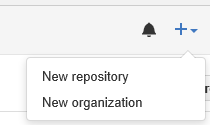
New Repository Menu

For the purposes of this tutorial I will make a repository called "Sample-Repository"

Create Sample Repository

The next page gives you options for creating the repository.

Repository Options

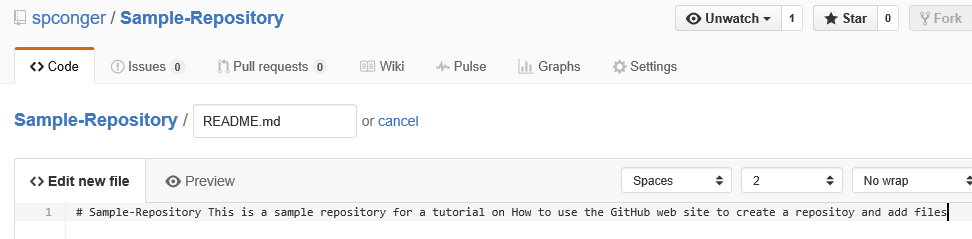
We are first going to add a readme file
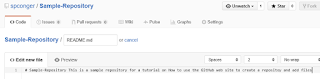
read me file

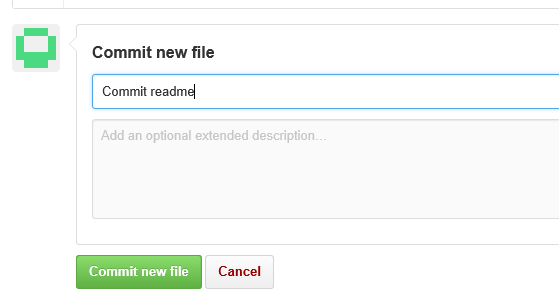
To actually add this file to the repository, we must commit it. The commit is lower on the same web page. We need to give the commit a name and, optionally, a description and then click the commit button.
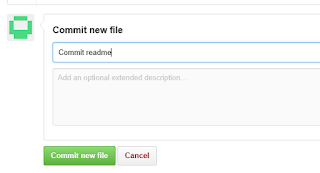
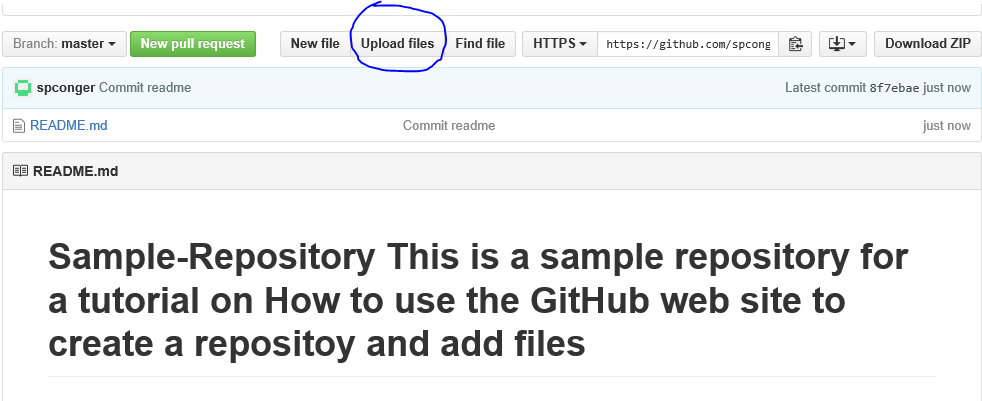
Now the repository looks like this. We are next going to upload some files

When you choose Upload files, it gives you two options: You can drag the files onto the web page or you can choose files which opens up a file dialog box.

drag files or choose them

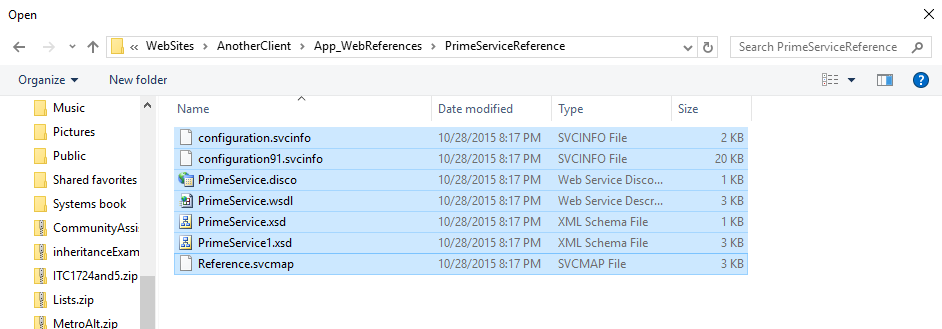
We will choose them. I am going to just get some random files from my Visual Studio directory

files

I will choose everything, but notice the folder doesn't upload.

only files no folders

We will deal with that in a minute. For now I will commit the files. Here is our repository so far:

repository so far

There is no way in GitHub to add an empty folder. This is a problem. But you can add a folder if you put something in it, even a dummy text file. So, the project I uploaded has some folders in which service references are stored. If we want the cloned program to work we need those folders. I click on new file and add, not only a file but the path I want.
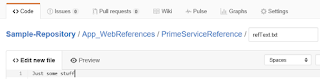
adding folders

Commit it. Navigate to the folder you desire and then choose upload files.

additional files

Now you have all your files and in their appropriate folders.
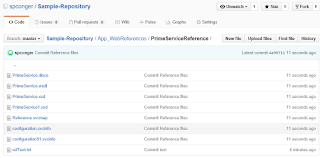
completed

Finally, if you wish to delete the repository, click on settings:
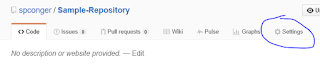
settings

Navigate down the page to the "Danger Zone" and choose "Delete Repository." You will receive several warnings and then have to type in the name of the repository before you can delete it.

Delete

Using the Windows Client


The web page is not difficult, and the windows client is even easier. First you have to download it. You can get it here: https://desktop.github.com/. Once you have downloaded and installed it. You need to log in to your Github account. Then you can create repositories.

To create a new repository, click the plus sign in the left corner of the application.

plus sign

Type in the name of the new Repository.
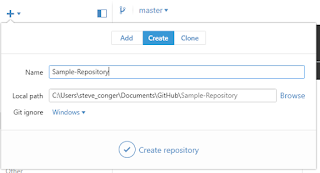
Create Repository

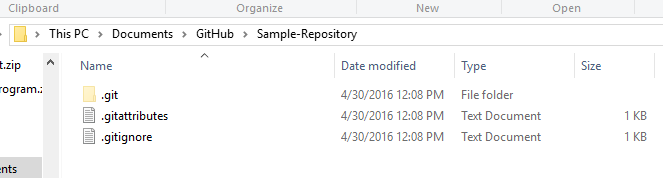
Click the check mark. This creates a GitHub directory in My Documents. Inside it will be the new Repository Folder.

Repository directory

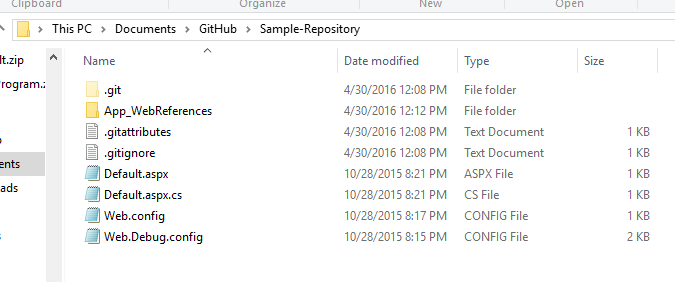
Using Windows file explorer, navigate to the folder with your Program files and copy all the files and directories and paste them into the Github repository folder.

files in Github folder

Now return to the Github windows application. Click on the tab "Change" and note that all your files are there. In the summary type a commit statement and then click the check mark by Commit to Master.

windows application, commit

Now click on "History." You will see all your files and folders. Click publish to push the files to the web site.
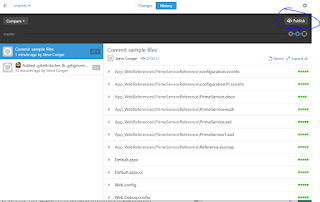
publish

If you check the web site you will see your files are posted there.

Files on Github

If you change files you can use sync to upload the changes to GitHub.

Using the Git Shell


Before beginning this part, I deleted the Sample-repository both on GitHub and on my local machine. Next I created a new directory in My documents called "Sample-Repository." I copied the same files I used before into the directory. I also recreated the Sample-Repository on Github and left it empty.
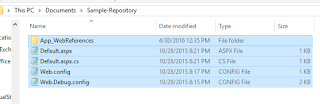
directory with files

Next I open the Git Shell. It is downloaded with the Windows Client. I navigate to my folder.
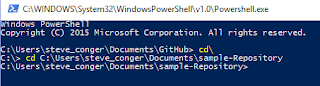
navigate to folder

Next I make it a git folder.

init

Then I add all the files.

add Files

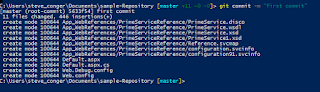
Then I do the first commit.

commit

Next I add the remote (GitHub) URL. and verify it.

Create and verify remote server

Now we push the files to the server.

Once again, if you check the web page, you will see the repository is populated with files and folders.

Here are the commands in order

Cd <path to your directory>
git init
git add .
git commit -m "<your commit statement>"
git remote add origin https://github.com/<username>/<repository>
git remote -v
git push origin master

Next we will look at cloning and forking GitHub Two