Showing posts with label ITC172. Show all posts

Wednesday, January 9, 2019

Setup and Configure Django --steps

The first two assignments involved a lot of steps, so I though it might be useful to list them. Most of these steps only need to be done once. Also I want to reiterate that the tech review project and app are the in-class examples, the assignments are all with the python club project and app.

Initial set up

  1. Create a directory for the django projects
  2. Install django into that directory
  3. Install venv, the virtual environment
  4. Activate the virtual environment
  5. Create the project techreviews
  6. change directory into techreviews and start the app tech
  7. (do the same two steps with pythonclub)

Configuration

  1. Create the techreviewdb in pgadmin (also create pythonclubdb)
  2. Open VSCode, Open a folder to the outermost techteview folder
  3. Also open a terminal in VSCode
  4. Open the settings.py file in the project folder.
  5. In the settings.py file add 'tech' to the registered apps list.
  6. Also in the settings.py change the database to postgresql_psycopg2.
  7. You will need to install psycopg2 using pip, using the terminal in VSCode
  8. Migrate the databases
  9. In the project lever urls.py add an include that points to the app's url
  10. Add a urls.py file to the app directory

At this point you will have completed the setup and configuration

Monday, February 12, 2018

Better Index method for add books

I will update the github to reflect this

public ActionResult Index([Bind(Include = "Title, ISBN, AuthorName")]NewBook nb)
        {
            Author a = new Author();
            a.AuthorName = nb.AuthorName;
            db.Authors.Add(a);
            db.SaveChanges();
            // for donation get userkey from the session
            Book b = new Book();
            b.BookTitle = nb.Title;
            b.BookISBN = nb.ISBN;
            b.BookEntryDate = DateTime.Now;
            Author author = db.Authors.FirstOrDefault
                (x => x.AuthorName == nb.AuthorName);
            b.Authors.Add(author);

            db.Books.Add(b);
            db.SaveChanges();

            Message m = new Message();
            m.MessageText="Thank you, the book has been added";

            return View("Result", m);
        }

Monday, January 29, 2018

NewPersonClass

Add this to your model and use it for the registration

    public class NewPerson
    {
        public string LastName { get; set; }
        public string FirstName { get; set; }
        public string Email { get; set; }
        public string Phone { get; set; }
        public string PlainPassword { get; set; }
        public string Apartment{ get; set; }
        public string Street{ get; set; }
        public string City { get; set; }
        public string State { get; set; }
        public string Zipcode { get; set; }


    }
}

Monday, January 22, 2018

Adding Github to Visual Studio

  1. Launch Visual Studio
  2. Go to TOOLS on the Menu
  3. Choose EXTENSIONS AND UPDATES
  4. In the Dialog Box click ONLINE
  5. In the search bar type "Github"
  6. Choose GITHUB EXTENSIONS FOR VISUAL STUDIO
  7. Download them
  8. Close Dialog and Visual Studio
  9. Installer will come up
  10. Say yes to allow changes
  11. MODIFY
  12. This can take a couple of minutes
  13. When done close dialog and open Visual Studio
  14. In the START window under OPEN click GITHUB
  15. Enter your github user name and password
  16. Close dialog
  17. Start a new project
  18. There should be a toolbar at the bottom of Visual Studio with the name, master and an up arrow with commits
  19. Click the up arrow.
  20. Publish to GitHub

Monday, January 8, 2018

Sample stuff

Model class

using System;
using System.Collections.Generic;
using System.Linq;
using System.Web;

namespace WebApplication2.Models
{
    public class ModelTest
    {
        public int ID { get; set; }

        public string ItemName { get; set; }

        public double Price { get; set; }


    }
}

Controller

using System;
using System.Collections.Generic;
using System.Linq;
using System.Web;
using System.Web.Mvc;
using WebApplication2.Models;

namespace WebApplication2.Controllers
{
    public class TestController : Controller
    {
        // GET: Test
        public ActionResult Index()
        {
            ModelTest mt = new ModelTest();
            mt.ID = 1;
            mt.ItemName = "item1";
            mt.Price = 25.00;
            ModelTest mt1 = new ModelTest();
            mt1.ID = 2;
            mt1.ItemName = "item2";
            mt1.Price = 5.00;
            ModelTest mt2 = new ModelTest();
            mt2.ID = 3;
            mt2.ItemName = "item3";
            mt2.Price = 13.00;
            List<ModelTest> items = new List<ModelTest>();
            items.Add(mt);
            items.Add(mt1);
            items.Add(mt2);

            return View(items);
        }
    }
}

the web page

@model  IEnumerable<WebApplication2.Models.ModelTest>
@{
    ViewBag.Title = "Index";
}

<h2>Index</h2>
<table class="table">
    <tr>
        <th>ID</th>
        <th>Name</th>
        <th>Price</th>
    </tr>
    @foreach (var item in Model)
    {
    <tr>
        <td>@Html.DisplayFor(model => item.ID)</td>
        <td>@Html.DisplayFor(model => item.ItemName)</td>
        <td>@Html.DisplayFor(model => item.Price)</td>
    </tr>
    }
</table>

Saturday, April 30, 2016

GitHub One

Overview


Github is a site that lets you store code in a way that allows you to share it with other coders or with potential employers. But more than that, it allows you to keep track of versions. Others can download or make copies of your code and, if they have permissions, upload their own versions and merge it with the original. This makes it an ideal for team projects.

You have to register to use it, but Github is free as long as your Repositories are public. Students can get a limited number of private repositories for free.

Definitions


So, what's a repository? Here are a few definitions:

Repository--this is basically a directory, a folder(s) where you store your code. These can be local meaning they are on your own machine, or hosted at Github. Repositories are public or private. Public means anyone can view the code and copy it. Private means only those with permission can see or modify the code in any way. As I mentioned before public repositories are free. Generally private requires paying.

Commit--To add code to a repository, you must commit it. You give the commit a name and, optionally, a description and then commit it to the repository. The commits are how GitHub keeps track of versions and changes. You can look at the Log to see a history of commits.

Clone--Cloning is making a copy of the online repository to your local machine or some other site.

Forking--Forking is making a copy of someone else's repository to your local machine. You get a copy of all the files and directories in the original repository.

Branch--a branch is a separate version of the code in the same repository. It allows you to have multiple versions simultaneously. When you are ready you can Merge them. This is how you can do team development

Here is a link to a GitHub glossary in Github's help files

Ways of Using GitHub


There are three basic ways of using Github. You can do most activities through the web page itself. You can also download a client application that resides on your machine. There are clients for Windows and Macs. I am only going to cover the Windows client and assume the Mac one is similar.

Power users use the Git Shell, or the BASH shell and use the command line for all their activities.

For this tutorial, I am going to focus on just creating repositories and getting your code on GitHub. I will follow up with tutorials on Cloning, branching etc.

Using the Web page


Once you have created an account, you can create repositories. If you are on your main page, there is a green button to create a new repository.

You can click it to get started. If you already have repositories you may be on a page viewing a list of those repositories. You can click on the down arrow beside the plus sign and choose "New Repository."
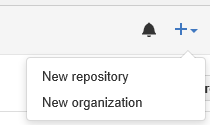
New Repository Menu

For the purposes of this tutorial I will make a repository called "Sample-Repository"

Create Sample Repository

The next page gives you options for creating the repository.

Repository Options

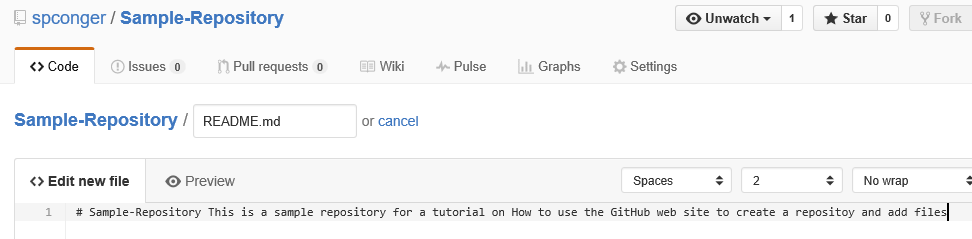
We are first going to add a readme file
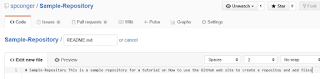
read me file

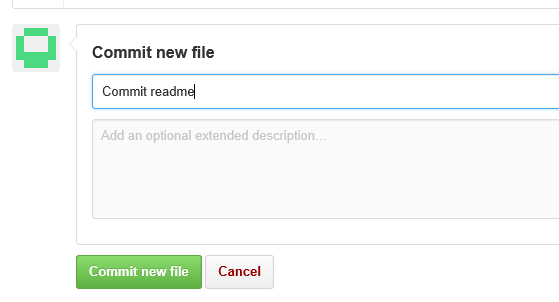
To actually add this file to the repository, we must commit it. The commit is lower on the same web page. We need to give the commit a name and, optionally, a description and then click the commit button.
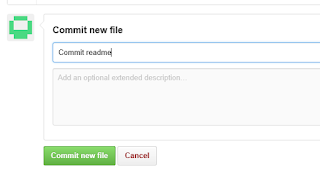
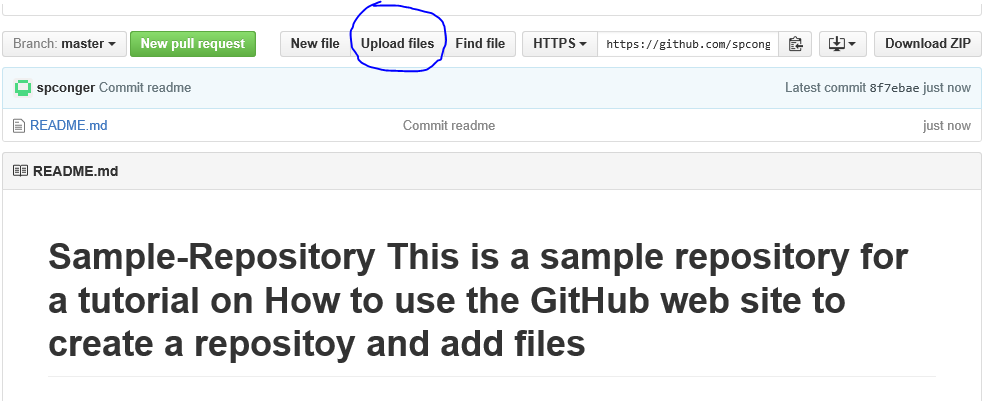
Now the repository looks like this. We are next going to upload some files

When you choose Upload files, it gives you two options: You can drag the files onto the web page or you can choose files which opens up a file dialog box.

drag files or choose them

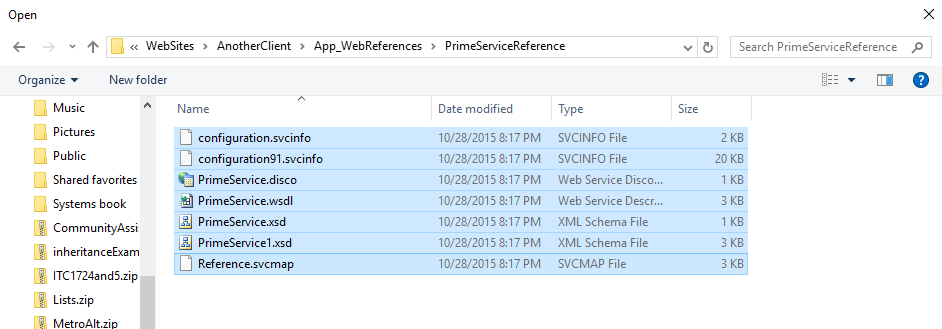
We will choose them. I am going to just get some random files from my Visual Studio directory

files

I will choose everything, but notice the folder doesn't upload.

only files no folders

We will deal with that in a minute. For now I will commit the files. Here is our repository so far:

repository so far

There is no way in GitHub to add an empty folder. This is a problem. But you can add a folder if you put something in it, even a dummy text file. So, the project I uploaded has some folders in which service references are stored. If we want the cloned program to work we need those folders. I click on new file and add, not only a file but the path I want.
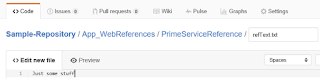
adding folders

Commit it. Navigate to the folder you desire and then choose upload files.

additional files

Now you have all your files and in their appropriate folders.
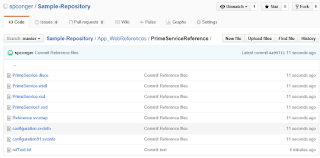
completed

Finally, if you wish to delete the repository, click on settings:
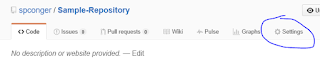
settings

Navigate down the page to the "Danger Zone" and choose "Delete Repository." You will receive several warnings and then have to type in the name of the repository before you can delete it.

Delete

Using the Windows Client


The web page is not difficult, and the windows client is even easier. First you have to download it. You can get it here: https://desktop.github.com/. Once you have downloaded and installed it. You need to log in to your Github account. Then you can create repositories.

To create a new repository, click the plus sign in the left corner of the application.

plus sign

Type in the name of the new Repository.
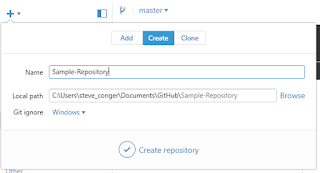
Create Repository

Click the check mark. This creates a GitHub directory in My Documents. Inside it will be the new Repository Folder.

Repository directory

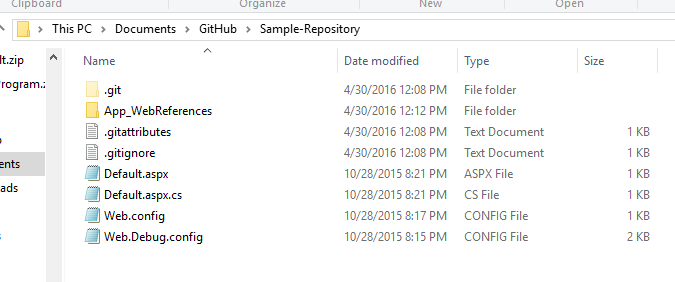
Using Windows file explorer, navigate to the folder with your Program files and copy all the files and directories and paste them into the Github repository folder.

files in Github folder

Now return to the Github windows application. Click on the tab "Change" and note that all your files are there. In the summary type a commit statement and then click the check mark by Commit to Master.

windows application, commit

Now click on "History." You will see all your files and folders. Click publish to push the files to the web site.
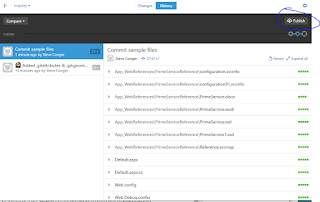
publish

If you check the web site you will see your files are posted there.

Files on Github

If you change files you can use sync to upload the changes to GitHub.

Using the Git Shell


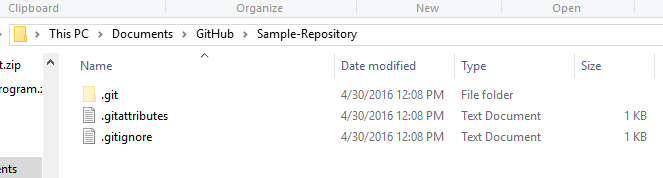
Before beginning this part, I deleted the Sample-repository both on GitHub and on my local machine. Next I created a new directory in My documents called "Sample-Repository." I copied the same files I used before into the directory. I also recreated the Sample-Repository on Github and left it empty.
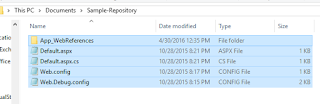
directory with files

Next I open the Git Shell. It is downloaded with the Windows Client. I navigate to my folder.
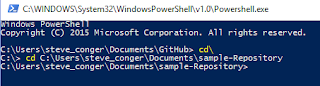
navigate to folder

Next I make it a git folder.

init

Then I add all the files.

add Files

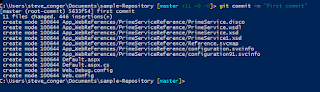
Then I do the first commit.

commit

Next I add the remote (GitHub) URL. and verify it.

Create and verify remote server

Now we push the files to the server.

Once again, if you check the web page, you will see the repository is populated with files and folders.

Here are the commands in order

Cd <path to your directory>
git init
git add .
git commit -m "<your commit statement>"
git remote add origin https://github.com/<username>/<repository>
git remote -v
git push origin master

Next we will look at cloning and forking GitHub Two

Thursday, April 21, 2016

Windows Communication service

This is the code we wrote in class. It does not include the code generated by the ADO Data Entities

here is the interface and data contract

using System;
using System.Collections.Generic;
using System.Linq;
using System.Runtime.Serialization;
using System.ServiceModel;
using System.Text;

// NOTE: You can use the "Rename" command on the "Refactor" menu to change the interface name "ISampleBookReviewService" in both code and config file together.
[ServiceContract]
public interface ISampleBookReviewService
{
    [OperationContract]
    List<string> GetAuthors();

    [OperationContract]
    List<BookLite> GetBooks(string authorName);
}

[DataContract]
public class BookLite
{
    [DataMember]
    public string Title { set; get; }

    [DataMember]
    public string ISBN { set; get; }

    [DataMember]
    public string AuthorName { set; get; }

    [DataMember]
    public DateTime EntryDate { set; get; }

}


Here is the service code

using System;
using System.Collections.Generic;
using System.Linq;
using System.Runtime.Serialization;
using System.ServiceModel;
using System.Text;

// NOTE: You can use the "Rename" command on the "Refactor" menu to change the class name "SampleBookReviewService" in code, svc and config file together.
public class SampleBookReviewService : ISampleBookReviewService
{
    BookReviewDbEntities db = new BookReviewDbEntities();
    public List<string> GetAuthors()
    {
        var auth = from a in db.Authors
                   orderby a.AuthorName
                   select new { a.AuthorName };
        List<string> authors = new List<string>();
        foreach (var au in auth)
        {
            authors.Add(au.AuthorName.ToString());
        }
        return authors;
    }

    public List<BookLite> GetBooks(string authorName)
    {
        var bks = from b in db.Books
                  from a in b.Authors
                  orderby b.BookTitle
                  where a.AuthorName.Equals(authorName)
                  select new {
                      b.BookTitle,
                      a.AuthorName,
                      b.BookISBN,
                      b.BookEntryDate
                  };
        List<BookLite> books = new List<BookLite>();

        foreach (var bk in bks)
        {
            BookLite bl = new BookLite();
            bl.Title = bk.BookTitle;
            bl.AuthorName = bk.AuthorName;
            bl.ISBN = bk.BookISBN;
            bl.EntryDate = bk.BookEntryDate;
            books.Add(bl);
        }
        return books;
    }
}

Thursday, April 14, 2016

Ado classic in class version.

Here is the dataClass.cs

using System;
using System.Collections.Generic;
using System.Linq;
using System.Web;
//libraries need to talk to database
using System.Data;
using System.Data.SqlClient;
using System.Configuration;

/// 
/// This class will connect to the database
/// It will have methods to retrieve the Services
/// It will also retreive all the grants for that service
/// Steve Conger 2016-4-12
/// 
/// 
public class DataClass
{
    private SqlConnection connect; 
    public DataClass()
    {
        connect = new SqlConnection
            (ConfigurationManager.
            ConnectionStrings["CommunityAssistConnectionString"].ToString());
    }//end constructor

    public DataTable GetServices()
    {
        DataTable tbl = null;

        string sql = "Select GrantTypeKey, GrantTypeName from GrantType";
        SqlCommand cmd = new SqlCommand(sql, connect);
       
     
        tbl = ReadData(cmd);

        
        return tbl;
    }

    public DataTable GetGrants(int grantTypeKey)
    {
        DataTable tbl = null;
        string sql = "SELECT GrantRequestDate, GrantRequestExplanation, GrantRequestAmount "
            + "FROM GrantRequest "
            + "WHERE GrantTypeKey=@Key";

        SqlCommand cmd = new SqlCommand(sql, connect);
        cmd.Parameters.AddWithValue("@Key", grantTypeKey);

        tbl = ReadData(cmd);
        return tbl;

        
    }

    private DataTable ReadData(SqlCommand cmd)
    {
        SqlDataReader reader = null;
        DataTable tbl = new DataTable();

        connect.Open();
        reader = cmd.ExecuteReader();
        tbl.Load(reader);
        reader.Close();
        connect.Close();

        return tbl;
    }


}//end class

Here is the Default.aspx page

<%@ Page Language="C#" AutoEventWireup="true" 
CodeFile="Default.aspx.cs" 
Inherits="_Default" %>

<!DOCTYPE html>

<html xmlns="http://www.w3.org/1999/xhtml">
<head runat="server">
    <title></title>
</head>
<body>
    <form id="form1" runat="server">
    <div>
        <asp:DropDownList ID="DropDownList1" runat="server" 
AutoPostBack="True" 
            OnSelectedIndexChanged="DropDownList1_SelectedIndexChanged">
        </asp:DropDownList>
        <asp:GridView ID="GridView1" runat="server"></asp:GridView>
    </div>
    </form>
</body>
</html>

Here is the code behind in Default.aspx.cs

using System;
using System.Collections.Generic;
using System.Linq;
using System.Web;
using System.Web.UI;
using System.Web.UI.WebControls;
using System.Data; //added for datatable

public partial class _Default : System.Web.UI.Page
{

    DataClass dc = new DataClass();
    protected void Page_Load(object sender, EventArgs e)
    {
        if(!IsPostBack)
        LoadDropDownList();
    }

    protected void LoadDropDownList()
    {
        DataTable tbl = dc.GetServices();
        DropDownList1.DataSource = tbl;
        DropDownList1.DataTextField = "GrantTypeName";
        DropDownList1.DataValueField = "GrantTypeKey";
        DropDownList1.DataBind();
        DropDownList1.Items.Insert(0, "Choose a Service");
    }


    protected void DropDownList1_SelectedIndexChanged(object sender, EventArgs e)
    {
        FillGrid();
    }

    protected void FillGrid()
    {
        if(!DropDownList1.SelectedValue.Equals("Choose a Service"))
        { 
            int key = int.Parse(DropDownList1.SelectedValue.ToString());
            DataTable tbl = dc.GetGrants(key);
            GridView1.DataSource = tbl;
            GridView1.DataBind();
        }
    }

}

Here is the web config with the connection string

<?xml version="1.0"?>

<!--
  For more information on how to configure your ASP.NET application, please visit
  http://go.microsoft.com/fwlink/?LinkId=169433
  -->

<configuration>

    <system.web>
      <compilation debug="true" targetFramework="4.5.2" />
      <httpRuntime targetFramework="4.5.2" />
    </system.web>
  <connectionStrings>
    <add name="CommunityAssistConnectionString" 
         connectionString="data source=srv38;
initial catalog=community_assist; 
integrated security=true"/>
  </connectionStrings>
</configuration>

Thursday, April 7, 2016

Beginnings and Overview

Here is the HTML source code

<%@ Page Language="C#" AutoEventWireup="true" CodeFile="Default.aspx.cs" 
Inherits="_Default" %>

<!DOCTYPE html>

<html xmlns="http://www.w3.org/1999/xhtml">
<head runat="server">
    <title></title>
    <link href="FirstStyle.css" rel="stylesheet" />
</head>
<body>
    <form id="form1" runat="server">
    <div>
        <!--This is a web or xml comment-->
    <h1>Birthday Calculator</h1>
        <hr />
        <p>Choose your birthday</p>
        <asp:Calendar ID="Calendar1" runat="server" >

        </asp:Calendar>
        <p>Enter your name <asp:TextBox ID="NameTextBox" runat="server">
                                      </asp:TextBox>
        </p>
        <p>
            <asp:Button ID="SubmitButton" runat="server" Text="Submit" 
OnClick="SubmitButton_Click" />
            <asp:Label ID="ResultLabel" runat="server" Text="" 
CssClass="result"></asp:Label>
        </p>
    </div>
    </form>
</body>
</html>


The C# code

using System;
using System.Collections.Generic;
using System.Linq;
using System.Web;
using System.Web.UI;
using System.Web.UI.WebControls;

public partial class _Default : System.Web.UI.Page
{
    /*This is a multiline comment. It's a good idea
    to put a header comment for every class */


    protected void Page_Load(object sender, EventArgs e)
    {

    }

    protected void SubmitButton_Click(object sender, EventArgs e)
    {
        GetTimeTillBirthday();
    }

    protected void GetTimeTillBirthday()
    {
        DateTime birthDay;
        

        if (Calendar1.SelectedDate==null)
        {
            birthDay = DateTime.Now;
        }
        else
        {
            birthDay = Calendar1.SelectedDate;
        }
        Response.Write(birthDay);
        string name = NameTextBox.Text;

        //this calculates the time until the birthday
        TimeSpan daysUntilBirthday = birthDay.Subtract(DateTime.Now);
        ResultLabel.Text ="Days until Birthday " +
            Math.Abs(daysUntilBirthday.Days).ToString() +
            ". And this many hours " 
         + Math.Abs(daysUntilBirthday.Hours).ToString();


    }

}

Here is the minimal css

body {
}

h1{
    color:navy;
}

.result{
    color:green;
}

Tuesday, March 15, 2016

Adding Artists to the Fan's List

I have made a method that can be included in the service to add artists the fan has selected to the fanArtist table.The code is commented to indicate what is going on.


 public int AddFanArtist( int fanKey, string artistName)
    {
        /*********************************
         * This method will add an artist to the artistFan
         * table. First we have to find the fan
         * and then the particular artist
         * Then we add the artist to the Fan's list
         * of artists to follow
         * **********************************/
        int result = 1;

        //get the fan. the key can come from their login
        Fan myFan = (from f in se.Fans
                     where f.FanKey == fanKey
                     select f).First();

        //get the artist by name
        Artist myArtist = (from a in se.Artists
                           where a.ArtistName.Equals(artistName)
                           select a).First();

        //add the artist to the fan;'s collection of artists
        myFan.Artists.Add(myArtist);

        //save the changes
        se.SaveChanges();

        return result;
    }
}

I also made a client method to show how you could use this. I used a CheckBoxList to select the artists from. Here is a picture of that on the web form

Obviously this could be made to look better. Here is the asp source code for the page


<%@ Page Language="C#" AutoEventWireup="true" CodeFile="Default.aspx.cs" Inherits="_Default" %>

<!DOCTYPE html>

<html xmlns="http://www.w3.org/1999/xhtml">
<head runat="server">
    <title></title>
</head>
<body>
    <form id="form1" runat="server">
    <div>
        <p>Select your artists and click enter to add them</p>
        <asp:CheckBoxList ID="CheckBoxList1" runat="server" RepeatColumns="3"></asp:CheckBoxList>
        <asp:Button ID="Button1" runat="server" Text="Add Artists" OnClick="Button1_Click" />
        <asp:Label ID="Label1" runat="server" Text="Label"></asp:Label>
    </div>
    </form>
</body>
</html>


Here is the code behind


using System;
using System.Collections.Generic;
using System.Linq;
using System.Web;
using System.Web.UI;
using System.Web.UI.WebControls;

public partial class _Default : System.Web.UI.Page
{
    ServiceReference1.FanArtistServiceClient sc = new ServiceReference1.FanArtistServiceClient();
    protected void Page_Load(object sender, EventArgs e)
    {
        //I hard coded the key in so I didn't have to do the login 
        //for this example
        Session["key"] = 2;
        if (!IsPostBack)
            PopulateArtists();
        
    }
    protected void Button1_Click(object sender, EventArgs e)
    {
        AddArtists();
    }

    protected void PopulateArtists()
    {
        //this method populates the CheckboxList
        //with artist names
        string[] artists = sc.GetArtist();
        CheckBoxList1.DataSource = artists;
        CheckBoxList1.DataBind();
    }

    protected void AddArtists()
    {
        //get the fan's key
        int key = (int)Session["key"];

        //loop through the checkboxList
        //to see what's checked
        foreach(ListItem i in CheckBoxList1.Items)
        {
            //if it is checked call the service method to add
            //it to the database
            if(i.Selected)
            {
                int x = sc.AddFanArtist(key, i.Text);
            }
        }
        Label1.Text = "Artist have been added";
        CheckBoxList1.Items.Clear();
    }
}

The next thing to do will be to make a query of all the artists and their shows for a particular fan. Here is my first take on that method. It works but could be made more elegant perhaps. This method also goes in the service.


 public List<ShowInfo> GetShowsForFanArtists(int fanKey)
    {
        //get the fan
        Fan myFan = (from f in se.Fans
                     where f.FanKey == fanKey
                     select f).First();

        List<ShowInfo> shows = new List<ShowInfo>();

        //this loop within a loop is very inefficient
         foreach(Artist a in myFan.Artists)
         {
             //get all the shows for the fan
             var shws = from s in se.Shows
                        from sd in s.ShowDetails
                        where sd.ArtistKey == a.ArtistKey
                        select new
                        {
                            s.ShowName,
                            s.ShowTime,
                            s.ShowDate,
                            s.ShowTicketInfo,
                            s.Venue.VenueName,
                            sd.Artist.ArtistName
                        };

             //loop through the shows and write them to 
             //ShowInfo objects then add those objects
             //to the list
             foreach(var sh in shws)
             {
                 ShowInfo info = new ShowInfo();
                 info.ShowName = sh.ShowName;
                 info.ShowDate = sh.ShowDate.ToString();
                 info.ShowTime = sh.ShowTime.ToString();
                 info.TicketInfo = sh.ShowTicketInfo;
                 info.VenueName = sh.VenueName;
                 info.ArtistName = sh.ArtistName;

                 shows.Add(info);
             }
             
             
         }
         return shows;
                  
    }

Monday, February 8, 2016

Login Service Code

Here is the Interface

using System;
using System.Collections.Generic;
using System.Linq;
using System.Runtime.Serialization;
using System.ServiceModel;
using System.Text;

// NOTE: You can use the "Rename" command on the "Refactor" menu to change the interface name "IbookReviewLoginService" in both code and config file together.
[ServiceContract]
public interface IbookReviewLoginService
{
    [OperationContract]
    int ReviewerLogin(string password, string username);

    [OperationContract]
    int ReviewerRegistration(ReviewerLite r);
    
}

[DataContract]
public class ReviewerLite
{
    [DataMember]
    public string LastName { set; get; }

    [DataMember]
    public string FirstName { set; get; }

    [DataMember]
    public string UserName { set; get; }

    [DataMember]
    public string Password { set; get; }
    [DataMember]
    public string Email { set; get; }
}


Here is the service itself

using System;
using System.Collections.Generic;
using System.Linq;
using System.Runtime.Serialization;
using System.ServiceModel;
using System.Text;

// NOTE: You can use the "Rename" command on the "Refactor" menu to change the class name "bookReviewLoginService" in code, svc and config file together.
public class bookReviewLoginService : IbookReviewLoginService
{
    BookReviewDbEntities db = new BookReviewDbEntities();
    public int ReviewerLogin(string password, string username)
    {
        int result = db.usp_ReviewerLogin(username, password);
        if(result !=-1)
        {
            var key = from k in db.Reviewers
                      where k.ReviewerUserName.Equals(username)
                      select new { k.ReviewerKey };
             foreach(var k in key)
            {
                result=(int)k.ReviewerKey;
            }
        }
       
        return result;
    }

    public int ReviewerRegistration(ReviewerLite r)
    {
     
        int result = db.usp_NewReviewer(r.UserName, r.FirstName, r.LastName, r.Email, r.Password);

        return result;
    }
}

Thursday, June 4, 2015

Service Query and client

Here is the service Interface for the service which queries Shows for a particular venue. It includes a data contract for for a class that allows us to combine fields from Show and ShowData.

using System;
using System.Collections.Generic;
using System.Linq;
using System.Runtime.Serialization;
using System.ServiceModel;
using System.Text;

// NOTE: You can use the "Rename" command on the "Refactor" menu to change the interface name "IService" in both code and config file together.
[ServiceContract]
public interface IService
{
 [OperationContract]
 List<ShowInfo> GetShowsByVenue(string venueName);

}


[DataContract]
public class ShowInfo
{
    [DataMember]
    public string ArtistName { get; set; }
    [DataMember]
    public string ShowName { get; set; }
    [DataMember]
    public string ShowDate { get; set; }
    [DataMember]
    public string ShowTime { get; set; }

    [DataMember]
    public string TicketInfo { get; set; }
}

Here is the code for the query itself

using System;
using System.Collections.Generic;
using System.Linq;
using System.Runtime.Serialization;
using System.ServiceModel;
using System.Text;

// NOTE: You can use the "Rename" command on the "Refactor" menu to change the class name "Service" in code, svc and config file together.
public class Service : IService
{
    ShowTrackerEntities db = new ShowTrackerEntities();

    public List<ShowInfo> GetShowsByVenue(string venueName)
    {
        var shws = from s in db.Shows
                   from d in s.ShowDetails
                   where s.Venue.VenueName.Equals(venueName)
                   select new
                   {
                       d.Artist.ArtistName,
                       s.ShowName,
                       s.ShowTime,
                       s.ShowDate,
                       s.ShowTicketInfo

                   };
        List<ShowInfo> shows = new List<ShowInfo>();

        foreach(var sh in shws)
        {
            ShowInfo sInfo = new ShowInfo();
            sInfo.ArtistName = sh.ArtistName;
            sInfo.ShowName = sh.ShowName;
            sInfo.ShowDate = sh.ShowDate.ToShortDateString();
            sInfo.ShowTime = sh.ShowTime.ToString();
            shows.Add(sInfo);
        }

        return shows;
    }
}

Now here is the ASP code for the simple web page client. We first had to make a reference to the service. Also we used a text box to enter the venue name. It should be a drop down list.

<%@ Page Language="C#" AutoEventWireup="true" CodeFile="Default.aspx.cs" Inherits="_Default" %>

<!DOCTYPE html>

<html xmlns="http://www.w3.org/1999/xhtml">
<head runat="server">
    <title></title>
</head>
<body>
    <form id="form1" runat="server">
    <div>
        <asp:TextBox ID="TextBox1" runat="server"></asp:TextBox>
        <asp:GridView ID="GridView1" runat="server"></asp:GridView>
        <asp:Button ID="Button1" runat="server" Text="Get Shows" OnClick="Button1_Click" />
    </div>
    </form>
</body>
</html>

And here is the code behind

using System;
using System.Collections.Generic;
using System.Linq;
using System.Web;
using System.Web.UI;
using System.Web.UI.WebControls;

public partial class _Default : System.Web.UI.Page
{
    protected void Page_Load(object sender, EventArgs e)
    {

    }
    protected void Button1_Click(object sender, EventArgs e)
    {
        //Instantiate the service client so we have access to the serivce
        ServiceReference1.ServiceClient sc = new ServiceReference1.ServiceClient();
        //create an array and assign it the result of the service query
        ServiceReference1.ShowInfo[] shows = sc.GetShowsByVenue(TextBox1.Text);
        //bind the array to the DataGrid
        GridView1.DataSource = shows;
        GridView1.DataBind();

    }
}

Tuesday, May 26, 2015

Assignment 5 Example Service Client

Default.aspx


<%@ Page Language="C#" AutoEventWireup="true" CodeFile="Default.aspx.cs" Inherits="_Default" %>

<!DOCTYPE html>

<html xmlns="http://www.w3.org/1999/xhtml">
<head runat="server">
    <title></title>
</head>
<body>
    <form id="form1" runat="server">
    <div>
    <table>
        <tr>
            <td>User Name</td>
            <td>
                <asp:TextBox ID="txtUserName" runat="server"></asp:TextBox></td>
        </tr>
        <tr>
            <td>Password</td>
            <td>
                <asp:TextBox ID="txtPassword" runat="server" TextMode="Password">

                </asp:TextBox></td>
        </tr>
        <tr>
            <td>
                <asp:Button ID="btnLogin" runat="server" Text="Log in" OnClick="btnLogin_Click" /></td>
            <td>
                <asp:Label ID="lblError" runat="server" Text=""></asp:Label></td>
        </tr>
    </table>
        <asp:LinkButton ID="LinkButton1" runat="server" 
            PostBackUrl="~/Registration.aspx">
            Register</asp:LinkButton>
    </div>
    </form>
</body>
</html>


Default.aspx.cs

using System;
using System.Collections.Generic;
using System.Linq;
using System.Web;
using System.Web.UI;
using System.Web.UI.WebControls;

public partial class _Default : System.Web.UI.Page
{
    protected void Page_Load(object sender, EventArgs e)
    {

    }
    protected void btnLogin_Click(object sender, EventArgs e)
    {
        RegistrationService.ReviewerRegistrationClient rrc
            = new RegistrationService.ReviewerRegistrationClient();
        int key=rrc.ReviewerLogin
            (txtUserName.Text, txtPassword.Text);
        if (key != 0)
        {
            Session["userKey"] = key;
            Response.Redirect("NewReview.aspx");
        }
        else
        {
            lblError.Text = "Invalid Login";
        }
    }
}

Registration.aspx


<%@ Page Language="C#" AutoEventWireup="true" CodeFile="Registration.aspx.cs" Inherits="Registration" %>

<!DOCTYPE html>

<html xmlns="http://www.w3.org/1999/xhtml">
<head runat="server">
    <title></title>
</head>
<body>
    <form id="form1" runat="server">
    <div>
    <p>First Name <br />
        <asp:TextBox ID="txtFirstName" runat="server"></asp:TextBox>
    </p>
 <p>Last Name <br />
        <asp:TextBox ID="txtLastName" runat="server"></asp:TextBox>
    </p>
         <p>Email <br />
        <asp:TextBox ID="txtEmail" runat="server"></asp:TextBox>
    </p>
         <p>UserName <br />
        <asp:TextBox ID="txtUserName" runat="server"></asp:TextBox>
    </p>
         <p>Password <br />
        <asp:TextBox ID="txtPassword" runat="server"></asp:TextBox>
    </p>
         <p><asp:Button runat="server" ID="btnRegister" Text="Register" OnClick="btnRegister_Click" /><br />
             <asp:Label ID="lblError" runat="server" Text=""></asp:Label>
    </p>
        <asp:LinkButton ID="LinkButton1" runat="server" 
            PostBackUrl="~/Default.aspx">Log in</asp:LinkButton>
    </div>
    </form>
</body>
</html>


Registration.aspx.cs

using System;
using System.Collections.Generic;
using System.Linq;
using System.Web;
using System.Web.UI;
using System.Web.UI.WebControls;
using RegistrationService;

public partial class Registration : System.Web.UI.Page
{
    protected void Page_Load(object sender, EventArgs e)
    {

    }
    protected void btnRegister_Click(object sender, EventArgs e)
    {
        Reviewer r = new Reviewer();
        r.ReviewerFirstName = txtFirstName.Text;
        r.ReviewerLastName = txtLastName.Text;
        r.ReviewerUserName = txtUserName.Text;
        r.ReviewerEmail = txtEmail.Text;
        r.ReviewPlainPassword = txtPassword.Text;

        ReviewerRegistrationClient rrc = new 
            ReviewerRegistrationClient();
     
            bool result=rrc.Register(r);
            if (result)
                lblError.Text = "Reviewer Registered";
            else
                lblError.Text = "Registration Failed";
        
    }
}

NewReview.aspx

<%@ Page Language="C#" AutoEventWireup="true" CodeFile="NewReview.aspx.cs" Inherits="NewReview" %>

<!DOCTYPE html>

<html xmlns="http://www.w3.org/1999/xhtml">
<head runat="server">
    <title></title>
</head>
<body>
    <form id="form1" runat="server">
    <div>
        <asp:DropDownList ID="ddlBooks" runat="server"></asp:DropDownList>
        <p>Title<br />
            <asp:TextBox ID="txtTitle" runat="server"></asp:TextBox>
        </p>
        <p>Rating
            <asp:RadioButtonList ID="RadioButtonList1" runat="server">
                <asp:ListItem Text="1" Value="1"></asp:ListItem>
                <asp:ListItem Text="2" Value="2"></asp:ListItem>
                <asp:ListItem Text="3" Value="3"></asp:ListItem>
                <asp:ListItem Text="4" Value="4"></asp:ListItem>
                <asp:ListItem Text="5" Value="5"></asp:ListItem>

            </asp:RadioButtonList>
        </p>
        <p>The Review<br />
            <asp:TextBox ID="txtReview" TextMode="MultiLine" 
                runat="server" Height="130px" Width="328px"></asp:TextBox>
        </p>
        <p>
            <asp:Button ID="btnAddReview" runat="server" Text="Add Review" 
                OnClick="btnAddReview_Click"></asp:Button> <br />
            <asp:Label ID="lblError" runat="server" Text=""></asp:Label>
        </p>
    </div>
    </form>
</body>
</html>

NewReview.aspx.cs

using System;
using System.Collections.Generic;
using System.Linq;
using System.Web;
using System.Web.UI;
using System.Web.UI.WebControls;
using NewReviewService;

public partial class NewReview : System.Web.UI.Page
{
    CreateReviewServiceClient crc = new CreateReviewServiceClient();
    protected void Page_Load(object sender, EventArgs e)
    {
        if (Session["userKey"] != null)
        {
            if (!IsPostBack)
            {
                Book[] books = crc.GetBooks();
                ddlBooks.DataSource = books;
                ddlBooks.DataTextField = "BookTitle";
                ddlBooks.DataValueField = "BookKey";
                ddlBooks.DataBind();
            }
        }
        else
        {
            Response.Redirect("Default.aspx");
        }
    }
    protected void btnAddReview_Click(object sender, EventArgs e)
    {
        Review r = new Review();
        r.BookKey = int.Parse(ddlBooks.SelectedValue.ToString());
        r.ReviewerKey = (int)Session["userKey"];
        r.ReviewTitle = txtTitle.Text;
        r.ReviewRating = int.Parse(RadioButtonList1.SelectedValue.ToString());
        r.ReviewText = txtReview.Text;

        bool good = crc.WriteReview(r);
        if(good)
        {
            lblError.Text="review saved";
        }
        else
        {
            lblError.Text = "something went horribly wrong";
        }
    }
}

Thursday, May 14, 2015

Assignment 4 in class example

Here is the code for the Register and login service. I have not included the HashPass, LoginClass or SeedCode classes.

IReviewerRegistration

using System;
using System.Collections.Generic;
using System.Linq;
using System.Runtime.Serialization;
using System.ServiceModel;
using System.Text;


[ServiceContract]
public interface IReviewerRegistration
{
 [OperationContract]
 bool Register(Reviewer reviewer);

    [OperationContract]
    int ReviewerLogin(string userName, string Password);
}


ReviewerRegistration the service

using System;
using System.Collections.Generic;
using System.Linq;
using System.Runtime.Serialization;
using System.ServiceModel;
using System.Text;

// NOTE: You can use the "Rename" command on the "Refactor" menu to change the class name "ReviewerRegistration" in code, svc and config file together.
public class ReviewerRegistration : IReviewerRegistration
{

    BookReviewDbEntities db = new BookReviewDbEntities();
    public bool Register(Reviewer reviewer)
    {
        bool good = true;

        try
        {

            KeyCode k = new KeyCode();
            int seed = k.GetKeyCode();
            PasswordHash hash = new PasswordHash();
            byte[] hashedpassword = hash.HashIt
                (reviewer.ReviewPlainPassword, seed.ToString());

           
            reviewer.ReviewerKeyCode = seed;
            reviewer.ReviewerHashedPass = hashedpassword;
            reviewer.ReviewerDateEntered = DateTime.Now;
            db.Reviewers.Add(reviewer);
            db.SaveChanges();
        }
        catch (Exception ex)
        {
            good = false;
        }


        return good;
    }

    public int ReviewerLogin(string userName, string Password)
    {
        LoginClass lc = new LoginClass(userName, Password);
        return lc.ValidateLogin();
    }
}


Now here is the code for the second service to Add a review

Here is the Interface

using System;
using System.Collections.Generic;
using System.Linq;
using System.Runtime.Serialization;
using System.ServiceModel;
using System.Text;

// NOTE: You can use the "Rename" command on the "Refactor" menu to change the interface name "ICreateReviewService" in both code and config file together.
[ServiceContract]
public interface ICreateReviewService
{
    [OperationContract]
    List GetBooks();

    [OperationContract]
    List GetAuthors();

    [OperationContract]
    List GetCategories();

    [OperationContract]
    bool WriteReview(Review r);
}


Here is the service code

using System;
using System.Collections.Generic;
using System.Linq;
using System.Runtime.Serialization;
using System.ServiceModel;
using System.Text;

// NOTE: You can use the "Rename" command on the "Refactor" menu to change the class name "CreateReviewService" in code, svc and config file together.
public class CreateReviewService : ICreateReviewService
{
    BookReviewDbEntities db = new BookReviewDbEntities();

    public List<Book> GetBooks()
    {
        var bks = from b in db.Books
                  orderby b.BookTitle
                  select b;

        List<Book> books = new List<Book>();
        foreach(Book b in bks)
        {
            Book bk = new Book();
            bk.BookTitle = b.BookTitle;
            bk.BookISBN = b.BookISBN;
            bk.BookKey = b.BookKey;

            books.Add(bk);
           
        }
        return books;
        
    }

    public List<Author> GetAuthors()
    {
        var auth = from a in db.Authors
                  orderby a.AuthorName
                  select a;

        List<Author> authors = new List<Author>();
        foreach (Author a in auth)
        {
            Author au = new Author();
            au.AuthorKey = a.AuthorKey;
            au.AuthorName = a.AuthorName;


            authors.Add(au);
        }
        return authors;
    }

    public List<Category> GetCategories()
    {
        var cats = from c in db.Categories
                  orderby c.CategoryName
                  select c;

        List<Category> categories = new List<Category>();
        foreach(Category c in cats)
        {
            Category bk = new Category();
            bk.CategoryName = c.CategoryName;
            bk.CategoryKey = c.CategoryKey;
           

            categories.Add(bk);
        }
        return categories;
           
    }

    public bool WriteReview(Review r)
    {
        bool result = true;
        try
        {

            r.ReviewDate = DateTime.Now;
            db.Reviews.Add(r);
            db.SaveChanges();
        }
        catch(Exception ex)
        {
            result = false;
        }
        return result;
    }
}

Thursday, April 30, 2015

Assignment 3 class Example

Here is the Default.aspx

<%@ Page Language="C#" AutoEventWireup="true" CodeFile="Default.aspx.cs" 
Inherits="_Default" %>

<!DOCTYPE html>

<html xmlns="http://www.w3.org/1999/xhtml">
<head runat="server">
    <title>Login</title>
</head>
<body>
    <form id="form1" runat="server">
    <div>
    <table>
        <tr>
            <td>Enter User Name</td>
            <td>
                <asp:TextBox ID="txtUserName" runat="server">
</asp:TextBox></td>
        </tr>
            <tr>
            <td>Enter Password</td>
            <td>
                <asp:TextBox ID="txtPassword" runat="server">
</asp:TextBox></td>
        </tr>
        <tr>
            <td>
                <asp:Button ID="btnSubmint" runat="server" Text="Log in" 
OnClick="btnSubmint_Click" /></td>
            <td>
                <asp:Label ID="lblResult" runat="server" Text="">
</asp:Label></td>
        </tr>
    </table>
    </div>
    </form>
</body>
</html>


Here is the Default.aspx.cs

using System;
using System.Collections.Generic;
using System.Linq;
using System.Web;
using System.Web.UI;
using System.Web.UI.WebControls;

public partial class _Default : System.Web.UI.Page
{
    protected void Page_Load(object sender, EventArgs e)
    {

    }
    protected void btnSubmint_Click(object sender, EventArgs e)
    {
        LoginClass lc = new LoginClass(txtPassword.Text, txtUserName.Text);
        int result = lc.ValidateLogin();
        if (result != 0)
        {
            
            Session["userKey"] = result;
            Response.Redirect("Welcome.aspx");
        }
        else
        {
            lblResult.Text = "Invalid login";
        }
    }
}

Here is the ReviewerRegistration.aspx


<%@ Page Language="C#" AutoEventWireup="true" CodeFile="Default.aspx.cs" 
Inherits="_Default" %>

<!DOCTYPE html>

<html xmlns="http://www.w3.org/1999/xhtml">
<head runat="server">
    <title>Login</title>
</head>
<body>
    <form id="form1" runat="server">
    <div>
    <table>
        <tr>
            <td>Enter User Name</td>
            <td>
                <asp:TextBox ID="txtUserName" runat="server">
</asp:TextBox></td>
        </tr>
            <tr><%@ Page Language="C#" AutoEventWireup="true" CodeFile="ReviewerRegistration.aspx.cs" Inherits="ReviewerRegistration" %>

<!DOCTYPE html>

<html xmlns="http://www.w3.org/1999/xhtml">
<head runat="server">
    <title></title>
</head>
<body>
    <form id="form1" runat="server">
    <div>
    <table>
        <tr>
            <td>First Name</td>
            <td><asp:TextBox ID="txtFirstName" runat="server"></asp:TextBox></td>
        </tr>
         <tr>
            <td>Last Name</td>
            <td><asp:TextBox ID="txtLastName" runat="server"></asp:TextBox></td>
        </tr>
         <tr>
            <td>Email</td>
            <td><asp:TextBox ID="txtEmail" runat="server"></asp:TextBox></td>
        </tr>
         <tr>
            <td>User Name</td>
            <td><asp:TextBox ID="txtUserName" runat="server"></asp:TextBox></td>
        </tr>
         <tr>
            <td>Password</td>
            <td><asp:TextBox ID="txtPassword" runat="server"  TextMode="Password"></asp:TextBox></td>
        </tr>
         <tr>
            <td>Confirm Password</td>
            <td><asp:TextBox ID="txtConfirm" runat="server" TextMode="Password"></asp:TextBox></td>
        </tr>
         <tr>
            <td>
                <asp:Button ID="btnRegister" runat="server" Text="Register" OnClick="btnRegister_Click" /></td>
            <td>
                <asp:Label ID="lblErrorSuccess" runat="server" Text=""></asp:Label></td>
        </tr>
       
    </table>
        <asp:LinkButton ID="LbLogin" runat="server" 
PostBackUrl="~/Default.aspx">Log in</asp:LinkButton>
        <asp:RequiredFieldValidator ID="RequiredFieldValidator2" runat="server" ControlToValidate="txtUserName" Display="None" ErrorMessage="User name required"></asp:RequiredFieldValidator>
        <asp:RequiredFieldValidator ID="RequiredFieldValidator1" runat="server" ControlToValidate="txtLastName" Display="None" ErrorMessage="Last name required"></asp:RequiredFieldValidator>
    </div>
        <asp:RegularExpressionValidator ID="RegularExpressionValidator1" runat="server" ControlToValidate="txtEmail" Display="None" ErrorMessage="Invalid email" ValidationExpression="\w+([-+.']\w+)*@\w+([-.]\w+)*\.\w+([-.]\w+)*"></asp:RegularExpressionValidator>
        <asp:ValidationSummary ID="ValidationSummary1" runat="server" />
    </form>
</body>
</html>

            <td>Enter Password</td>
            <td>
                <asp:TextBox ID="txtPassword" runat="server">
</asp:TextBox></td>
        </tr>
        <tr>
            <td>
                <asp:Button ID="btnSubmint" runat="server" Text="Log in" 
OnClick="btnSubmint_Click" /></td>
            <td>
                <asp:Label ID="lblResult" runat="server" Text="">
</asp:Label></td>
        </tr>
    </table>
    </div>
    </form>
</body>
</html>


And here is the ReviewerRegistration.aspx.cs

using System;
using System.Collections.Generic;
using System.Linq;
using System.Web;
using System.Web.UI;
using System.Web.UI.WebControls;

public partial class ReviewerRegistration : System.Web.UI.Page
{
    protected void Page_Load(object sender, EventArgs e)
    {

    }
    protected void btnRegister_Click(object sender, EventArgs e)
    {

        BookReviewDbEntities db = new BookReviewDbEntities();
        try
        {


            Reviewer r = new Reviewer();
            r.ReviewerFirstName = txtFirstName.Text;
            r.ReviewerLastName = txtLastName.Text;
            r.ReviewerEmail = txtEmail.Text;
            r.ReviewerUserName = txtUserName.Text;
            r.ReviewPlainPassword = txtPassword.Text;

            KeyCode kc = new KeyCode();
            int code = kc.GetKeyCode();

            r.ReviewerKeyCode = code;

            PasswordHash ph = new PasswordHash();

            Byte[] hashed = ph.HashIt(txtPassword.Text, code.ToString());
            r.ReviewerHashedPass = hashed;
            r.ReviewerDateEntered = DateTime.Now;
            db.Reviewers.Add(r);

            CheckinLog log = new CheckinLog();
            log.Reviewer = r;
            log.CheckinDateTime = DateTime.Now;
            db.CheckinLogs.Add(log);
            
            db.SaveChanges();
            lblErrorSuccess.Text = "Sucessfully Registered";
        }
        catch(Exception ex)
        {
            lblErrorSuccess.Text = ex.Message;
        }
    }
}

And here again is the LoginClass.cs though it is the same as in the other blog. I am not including the password hash class or the key code classes

using System;
using System.Collections.Generic;
using System.Linq;
using System.Web;

/// 
/// This class takes in the user name and password
/// retrieves information from the database
/// and then hashes the password and key to
/// see if it matches the database hash
/// 
public class LoginClass
{
    //class level variables-fields
    private string pass;
    private string username;
    private int seed;
    private byte[] dbhash;
    private int key;
    private byte[] newHash;

    //constructor takes in password and username
    public LoginClass(string pass, string username)
    {
        this.pass = pass;
        this.username = username;
    }

    //gets the user info from the database
    private void GetUserInfo()
    {
        //declare the ADO Entities
        BookReviewDbEntities brde = new BookReviewDbEntities();
        //query the fields
        var info = from i in brde.Reviewers
                   where i.ReviewerUserName.Equals(username)
                   select new { i.ReviewerKey, i.ReviewerHashedPass, i.ReviewerKeyCode };

        //loop through the results and assign the
        //values to the field variables
        foreach (var u in info)
        {
            seed = u.ReviewerKeyCode;
            dbhash = u.ReviewerHashedPass;
            key = u.ReviewerKey;
        }
    }

    private void GetNewHash()
    {
        //get the new hash
        PasswordHash h = new PasswordHash();
        newHash = h.HashIt(pass, seed.ToString());
    }

    private bool CompareHash()
    {
        //compare the hashes
        bool goodLogin = false;

        //if the hash doesn't exist
        //because not a valid user
        //the return will be false
        if (dbhash != null)
        {
            //if the hashes do match return true
            if (newHash.SequenceEqual(dbhash))
                goodLogin = true;
        }

        return goodLogin;

    }

    public int ValidateLogin()
    {
        //call the methods
        GetUserInfo();
        GetNewHash();
        bool result = CompareHash();

        //if the result is not true
        //set the key to 0
        if (!result)
            key = 0;


        return key;
    }

}

Tuesday, April 7, 2015

First ASP

the Default web page

<%@ Page Language="C#" AutoEventWireup="true" 
    CodeFile="Default.aspx.cs" Inherits="_Default" %>

<!DOCTYPE html>

<html xmlns="http://www.w3.org/1999/xhtml">
<head runat="server">
    <title></title>
    
    <link href="FirstAspStyle.css" rel="stylesheet" type="text/css" />
    
</head>
<body>
    <form id="form1" runat="server">
    <div>
        <p>Choose your birthday</p>
        <!--add an asp calendar control-->
        <asp:Calendar ID="CalendarFirst"  
             runat="server" ></asp:Calendar>
        <p>
        <asp:Label ID="Label1" runat="server" 
            Text="Enter Your Name"></asp:Label>
        <asp:TextBox ID="txtName" 
            runat="server" CssClass="textback"></asp:TextBox></p>
        <p>
        <asp:Button ID="Button1" 
            runat="server" Text="Get Days" OnClick="Button1_Click" />
        <asp:Label ID="lblResult" runat="server" 
            Text=""></asp:Label>

        </p>
    </div>
    </form>
</body>
</html>

The C# code behind

using System;
using System.Collections.Generic;
using System.Linq;
using System.Web;
using System.Web.UI;
using System.Web.UI.WebControls;

public partial class _Default : System.Web.UI.Page
{
    /* this is a multi line
     * comment
     */


    protected void Page_Load(object sender, EventArgs e)
    {

    }
    protected void Button1_Click(object sender, EventArgs e)
    {
        //take the value from the text box
        //and assign it to the variable name
        string name = txtName.Text;
        string birthDate = CalendarFirst.SelectedDate.ToShortDateString();
        lblResult.Text = "Hello, " + name + " Your birthday is " + birthDate;
      
    }
}

Here is the CSS

body {
}

table tr th{
    font-weight:bold;
    background-color:aliceblue;
    border :5px solid black;
}

.textback{
    background-color:yellow;
}


Tuesday, March 17, 2015

Simple Ajax

First we have a simple web service

here is the interface

using System;
using System.Collections.Generic;
using System.Linq;
using System.Runtime.Serialization;
using System.ServiceModel;
using System.Text;

// NOTE: You can use the "Rename" command on the "Refactor" menu to change the interface name "ItimeService" in both code and config file together.
[ServiceContract]
public interface ItimeService
{
 [OperationContract]
 string GetCurrentTime();
}

Here is the extremely simple service that implements that interface

using System;
using System.Collections.Generic;
using System.Linq;
using System.Runtime.Serialization;
using System.ServiceModel;
using System.Text;

// NOTE: You can use the "Rename" command on the "Refactor" menu to change the class name "timeService" in code, svc and config file together.
public class timeService : ItimeService
{
 

    public string GetCurrentTime()
    {
        return DateTime.Now.ToLongTimeString();
    }
}

You want to run this and keep it running. Start a second instance of Visual Studio to create the client. Create the reference to the service.

here is the web form for Default.aspx

<%@ Page Language="C#" AutoEventWireup="true" CodeFile="Default.aspx.cs" Inherits="_Default" %>

<!DOCTYPE html>

<html xmlns="http://www.w3.org/1999/xhtml">
<head runat="server">
    <title></title>
</head>
<body>
    <form id="form1" runat="server">
    <div>
        <h1>Time of Day</h1>
        <asp:Image ID="Image1" runat="server" ImageUrl="~/the-persistence-of-memory-4.jpg"/>
        <asp:ScriptManager ID="ScriptManager1" runat="server"></asp:ScriptManager>
        <asp:UpdatePanel ID="UpdatePanel1" runat="server">
          <ContentTemplate>
              <asp:Timer ID="Timer1" runat="server" Enabled="true"   OnTick="Timer1_Tick" Interval="1000" ></asp:Timer>
              <asp:Label ID="lblTime" runat="server" Text="Label"></asp:Label>
          </ContentTemplate>
        </asp:UpdatePanel>
        
    </div>
    </form>
</body>
</html>

Here is the default.aspx.cs code

using System;
using System.Collections.Generic;
using System.Linq;
using System.Web;
using System.Web.UI;
using System.Web.UI.WebControls;

public partial class _Default : System.Web.UI.Page
{
    protected void Page_Load(object sender, EventArgs e)
    {


    }
    protected void Timer1_Tick(object sender, EventArgs e)
    {
       
        TimeServiceReference.ItimeServiceClient tsr = new TimeServiceReference.ItimeServiceClient();
        lblTime.Text = tsr.GetCurrentTime();
    }
   
}

Thursday, February 12, 2015

Tuesday, February 10, 2015

Community Service Services and Client Examples

Here is the path to the code for Tuesday 2/10/2015 code on github https://github.com/spconger/CAServiceExample

Here is the code to the code for the client https://github.com/spconger/CommunityAssistClient2015

Tuesday, February 3, 2015

A fix for Assignment 3

There is a permissions error in the Fan log in. To fix it Go to TOOLS in the Visual Studio menu, choose SQL, NEW QUERY. Connect the database to .\sqlexpress. Type in the following SQL.

Use ShowTracker
Grant Select on FanLogin to FanRole

Once you run this code you should have the permissions you need


There are a couple of other common problems.

In the Login class there is a line (47) that assigns the userkey to key

  key = u.ReviewerKey;

For some reason with the showtracker database we have to cast this to an int

  key = (int)u.ReviewerKey;

Finally, be aware the random seed that is concatenated with the password is "LoginRandom" in the fanlogin table, not "FanKey" or "FanLoginKey."