Tuesday, October 2, 2012

Gas Mileage with Methods

Here is the Gas Mileage calculator without methods that we did as the first assignment

using System;
using System.Collections.Generic;
using System.Linq;
using System.Text;

namespace GasMileageCalculator
{
    /*********************
     * This program will calculate miles per
     * gallon and price per mile
     * Steve Conger 9/27/2012
     * *********************/
    class Program
    {
        static void Main(string[] args)
        {
            //get inputs 
            //prompt user 
            Console.WriteLine("Enter the Total Mileage");//write prompt
            int miles = int.Parse (Console.ReadLine());

            Console.WriteLine("Enter the total Gallons");
            int gallons = int.Parse(Console.ReadLine());

            Console.WriteLine("Enter the Price Per Gallon");
            double price = double.Parse(Console.ReadLine());

            //Calculate the outputs

            double milesPerGallon = (double) miles / gallons;
            double pricePerMile = price / milesPerGallon;

            // Display outputs
            Console.WriteLine();
            Console.WriteLine("Your miles per gallon is {0:F2} \n", milesPerGallon);
            
            Console.WriteLine("The price per mile is {0:c}", pricePerMile);

            Console.ReadKey();


        }
    }
}


Methods

A few words about methods:

Methods are ways of braking up code into more manageable blocks.

Ideally each method does one thing. It can be one complicated thing involving several lines of code, but still one thing.

In order to execute a method must be called. You call a method by using its name and providing any required parameters. (See Example Two.)

Methods can only be called from other methods. At least one method must be called from the Main method to start the program

Methods can be private meaning they can only be seen by other methods in the current class, or they can be public meaning they can be seen by other classes and programs. (there are other options in between such as protected.)

Methods can be void (as in the first example) meaning that they return nothing to the calling method or they can return a value(see example two)


Here is the code from class. This version makes the variables have class scope, which means they can be accessed by any of the methods in the class.

using System;
using System.Collections.Generic;
using System.Linq;
using System.Text;


namespace GasMileageCalculatorWithMethods
{
    class Program
    {
        /*
         * get inputs
         * calculate miles per Gallon
         * calculate price per mile
         * Display the outputs
         */
        //declaring variables with class scope
        int miles;
        int gallons;
        double price;
        
        static void Main(string[] args)
        {
            //The Program class is not yet loaded
            //into memory, though the Main method is
            //because it is static, so we have to
            //load the class into memory with the new
            //keyword
            Program p = new Program();
            p.CallMethods();
           
        }//end main


        private void GetMiles()
        {
            Console.WriteLine("Please Enter the total Miles");
            miles = int.Parse(Console.ReadLine());
        }//end GetMiles

        private void GetGallons()
        {
            Console.WriteLine("Please Enter the total Gallons");
            gallons = int.Parse(Console.ReadLine());
        }//end getGallons

        private void GetPricePerGallon()
        {
            Console.WriteLine("Please Enter the price per Gallon");
            price= double.Parse(Console.ReadLine());
        }

        private double CalculateMilesPerGallon()
        {
            double mpg;
            mpg=miles / (double)gallons;
            return mpg;
        }

        private double CalculateCostPerMile()
        {
            return price / CalculateMilesPerGallon();
        }

        private void DisplayResults()
        {
            Console.WriteLine("Your Miles per Gallon is {0:F2}", CalculateMilesPerGallon());
            Console.WriteLine("The cost per mile is {0:C}", CalculateCostPerMile());
            Console.ReadKey();
        }

        private void CallMethods()
        {
            GetMiles();
            GetGallons();
            GetPricePerGallon();
            DisplayResults();
        }

    }//end class
}//end namespace


Here is a second example of the same program. Instead of making variables with class level scope, the variables are passed as parameters to the appropriate methods

using System;
using System.Collections.Generic;
using System.Linq;
using System.Text;

namespace GasMileageCalculatorMethods
{
    class Program
    {
        //This program use methods with parameters
        // to calculate gas mileage
       
        double price;

        static void Main(string[] args)
        {
            //explain this
            Program p = new Program();
            p.Display();
        }

        private void Display()
        {
            //calling methods
            GetInputs();
            Console.ReadKey();
        }

        private void GetInputs()
        {
            //this method could be broken up as we did
            //in the example above
            Console.WriteLine("Enter the total Miles");
            int miles = int.Parse(Console.ReadLine());
            Console.WriteLine("Enter the Total gallons");
            double gallons = double.Parse(Console.ReadLine());

            //call and pass values
            double milesPerGallon=CalculateMileage(miles, gallons);

            Console.WriteLine("Enter the price per gallon");
            price = double.Parse(Console.ReadLine());

            double pricePerMile = CalculatePrice(price, milesPerGallon);

            DisplayOutputs(milesPerGallon, pricePerMile);


        }

        private double CalculateMileage(int m, double gals)
        {
            //explain return
            return m / gals;
        }

        private double CalculatePrice( double pr, double mpg)
        {
            return pr  / mpg;
        }

        private void DisplayOutputs(double milesPerGallon, double pricePerMile)
        {
            //explain calling the method 
            Console.WriteLine("You got {0:F2} miles per gallon", milesPerGallon);
            Console.WriteLine("The price per mile was {0:C}", pricePerMile);
        }
    }
}

Wednesday, September 26, 2012

Statement of scope

Here are the questions and ideas we came up with in class related to the database to track local venues and bands

--Track "local" bands  and the venues where they intend to play
what is the lineup?
event name (tour, album)
How many venues , how many bands
Types of bands--types of music
Times they play
Age range--venue age restrictions
Location of venues
commissions? who do you charge?
contact information for both bands and venues
Local or touring bands
seated
web sites 
How many users
who is the user
How do the users access the database
login (some personal informatin)
commissions
--Constraints Not going to track TV, Radio, and other media


Here is the preliminary statement of work

History

We know a lot of people who are very interested in the current music scene in the northwest. Currently there is no centralized way to find out which bands are playing at what venue at any given time. We believe a database with a web front end would be the most efficient way to get this information across and would draw a large audience.

Statement of Scope

The database will track regional venues and the bands performing there. It will store basic band information, where they are from, type of music, some contact information etc. It will also store venue information such as address, contact information, and age and other restrictions. The database will track the dates, times and locations of shows. Fans can register to recieve notifications of upcoming shows of bands they mark as of interest.

Constraints: The database will not directly handle ticket sales or other financial information

Band information will be limited to basic description and contact information

Objectives

Make it easier to follow local venues and bands

Time Line

  • Gathering Data:
  • Analyze Data
  • Design and normalize the data
  • Build the physical database
  • Test the database

Wednesday, August 15, 2012

Add JList Data on Selecting a Radio Button

Here is some code displays a different JList content depending on which radio button is selected.

First here are the forms


here is the code. It uses validate() and repaint() methods on the JFrame to refresh the form

import java.awt.BorderLayout;
import java.awt.GridLayout;
import java.awt.event.ItemEvent;
import java.awt.event.ItemListener;

import javax.swing.ButtonGroup;
import javax.swing.JFrame;
import javax.swing.JList;
import javax.swing.JPanel;
import javax.swing.JRadioButton;


public class mainForm extends JFrame implements ItemListener{
 private JPanel panel;
 private JPanel listPanel;
 private JPanel borderPanel;
 private JRadioButton one;
 private JRadioButton two;
 private JList list;
 private String[] arrayOne= new String[]{"Monday", "Tuesday", "Wednesday"};
 private String[] arrayTwo=new String[]{"Thursday", "Friday", "Saturday"};
 
 public mainForm(){
  CreatePanel();
  this.add(borderPanel);
  this.setBounds(100, 100, 200, 200);
  this.setVisible(true);
 }
 
 private void CreatePanel(){
  panel=new JPanel();
  borderPanel=new JPanel(new BorderLayout());
  
  one=new JRadioButton("one");
  one.addItemListener(this);
  two=new JRadioButton("two");
  two.addItemListener(this);
  list=new JList();
  
  ButtonGroup group = new ButtonGroup();
  group.add(one);
  group.add(two);
  
  panel.add(one);
  panel.add(two);
  listPanel=new JPanel();
  listPanel.add(list);
  
  borderPanel.add(panel, BorderLayout.CENTER);
  borderPanel.add(listPanel, BorderLayout.SOUTH);
  
 }

 @Override
 public void itemStateChanged(ItemEvent arg0) {

  
  Object source = arg0.getSource();
  if(source.equals(one)){
   
   list.removeAll();
   list.setListData(arrayOne);
   
   
  }
  else{
   list.removeAll();
   list.setListData(arrayTwo);
  }
  
  //borderPanel.add(listPanel, BorderLayout.SOUTH);
  //this.add(borderPanel);
  this.validate();
  this.repaint(); 
 }
 
 
}


Tuesday, August 14, 2012

Final Version of VenueAdmin

I am linking to a zip file of the VenueAdmin Application. The application uses LINQ to log in to the VenueTracker database with the VenueLogin and using the VenueRole. The login page gets the venue name and password. the password is hashed to not be in plain text. If the login is successful the venueid is stored in a Session variable, and the user is redirected to a second web page that retrieves and displays the information about their particular venue on the page using a datalist and an xml control.

There is a button on this web page that allows them to add a show. This redirects them to the add show form. On this form they can enter the show information and submit it. If the artist is not in the dropdown list they can click the add artist button and be directed to the form for entering a new artist. when the artist is submitted it returns them to the show page so that they can complete that form

Before I could get it to run I needed to suspend the trigger we had made earlier. That was the source of the no create table permission error. I also had to grant execute on the schema dbo. Here is the SQL for doing that

Use VenueTracker
Go
disable trigger tr_NotifyCustomers on Show
Go
Select * from Show

Grant exec on schema::dbo to VenueRole

It is also quite possible that you will need to edit the webconfig file to change the connection string. I mistyped "venulogin" for "VenueLogin" when I created the database login. Also substitute your password for mine and change the server name if you are not using localhost.

Here are pictures of the site running


Thursday, August 9, 2012

SQL Injection Attack

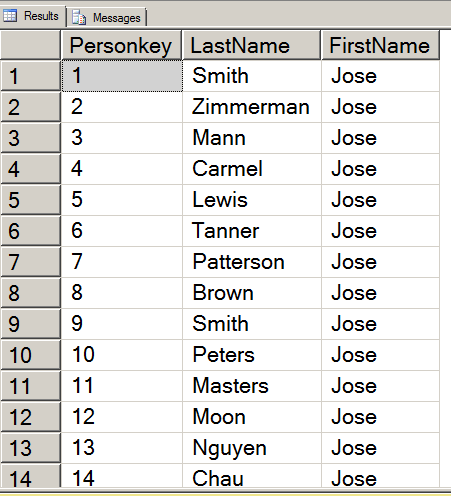
Here is an example of SQL injection attack. It takes a set of fairly foolish mistakes--connecting as admin, not validating the textbox, concatenating the text box directly into the SQL string etc. The key is to meet any critera of the query with something like "or 1=1", then do your command and end with a "--" or "/*" which comments out the rest of the SQL code. Our example takes an update statement. It provides a value, provides a closing quote and then comments out the remainder of the SQL. The result is that every field in the table will have the same value for that field.

Here is the c# for the example

using System;
using System.Collections.Generic;
using System.Linq;
using System.Web;
using System.Web.UI;
using System.Web.UI.WebControls;
using System.Data;
using System.Data.SqlClient;

public partial class _Default : System.Web.UI.Page
{
    protected void Page_Load(object sender, EventArgs e)
    {
        //or 1 =1; Drop table student /*
    }
    protected void Button1_Click(object sender, EventArgs e)
    {
        SqlConnection connect = new SqlConnection("Data Source=localhost;initial catalog=InjectionTest; Integrated Security=true");
        string sql = "Update tblPerson set Firstname='" + TextBox1.Text + "' where PersonKey=1"; 
        SqlCommand cmd = new SqlCommand(sql, connect);
        connect.Open();
        cmd.ExecuteNonQuery();
        connect.Close();
        Label1.Text = "thank you";

    }
}

Here is a picture of the form running


Here is a picture of the results

Tuesday, August 7, 2012

Creating a Login using LinQ

First we Reviewed some of the requirements for the Venue user


/*
Venue
Login and get their information
Edit own information
Add a show-- choose or add an Artist
Edit add tickets
See their own profits (stored procedure)
----
we have usp_venuShows
usp_AddVenue
usp_ShowList
Usp_UpdateVenue
veiw CurrentSalesSummary

-- 
add some privledges to venuerole
--select and insert on Artist, ArtistGenre
--Select and insert on show
--Select and insert on ticketoutlet
--add a password field to the Venue
*/

Here is the code for creating a login. First we had to make some changes in SQL Server. We added a password field to the Venue Table


Use VenueTracker 

Alter Table Venue
add VenuePassword varbinary(500)

Then we added passwords for each of the venues. Your VenueIDs may be different than mine


Declare @password varbinary(500)
Set @password = HASHBYTES('MD5', 'arena')
update Venue 
Set VenuePassword=@password
where VenueID=1
go
Declare @password varbinary(500)
Set @password = HASHBYTES('MD5', 'gorge')
update Venue 
Set VenuePassword=@password
where VenueID=2
go
Declare @password varbinary(500)
Set @password = HASHBYTES('MD5', 'tractor')
update Venue 
Set VenuePassword=@password
where VenueID=3

go
Declare @password varbinary(500)
Set @password = HASHBYTES('MD5', 'comet')
update Venue 
Set VenuePassword=@password
where VenueID=4

go
Declare @password varbinary(500)
Set @password = HASHBYTES('MD5', 'nuemos')
update Venue 
Set VenuePassword=@password
where VenueID=6

go
Declare @password varbinary(500)
Set @password = HASHBYTES('MD5', 'jazz alley')
update Venue 
Set VenuePassword=@password
where VenueID=9

Next we added some permissions to the VenueRole


Grant Select on Artist to VenueRole
Grant Insert on Artist to VenueRole
Grant Select on Show to VenueRole
Grant Insert on show to VenueRole
Grant Select on TicketOutlet to VenueRole
Grant Insert on TicketOutlet to Venuerole
Grant Select on Venue to VenueRole
Grant Update on Venue to VenueRole
Grant Select on ArtistGenre to VenueRole
Grant Insert on ArtistGenre to Venuerole


Next we went to Visual Studio 2010 and started an empty web site. We added a web page and then added a LINQ to SQL Classes. Then we added a new data connection using SQL server Authentication and the VenueLogin. We dragged on all the tables and stored procedures available in that login.


Next we added a new item, a class called PasswordHash. The purpose is to take the password entered into the login control and convert it to a MD5 hash


using System;
using System.Collections.Generic;
using System.Linq;
using System.Web;
using System.Text;
using System.Security.Cryptography;
using System.Text.RegularExpressions;

/// 
/// Summary description for PasswordHash
/// 
public class PasswordHash
{
    
 public PasswordHash()
 {
  
 }

    //I changed this to return a Byte array instead of a string
    //that makes it work
    public Byte[] hashedpassword(string pass)
    {
        Byte[] originalBytes;
        Byte[] encodedBytes;
        MD5 md5=MD5.Create(); //this is also a change

      
        originalBytes = ASCIIEncoding.Default.GetBytes(pass);
        encodedBytes = md5.ComputeHash(originalBytes);
        //string hashstr = ConvertBytes(encodedBytes);
        return encodedBytes;

    }

    //No longer need this method though it is a neat
    //use of Regular expressions

    //private string ConvertBytes(Byte[] encodedBytes)
    //{
    //    string x = BitConverter.ToString(encodedBytes);
    //    Regex rgx = new Regex("[^a-zA-Z0-9]");
    //    x = rgx.Replace(x, "");
    //    return "0x" + x;
    //   // return x;
       
    //}

}

Here is the login class


using System;
using System.Collections.Generic;
using System.Linq;
using System.Web;

/// 
/// Summary description for LoginClass
/// 
public class LoginClass
{
    string name, pass;
 public LoginClass(string name, string pass)
 {
        this.name = name;
        this.pass = pass;
 }

    public int ValidateLogin()
    {
        int vID = 0;
        PasswordHash ph = new PasswordHash();
        Byte[] hashed = ph.hashedpassword(pass);

        VenueClassesDataContext context = new VenueClassesDataContext();

        var log = from l in context.Venues
                  where l.VenueName == name && l.VenuePassword == hashed
                  select new { l.VenueID, l.VenueName, l.VenuePassword };
        //match it as byte[] instead of string
       //&& l.VenuePassword.ToString() == hashed

        if (log != null)
        {
            foreach (var i in log)
            {
                Console.WriteLine(i.VenuePassword);
                vID = i.VenueID;
  
            }
        }


        return vID;
    }
}

Here is the code behind for Default.aspx.cs


using System;
using System.Collections.Generic;
using System.Linq;
using System.Web;
using System.Web.UI;
using System.Web.UI.WebControls;

public partial class _Default : System.Web.UI.Page
{
    protected void Page_Load(object sender, EventArgs e)
    {
        //PasswordHash ph = new PasswordHash();
        //string passwrd = ph.hashedpassword("arena");
        //Response.Write(passwrd);
    }
    protected void Login1_Authenticate(object sender, AuthenticateEventArgs e)
    {
        LoginClass lc = new LoginClass(Login1.UserName, Login1.Password);
        int id = lc.ValidateLogin();
        Response.Write(id.ToString());
        if (id != 0)
        {
            Session["venueid"] = id;
            
            e.Authenticated = true;
            Response.Redirect("Default2.aspx");
        }
        else
        {
            e.Authenticated = false;
        }
    }
}

Here is the source for Default.aspx


<%@ Page Language="C#" AutoEventWireup="true" 
CodeFile="Default.aspx.cs" Inherits="_Default" %>

<!DOCTYPE html PUBLIC "-//W3C//DTD XHTML 1.0 Transitional//EN" 
"http://www.w3.org/TR/xhtml1/DTD/xhtml1-transitional.dtd">

<html xmlns="http://www.w3.org/1999/xhtml">
<head runat="server">
    <title></title>
</head>
<body>
    <form id="form1" runat="server">
    <div>
    <h1>Venue Login</h1>
        <asp:Login ID="Login1" runat="server" BackColor="#EFF3FB" BorderColor="#B5C7DE" 
            BorderPadding="4" BorderStyle="Solid" BorderWidth="1px" Font-Names="Verdana" 
            Font-Size="0.8em" ForeColor="#333333" onauthenticate="Login1_Authenticate">
            <InstructionTextStyle Font-Italic="True" ForeColor="Black" />
            <LoginButtonStyle BackColor="White" BorderColor="#507CD1" BorderStyle="Solid" 
                BorderWidth="1px" Font-Names="Verdana" Font-Size="0.8em" ForeColor="#284E98" />
            <TextBoxStyle Font-Size="0.8em" />
            <TitleTextStyle BackColor="#507CD1" Font-Bold="True" Font-Size="0.9em" 
                ForeColor="White" />
        </asp:Login>
    </div>
    </form>
</body>
</html>


Here is the source code for Default2.aspx


<%@ Page Language="C#" AutoEventWireup="true" 
CodeFile="Default2.aspx.cs" Inherits="Default2" %>

<!DOCTYPE html PUBLIC "-//W3C//DTD XHTML 1.0 Transitional//EN" 
"http://www.w3.org/TR/xhtml1/DTD/xhtml1-transitional.dtd">

<html xmlns="http://www.w3.org/1999/xhtml">
<head runat="server">
    <title></title>
</head>
<body>
    <form id="form1" runat="server">
    <div>
    <h1>Welcome</h1>
    </div>
    </form>
</body>
</html>

Wednesday, August 1, 2012

Dynamically generating Checkboxes and accessing their content

Here is code which automatically generates checkboxes based on an arraylist of strings. The trick to accessing the checkboxes afterwards is to also store them in a an arraylist. Here is the code for CheckboxTest.java


package com.spconger.www;
/*
 * This class creates two arrays
 * one for a list of titles
 * and one to store dynamically created
 * checkboxes
 */
import java.awt.event.ActionEvent;
import java.awt.event.ActionListener;
import java.util.ArrayList;

import javax.swing.*;

public class CheckboxTestForm {
 
 //declare private fields
 private ArrayList titles; //arraylist for titles
 private JFrame frame;
 private ArrayListchecks; //array of checkboxes
 private JPanel panel;
 private JButton button;
 private JLabel result;
 private JCheckBox chk;
 
 //constructor that calls the methods
 //and initializes the checkbox array
 public CheckboxTestForm(){
  fillArray();
  checks = new ArrayList();
  createCheckBoxes();
 }
 
 private void fillArray(){
  //this method populates the array
  //manually--you could do this
  //dynamically with user input
  titles=new ArrayList();
  titles.add("Foundation Trilogy");
  titles.add("lord of the Rings");
  titles.add("1@84");
  titles.add("The Martian Chronicles");
 }
 
 private void createCheckBoxes(){
  //set up the frame
  JFrame frame=new JFrame();
  frame.setDefaultCloseOperation(JFrame.EXIT_ON_CLOSE);
  
  //call the method to create the panel
  createPanel();
  //add the panel to the frame and make it visible
  frame.add(panel);
  frame.setBounds(100,100,300,300);
  frame.setVisible(true);
 }
 
 private void createPanel(){
  //initialize the panel
  panel = new JPanel();
  panel.setLayout(new GridLayout(0,1,5,5));
  //loop through the title array
  for (String s:titles){
    //create a new checkbox 
   //for each string in the array
    chk=new JCheckBox(s);
    //add the checkbox to the panel
    panel.add(chk);
    //add the checkbox to the array
    //of checkboxes
    checks.add(chk);
  }
  
  //add a button
  button=new JButton("Test");
  //assign a listener
  button.addActionListener(new buttonListener());
  //add it to the panel
  panel.add(button);
  
  //add a label to show the results
  result = new JLabel();
  panel.add(result);
  
  
 }
 
 private class buttonListener implements ActionListener{
  /*
   * (non-Javadoc)
   * @see java.awt.event.ActionListener#actionPerformed(java.awt.event.ActionEvent)
   * This class responds to the button click
   */
  @Override
  public void actionPerformed(ActionEvent arg0) {
   String s="";
   //loop through the array of checkboxes
   //and get the text of each checkbox
   //that is checked
   for (JCheckBox ck:checks){
    if(ck.isSelected()){
    s += ck.getText() + ", ";
    }
   }
   //display the results
   result.setText(s);
  }
  
 }

}


Here is the code for Program.java


package com.spconger.www;

public class Program {

 /**
  * this program is an example of 
  * creating checkboxes dynamically
  * on the fly. You can use this in
  * a todo list. Add your tasks to an 
  * Array List and then dynamically display them
  * The main merely calls the class
  */
 public static void main(String[] args) {
  CheckboxTestForm c= new CheckboxTestForm();

 }

}