Thursday, August 9, 2012

SQL Injection Attack

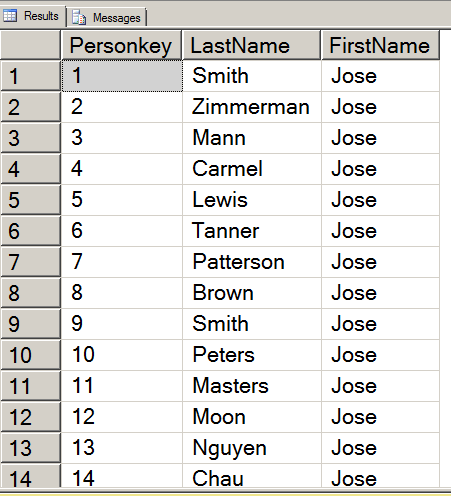
Here is an example of SQL injection attack. It takes a set of fairly foolish mistakes--connecting as admin, not validating the textbox, concatenating the text box directly into the SQL string etc. The key is to meet any critera of the query with something like "or 1=1", then do your command and end with a "--" or "/*" which comments out the rest of the SQL code. Our example takes an update statement. It provides a value, provides a closing quote and then comments out the remainder of the SQL. The result is that every field in the table will have the same value for that field.

Here is the c# for the example

using System;
using System.Collections.Generic;
using System.Linq;
using System.Web;
using System.Web.UI;
using System.Web.UI.WebControls;
using System.Data;
using System.Data.SqlClient;

public partial class _Default : System.Web.UI.Page
{
    protected void Page_Load(object sender, EventArgs e)
    {
        //or 1 =1; Drop table student /*
    }
    protected void Button1_Click(object sender, EventArgs e)
    {
        SqlConnection connect = new SqlConnection("Data Source=localhost;initial catalog=InjectionTest; Integrated Security=true");
        string sql = "Update tblPerson set Firstname='" + TextBox1.Text + "' where PersonKey=1"; 
        SqlCommand cmd = new SqlCommand(sql, connect);
        connect.Open();
        cmd.ExecuteNonQuery();
        connect.Close();
        Label1.Text = "thank you";

    }
}

Here is a picture of the form running


Here is a picture of the results

Tuesday, August 7, 2012

Creating a Login using LinQ

First we Reviewed some of the requirements for the Venue user


/*
Venue
Login and get their information
Edit own information
Add a show-- choose or add an Artist
Edit add tickets
See their own profits (stored procedure)
----
we have usp_venuShows
usp_AddVenue
usp_ShowList
Usp_UpdateVenue
veiw CurrentSalesSummary

-- 
add some privledges to venuerole
--select and insert on Artist, ArtistGenre
--Select and insert on show
--Select and insert on ticketoutlet
--add a password field to the Venue
*/

Here is the code for creating a login. First we had to make some changes in SQL Server. We added a password field to the Venue Table


Use VenueTracker 

Alter Table Venue
add VenuePassword varbinary(500)

Then we added passwords for each of the venues. Your VenueIDs may be different than mine


Declare @password varbinary(500)
Set @password = HASHBYTES('MD5', 'arena')
update Venue 
Set VenuePassword=@password
where VenueID=1
go
Declare @password varbinary(500)
Set @password = HASHBYTES('MD5', 'gorge')
update Venue 
Set VenuePassword=@password
where VenueID=2
go
Declare @password varbinary(500)
Set @password = HASHBYTES('MD5', 'tractor')
update Venue 
Set VenuePassword=@password
where VenueID=3

go
Declare @password varbinary(500)
Set @password = HASHBYTES('MD5', 'comet')
update Venue 
Set VenuePassword=@password
where VenueID=4

go
Declare @password varbinary(500)
Set @password = HASHBYTES('MD5', 'nuemos')
update Venue 
Set VenuePassword=@password
where VenueID=6

go
Declare @password varbinary(500)
Set @password = HASHBYTES('MD5', 'jazz alley')
update Venue 
Set VenuePassword=@password
where VenueID=9

Next we added some permissions to the VenueRole


Grant Select on Artist to VenueRole
Grant Insert on Artist to VenueRole
Grant Select on Show to VenueRole
Grant Insert on show to VenueRole
Grant Select on TicketOutlet to VenueRole
Grant Insert on TicketOutlet to Venuerole
Grant Select on Venue to VenueRole
Grant Update on Venue to VenueRole
Grant Select on ArtistGenre to VenueRole
Grant Insert on ArtistGenre to Venuerole


Next we went to Visual Studio 2010 and started an empty web site. We added a web page and then added a LINQ to SQL Classes. Then we added a new data connection using SQL server Authentication and the VenueLogin. We dragged on all the tables and stored procedures available in that login.
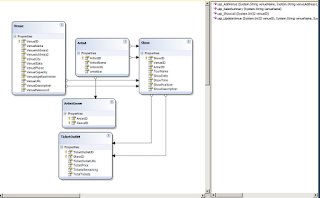

Next we added a new item, a class called PasswordHash. The purpose is to take the password entered into the login control and convert it to a MD5 hash


using System;
using System.Collections.Generic;
using System.Linq;
using System.Web;
using System.Text;
using System.Security.Cryptography;
using System.Text.RegularExpressions;

/// 
/// Summary description for PasswordHash
/// 
public class PasswordHash
{
    
 public PasswordHash()
 {
  
 }

    //I changed this to return a Byte array instead of a string
    //that makes it work
    public Byte[] hashedpassword(string pass)
    {
        Byte[] originalBytes;
        Byte[] encodedBytes;
        MD5 md5=MD5.Create(); //this is also a change

      
        originalBytes = ASCIIEncoding.Default.GetBytes(pass);
        encodedBytes = md5.ComputeHash(originalBytes);
        //string hashstr = ConvertBytes(encodedBytes);
        return encodedBytes;

    }

    //No longer need this method though it is a neat
    //use of Regular expressions

    //private string ConvertBytes(Byte[] encodedBytes)
    //{
    //    string x = BitConverter.ToString(encodedBytes);
    //    Regex rgx = new Regex("[^a-zA-Z0-9]");
    //    x = rgx.Replace(x, "");
    //    return "0x" + x;
    //   // return x;
       
    //}

}

Here is the login class


using System;
using System.Collections.Generic;
using System.Linq;
using System.Web;

/// 
/// Summary description for LoginClass
/// 
public class LoginClass
{
    string name, pass;
 public LoginClass(string name, string pass)
 {
        this.name = name;
        this.pass = pass;
 }

    public int ValidateLogin()
    {
        int vID = 0;
        PasswordHash ph = new PasswordHash();
        Byte[] hashed = ph.hashedpassword(pass);

        VenueClassesDataContext context = new VenueClassesDataContext();

        var log = from l in context.Venues
                  where l.VenueName == name && l.VenuePassword == hashed
                  select new { l.VenueID, l.VenueName, l.VenuePassword };
        //match it as byte[] instead of string
       //&& l.VenuePassword.ToString() == hashed

        if (log != null)
        {
            foreach (var i in log)
            {
                Console.WriteLine(i.VenuePassword);
                vID = i.VenueID;
  
            }
        }


        return vID;
    }
}

Here is the code behind for Default.aspx.cs


using System;
using System.Collections.Generic;
using System.Linq;
using System.Web;
using System.Web.UI;
using System.Web.UI.WebControls;

public partial class _Default : System.Web.UI.Page
{
    protected void Page_Load(object sender, EventArgs e)
    {
        //PasswordHash ph = new PasswordHash();
        //string passwrd = ph.hashedpassword("arena");
        //Response.Write(passwrd);
    }
    protected void Login1_Authenticate(object sender, AuthenticateEventArgs e)
    {
        LoginClass lc = new LoginClass(Login1.UserName, Login1.Password);
        int id = lc.ValidateLogin();
        Response.Write(id.ToString());
        if (id != 0)
        {
            Session["venueid"] = id;
            
            e.Authenticated = true;
            Response.Redirect("Default2.aspx");
        }
        else
        {
            e.Authenticated = false;
        }
    }
}

Here is the source for Default.aspx


<%@ Page Language="C#" AutoEventWireup="true" 
CodeFile="Default.aspx.cs" Inherits="_Default" %>

<!DOCTYPE html PUBLIC "-//W3C//DTD XHTML 1.0 Transitional//EN" 
"http://www.w3.org/TR/xhtml1/DTD/xhtml1-transitional.dtd">

<html xmlns="http://www.w3.org/1999/xhtml">
<head runat="server">
    <title></title>
</head>
<body>
    <form id="form1" runat="server">
    <div>
    <h1>Venue Login</h1>
        <asp:Login ID="Login1" runat="server" BackColor="#EFF3FB" BorderColor="#B5C7DE" 
            BorderPadding="4" BorderStyle="Solid" BorderWidth="1px" Font-Names="Verdana" 
            Font-Size="0.8em" ForeColor="#333333" onauthenticate="Login1_Authenticate">
            <InstructionTextStyle Font-Italic="True" ForeColor="Black" />
            <LoginButtonStyle BackColor="White" BorderColor="#507CD1" BorderStyle="Solid" 
                BorderWidth="1px" Font-Names="Verdana" Font-Size="0.8em" ForeColor="#284E98" />
            <TextBoxStyle Font-Size="0.8em" />
            <TitleTextStyle BackColor="#507CD1" Font-Bold="True" Font-Size="0.9em" 
                ForeColor="White" />
        </asp:Login>
    </div>
    </form>
</body>
</html>


Here is the source code for Default2.aspx


<%@ Page Language="C#" AutoEventWireup="true" 
CodeFile="Default2.aspx.cs" Inherits="Default2" %>

<!DOCTYPE html PUBLIC "-//W3C//DTD XHTML 1.0 Transitional//EN" 
"http://www.w3.org/TR/xhtml1/DTD/xhtml1-transitional.dtd">

<html xmlns="http://www.w3.org/1999/xhtml">
<head runat="server">
    <title></title>
</head>
<body>
    <form id="form1" runat="server">
    <div>
    <h1>Welcome</h1>
    </div>
    </form>
</body>
</html>

Wednesday, August 1, 2012

Dynamically generating Checkboxes and accessing their content

Here is code which automatically generates checkboxes based on an arraylist of strings. The trick to accessing the checkboxes afterwards is to also store them in a an arraylist. Here is the code for CheckboxTest.java


package com.spconger.www;
/*
 * This class creates two arrays
 * one for a list of titles
 * and one to store dynamically created
 * checkboxes
 */
import java.awt.event.ActionEvent;
import java.awt.event.ActionListener;
import java.util.ArrayList;

import javax.swing.*;

public class CheckboxTestForm {
 
 //declare private fields
 private ArrayList titles; //arraylist for titles
 private JFrame frame;
 private ArrayListchecks; //array of checkboxes
 private JPanel panel;
 private JButton button;
 private JLabel result;
 private JCheckBox chk;
 
 //constructor that calls the methods
 //and initializes the checkbox array
 public CheckboxTestForm(){
  fillArray();
  checks = new ArrayList();
  createCheckBoxes();
 }
 
 private void fillArray(){
  //this method populates the array
  //manually--you could do this
  //dynamically with user input
  titles=new ArrayList();
  titles.add("Foundation Trilogy");
  titles.add("lord of the Rings");
  titles.add("1@84");
  titles.add("The Martian Chronicles");
 }
 
 private void createCheckBoxes(){
  //set up the frame
  JFrame frame=new JFrame();
  frame.setDefaultCloseOperation(JFrame.EXIT_ON_CLOSE);
  
  //call the method to create the panel
  createPanel();
  //add the panel to the frame and make it visible
  frame.add(panel);
  frame.setBounds(100,100,300,300);
  frame.setVisible(true);
 }
 
 private void createPanel(){
  //initialize the panel
  panel = new JPanel();
  panel.setLayout(new GridLayout(0,1,5,5));
  //loop through the title array
  for (String s:titles){
    //create a new checkbox 
   //for each string in the array
    chk=new JCheckBox(s);
    //add the checkbox to the panel
    panel.add(chk);
    //add the checkbox to the array
    //of checkboxes
    checks.add(chk);
  }
  
  //add a button
  button=new JButton("Test");
  //assign a listener
  button.addActionListener(new buttonListener());
  //add it to the panel
  panel.add(button);
  
  //add a label to show the results
  result = new JLabel();
  panel.add(result);
  
  
 }
 
 private class buttonListener implements ActionListener{
  /*
   * (non-Javadoc)
   * @see java.awt.event.ActionListener#actionPerformed(java.awt.event.ActionEvent)
   * This class responds to the button click
   */
  @Override
  public void actionPerformed(ActionEvent arg0) {
   String s="";
   //loop through the array of checkboxes
   //and get the text of each checkbox
   //that is checked
   for (JCheckBox ck:checks){
    if(ck.isSelected()){
    s += ck.getText() + ", ";
    }
   }
   //display the results
   result.setText(s);
  }
  
 }

}


Here is the code for Program.java


package com.spconger.www;

public class Program {

 /**
  * this program is an example of 
  * creating checkboxes dynamically
  * on the fly. You can use this in
  * a todo list. Add your tasks to an 
  * Array List and then dynamically display them
  * The main merely calls the class
  */
 public static void main(String[] args) {
  CheckboxTestForm c= new CheckboxTestForm();

 }

}

Tuesday, July 31, 2012

Service Broker and system tables

Use master

Alter Database Automart
Set Enable_Broker

Use Automart
--create reply and request message types
Create Message Type
[//AWDB/1DBSample/RequestMessage]
Validation = Well_Formed_xml
GO
Create Message Type
[//AWDB/1DBSample/ReplyMessage]
Validation=well_formed_xml
Go
--create a contract with the message types
Create Contract [//AWDB/1DBSample/SampleContract]
([//AWDB/1DBSample/RequestMessage]
Sent by initiator,
[//AWDB/1DBSample/ReplyMessage]
sent by Target)
Go
--create queue for messages
Create Queue TargetQueue1Db

--create a service for target and initiator

Create service 
[//AWDB/DBSample/TargetService]
On Queue TargetQueue1Db
([//AWDB/1DBSample/SampleContract]) 

Create Queue InitiatorQueue1DB
Create Service
[//AWDB/1DBSample/InitiatorService]
On Queue InitiatorQueue1DB

Declare @initDigHandle UniqueIdentifier
Declare @requestMessage nvarchar(100);

Begin Transaction
Begin Dialog @initDigHandle
From Service
[//AWDB/1DBSample/InitiatorService]
To Service
N'//AWDB/DBSample/TargetService'
on Contract
[//AWDB/1DBSample/SampleContract]
With
Encryption=off

Select @requestMessage=N'Message for Target Service';
Send
on Conversation @initDigHandle
Message type
[//AWDB/1DBSample/RequestMessage]
(@RequestMessage)
Select @requestMessage As SentRequestMsg;
Commit Transaction

Declare @RecvReqDigHandle uniqueidentifier
Declare @RecvReqMsg Nvarchar(100)
Declare @recvReqMsgName sysname

Begin Tran
Waitfor
(
    Receive top(1)
    @RecvReqDigHandle=conversation_handle,
    @RecvReqMsg=message_body,
    @recvReqMsgName=message_type_name
   From TargetQueue1DB 
),
TimeOut 1000
Select @RecvReqMsg As RecievedRequestMsg
if  @recvReqMsgName=N'//AWDB/1DBSample/RequestMessage'
Begin
Declare @replyMsg NVarchar(100)
Select @replyMsg=N'Message for initiator service';
Send on Conversation  @RecvReqDigHandle
Message type
[//AWDB/1DBSample/ReplyMessage]
(@replymsg)
End Conversation  @RecvReqDigHandle
End
Select @replyMsg as SentReplyMsg
Commit transaction
GO

Declare @RecvReqDigHandle uniqueidentifier
Declare @RecvReqMsg Nvarchar(100)
Begin Transaction
Waitfor
(
   Receive top(1)
    @RecvReqDigHandle=conversation_handle,
    @RecvReqMsg=message_body
   From InitiatorQueue1DB 
),
Timeout 1000
End
Conversation @RecvReqDigHandle
Select @RecvReqMsg as RecievedReplyMsg
Commit Transaction

use VenueTracker
exec sp_help 

Use Automart
--there are over 200 of these in sql server
Select name from sys.Tables
Select * from sys.Databases
Select * from sys.Tables
Select * from sys.all_columns where object_id=357576312 and Is_nullable=1
Select * from sys.backup_devices
Select * from sys.database_files
Select * from sys.xml_schema_collections

Select * from sys.conversation

Xml for Artist Bio

Here is the source for the Default.aspx

<%@ Page Language="C#" AutoEventWireup="true" CodeFile="Default.aspx.cs" Inherits="_Default" %>

<!DOCTYPE html PUBLIC "-//W3C//DTD XHTML 1.0 Transitional//EN" "http://www.w3.org/TR/xhtml1/DTD/xhtml1-transitional.dtd">

<html xmlns="http://www.w3.org/1999/xhtml">
<head runat="server">
    <title></title>
    <link href="artistInfo.css" rel="stylesheet" type="text/css" />
</head>
<body>
    <form id="form1" runat="server">
    <div>
        <asp:GridView ID="GridView1" runat="server" AutoGenerateColumns="False" 
            BackColor="White" BorderColor="#E7E7FF" BorderStyle="None" BorderWidth="1px" 
            CellPadding="3" DataKeyNames="ArtistID" DataSourceID="SqlDataSource1" 
            GridLines="Horizontal" onselectedindexchanged="GridView1_SelectedIndexChanged">
            <AlternatingRowStyle BackColor="#F7F7F7" />
            <Columns>
                <asp:CommandField ShowSelectButton="True" />
                <asp:BoundField DataField="ArtistID" HeaderText="ArtistID" 
                    InsertVisible="False" ReadOnly="True" SortExpression="ArtistID" />
                <asp:BoundField DataField="ArtistName" HeaderText="ArtistName" 
                    SortExpression="ArtistName" />
            </Columns>
            <FooterStyle BackColor="#B5C7DE" ForeColor="#4A3C8C" />
            <HeaderStyle BackColor="#4A3C8C" Font-Bold="True" ForeColor="#F7F7F7" />
            <PagerStyle BackColor="#E7E7FF" ForeColor="#4A3C8C" HorizontalAlign="Right" />
            <RowStyle BackColor="#E7E7FF" ForeColor="#4A3C8C" />
            <SelectedRowStyle BackColor="#738A9C" Font-Bold="True" ForeColor="#F7F7F7" />
            <SortedAscendingCellStyle BackColor="#F4F4FD" />
            <SortedAscendingHeaderStyle BackColor="#5A4C9D" />
            <SortedDescendingCellStyle BackColor="#D8D8F0" />
            <SortedDescendingHeaderStyle BackColor="#3E3277" />
        </asp:GridView>
        <asp:SqlDataSource ID="SqlDataSource1" runat="server" 
            ConnectionString="<%$ ConnectionStrings:VenueTrackerConnectionString %>" 
            SelectCommand="SELECT [ArtistID], [ArtistName] FROM [Artist]">
        </asp:SqlDataSource>
        <asp:Xml ID="Xml1" runat="server"></asp:Xml>

    </div>
    </form>
</body>
</html>

Here is the code for Default.aspx.cs

using System;
using System.Collections.Generic;
using System.Linq;
using System.Web;
using System.Web.UI;
using System.Web.UI.WebControls;
using System.Data; //add these four libraries
using System.Data.SqlClient;
using System.Xml;
using System.Configuration;

public partial class _Default : System.Web.UI.Page
{
    protected void Page_Load(object sender, EventArgs e)
    {

    }
    protected void GridView1_SelectedIndexChanged(object sender, EventArgs e)
    {
        SqlConnection connect = new SqlConnection(
            ConfigurationManager.ConnectionStrings["VenueTrackerConnectionString"].ToString());
        string sql = "Select artistbio from Artist where ArtistID=@ID";
        SqlCommand cmd = new SqlCommand(sql, connect);
        cmd.Parameters.AddWithValue("@ID", int.Parse(GridView1.SelectedRow.Cells[1].Text));
        XmlReader xreader = null;
        XmlDocument xdoc = new XmlDocument();
        connect.Open();
        xreader = cmd.ExecuteXmlReader();
        xdoc.Load(xreader);
        xreader.Close();
        connect.Close();

        Xml1.Document = xdoc;
        Xml1.TransformSource = MapPath("autobio.xslt");


    }
}

Here is the artistinfo.css file, such as it is

body 
{
    font-family:Verdana;
}

h2
{
    color:Blue;
}

Here is the XSLT file, that should be imported into the project

<?xml version="1.0" encoding="utf-8"?>
<xsl:stylesheet version="1.0" 
    xmlns:xsl="http://www.w3.org/1999/XSL/Transform"
    xmlns:msxsl="urn:schemas-microsoft-com:xslt" 
    exclude-result-prefixes="msxsl"
    xmlns:a="http://www.venutracker.com/artistbio"
    xmlns="http://www.w3.org/1999/xhtml" 
>
    <xsl:output method="xml" indent="yes"/>
 
  <xsl:template match="/">
  <h2>Artist Bio</h2>
  <p> Artist Country <xsl:text>, </xsl:text>
    <xsl:value-of select="/a:artistbio/a:background/a:country" />
    </p>
    <p>Artist Birthdate <xsl:text>, </xsl:text>
      <xsl:value-of select="/a:artistbio/a:background/a:birthdate"/>
  </p>
    <ul>
      <xsl:for-each select="a:artistbio/a:albums/a:album">
        <li>
          <xsl:value-of select="a:title"/>
          <xsl:text>, </xsl:text>
          <xsl:value-of select="a:date"/>
        </li>
      </xsl:for-each>
      
    </ul>
  </xsl:template>
  
  
</xsl:stylesheet>


here is the script so far

use VenueTracker

Alter table Artist
drop column ArtistBio

Create xml Schema collection artistBio_schema
As
'<?xml version="1.0" encoding="utf-8"?>
<xs:schema attributeFormDefault="unqualified" elementFormDefault="qualified" targetNamespace="http://www.venutracker.com/artistbio" xmlns:xs="http://www.w3.org/2001/XMLSchema">
  <xs:element name="artistbio">
    <xs:complexType>
      <xs:sequence>
        <xs:element name="background">
          <xs:complexType>
            <xs:sequence>
              <xs:element name="country" type="xs:string" />
              <xs:element name="birthdate" type="xs:string" />
            </xs:sequence>
          </xs:complexType>
        </xs:element>
        <xs:element name="albums">
          <xs:complexType>
            <xs:sequence>
              <xs:element maxOccurs="unbounded" name="album">
                <xs:complexType>
                  <xs:sequence>
                    <xs:element name="title" type="xs:string" />
                    <xs:element name="date" type="xs:unsignedShort" />
                  </xs:sequence>
                </xs:complexType>
              </xs:element>
            </xs:sequence>
          </xs:complexType>
        </xs:element>
      </xs:sequence>
    </xs:complexType>
  </xs:element>
</xs:schema>'

Alter table Artist
Add artistbio xml (artistbio_schema)

Select * from Artist

Update Artist
Set artistbio=
'<?xml version="1.0" encoding="utf-8"?>
<artistbio xmlns="http://www.venutracker.com/artistbio">
  <background>
    <country>United States</country>
    <birthdate>5/1/1948</birthdate>
  </background>
  <albums>
    <album>
      <title>Blond on Blond</title>
      <date>1965</date>
    </album>
    <album>
      <title>Blood on the Tracks</title>
      <date>1973</date>
    </album>
    
  </albums>
  
</artistbio>'
Where ArtistID=1


Update Artist
Set artistbio=
'<?xml version="1.0" encoding="utf-8"?>
<artistbio xmlns="http://www.venutracker.com/artistbio">
  <background>
    <country>United States</country>
    <birthdate>6/1/1950</birthdate>
  </background>
  <albums>
    <album>
      <title>People</title>
      <date>1967</date>
    </album>
    <album>
      <title>Stoney End</title>
      <date>1972</date>
    </album>
    
  </albums>
  
</artistbio>'
Where ArtistID=2

Update Artist
Set artistbio=
'<?xml version="1.0" encoding="utf-8"?>
<artistbio xmlns="http://www.venutracker.com/artistbio">
  <background>
    <country>United States</country>
    <birthdate>5/1/1965</birthdate>
  </background>
  <albums>
    <album>
      <title>The Crane Wife</title>
      <date>2010</date>
    </album>
    <album>
      <title>The Hazards of love</title>
      <date>2011</date>
    </album>
    
  </albums>
  
</artistbio>'
Where ArtistID=3

Update Artist
Set artistbio=
'<?xml version="1.0" encoding="utf-8"?>
<artistbio xmlns="http://www.venutracker.com/artistbio">
  <background>
    <country>United States</country>
    <birthdate>5/1/1965</birthdate>
  </background>
  <albums>
    <album>
      <title>The Crane Wife</title>
      <date>2010</date>
    </album>
    <album>
      <title>The Hazards of love</title>
      <date>2011</date>
    </album>
    
  </albums>
  
</artistbio>'
Where ArtistID=3

Update Artist
Set artistbio=
'<?xml version="1.0" encoding="utf-8"?>
<artistbio xmlns="http://www.venutracker.com/artistbio">
  <background>
    <country>United States</country>
    <birthdate>6/1/1970</birthdate>
  </background>
  <albums>
    <album>
      <title>Hot fuss</title>
      <date>2010</date>
    </album>
    <album>
      <title>Day and Age</title>
      <date>2011</date>
    </album>
    
  </albums>
  
</artistbio>'
Where ArtistID=4

Update Artist
Set artistbio=
'<?xml version="1.0" encoding="utf-8"?>
<artistbio xmlns="http://www.venutracker.com/artistbio">
  <background>
    <country>United States</country>
    <birthdate>5/1/1950</birthdate>
  </background>
  <albums>
    <album>
      <title>Damn the torpedos</title>
      <date>1979</date>
    </album>
    <album>
      <title>Hard Promises</title>
      <date>1981</date>
    </album>
      <album>
      <title>Southern Accents</title>
      <date>1985</date>
    </album>
  </albums>
  
</artistbio>'
Where ArtistID=5

Monday, July 30, 2012

Simple check Box Example

Here is a picture of the form running

Here is the code for the Form1.java and panel


import java.awt.FlowLayout;
import java.awt.event.ActionEvent;
import java.awt.event.ActionListener;

import javax.swing.*;
public class Form1 {
 JFrame frame= new JFrame("Checkbox test");
 JPanel panel = new JPanel(new FlowLayout());
 JCheckBox chk1 = new JCheckBox("0ne");
 JCheckBox chk2=new JCheckBox("Two");
 JButton button = new JButton("test");
 
 JLabel label = new JLabel();
 
 public Form1(){
 
 panel.add(chk1);
 panel.add(chk2);
 panel.add(button);
 button.addActionListener(new TestAction());
 panel.add(label);
 frame.add(panel);
 frame.setBounds(100,100,300,300);
 frame.setVisible(true);
 
 }
 
 private class TestAction implements ActionListener{

  @Override
  public void actionPerformed(ActionEvent arg0) {
   String s = "";
  
   if(chk1.isSelected()){
    s+=chk1.getText() + " ";
   }
   
   if (chk2.isSelected()){
    s+=chk2.getText() + " ";
   
  }
   label.setText(s);
  
 }
 }
}


Here is Program.java


public class Program {

 public static void main(String[] args){
  Form1 f = new Form1();
  
 }
}

Thursday, July 26, 2012

XSLT and Reading XML from SQL Server

First we made sure there was a description for every Venue

Use VenueTracker


Select * From Venue

Update Venue
Set VenueDescription=
'<?xml version="1.0" encoding="utf-8"?>
<venuedescription xmlns="http://www.venutracker.com/description">
  <header>
    <datelastupdated>7/26/2012</datelastupdated>
    <contactname>Robert Zimmerman</contactname>
  </header>
  <body>
    <description>
      A stadium venue for sports and concerts at Seattle Center.

    </description>
  </body>
</venuedescription>'
Where VenueID=1

Update Venue
Set VenueDescription=
'<?xml version="1.0" encoding="utf-8"?>
<venuedescription xmlns="http://www.venutracker.com/description">
  <header>
    <datelastupdated>7/26/2012</datelastupdated>
    <contactname>Sara Smith</contactname>
  </header>
  <body>
    <description>
      A large Tavern in Ballard. Ideal for intimate concerts with the newest bands.

    </description>
  </body>
</venuedescription>'
Where VenueID=3

Update Venue
Set VenueDescription=
'<?xml version="1.0" encoding="utf-8"?>
<venuedescription xmlns="http://www.venutracker.com/description">
  <header>
    <datelastupdated>7/26/2012</datelastupdated>
    <contactname>Joe Manning</contactname>
  </header>
  <body>
    <description>
     A classy dive ideal for music. Located on Capital Hill.

    </description>
  </body>
</venuedescription>'
Where VenueID=4


Update Venue
Set VenueDescription=
'<?xml version="1.0" encoding="utf-8"?>
<venuedescription xmlns="http://www.venutracker.com/description">
  <header>
    <datelastupdated>7/26/2012</datelastupdated>
    <contactname>Sue Lewis</contactname>
  </header>
  <body>
    <description>
      Like the tractor but bigger. 

    </description>
  </body>
</venuedescription>'
Where VenueID=6

Delete From Venue Where VenueID = 7

Then we created an XSLT document to style and transform our venue description xml column


Here is the Venue.xslt

<?xml version="1.0" encoding="utf-8"?>
<xsl:stylesheet version="1.0" 
xmlns:xsl="http://www.w3.org/1999/XSL/Transform" 
xmlns:msxsl="urn:schemas-microsoft-com:xslt" exclude-result-prefixes="msxsl" 
xmlns="http://www.w3.org/1999/xhtml" 
xmlns:d ="http://www.venutracker.com/description"
>
    <xsl:output method="xml" indent="yes"/>

  <xsl:template match="/">
    <h2>Venue Description</h2>
    <p>
      <strong>Date Last Updated:</strong>
      <xsl:value-of 
select ="d:venuedescription/d:header/d:datelastupdated"/>
    </p>
      <p>
        <strong>Contact Person: </strong>
        <xsl:value-of 
select="d:venuedescription/d:header/d:contactname"/>
      </p>
      <hr/>
      <p>
        <xsl:value-of 
select ="d:venuedescription/d:body/d:description"/>
      </p>


  </xsl:template>
   
</xsl:stylesheet>


Next we Created a web page. we added two controls, a GridView and an XML control. For the GridView we used the wizard to connect it to the database. We also styled it and added a select button. Here is the code for Default.aspx. Just copying the source will reproduce all the wizard did.

<%@ Page Language="C#" AutoEventWireup="true" CodeFile="Default.aspx.cs" Inherits="_Default" %>

<!DOCTYPE html PUBLIC "-//W3C//DTD XHTML 1.0 Transitional//EN" "http://www.w3.org/TR/xhtml1/DTD/xhtml1-transitional.dtd">

<html xmlns="http://www.w3.org/1999/xhtml">
<head runat="server">
    <title></title>
    <link href="VenueDescriptionTest.css" rel="stylesheet" type="text/css" />
</head>
<body>
    <form id="form1" runat="server">
    <div>
    <h1>Venues</h1>
        <asp:GridView ID="GridView1" runat="server" AutoGenerateColumns="False" 
            BackColor="White" BorderColor="#3366CC" BorderStyle="None" BorderWidth="1px" 
            CellPadding="4" DataKeyNames="VenueID" DataSourceID="SqlDataSource1" 
            onselectedindexchanged="GridView1_SelectedIndexChanged">
            <Columns>
                <asp:CommandField ShowSelectButton="True" />
                <asp:BoundField DataField="VenueID" HeaderText="VenueID" InsertVisible="False" 
                    ReadOnly="True" SortExpression="VenueID" />
                <asp:BoundField DataField="VenueName" HeaderText="VenueName" 
                    SortExpression="VenueName" />
                <asp:BoundField DataField="VenueAddress2" HeaderText="VenueAddress2" 
                    SortExpression="VenueAddress2" />
                <asp:BoundField DataField="VenueCity" HeaderText="VenueCity" 
                    SortExpression="VenueCity" />
                <asp:BoundField DataField="VenueState" HeaderText="VenueState" 
                    SortExpression="VenueState" />
                <asp:BoundField DataField="VenuePhone" HeaderText="VenuePhone" 
                    SortExpression="VenuePhone" />
                <asp:BoundField DataField="VenueCapacity" HeaderText="VenueCapacity" 
                    SortExpression="VenueCapacity" />
                <asp:CheckBoxField DataField="VenueAgeRestriction" 
                    HeaderText="VenueAgeRestriction" SortExpression="VenueAgeRestriction" />
                <asp:BoundField DataField="VenueURL" HeaderText="VenueURL" 
                    SortExpression="VenueURL" />
            </Columns>
            <FooterStyle BackColor="#99CCCC" ForeColor="#003399" />
            <HeaderStyle BackColor="#003399" Font-Bold="True" ForeColor="#CCCCFF" />
            <PagerStyle BackColor="#99CCCC" ForeColor="#003399" HorizontalAlign="Left" />
            <RowStyle BackColor="White" ForeColor="#003399" />
            <SelectedRowStyle BackColor="#009999" Font-Bold="True" ForeColor="#CCFF99" />
            <SortedAscendingCellStyle BackColor="#EDF6F6" />
            <SortedAscendingHeaderStyle BackColor="#0D4AC4" />
            <SortedDescendingCellStyle BackColor="#D6DFDF" />
            <SortedDescendingHeaderStyle BackColor="#002876" />
        </asp:GridView>
        <asp:SqlDataSource ID="SqlDataSource1" runat="server" 
            ConnectionString="<%$ ConnectionStrings:VenueTrackerConnectionString %>" 
            SelectCommand="SELECT [VenueID], [VenueName], [VenueAddress2], [VenueCity], [VenueState], [VenuePhone], [VenueCapacity], [VenueAgeRestriction], [VenueURL] FROM [Venue]">
        </asp:SqlDataSource>
        <asp:Xml ID="Xml1" runat="server"></asp:Xml>
    </div>
    </form>
</body>
</html>


You will also need the web.config file. It contains the connection string


<?xml version="1.0"?>

<!--
  For more information on how to configure your ASP.NET application, please visit
  http://go.microsoft.com/fwlink/?LinkId=169433
  -->

<configuration>

    <connectionStrings>
        <add name="VenueTrackerConnectionString" connectionString="Data Source=localhost;Initial Catalog=VenueTracker;Integrated Security=True"
            providerName="System.Data.SqlClient" />
    </connectionStrings>
    <system.web>
        <compilation debug="false" targetFramework="4.0" />
    </system.web>

</configuration>

Finally, here is the C# code.

using System;
using System.Collections.Generic;
using System.Linq;
using System.Web;
using System.Web.UI;
using System.Web.UI.WebControls;
using System.Data; //add these four libraries
using System.Data.SqlClient;
using System.Xml;
using System.Configuration;

public partial class _Default : System.Web.UI.Page
{
    protected void Page_Load(object sender, EventArgs e)
    {

    }
    protected void GridView1_SelectedIndexChanged(object sender, EventArgs e)
    {
        SqlConnection connect = new SqlConnection(ConfigurationManager.ConnectionStrings["VenueTrackerConnectionString"].ToString());

        XmlDocument xDoc = new XmlDocument();
        string sql = "Select venueDescription from Venue where VenueID = @ID";
        SqlCommand cmd = new SqlCommand(sql, connect);
        cmd.Parameters.AddWithValue("@ID", int.Parse(GridView1.SelectedRow.Cells[1].Text));

        XmlReader xreader = null;
        connect.Open();
        xreader = cmd.ExecuteXmlReader();
        xDoc.Load(xreader);
        xreader.Close();
        connect.Close();

        Xml1.Document = xDoc;
        Xml1.TransformSource = MapPath("Venue.xslt");
          
    }
}