Monday, September 30, 2013

Operators, constants, methods, scope (1)

Here is our first program with the number of passengers per van declared as a constant. We us the modulus to return the remainder to make sure we don't leave anyone behind

using System;
using System.Collections.Generic;
using System.Linq;
using System.Text;
using System.Threading.Tasks;

namespace VanPoolExample
{
    class Program
    {
        //declare a constant
        const int MAXPASSENGERS = 11;

        static void Main(string[] args)
        {
            //Input
            Console.WriteLine("How many people do you need to Transport?");
            int passengers = int.Parse(Console.ReadLine());

            //Calculation
            int vans = passengers / MAXPASSENGERS;

            if (passengers % MAXPASSENGERS > 0)
            {
                vans += 1;
            }

            //output
            Console.WriteLine("You will need {0} vans", vans);

            Console.ReadKey();

        }
    }
}

Here is the cube program with methods

using System;
using System.Collections.Generic;
using System.Linq;
using System.Text;
using System.Threading.Tasks;

namespace methodExamples
{
    class Program
    {
        int number; //class variable class scope
        static void Main(string[] args)
        {
            Program p = new Program();
            p.GetNumber();
            
           Console.ReadKey();
        }//end main

        void GetNumber()
        {
            //input
            Console.WriteLine("enter a integer");
             number = int.Parse(Console.ReadLine());
             CalculateCube();
        }

        void CalculateCube()
        { 
           // calculation
            int cube = number * number * number;


            DisplayCube(cube);
        } //end calculate cube

        void DisplayCube(int cubedNumber)
        {
            //output
            Console.WriteLine("The cube of {0} is {1}", number, cubedNumber);

          
        }

    }//end class
}//end namespace

Wednesday, September 25, 2013

Statement of Work

Show Times: Local Shows and Acts

History:

It is often difficult to know where and when a local band or artist is performing. Most advertising for shows is ad hoc, consisting of bills posted on the street and small adds in free newspapers. To solve this we conceived of creating a database that would track all the local venues and shows.

Scope:

The Database will track local bands and shows. It will list the venues where the bands or artists perform. It will let fans register and be notified when an artist is playing or when a show’s act matches select genres. In order to accomplish this the database will also track artists and fans who choose to register. Artists are entered by the system administrator. Venues can enter their schedule information. Fans can self register to get notifications. Constraints:

The database will only track local artists and venues in the greater Seattle area. A local artist is one who resides mostly in the Seattle area.

Local artists will be listed but will not be allowed to add material to their information. The database will link to their homepage.

Objective:

To make it easier to locate artists and shows. To let fans receive notifications of shows that might interest them.

Schedule:

Gather information week 2
Deliverable: List of potential fields and entities
Requirements and business rules week 3
Deliverable: list of requirements and business rules
Logical Design. Week 4
Visio diagrams:
Normalization: week 5
Build the physical database add sample data
Test the database SQL
Security

Saturday, September 21, 2013

First Thoughts for Programming

Programming is difficult. It is not something you are born knowing. It is not something you usually learn when you are growing up. Programming languages are artificial. They serve to function as a bridge between human languages and machine language.

Programming languages are meant to have some of the features of human languages while maintaining the strict unambiguous logic required by computing machines.

Interestingly, computers don't understand the programming languages any better then you do at this point. A language must be complied, that is converted into the language of the machine before it can function.

Computers only understand 0's and 1's. on, off, magnetized, unmagnetized, switches open or closed. And a language must be compiled to a particular computer's processor and operating system to work.

Note: some languages, like C# or Java, do a precompile to a intermediate language that allow it to be more portable. The intermediate language is machine and Operating System neutral and can be ported to any machine. A run time (Java or .Net) then compiles the intermediate language to the actual machine.

There is usually a period of frustration when you first start programming. It seems alien and difficult and impossible. The important thing is, programming is something you can do with practice. You are smart enough. You can learn it with practice. The more you practice, the more you exercise your skills, the more you explore, the stronger your skills and instincts will grow.

You may find you like programming or you may find that you hate it, but you can learn it.

Either way it is valuable. Programming gives you a valuable insight into how computers work, and how all the things we take for granted on our computers, tablets and phones came to be.

Sunday, August 11, 2013

Business Intelligence

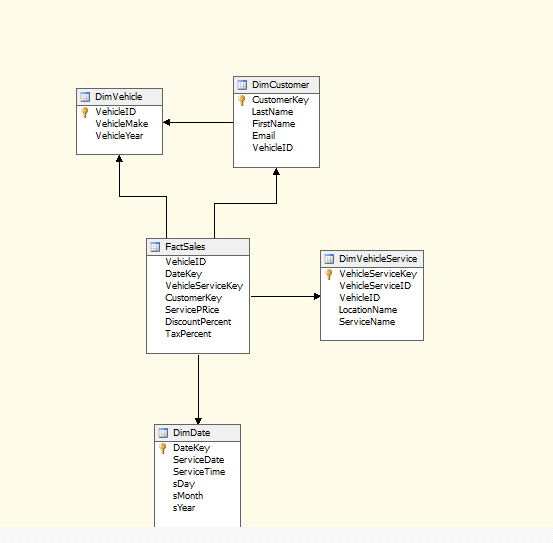
I am going to set up the Automart database as a Data warehouse. (I am using Automart because at home CommunityAssist is in a process of transformation and is too different from the version on your servers to be useful.) I have tried to reorganize the database into a "Star" structure consisting of a fact table surrounded by Dim or Dimension tables. Here is the diagram:

First we create the new database

Create Database AutomartDW
Go
use AutomartDW
Go

Then we create the tables

Create table DimVehicle
(
 VehicleID int primary key,
 VehicleMake nvarchar(255),
 VehicleYear nvarchar(4)
)
go
Create table DimCustomer
(
 CustomerKey int identity(1,1) primary key,
 LastName nvarchar(255),
 FirstName nvarchar(255),
 Email nvarchar(255),
 VehicleID int Foreign key references DimVehicle(VehicleID)
)

Create table DimVehicleService
(
 VehicleServiceKey  int identity(1,1) primary key,
 VehicleServiceID int,
 VehicleID int,
 LocationName nvarchar(255),
 ServiceName nvarchar(255),

)

go

Create Table DimDate
(
 DateKey int identity (1,1) primary key,
 ServiceDate Date,
 ServiceTime Time,
 sDay int,
 sMonth int,
 sYear int
)
go

Create table FactSales
(
 VehicleID int foreign Key references DimVehicle(VehicleID),
 DateKey int foreign key references DimDate(DateKey),
 VehicleServiceKey int foreign Key references DimVehicleService(VehicleServiceKey),
 CustomerKey int foreign key references DimCustomer(customerKey),
 ServicePRice money,
 DiscountPercent decimal(3,2),
 TaxPercent decimal(3,2)


)

Next we populate the tables. I am pretty sure of the Dim table inserts, but must confess a bit of uncertainty about how I populated the Fact Table

--start inserts into tables

Insert into DimVehicle(VehicleID, VehicleMake, VehicleYear)
Select vehicleID, VehicleMake, VehicleYEar from Automart.Customer.Vehicle

Insert into DimCustomer (LastName, FirstName, Email, VehicleID)
Select LastName, Firstname, Email, VehicleID
From Automart.dbo.Person p
Inner join Automart.Customer.Vehicle v
on p.Personkey=v.PersonKey
inner join Automart.Customer.RegisteredCustomer c
on c.PersonKey=p.Personkey

Insert into DimVehicleService(VehicleServiceID, VehicleID, LocationName, ServiceName)
Select vs.VehicleServiceID, VehicleID, LocationName, ServiceName
From Automart.Employee.VehicleService vs
Inner join Automart.Employee.VehicleServiceDetail vsd
on vs.VehicleServiceID=vsd.VehicleServiceID
inner join Automart.Customer.Location l
on vs.LocationID=l.LocationID
inner join Automart.Customer.AutoService a
on a.AutoServiceID=vsd.AutoServiceID

INsert into dimDate(ServiceDate, ServiceTime, sDay, sMonth, sYear)
Select ServiceDate, ServiceTime, Day(ServiceDate), Month(ServiceDate), Year(serviceDate) 
From Automart.Employee.VehicleService

Insert into FactSales(VehicleID, DateKey, VehicleServiceKey, CustomerKey, ServicePRice, DiscountPercent, TaxPercent)
Select dv.VehicleID, DateKey, VehicleServiceKey, CustomerKey, ServicePRice, DiscountPercent, TaxPErcent
From DimVehicle dv
inner Join DimCustomer dc
on dv.VehicleID = dc.VehicleID
inner join Automart.Employee.VehicleService vs
on dv.VehicleID=vs.VehicleID
inner join Automart.Employee.VehicleServiceDetail vsd
on vs.VehicleServiceID=vsd.VehicleServiceID
inner join DimVehicleService dvs
on vs.VehicleServiceID=dvs.VehicleServiceID
inner join Automart.customer.AutoService a
on vsd.AutoServiceID=a.AutoServiceID
inner join DimDate dd
on vs.ServiceDate=dd.ServiceDate 

Next we need to make sure we add the service user to the AutomartDW database

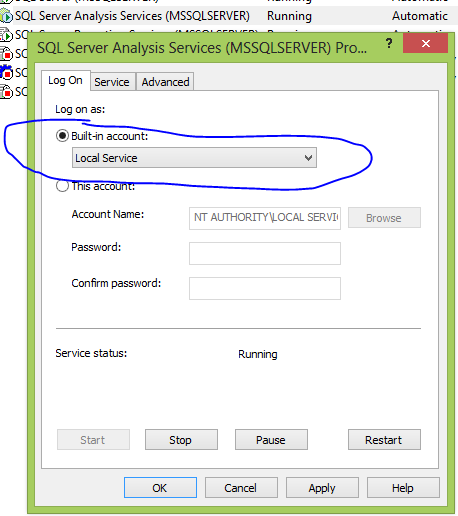
First open the SQL Server Configuration Manager and select SQL Server Analysis Services. Right Click on the properties. You will probably see something like this.

We want to change it to local services.

If it already looks like this, great. other wise change it. Oking this will cause a server restart. Say OK to the warning. Then return to Sql Server Management studio. Go to the Server Security folder and right click logins. Select New Login. In the login dialog click on search,and then advanced. Select NT Authority/Local Service as a login.
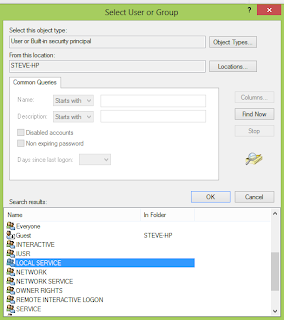
Then click OK, OK until you are back at the main dialog window. Click on the page User Mapping. Then check the box by AutomartDW and Check the roles DataReader, DataWriter

Click OK. Now we need to open Visual Studio Data tools. and Start a new Data Analysis Multidimensional cube project. Name it "AutomartAnalysisProject."

In the Solution Explorer right click on Data Sources and add a new Data source
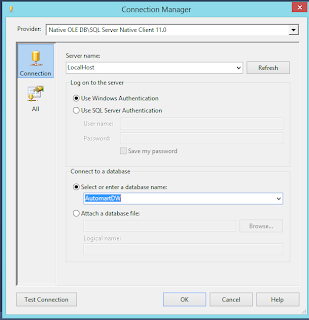
Click OK and Next and then choose Use Service Account

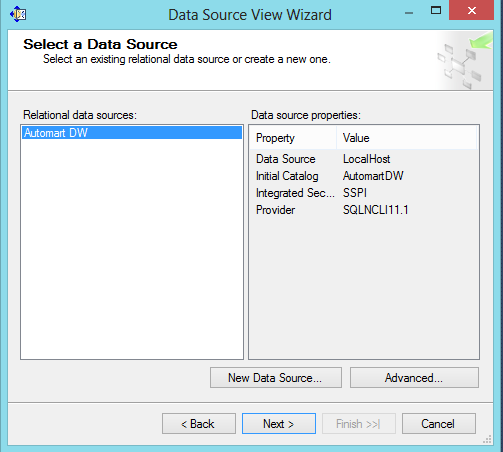
Go Next and Finish. Now right click Data Source Views in the Solution Explored and Select New. Use the data source we just created.
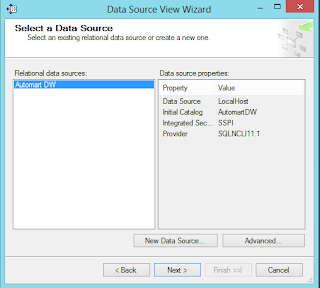
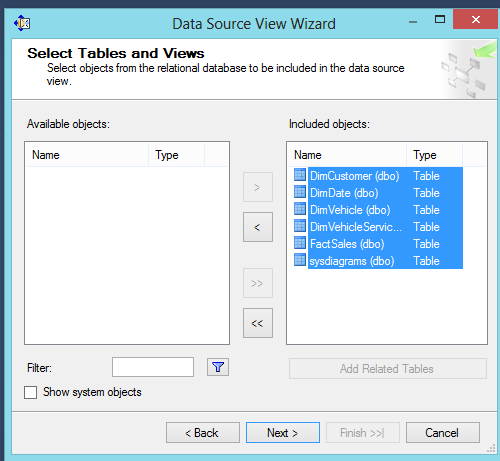
On the next dialog of the wizard, add all the tables

Click Next and finish. You will see the designer with the tables.

Now right click on the Cubes folder and add a new cube

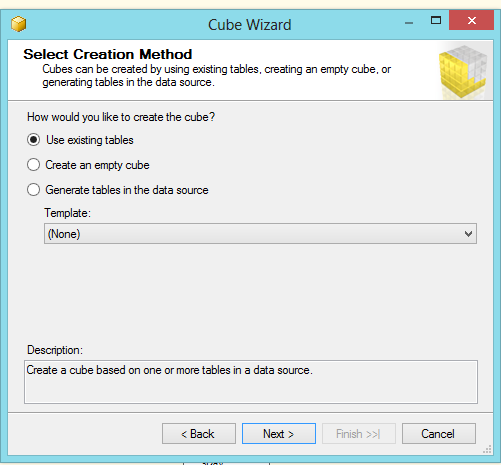
Use Existing tables
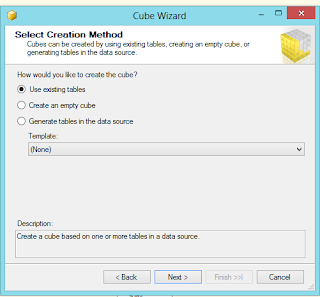
Click Next and then choose all the tables except sysDiagrams

click Next, Next and Finish. It wouldn't hurt at this time to build the solution. Then right click on the cube and select Process.

Click Run. You should see something like this when it is done.

Click Close, Close. Then click the Browser tab. Here you can drag in dimensions and calculations

Not very exciting, but Automart doesn't have much data. Also, I am not absolutely confident of my dimesion setup. I seemed to have missed the location. It should have been a dim table. Also I am not sure about how I populated the SaleFact table. The numbers displaying are correct, but some of the other measures produce wrong results. But this blog does give you an overview of the process.

You can still look at other measures and try to add KPIs and other aspects. Maybe sometime in the not too distant future I will do a blog where I take it from the cube and show how to apply statistics and KPIs to the results.

Saturday, August 3, 2013

Query Optimization

Overview

Query optimization is an important administrative task. But it is a difficult and subtle process. It involves extensive testing of various query structures and indexes and comparing the results.

Sql Server has a built in optimazation engine (see below) that usually but not always provides the best execution plan. You can also look at the actual execution plans and compare statistics when running variations of a query. Sql Server also provides the syntax for getting "Hints" when running queries. Finally you can use the Database Tuning Advisor to get suggestions for what indexes to create.


SQL Servers Query Optimization

Sql Server has a built in query optimization engine. Every time a query is run it goes through the following steps:

Parsing makes sure the query is valid SQL. Binding is mostly about name resolution, getting the table and column names. Optimization generates candidate execution paths and determines which has the least cost in cpu and total execution time.

Query optimization is complex and even the best optimizer doesn't get it right all the time. Still most of the time the optimizer does generate the optimal path.


Looking at a query with the execution plan and statistics

Open SQL Server Management Studio.

Start a new Query window

Select the Actual Execution Plan, and the Include Client Statistics from the toolbar

We are going to use Adventure works because it has more records. Our query will focus on the sales and sales details tables, but we will also bring in the Product name from the product table. We will use the dates and salesperson IDs for criteria.

Here is the query:

Use AdventureWorks2012

Select s.SalesOrderID, OrderDate, 
SalesOrderNumber, SalesPersonID,
ORderQty, Name, unitPrice,
 UnitPRiceDiscount
From Sales.SalesOrderHeader s
Inner Join Sales.SalesOrderDetail sd
on s.SalesOrderID=sd.SalesOrderID
inner Join Production.Product p
on p.ProductID=sd.ProductID
Where OrderDate between '2008-1-1' and '2008-1-31'
And SalesPersonID is not null

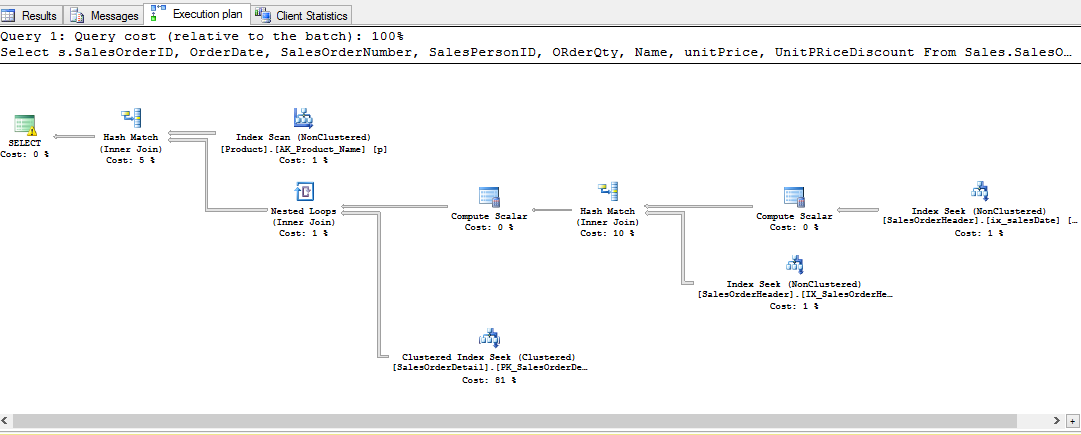
After you run this click the tab Execution plan. You will have the following output

Notice that it suggests a couple of indexes that are missing--in other words should be created, particularly on SalesOrderDate and SalesPersonID. Notice also that the majority of the cost is incurred processing the clustered indexes--which means going row by row through the table.

Next look at the statistics output

Open a second query window. We are going to create part of the suggested index

Create index ix_salesDate on Sales.SalesOrderHeader(OrderDate)

Now go back and rerun the query. Notice the query results include the new index. Now all the cost is in SalesDetail clustered index. This would suggest we should add another index.

Look at the statistics. Notice, interestingly the total cost has actually gone up and many of the indicators are worse.

This suggests that the next step would be to try an index on SalesPersonID and see if that improves the stats.


Query Hints

Query hints are a set of commands that you can add to a query to suggest an execution path. I am only going to show a couple. Query hints start with the Option keyword and have various arguments in parenthesis. The first example is a merge join which suggest executing the Joins as merges. Here is the code. The only change is in the last line.

Select s.SalesOrderID, OrderDate, SalesOrderNumber, SalesPersonID,
ORderQty, Name, unitPrice, UnitPRiceDiscount
From Sales.SalesOrderHeader s
Inner Join Sales.SalesOrderDetail sd
on s.SalesOrderID=sd.SalesOrderID
inner Join Production.Product p
on p.ProductID=sd.ProductID
Where OrderDate between '2008-1-1' and '2008-1-31'
And SalesPersonID is not null
Option (Merge Join)

Notice the change in results and statistics. Notice the change of joins to merge join and the suggestion to create and index.

Here are the statistics

Most of the other query hints are suggestions to the query optimizer. Look at http://msdn.microsoft.com/en-us/library/ms181714.aspx for a complete descriptions.


The DataBase Engine Tuning Advisor

To start the Tuning advisor go to the TOOLS menu in the Sql Server Management Studio. Connect to Localhost.

In the general tab, select "Plain Cache", and check Automart

Click the Tuning Options Tab. Leave everything as default except the time.

In Advanced Options set the max space to 4 mbs or so

Move it ahead 10 minutes or so.

Click start analysis.

The Tuning adviser has no suggestions. (Automart is too small a database to really analyze.) Here is the report:


Useful links:

Query hints

http://msdn.microsoft.com/en-us/library/ms181714.aspx

Overview of query optimization

https://www.simple-talk.com/sql/sql-training/the-sql-server-query-optimizer/
http://sqlblog.com/blogs/paul_white/archive/2012/04/28/query-optimizer-deep-dive-part-1.aspx
http://sqlblog.com/blogs/paul_white/archive/2012/04/28/query-optimizer-deep-dive-part-2.aspx

Advice

http://exacthelp.blogspot.com/2012/04/sql-server-query-optimization-tips.html
http://blogs.lessthandot.com/index.php/DataMgmt/DBAdmin/sql-server-tuning

Database tuning advisor

http://msdn.microsoft.com/en-us/library/ms174202.aspx

Wednesday, July 31, 2013

File Input/Output

I have posted the code from class related to writing and reading text files at GitHub

Tuesday, July 30, 2013

Misc SQL Server Stuff (Hash, backup, fulltext)

Declare @password Varbinary(5000)
Declare @passwordseed DateTime
Set @passwordseed=GetDate()
Set @password=HashBytes('Sha1', cast(@passwordseed as NVarchar) +'P@ssw0rd1')
Select @passwordSeed as seed, @password as [password]

use Automart
Alter table Customer.RegisteredCustomer
add HashedPassword varbinary(5000)

Update Customer.RegisteredCustomer
Set hashedPassword=hashbytes('sha1', CustomerPassword)
where RegisteredCustomerID=1

Select * from Customer.RegisteredCustomer

Declare @myPassword nvarchar(20)
set @myPassword='amypass'
Declare @hPassword varbinary(5000)
Set @hPassword=hashbytes('sha1',@myPassword)
if exists
 (Select hashedPassword from Customer.RegisteredCustomer
 where hashedPassword=@hPassword)
Begin
print 'Successful Login'
End
Else
Begin
Print 'Login Failed'
End

Declare @myPassword nvarchar(20)
set @myPassword='jpass'

Declare @hPassword varbinary(5000)
Set @hPassword=hashbytes('sha1',N'jpass')
if exists
 (Select hashedPassword from Customer.RegisteredCustomer
 where hashedPassword=@hPassword)
Begin
print 'Successful Login'
End
Else
Begin
Print 'Login Failed'
End

--backups

-- change recovery model 
ALTER DATABASE Automart SET RECOVERY SIMPLE; 
--ALTER DATABASE Automart SET RECOVERY BulkLogged; 
ALTER DATABASE Automart SET RECOVERY full; 

-- create a full backup of Automart 
BACKUP DATABASE Automart 
TO DISK = 'C:\Backups\Automart.bak' 
with init; 

use Automart
Alter table Customer.RegisteredCustomer
add HashedPassword varbinary(500)

-- create a differential backup of Automart appending to the last full backup 
BACKUP DATABASE Automart 
TO DISK = 'C:\Backups\Automart.bak' 
with differential; 

-- create a backup of the log 
use master; 
BACKUP LOG Automart 
TO disk = 'C:\Backups\AutomartLog.bak' 
WITH NORECOVERY, NO_TRUNCATE; 

create table TestTable 
( 
ID int identity(1,1) primary key, 
MyTimestamp datetime 
); 

insert into TestTable values 
( 
GETDATE() 
); 

use Automart; 
select * from TestTable; 

-- restore from the full backup 
use master; 
RESTORE DATABASE Automart 
FROM disk = 'C:\Backups\Automart.bak' 
with norecovery, file = 1; 

-- restore from the differential backup on file 2 
RESTORE DATABASE Automart 
FROM disk = 'C:\Backups\Automart.bak' 
with norecovery, file = 2; 

-- restore from the differential backup on file 3 
RESTORE DATABASE Automart 
FROM disk = 'C:\Backups\Automart.bak' 
with norecovery, file = 3; 

-- restore from the log 
use master; 
RESTORE LOG Automart 
FROM disk = 'C:\Backups\AutomartLog.bak' 
WITH NORECOVERY; 

restore database Automart; 

--Full Text Catalog
use Master

--add a filegroup
Alter Database Automart
Add Filegroup FullTextCatalog

use Automart
--add a table with some text
Create Table TextTest
(
   TestId int identity (1,1) primary key,
   TestNotes Nvarchar(255)
)

--insert text
Insert into TextTest(TestNotes)
Values('For test to be successful we must have a lot of text'),
('The test was not successful. sad face'),
('there is more than one test that can try a man'),
('Success is a relative term'),
('It is a rare man that is always successful'),
('The root of satisfaction is sad'),
('men want success')

Select * From TextTest

--create full text catalog
Create FullText Catalog TestDescription
on Filegroup FullTextCatalog

--Create a full text index
Create FullText index on textTest(TestNotes)
Key Index PK__TextTest__8CC331603A9A1988
on TestDescription
With Change_tracking auto

--run queries on the full text catalog

--find all instances that have the word "sad"
Select TestID, TestNotes 
From TextTest
Where FreeText(TestNotes, 'sad')

--do the same with successful
Select TestID, TestNotes 
From TextTest
Where FreeText(TestNotes, 'successful')

Select TestID, TestNotes 
From TextTest
Where Contains(TestNotes, '"success"')

--look for any words containing the letters "success"
--the * is a wildcard
Select TestID, TestNotes 
From TextTest
Where Contains(TestNotes, '"success*"')

--looks for all grammatical forms of a word
Select TestID, TestNotes 
From TextTest
Where Contains(TestNotes, ' Formsof (Inflectional, man)')

--finds words near another word
Select TestID, TestNotes 
From TextTest
Where Contains(TestNotes, ' not near successful')

Select TestID, TestNotes 
From TextTest
Where Contains(TestNotes, ' sad near successful')


Select ServiceName, ServiceDescription.query
('declare namespace s="http://www.automart.com/servicedescription";
//s:servicedescription/s:labor') 
From Customer.AutoService
Where ServiceName='Tune Up'


Select * From Customer.AutoService