I have posted the code from class related to writing and reading text files at GitHub
Wednesday, July 31, 2013

Tuesday, July 30, 2013
Misc SQL Server Stuff (Hash, backup, fulltext)
Declare @password Varbinary(5000)
Declare @passwordseed DateTime
Set @passwordseed=GetDate()
Set @password=HashBytes('Sha1', cast(@passwordseed as NVarchar) +'P@ssw0rd1')
Select @passwordSeed as seed, @password as [password]

use Automart
Alter table Customer.RegisteredCustomer
add HashedPassword varbinary(5000)

Update Customer.RegisteredCustomer
Set hashedPassword=hashbytes('sha1', CustomerPassword)
where RegisteredCustomerID=1

Select * from Customer.RegisteredCustomer

Declare @myPassword nvarchar(20)
set @myPassword='amypass'
Declare @hPassword varbinary(5000)
Set @hPassword=hashbytes('sha1',@myPassword)
if exists
 (Select hashedPassword from Customer.RegisteredCustomer
 where hashedPassword=@hPassword)
Begin
print 'Successful Login'
End
Else
Begin
Print 'Login Failed'
End

Declare @myPassword nvarchar(20)
set @myPassword='jpass'

Declare @hPassword varbinary(5000)
Set @hPassword=hashbytes('sha1',N'jpass')
if exists
 (Select hashedPassword from Customer.RegisteredCustomer
 where hashedPassword=@hPassword)
Begin
print 'Successful Login'
End
Else
Begin
Print 'Login Failed'
End

--backups

-- change recovery model
ALTER DATABASE Automart SET RECOVERY SIMPLE;
--ALTER DATABASE Automart SET RECOVERY BulkLogged;
ALTER DATABASE Automart SET RECOVERY full;

-- create a full backup of Automart
BACKUP DATABASE Automart
TO DISK = 'C:\Backups\Automart.bak'
with init;

use Automart
Alter table Customer.RegisteredCustomer
add HashedPassword varbinary(500)

-- create a differential backup of Automart appending to the last full backup
BACKUP DATABASE Automart
TO DISK = 'C:\Backups\Automart.bak'
with differential;

-- create a backup of the log
use master;
BACKUP LOG Automart
TO disk = 'C:\Backups\AutomartLog.bak'
WITH NORECOVERY, NO_TRUNCATE;

create table TestTable
(
ID int identity(1,1) primary key,
MyTimestamp datetime
);

insert into TestTable values
(
GETDATE()
);

use Automart;
select * from TestTable;

-- restore from the full backup
use master;
RESTORE DATABASE Automart
FROM disk = 'C:\Backups\Automart.bak'
with norecovery, file = 1;

-- restore from the differential backup on file 2
RESTORE DATABASE Automart
FROM disk = 'C:\Backups\Automart.bak'
with norecovery, file = 2;

-- restore from the differential backup on file 3
RESTORE DATABASE Automart
FROM disk = 'C:\Backups\Automart.bak'
with norecovery, file = 3;

-- restore from the log
use master;
RESTORE LOG Automart
FROM disk = 'C:\Backups\AutomartLog.bak'
WITH NORECOVERY;

restore database Automart;

--Full Text Catalog
use Master

--add a filegroup
Alter Database Automart
Add Filegroup FullTextCatalog

use Automart
--add a table with some text
Create Table TextTest
(
   TestId int identity (1,1) primary key,
   TestNotes Nvarchar(255)
)

--insert text
Insert into TextTest(TestNotes)
Values('For test to be successful we must have a lot of text'),
('The test was not successful. sad face'),
('there is more than one test that can try a man'),
('Success is a relative term'),
('It is a rare man that is always successful'),
('The root of satisfaction is sad'),
('men want success')

Select * From TextTest

--create full text catalog
Create FullText Catalog TestDescription
on Filegroup FullTextCatalog

--Create a full text index
Create FullText index on textTest(TestNotes)
Key Index PK__TextTest__8CC331603A9A1988
on TestDescription
With Change_tracking auto

--run queries on the full text catalog

--find all instances that have the word "sad"
Select TestID, TestNotes
From TextTest
Where FreeText(TestNotes, 'sad')

--do the same with successful
Select TestID, TestNotes
From TextTest
Where FreeText(TestNotes, 'successful')

Select TestID, TestNotes
From TextTest
Where Contains(TestNotes, '"success"')

--look for any words containing the letters "success"
--the * is a wildcard
Select TestID, TestNotes
From TextTest
Where Contains(TestNotes, '"success*"')

--looks for all grammatical forms of a word
Select TestID, TestNotes
From TextTest
Where Contains(TestNotes, ' Formsof (Inflectional, man)')

--finds words near another word
Select TestID, TestNotes
From TextTest
Where Contains(TestNotes, ' not near successful')

Select TestID, TestNotes
From TextTest
Where Contains(TestNotes, ' sad near successful')


Select ServiceName, ServiceDescription.query
('declare namespace s="http://www.automart.com/servicedescription";
//s:servicedescription/s:labor')
From Customer.AutoService
Where ServiceName='Tune Up'


Select * From Customer.AutoService
Xml in SQL Server once again
If you search this blog you will find several similar and some more detailed versions of this
Use Automart
Select * from Customer.AutoService

Insert into Customer.AutoService(Servicename, ServicePrice, ServiceDescription)
values('Pinstriping', '10000.00',
'<servicedescription xmlns="http://www.automart.com/servicedescription">
  <description>
Change of oil and replacement of oil filter.
check of all filters, fluids and tire pressure
</description>
  <parts>
    <part>
      <partname>oil quarts</partname>
      <quantity>5</quantity>
      <perpartprice>3.22</perpartprice>
    </part>
    <part>
      <partname>Oil Filter</partname>
      <quantity>1</quantity>
      <perpartprice>3.15</perpartprice>
    </part>
  </parts>
  <labor>
    <workers>2</workers>
    <hours>0.5</hours>
  </labor>
</servicedescription>')

Select * from Person for xml raw('person'), elements, root('dataroot')

Select LastName, FirstName, LicenseNumber, VehicleMake, VehicleYear
From Person person
inner join Customer.vehicle vehicle
on person.personkey=vehicle.personkey
Where person.personkey=43
For xml auto, elements, root('Vehicles')

use CommunityAssist

alter table ServiceGrant
drop column GrantNotes

--if you wanted to save the existing grant notes
--you could do this before the previous statement
Insert into GrantTemp (grantKey, grantnotes)
Select GrantKey, GrantNotes from ServiceGrant

Create xml schema collection sc_ServiceNotesSchema
AS
'<?xml version="1.0" encoding="utf-8"?>
<xs:schema attributeFormDefault="unqualified" elementFormDefault="qualified" targetNamespace="http://www.communityassist.org/servicenotes" xmlns:xs="http://www.w3.org/2001/XMLSchema">
  <xs:element name="servicenotes">
    <xs:complexType>
      <xs:sequence>
        <xs:element name="header">
          <xs:complexType>
            <xs:sequence>
              <xs:element name="date" type="xs:string" />
              <xs:element name="topic" type="xs:string" />
            </xs:sequence>
          </xs:complexType>
        </xs:element>
        <xs:element maxOccurs="unbounded" name="note" type="xs:string" />
      </xs:sequence>
    </xs:complexType>
  </xs:element>
</xs:schema>'

alter table ServiceGrant
add ServiceNotes xml(sc_ServiceNotesSchema)

Update ServiceGrant
Set ServiceNotes=
'<?xml version="1.0" encoding="utf-8"?>
<servicenotes xmlns="http://www.communityassist.org/servicenotes">
  <header>
 <topic>Loan issues</topic>
    <date>7/30/2013</date>

  </header>
  <note>
    the client spent his last loan money on gambling, but he did
    win more than we lent
  </note>
  <note>
    I think he should pay us any profits
  </note>

</servicenotes>'
Where GrantKey=2

Select * From ServiceGrant

use Automart

Select * from customer.AutoService
Here is the xslt file we used for AutoService Descriptions
<?xml version="1.0" encoding="utf-8"?>
<xsl:stylesheet version="1.0" xmlns:xsl="http://www.w3.org/1999/XSL/Transform"
    xmlns:msxsl="urn:schemas-microsoft-com:xslt"
                exclude-result-prefixes="msxsl"
    xmlns:a="http://www.automart.com/servicedescription"
    xmlns="http://www.w3.org/1999/xhtml">

  <!--xsl:output method="xml" indent="yes"/>-->

  <xsl:template match="/">
    <h2>Service Description</h2>
    <p>
      <xsl:value-of select="//a:servicedescription/a:description"/>
    </p>
    <h3>Parts</h3>
    <ul>
      <xsl:for-each select="//a:servicedescription/a:parts/a:part">
        <li>
          <xsl:value-of select="a:partname"/> ,
          <xsl:value-of select="a:quantity"/>
          <xsl:value-of select="a:perpartprice"/>
        </li>
      </xsl:for-each>
    </ul>
  </xsl:template>
</xsl:stylesheet>
Here is the default.aspx markup
<%@ Page Language="C#" AutoEventWireup="true" CodeFile="Default.aspx.cs" Inherits="_Default" %>

<!DOCTYPE html>

<html xmlns="http://www.w3.org/1999/xhtml">
<head runat="server">
    <title></title>
</head>
<body>
    <form id="form1" runat="server">
    <div>
        <asp:GridView ID="GridView1" runat="server" AutoGenerateColumns="False" CellPadding="4" DataKeyNames="AutoServiceID" DataSourceID="SqlDataSource1" ForeColor="#333333" GridLines="None" OnSelectedIndexChanged="GridView1_SelectedIndexChanged">
            <AlternatingRowStyle BackColor="White" />
            <Columns>
                <asp:CommandField ShowSelectButton="True" />
                <asp:BoundField DataField="AutoServiceID" HeaderText="AutoServiceID" InsertVisible="False" ReadOnly="True" SortExpression="AutoServiceID" />
                <asp:BoundField DataField="ServiceName" HeaderText="ServiceName" SortExpression="ServiceName" />
                <asp:BoundField DataField="ServicePrice" HeaderText="ServicePrice" SortExpression="ServicePrice" />
            </Columns>
            <EditRowStyle BackColor="#2461BF" />
            <FooterStyle BackColor="#507CD1" Font-Bold="True" ForeColor="White" />
            <HeaderStyle BackColor="#507CD1" Font-Bold="True" ForeColor="White" />
            <PagerStyle BackColor="#2461BF" ForeColor="White" HorizontalAlign="Center" />
            <RowStyle BackColor="#EFF3FB" />
            <SelectedRowStyle BackColor="#D1DDF1" Font-Bold="True" ForeColor="#333333" />
            <SortedAscendingCellStyle BackColor="#F5F7FB" />
            <SortedAscendingHeaderStyle BackColor="#6D95E1" />
            <SortedDescendingCellStyle BackColor="#E9EBEF" />
            <SortedDescendingHeaderStyle BackColor="#4870BE" />
        </asp:GridView>
        <asp:SqlDataSource ID="SqlDataSource1" runat="server" ConnectionString="<%$ ConnectionStrings:AutomartConnectionString %>" SelectCommand="Select AutoServiceID, ServiceName, ServicePrice from Customer.AutoService"></asp:SqlDataSource>
    </div>
        <asp:Xml ID="Xml1" runat="server"></asp:Xml>
    </form>
</body>
</html>
And finally here is the C# code
using System;
using System.Collections.Generic;
using System.Linq;
using System.Web;
using System.Web.UI;
using System.Web.UI.WebControls;
using System.Data.SqlClient;
using System.Xml;
using System.Configuration;

public partial class _Default : System.Web.UI.Page
{
    protected void Page_Load(object sender, EventArgs e)
    {

    }
    protected void GridView1_SelectedIndexChanged(object sender, EventArgs e)
    {
        SqlConnection connect = new SqlConnection(
            ConfigurationManager.ConnectionStrings["AutomartConnectionString"].ToString());
        string sql = "Select ServiceDescription from Customer.AutoService where AutoServiceID=@ID";
        SqlCommand cmd = new SqlCommand(sql, connect);
        cmd.Parameters.AddWithValue("@ID", int.Parse(GridView1.SelectedRow.Cells[1].Text));
        XmlReader xreader = null;
        XmlDocument xdoc = new XmlDocument();
        connect.Open();
        xreader = cmd.ExecuteXmlReader();
        xdoc.Load(xreader);
        xreader.Close();
        connect.Close();

        Xml1.Document = xdoc;
        Xml1.TransformSource = MapPath("ServiceDescription.xslt");
    }
}
Thursday, July 25, 2013
Stored procedures for CommunityAssist
Here is the SQL we did in class. The C# code is posted on gitHub
use CommunityAssist
go
Create schema Client
Go

Create view client.vw_services
As
Select ServiceKey, ServiceName, ServiceDescription
From [Service]
go
Select * from vw_Services
go

Create Proc Client.uspLogin
@userName nvarchar(255),
@userPassword nvarchar(255)
As
Select PersonKey from Person
Where userName=@userName
And userPassword=@userPassword

usplogin 'JAnderson', 'APass'
Select * From Person
Go

Alter proc Client.usp_Register
@lastName Nvarchar(255),
@FirstName Nvarchar(255),
@userName Nvarchar(255),
@password Nvarchar(255),
@email Nvarchar(255),
@HomePhone Nvarchar(255)
As
Begin Tran
Begin Try
Insert into Person(Lastname, FirstName, UserName, userPassword)
Values(@LastName, @FirstName, @Username, @password)

Declare @Personkey int
Set @PersonKey=ident_current('Person');
--Select @personkey=personkey
--from Person
--where PersonKey=(Select max(personkey) from Person)

Insert into PersonContact(ContactInfo, PersonKey, contactTypeKey)
Values (@Email, @PersonKey, 6)

Insert into PersonContact(ContactInfo, PersonKey, contactTypeKey)
Values (@HomePhone, @PersonKey,1)

Commit tran
End Try
Begin Catch
Rollback Tran
return error_number()
End Catch
Go

Client.usp_Register
@Lastname='Danielle',
@FirstName='Mary',
@UserName='maryD',
@password='marypass',
@email='md@gmail.com',
@HomePhone='2065553256'

Select * from PersonContact
Go
Alter proc Client.uspGetGrants
@PersonKey int
As
Select GrantDate, GrantAmount, Servicename, GrantDateApproved
From ServiceGrant sg
inner join [Service] s
on s.ServiceKey=sg.ServiceKey
Where personkey=@personkey
Go

Client.uspGetGrants 1
Go
Create proc Client.uspNewGrant
@GrantAmount money,
@ServiceKey int,
@PersonKey int
As
Insert into ServiceGrant(GrantAmount, GrantDate, PersonKey, ServiceKey)
Values(@GrantAmount, getDate(), @PersonKey, @ServiceKey)

Client.uspNewGrant
300.00,3,52

Select * From ServiceGrant


Create Login ClientLogin with password='P@ssw0rd1', default_database=CommunityAssist
Create user ClientUser for login ClientLogin with default_schema=Client
Grant execute, select on Schema::Client to ClientUser
Monday, July 22, 2013
Box Classes
Here is the UML diagram

I have also posted this on Git Hub. Also look at the comment to this blog to see a correction to the code offered by Mitchel
Here is the Box class
package com.spconger.Boxes;

public class Box {

 private int height;
 private int width;
 private int depth;

 public void setHeight(int height){
  this.height=height;
 }

 public int getHeight(){
  return height;
 }

 public int getWidth() {
  return width;
 }

 public void setWidth(int width) {
  this.width = width;
 }

 public int getDepth() {
  return depth;
 }

 public void setDepth(int depth) {
  this.depth = depth;
 }

 @Override
 public String toString() {
  // TODO Auto-generated method stub
  return "height: " + getHeight() + ", width: " + getWidth()
    + ", depth: " + getDepth();
 }

}
Here is the BoxManager class
package com.spconger.Boxes;

import java.util.ArrayList;

public class BoxManager {
 private ArrayList boxList;

 public BoxManager(){
  boxList=new ArrayList();
 }

 public void add(Box b){
  boxList.add(b);
 }

 public int getVolume(){
  int volume=0;
  int h=0, w=0, d=0;
  for(Box b:boxList){
   h = b.getHeight();
   w = b.getWidth();
   d = b.getDepth();
   volume += h * w * d;
  }
  //volume=h * w * d;
  return volume;
 }

 public int getVolume(int boxNumber){

  int volume=0;
  if (boxNumber <= boxList.size()){
  Box b = boxList.get(boxNumber);
  volume =b.getDepth() * b.getHeight() * b.getWidth();
  }
  return volume;
 }

}
Here is the MainForm class
package com.spconger.Boxes;
import javax.swing.*;

import java.awt.GridLayout;
import java.awt.event.*;

public class MainForm {

 //declare all the form elements
 private JFrame frame;
 private JPanel panel;
 private JLabel lblHeight;
 private JTextField txtHeight;
 private JLabel lblWidth;
 private JTextField txtWidth;
 private JLabel lblDepth;
 private JTextField txtDepth;
 private JLabel lblVolume;
 private JButton btnAdd;
 private JButton btnGetVolume;
 private JTextField txtBoxNumber;
 private JButton btnExit;

 private BoxManager bxManager;

 public MainForm(){
  //constructor
  //
  createFrame();
  bxManager=new BoxManager();
 }

 //create the frame
 private void createFrame(){
  frame = new JFrame();
  frame.setSize(300,300);
  createPanel();
  frame.add(panel);
  frame.setVisible(true);
 }

 //create the panel
 private void createPanel(){
  panel = new JPanel();
  panel.setLayout(new GridLayout(6,2,5,5));

  //make all the objects new
  lblHeight=new JLabel("Enter the Height");
  txtHeight=new JTextField();
  lblWidth=new JLabel("Enter the Width");
  txtWidth=new JTextField();
  lblDepth=new JLabel("Enter the Depth");
  txtDepth=new JTextField();
  btnAdd = new JButton("Add");
  btnAdd.addActionListener(new AddBox());
  btnGetVolume = new JButton("Get Volume");
  btnGetVolume.addActionListener(new GetBoxVolumes());
  txtBoxNumber = new JTextField();
  btnExit = new JButton("Exit");
  btnExit.addActionListener(new ExitEvent());
  lblVolume = new JLabel();

  //add them all to the panel
  panel.add(lblHeight);
  panel.add(txtHeight);
  panel.add(lblWidth);
  panel.add(txtWidth);
  panel.add(lblDepth);
  panel.add(txtDepth);
  panel.add(btnAdd);
  panel.add(btnGetVolume);
  panel.add(txtBoxNumber);
  panel.add(btnExit);
  panel.add(lblVolume);

 }
 //private classes to implement button actions
 private class ExitEvent implements ActionListener{

  @Override
  public void actionPerformed(ActionEvent arg0) {
   System.exit(0);

  }

 }

 private class AddBox implements ActionListener{

  @Override
  public void actionPerformed(ActionEvent e) {
   Box b = new Box();
   b.setWidth(Integer.parseInt(txtWidth.getText()));
   b.setDepth(Integer.parseInt(txtDepth.getText()));
   b.setHeight(Integer.parseInt(txtHeight.getText()));
   bxManager.add(b);
   txtHeight.setText("");
   txtWidth.setText("");
   txtDepth.setText("");

  }

 }

 private class GetBoxVolumes implements ActionListener{

  @Override
  public void actionPerformed(ActionEvent e) {
   int volume=0;
   //if (txtBoxNumber.getText() != null || !txtBoxNumber.getText().equals("")){
   // int boxIndex=Integer.parseInt(txtBoxNumber.getText());
    //volume=bxManager.getVolume(boxIndex);
   //}
  // else
   //{
    volume=bxManager.getVolume();
   //}
   lblVolume.setText("the volume is: " + volume);
  }

 }

}
Here is the Program class
package com.spconger.Boxes;

public class Program {

 /**
  * @param args
  */
 public static void main(String[] args) {
  //call main form that creates form
  MainForm form = new MainForm();

 }

}
Sunday, July 14, 2013
Stored Procedures For Automart Employee
Here is a script for the stored procedures and view we will use in the ASP.Net application
The code for this is at GitHub
Use Automart
Go
--the login will just consist of the employeeID
--and the locationID


Create Proc Employee.usp_GetVehicleandCustomerInfo
@License nvarchar(10)
As
Select LastName,
Firstname,
VehicleID,
LicenseNumber,
vehicleMake,
VehicleYear
From Person p
inner join Customer.Vehicle v
on p.personkey=v.PersonKey
Where LicenseNumber=@License

Go


Create proc Employee.usp_Services
@VehicleID int
As
Select VehicleServiceID,
LocationName,
ServiceDate,
ServiceTime
From Employee.VehicleService vs
inner join Customer.Location l
on l.locationId=vs.LocationID
Where VehicleID = @VehicleID

go


Create Proc Employee.usp_ServiceDetails
@VehicleServiceID int
As
Select ServiceName, DiscountPercent, TaxPercent, ServiceNotes
From Employee.VehicleServiceDetail vsd
Inner Join Customer.AutoService a
on a.AutoServiceID=vsd.AutoServiceID
Where VehicleServiceID=@vehicleServiceID

Go


Alter Proc Employee.usp_AddNewVehicle
@lastname Nvarchar(255),
@FirstName Nvarchar(255),
@License Nvarchar(10),
@VehicleMake Nvarchar(255),
@vehicleYear Nchar(4)
As
Begin tran
Begin Try
Insert into Person(LastName, firstname)
Values (@lastName, @firstName)

Declare @Personkey int
Select @personkey = max(personKey) from Person

Insert into Customer.Vehicle(LicenseNumber, VehicleMake, VehicleYear, PersonKey)
Values(@License, @VehicleMake, @vehicleYear, @PersonKey)

Commit tran
End try
Begin Catch
Rollback tran
Return error_number()
End Catch

GO


Create proc Employee.usp_AddVehicleService
@vehicleID int,
@LocationID int
As
Declare @ServiceDate Date
Declare @serviceTime Time
Set @ServiceDate = GetDate()
Set @ServiceTime=GetDate()
Insert into Employee.VehicleService(
VehicleID,
LocationID,
ServiceDate,
ServiceTime
)
Values(
@VehicleID,
@LOcationID,
@ServiceDate,
@ServiceTime
)
Go

Create proc Employee.usp_AddServiceDetails
@AutoServiceID int,
@DiscountPercent decimal(3,2),
@ServiceNotes xml
As
Declare @TaxPercent decimal(3,2)
Declare @VehicleServiceID int
Set @TaxPercent = .09;
Set @VehicleServiceID=IDENT_CURRENT('Employee.VehicleService')
Insert into Employee.VehicleServiceDetail(
VehicleServiceID,
AutoServiceID,
DiscountPercent,
TaxPercent,
serviceNotes
)
values(
@VehicleServiceID,
@AutoServiceID,
@DiscountPercent,
@TaxPercent,
@serviceNotes)
Go
Create view Employee.vw_Services
As
Select ServiceName, AutoServiceID
From Customer.AutoService
Go
Create login EmployeeLogin with password='P@ssw0rd1',
default_database=Automart

Go
Create user EmployeeUser for Login EmployeeLogin with default_schema=Employee
Go

Grant exec on schema::Employee to EmployeeUser
Grant select on Schema::Employee to EmployeeUser
Friday, July 12, 2013
Introduction to swing and swing layouts
Swing is a set if libraries in Java that provide the tools to build graphical forms. You get the libraries by adding this import:
import javax.swing.*;
Some of the layouts we will use such as the BorderLayout can be found in java.awt:
import java.awt.BorderLayout;
First we will look at the basics structure of a Swing form. The basic window is called a JFrame. The JFrame is the container for any windows content. Essentially it just forms a box. Here is some code that makes a basic JFrame and a picture of it running:
package com.spconger.SwingTests;
import javax.swing.*;

public class program {

 /**
  * @param args
  */
 public static void main(String[] args) {
  // TODO Auto-generated method stub
  JFrame frame = new JFrame();
  frame.setBounds(200,200,300,200);
  frame.setVisible(true);

 }

}

Inside the JFrame it is most common to put one or more JPanel. JPanels are containers for controls such as labels, text boxes and buttons. We will look at three common layouts and then combine them in our simple hello world application. The types of layout are:
* FlowLayout
* GridLayout
* BorderLayout
Flow layout just flows the controls one after another a wraps at the form edges. It can be LEFT aligned or RIGHT aligned. Here is the code that adds a panel and uses flow layout. To illustrate the flow I have added JLabel controls. I also narrowed the JFrame width to 100 to show the flow wrap.
package com.spconger.SwingTests;
import java.awt.FlowLayout;

import javax.swing.*;

public class program {

 /**
  * @param args
  */
 public static void main(String[] args) {
  // TODO Auto-generated method stub
  program p = new program();
  JFrame frame = new JFrame();
  frame.setBounds(200,200,100,200);
  JPanel panel = p.createFlowLayoutPanel();
  frame.add(panel);
  frame.setVisible(true);


 }

 private JPanel createFlowLayoutPanel(){
  JPanel panel = new JPanel();
  panel.setLayout(new FlowLayout(FlowLayout.LEFT));
  JLabel lblOne=new JLabel("ONE");
  JLabel lblTwo=new JLabel("TWO");
  JLabel lblThree=new JLabel("THREE");
  JLabel lblFour=new JLabel("FOUR");
  panel.add(lblOne);
  panel.add(lblTwo);
  panel.add(lblThree);
  panel.add(lblFour);

  return panel;
 }
Here is a picture of the form.

Next we will do a grid layout. For a grid layout you set up the rows and the columns you want. You don't have control over which grid cell a control goes into really. They just flow first control, first cell, second goes into the second cell, left to right, etc.
package com.spconger.SwingTests;
import java.awt.FlowLayout;
import java.awt.GridLayout;

import javax.swing.*;

public class program {

 /**
  * @param args
  */
 public static void main(String[] args) {
  // TODO Auto-generated method stub
  program p = new program();
  JFrame frame = new JFrame();
  frame.setBounds(200,200,100,200);
  JPanel panel = p.createGridLayoutPanel();
  frame.add(panel);
  frame.setVisible(true);


 }

 private JPanel createGridLayoutPanel(){
  JPanel panel = new JPanel();
  //this is the only line that is different
  panel.setLayout(new GridLayout(2,2));
  JLabel lblOne=new JLabel("ONE");
  JLabel lblTwo=new JLabel("TWO");
  JLabel lblThree=new JLabel("THREE");
  JLabel lblFour=new JLabel("FOUR");
  panel.add(lblOne);
  panel.add(lblTwo);
  panel.add(lblThree);
  panel.add(lblFour);

  return panel;
 }

}
Here is a picture of the form with the grid layout
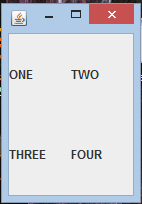
The border layout we will use in context with our hello world app. The border layout sets designations for the different areas of the panel. The top is NORTH, the botton SOUTH, Left is EAST and Right is WEST. The center has a CENTER designation. You can use the border layout of a panel to help arrange other panels.

What we are going to do, is create a panel with a border layout. We will add a grid layout in the center that has a JLabel, a aJTextField and another JLabel
Then we will add a JPanel to the SOUTH. It will have a flow layout and contain two JButtons.

What the program will do is take a user's name as in a JTextField. When the user clicks the JButton btnSubmit. the second JLabel will display a greeting. A second JButton, btnExit, will exit the program. To handle the buttons we will need to add Action listeners. Will will do this by implementing the ActionListeners interface. Later I will show how to do listeners as internal classes.
Here is the full code. I have commented it to help clarify what is going on.
package com.spconger.FirstSwing;

import javax.swing.*;
import java.awt.*;
import java.awt.event.ActionEvent;
import java.awt.event.ActionListener;

//the class implements the interface ActionListener
public class Program implements ActionListener{

 JButton btnExit;
 JButton btnGetName;
 JLabel result;
 JTextField txtName;

 /**
  * Build through this one very slowly in class
  * first show flow layout then grid
  * build up the panel, add one thing at a time
  * until we arrive at this form
  * talk about frame and panel and controls
  * and then the listeners.
  * maybe reorganize the methods to have more logic
  * and declare all the elements at top.
  * @param args
  */
 public static void main(String[] args){
  //instantiate the non static parts of the class
  Program p = new Program();
  //call the createFrame method
  p.createFrame();
 }

 private void createFrame(){
  JFrame frame = new JFrame();
  //frame.setDefaultCloseOperation(EXIT_ON_CLOSE));

  frame.add(createPanel());
  frame.setBounds(200,200,300,150);
  frame.setVisible(true);
 }

 private JPanel createPanel(){
  //this method creates the main panel which
  //has a border layout
  //then it calls and adds the grid and flow layout
  //panels
  JPanel mainPanel=new JPanel();
  mainPanel.setLayout(new BorderLayout());
  mainPanel.add(createInfoPanel(),BorderLayout.CENTER);
  mainPanel.add(createButtonPanel(), BorderLayout.SOUTH);
  return mainPanel;
 }

 private JPanel createInfoPanel(){
  //this creates a new grid layout panel

  JPanel panel = new JPanel();
  //the grid has two rows and 2 columns with a 5 pixel space
  //between them
  panel.setLayout(new GridLayout(2,2,5,5));
  //add the controls
  JLabel label = new JLabel("Enter You name");
  panel.add(label);
  txtName = new JTextField();
  panel.add(txtName);
  result = new JLabel();
  panel.add(result);
  return panel;
 }

 private JPanel createButtonPanel(){
  //the button panel is a flow layout panel
  JPanel buttonPanel =new JPanel();
  buttonPanel.setLayout(new FlowLayout(FlowLayout.RIGHT));
  btnGetName=new JButton("Submit");
  //each button needs to be directed to the action listener
  btnGetName.addActionListener(this);
  buttonPanel.add(btnGetName);
  btnExit = new JButton("Exit");
  btnExit.addActionListener(this);
  buttonPanel.add(btnExit);


  return buttonPanel;
 }

 @Override
 //this method handles the button click events
 //for both buttons
 public void actionPerformed(ActionEvent e) {
  // TODO Auto-generated method stub
  Object source = e.getSource();
  if(source==btnExit){
   System.exit(0);
  }
  if (source==btnGetName){
   result.setText("Hello, " + txtName.getText());
  }

 }

}
Now here is a picture of the code running after the name has been entered and the submit button clicked

Subscribe to:
Posts (Atom)