Saturday, June 28, 2014

First use of Eclipse

Double click the Eclipse icon to start it

You will get this dialog


Your workspace is where all you files will be stored by default. These are the files that will show up in the package explorer. You can change your workspace location if you wish.

When Eclipse opens the first time you will have a screen that shows various options. Click get started to get to the IDE. (I am doing this from memory so it may be a little different.)

From the FILE menu select NEW then Java Project. Give the project a name.


Then click Next to see how the project will be laid out. You could also just click Finish if you prefer.

In the package explorer click the triangle to expand the project.


The src folder is where your files will go. Right Click on the src folder and add new class. You will get the following dialog:


I have filled out the main details. First you should give a package name. The convention is a sort of reverse url: "com.spconger.FirstProject." This gives the com, my user name and the name of the project. You don't have to follow this convention, but it makes assigning package names easier. A package functions much like a namespace in C#. It is used to group classes that belong together and differentiate them from classes in other packages that might have the same name. You have to give the class a name. I chose Program for this one. I usually call the class that contains the main() function program. The convention for class names is to start them with a capital letter and then capitalize the first letter of each succeeding word. Of course there can be no spaces. I have checked the box that adds a public static main() method. The main is the starting point for every Java program. There must be one and only one main per project. Click Finish to create the class. With the main stub the file looks like this.


In the package explorer you now have the Program class listed under source:


A couple of notes: Notice that the "main" method starts with a lower case m. The naming convention for methods in Java is to start method names with a lower case letter and then capitalize the first letter of any following word. This is different than C# which capitalizes the first letter of method names. Also, unlike C#, the Java class name and the physical file name for that class must be the same. The Program class must be in a file called Program.java

Let's add a couple of methods to take in a name and an integer and repeat that name as many times as the integer indicates. In this example we will declare variables, get input , use an if statement to validate the input and create a loop to do the output. In short we will cover many of the basics of Java.

First we will create a new private method to get input. Next we will add two variables, a String variable called "name" and an int variable called "number." Notice that "String" starts with a capital letter. The String type in java always starts with a capital. Then we will add a Scanner object. A Scanner can read input when you place the argument "System.in" in the constructor. Eclipse will place a red line under Scanner. When you hover the mouse over the term, you will see options. One of them is to import Scanner from java.util. Do that.

Now we use the System.out.println to output prompts and the Scanner object to get the answers. There is an if statement to make sure the name is not null. At the end of the method we call the display method.


Now lets create the display method. It will use a for loop to loop through and print the name the specified number of times.


You should notice that the if and for statements are exactly the same as in C#.

Finally we have to call the Input method from main. To do this we must instantiate the Program class just as in C#. This is because, the main is static, but we did not make our other methods static.


Here is the whole program.


package com.spconger.firstProject;

import java.util.Scanner;

public class Program {

         /**
         * PROGRAM HEADER
         * This is a first Java Program
         * It takes a name and number as input
         * and outputs the name as many times
         * as the number indicates
         * Steve Conger 6/28/2014
         */

 public static void main(String[] args) {
  Program p = new Program();
  p.getInput();

 }
 
 private void getInput(){
  //variable declarations
  String name=null;
  int number=1;
  //declaring the Scanner object
  Scanner scan = new Scanner(System.in);
  //printing prompt to console
  System.out.println("Enter your name"); 
  //getting value with scanner
  name=scan.next();
  //check to make sure there is a name entered
  if (name==null){
   System.out.println("You must enter a name");
   return;
  }
  //propmpt and get integer value
  System.out.println("Enter an integer");
  number=scan.nextInt();
  //call the display method and  pass it 
                //the name and number
  displayNames(name, number);
 }
 
 private void displayNames(String n, int num){
  //loop to print out names
  for (int i=0;i<num;i++){
   System.out.println(n);
  }
 }

}


To run the project click on the green triangle on the toolbar. A dialog will appear asking if you want to build your class. Click ok. Then your prompt should appear at the bottom of your eclipse instance looking something like this:


Enter a name and a number. Your results should look something like this:


Tuesday, May 27, 2014

Unit Testing Visual Studio.

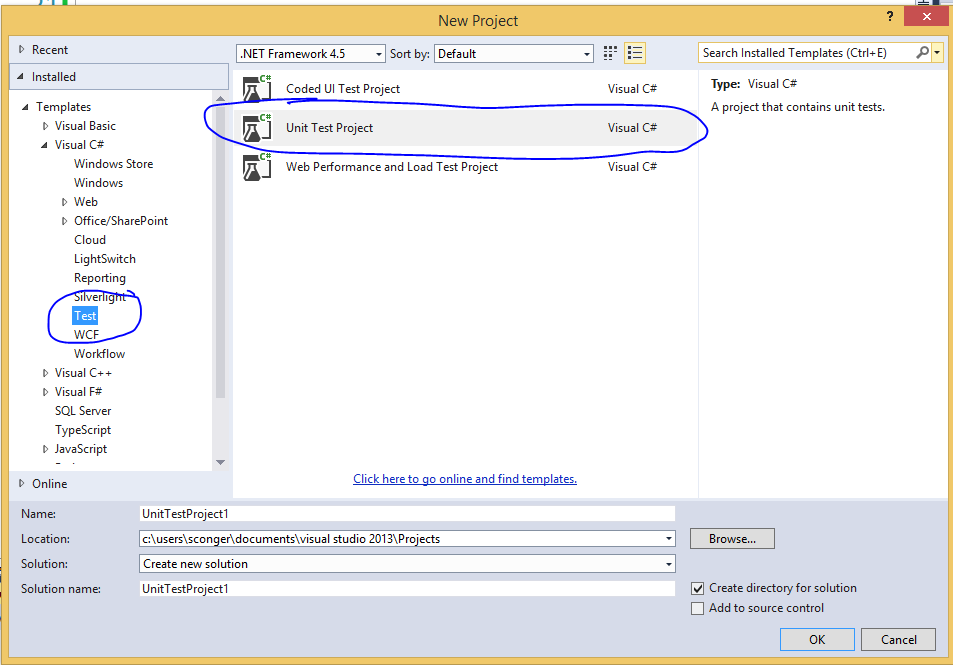
I create a unit test to test the CalcualteGPA method in the GPACalculator. First right click on the solution and add a new test project.

Right click on the new Test Project. Add a reference to the project you want to test

The Solution should look like this

Add code to test the method

using System;
using Microsoft.VisualStudio.TestTools.UnitTesting;
using GradePointCalculator;
using System.Collections.Generic;

namespace UnitTestProject1
{
    [TestClass]
    public class UnitTest1
    {
        GPACalculator gp = new GPACalculator();
     
        [TestMethod]
        public void TestMethod1()
        {
            //addGrades
            CreateGradeList();
            //call the method
            double gpa = gp.GetGpa();
            //assert the value you expect, and
            //the actual value. (rounded because hard to match all the decimals)
            Assert.AreEqual(3.5, Math.Round(gpa, 2));
            
        }

        private void CreateGradeList()
        {
            //add a couple of grades
            Grade g1 = new Grade();
            g1.ClassName = "ITC 110";
            g1.Credits = 2;
            g1.GradePoint = 1;

            gp.AddGrade(g1);

            Grade g2 = new Grade();
            g2.ClassName = "ITC 220";
            g2.Credits = 5;
            g2.GradePoint = 4;
            gp.AddGrade(g2);

            
        }
    }
}

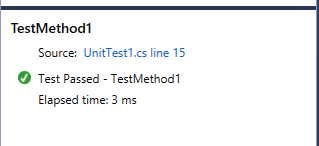
Go to the Test menu in Visual Studio and choosr tun all tests. A test explorer will show up. Here is the result for a passed test

I changed the value so that the result will fail. Here is a failed result

Thursday, May 22, 2014

Park and Rec Sample Sequence Diagram

Here is a slightly revised version of the diagram we did in class

The alternate login class

using System;
using System.Collections.Generic;
using System.Linq;
using System.Web;

/// 
/// Summary description for Login
/// 
public class Login
{
    private string userName;
    private string password;
 public Login(string user, string pass)
 {
        userName = user;
        password = pass;
 }

    public int ValidateLogin()
    {
        int pKey = 0;
        AutomartEntities ae = new AutomartEntities();

        var loginData = from p in ae.RegisteredCustomers
                        where p.Email.Equals(userName)
                        select new
                        {
                            p.CustomerPassCode,
                            p.CustomerHashedPassword,
                            p.PersonKey
                        };

        int passcode=0;
        byte[] hashed=null;
        int personKey = 0;


            foreach (var ld in loginData)
            {
                passcode =(int) ld.CustomerPassCode;
                hashed = (byte[])ld.CustomerHashedPassword;
                personKey = (int)ld.PersonKey;
            }

            PasswordHash ph = new PasswordHash();
            if (passcode != 0) 
            {
                byte[] generatedPassword = ph.HashIt(password, passcode.ToString());

                if (hashed != null)
                {
                     if (generatedPassword.SequenceEqual(hashed))
                    {
                        pKey = personKey;
                    }//end if
                }//end first inner if
           }//end outer if


        return pKey;
    }
}

Sunday, May 18, 2014

Domain Diagram for Parks and Rec

Last week I posted a partial diagram for the Parks and Rec scenario. Here is a more complete one, though there are still some minor changes and additions that can be made.


Some Notes

Still missing from the diagram is a class to manage the check ins and check outs of equipment.

I made Person abstract. That means that you can never instantiate (use) Person directly. You can only use its children. Person has two children, Employee and client that inherit from it.

Client, Inventory and Park all implement the Interface I_Manage which gives them Add, Edit, and Remove methods. Implementing an interface is similar to Inheritance. You not only get the methods in the interface, you must implement them.

There are two Composition relations. Remember Composition represents a whole/part relationship where if the whole is destroyed the parts are also destroyed. Item is a part of Inventory. If the inventory is removed we will say all the items go with it. Fine is a part of Client. If the client is removed the fines go with him or her.

We have one Aggregate relationship. Employees are a part of a Park. But if the Park is removed, we will not remove all employees.

There is an Association relationship between Park and Inventory. Park calls a method in Inventory to get the Items for its park.

In Park I noted two constructors because they are not the default constructors. Also note that most of Park's methods are private, meaning they can only be called from within the class itself.


"Is a" versus "has a" Relationships

One way to look at relationships between classes is to determine if a relationship is an "is a" of a "has a" type of relationship. For instance Client is a type of person, Employee is a type of person also. Inventory has a collection of Item. Park has a collection of Employees. Client has a collection of fines.

Most relationships can be resolved into one of these two relations.

Tuesday, May 13, 2014

Interfaces and class relations

Here is our partial class diagram

Here is the code

IFRed the interface


using System;
using System.Collections.Generic;
using System.Linq;
using System.Text;
using System.Threading.Tasks;

namespace InterfacesExample
{
    public interface IFred
    {
         void Add(object o);
        void Edit(object o);
        void Remove(object o);

         List<object> GetList();
    }
}


Barney class


using System;
using System.Collections.Generic;
using System.Linq;
using System.Text;
using System.Threading.Tasks;

namespace InterfacesExample
{
    class Barney:IFred
    {
        List<object> itemList;

        public Barney()
        {
            itemList = new List<object>();
        }


        public void Add(object o)
        {
            //Item i = (Item)o;
            itemList.Add(o);
        }

        public void Edit(object o)
        {
            throw new NotImplementedException();
        }

        public void Remove(object o)
        {
            throw new NotImplementedException();
        }

        public List<object> GetList()
        {
            return itemList;
        }
    }
}


The Programclass


the Item class


using System;
using System.Collections.Generic;
using System.Linq;
using System.Text;
using System.Threading.Tasks;

namespace InterfacesExample
{
    class Item
    {
        public string Name { get; set; }
        public double Price { get; set; }
    }
}

using System;
using System.Collections.Generic;
using System.Linq;
using System.Text;
using System.Threading.Tasks;

namespace InterfacesExample
{
    class Program
    {
        static void Main(string[] args)
        {
            Barney b = new Barney();
            Console.WriteLine("how many items?");
            int number = int.Parse(Console.ReadLine());
            for (int i = 0; i < number; i++)
            {
                Item item = new Item();
                Console.WriteLine("Enter item name");
                item.Name = Console.ReadLine();
                Console.WriteLine("Enter Price");
                item.Price = double.Parse(Console.ReadLine());
                b.Add(item);
            }

            Console.Clear();
            List<object> items = b.GetList();
            foreach(object o in items)
            {
                Item i = (Item)o;
       
                Console.WriteLine(i.Name + "  " + i.Price);
            }

            Console.ReadKey();
        }
    }
}

Thursday, May 8, 2014

Aggregation

Aggregation is a whole part relationship in which the parts can survive if the whole is destroyed. Here is a simple inventory example

Here is the code

Item


using System;
using System.Collections.Generic;
using System.Linq;
using System.Text;
using System.Threading.Tasks;

namespace aggregation
{
    class Item
    {
        public int ItemNumber { get; set; }
        public string ItemName { get; set; }
        public string ItemDescription { get; set; }
        public string Catagory { get; set; }
        public double PurchasePrice { get; set; }
        public string Condition { get; set; }
    }
}

Inventory


using System;
using System.Collections.Generic;
using System.Linq;
using System.Text;
using System.Threading.Tasks;

namespace aggregation
{
    class Inventory
    {
        private List<Item> itemList;

        public Inventory()
        {
            itemList = new List<Item>();
        }

        public void AddItem(Item i)
        {
            itemList.Add(i);
        }

        public void EditItem(Item i)
        {
            foreach(Item j in itemList)
            {
                int counter = 0;
                if(j.ItemNumber==i.ItemNumber)
                {
                    itemList[counter] = i;
                    counter++;
                }
            }
        }

        public List GetItems()
        {
            return itemList;
        }
    }
}


Here is the Program class


using System;
using System.Collections.Generic;
using System.Linq;
using System.Text;
using System.Threading.Tasks;

namespace aggregation
{
    class Program
    {
        static void Main(string[] args)
        {
            Console.WriteLine("How many items do you want to enter");
            int number = int.Parse(Console.ReadLine());
            Inventory inv = new Inventory();
            for(int i=0;i<number;i++)
            {
                Item item = new Item();
                Console.WriteLine("Enter item number");
                item.ItemNumber = int.Parse(Console.ReadLine());
                Console.WriteLine("Enter Item name");
                item.ItemName = Console.ReadLine();
                Console.WriteLine("enter purchase price");
                item.PurchasePrice = double.Parse(Console.ReadLine());

                inv.AddItem(item);
            }

            Console.Clear();
            List<Item>items = inv.GetItems();
            foreach(Item i in items)
            {
                Console.WriteLine("{0}, {1}, {2}", i.ItemNumber, i.ItemName, i.PurchasePrice);
            }

            Console.ReadKey();
        }
    }
}