Tuesday, December 2, 2014

First ASP.Net Web Project.

What is ASP.Net

ASP.Net is a Microsoft technology for creating web pages and web sites. It is not the only one Microsoft has, but it is probably the easiest to use initially. One question I often get is "Where is ASP.Net used?" The answer is varied. Anyone can use it, though the hosting is often more expensive since it requires a Windows server with IIS (Internet Information Server). IIS is the Microsoft equivalent of Apache. It serves web pages that are requested by a browser such as Internet Explorer or Chrome. Typically ASP.Net is used by more enterprise level companies. ASP.Net is (or at least can be) more secure than interpreted code like PHP because it is compiled and stored on the server. It also interacts extremely well with Microsoft's SQL Server Databases and Azure cloud platform. ASP.Net with SQL Server is also the technology underlying SharePoint.

That being said more companies, especially small to medium sized companies, use PHP and mySQL.

Creating a Web Page with a web form

First start a new Web Site in Visual Studio

We will select an Empty web site for our template. Make sure that it is C#, and also check the file location. We are using "File System" which uses a built in IIS express to host and run the web pages. They are not available anywhere but on the current machine. HTTP would host the web page in the real IIS and the page would be available to anyone that knew the IP address. FTP is for remoting into a web site on another server somewhere else.

Now we need to add a web form. Right click on the website name in the Solution Explorer--this window keeps track of all your files-- and select add new and then Web Form

You will be asked to name the form. Just let it stay "Default." Default is the same as index on most sites.

Here is an image of the default source view with the HTML
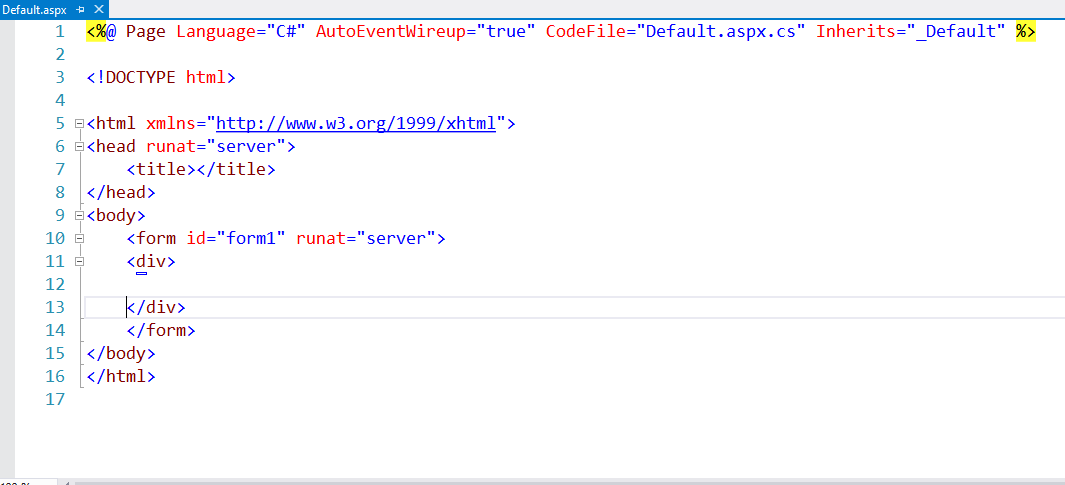
Note that the form gives you both the HTML 5 designation and the xhtml namespace. You can delete the xhtml if you wish.

Also note the Page header at the very top. This is what tells IIS that this is an ASP.Net page. The attributes set some of the page's initial parameters.

The head tag and the form tag have an attribute "runat" with the value "server." This tells IIS to process the content at the server. The ASP tags that we will use mean nothing to the browser. It requires the compiler on the server to interpret and render them.

All ASP controls from the tool box must be placed inside the Form tags. Additionally no ASP.Net Web Form can have more than one form element.

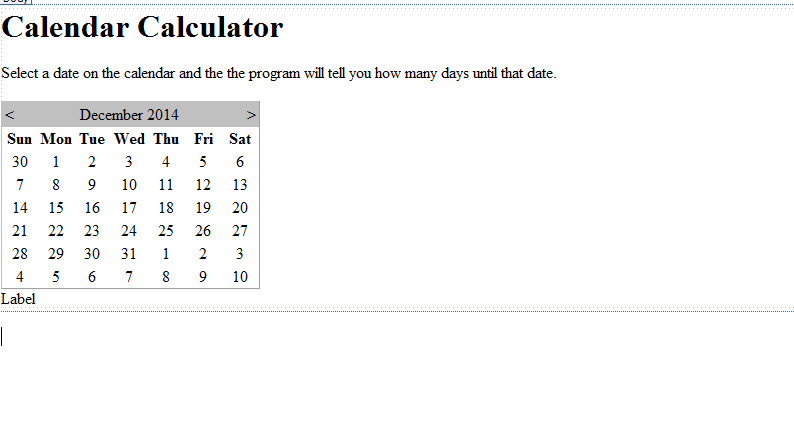
You can add all the HTML you like. You can also drag in ASP controls from the took box. Here is a picture of the source for the page with some HTML added (an H2 tag and a p tag) and two ASP.Net controls: a Calendar and a label.

Here is what it looks like in Design view (the tabs on the bottom of the window)
Just as any web page, you use CSS to style and order your elements. To add a css stylesheet you can right click on the web site in the Solution Explorer and choose add new item stylesheet

You will be asked to name it

We will add a few simple style statements
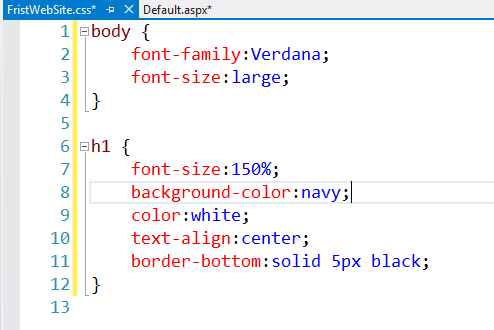
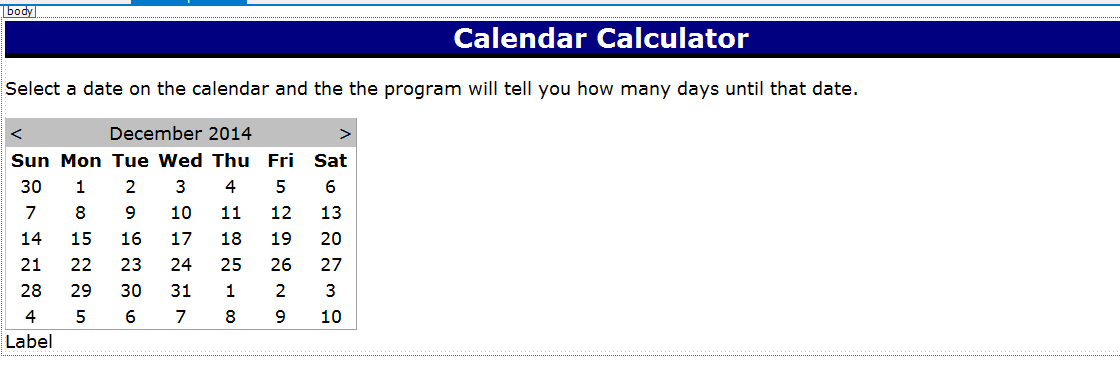
We need to attach the style sheet to the page. You can do that by dragging the stylesheet onto the page in design view or by typing the following lines

Here is the view in the Designer afterwards
Double click the Calendar in design view. This will open the Code Behind page and create a Selected date changed event for the calendar

Now we will add some code. The code gets the current date from the machine and whatever date the user selects from the calendar. It subtracts the current date from the present date and returns days. If the number of days is less than 0 then the user selected a earlier date. Otherwise he selected the current or a later date. We return the difference in days and write it to the label.

The calendar has its own pre built format, but it is probably better to use CSS to format it. The calendar renders into html as a table, so by formatting the table elements I can format the calendar. I add these to the CSS.

Because this CSS targets the rendered calendar, they won't be reflected in the Designer.

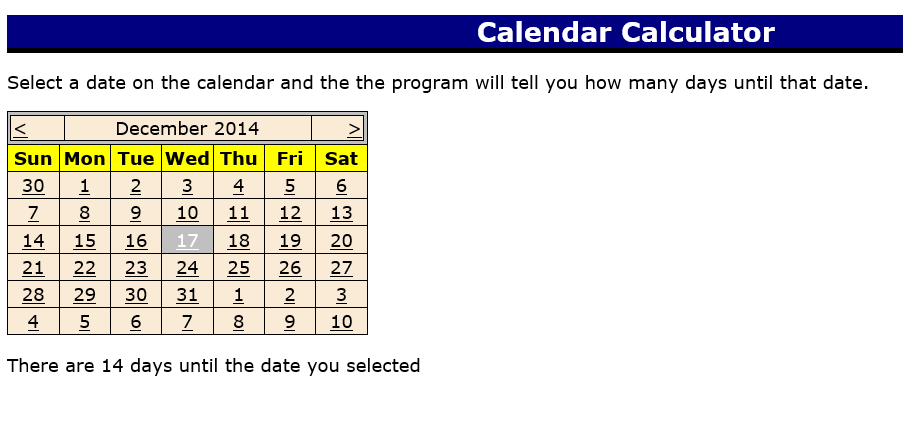
Here is a picture of the running Web page
Wednesday, November 19, 2014

Mileage WPF (Evening)

Here is the Mileage class

using System;
using System.Collections.Generic;
using System.Linq;
using System.Text;
using System.Threading.Tasks;

namespace MileageForm
{
    /// 
    /// this is a very simple mileage class 
    /// it has three properties
    /// Distance, Gallons and PricePerGallon
    /// I used a short cut method to create
    /// the properties just expressing the get and set
    /// It has two methods one to calculate 
    /// the gas mileage and one to calculate the 
    /// price per mile
    /// 
    class Mileage
    {
        //short cut for properties
         public double Distance {get; set;}
         public double Gallons { get; set; }
         public double PricePerGallon { get; set; }

        //methods
        public double CalculateMileage()
         {
             return Distance / Gallons;
         }

        public double CalculatePricePerMile()
        {
            return  PricePerGallon * Gallons /Distance;
        }

    } 
}

Here is the XAML for the form

<Window x:Class="MileageForm.MainWindow"
        xmlns="http://schemas.microsoft.com/winfx/2006/xaml/presentation"
        xmlns:x="http://schemas.microsoft.com/winfx/2006/xaml"
        Title="MainWindow" Height="350" Width="525"
        Name="Form1">
    <Grid x:Name="labelCost">
        <Label Content="Enter the miles traveled" HorizontalAlignment="Left" Margin="46,7,0,0" VerticalAlignment="Top"/>
        <TextBox x:Name="textMiles" HorizontalAlignment="Left" Height="23" Margin="227,11,0,0" TextWrapping="Wrap" VerticalAlignment="Top" Width="120"/>
        <Label Content="Enter the total gallons" HorizontalAlignment="Left" Margin="46,55,0,0" VerticalAlignment="Top"/>
        <TextBox x:Name="textGallons" HorizontalAlignment="Left" Height="23" Margin="227,55,0,0" TextWrapping="Wrap" VerticalAlignment="Top" Width="120"/>
        <Label Content="Enter the price per Gallon" HorizontalAlignment="Left" Margin="46,98,0,0" VerticalAlignment="Top"/>
        <TextBox x:Name="textPrice" HorizontalAlignment="Left" Height="23" Margin="227,98,0,0" TextWrapping="Wrap" VerticalAlignment="Top" Width="120"/>
        <Button x:Name="ButtonCalculate" Content="Calculate" HorizontalAlignment="Left" Margin="56,142,0,0" VerticalAlignment="Top" Width="75" Click="ButtonCalculate_Click"/>
        <Label Content="Your Mileage is" HorizontalAlignment="Left" Margin="46,181,0,0" VerticalAlignment="Top"/>
        <Label x:Name="labelMileage" Content="Label" HorizontalAlignment="Left" Margin="227,181,0,0" VerticalAlignment="Top" RenderTransformOrigin="0.474,-0.385"/>
        <Label Content="The cost per mile is" HorizontalAlignment="Left" Margin="46,212,0,0" VerticalAlignment="Top"/>
        <Label x:Name="labelCost1" Content="Label" HorizontalAlignment="Left" Margin="227,220,0,0" VerticalAlignment="Top" RenderTransformOrigin="-0.026,0.385"/>
        <Button x:Name="buttonClear" Content="Clear" HorizontalAlignment="Left" Margin="56,259,0,0" VerticalAlignment="Top" Width="75" Click="buttonClear_Click"/>
        <Button x:Name="buttonExit" Content="Exit" HorizontalAlignment="Left" Margin="156,259,0,0" VerticalAlignment="Top" Width="75" Click="buttonExit_Click"/>

    </Grid>
</Window>

Here is the code behind the form

using System;
using System.Collections.Generic;
using System.Linq;
using System.Text;
using System.Threading.Tasks;
using System.Windows;
using System.Windows.Controls;
using System.Windows.Data;
using System.Windows.Documents;
using System.Windows.Input;
using System.Windows.Media;
using System.Windows.Media.Imaging;
using System.Windows.Navigation;
using System.Windows.Shapes;

namespace MileageForm
{
    /// 
    /// Interaction logic for MainWindow.xaml
    /// this is the code behind the windows form
    /// 
    public partial class MainWindow : Window
    {
        public MainWindow()
        {
            //initilize the form--don't remove thos
            InitializeComponent();
        }

        private void ButtonCalculate_Click(object sender, RoutedEventArgs e)
        {

            //call the method to make sure the text boxes have content
            //they return true if there is a value missing
            bool good =CheckTextBoxes();
            //if there is a value missing stop the action
            //here
            if (good)
            {
                return;
            }
            //delcare a new instance of Mileage class
            Mileage m = new Mileage();
            //get inputs
            m.Distance = double.Parse(textMiles.Text);
            m.Gallons = double.Parse(textGallons.Text);
            m.PricePerGallon = double.Parse(textPrice.Text);
            //outputs
            labelMileage.Content = m.CalculateMileage().ToString();
            EvaluateMileage(m.CalculateMileage());
            labelCost1.Content= m.CalculatePricePerMile().ToString("C");

        }

        private void buttonClear_Click(object sender, RoutedEventArgs e)
        {
            //this method clears the textboxes and labels
            textMiles.Clear();
            textGallons.Clear();
            textPrice.Clear();
            labelCost1.Content="";
            labelMileage.Content = "";
            //resets the color to white
            Form1.Background = new SolidColorBrush(Colors.White);
            textMiles.Focus();
        }

        private void buttonExit_Click(object sender, RoutedEventArgs e)
        {
            //close the form
            this.Close();
            
        }

        private void EvaluateMileage(double mileage)
        {
            //this checks the mileage and returns a 
            //background color based on the value
            if (mileage > 35)
            {
                Form1.Background = new SolidColorBrush(Colors.Green);
            }
            else if (mileage > 25)
            {
                Form1.Background = new SolidColorBrush(Colors.Yellow);
            }
            else
            {
                Form1.Background = new SolidColorBrush(Colors.Red);
            }
        }

        private bool CheckTextBoxes()
        {
           //this method checks to make sure the form
            //textboxes have values
            if (textMiles.Text=="")
            {
                MessageBox.Show("Enter a valid mileage");
                return true;
            }
            if(textGallons.Text=="")
            {
                MessageBox.Show("Enter a valid Gallon amount");
               return true;
            }
            if (textPrice.Text == "")
            {
                MessageBox.Show("Enter a valid Price per Gallon");
                return true;
            }
            return false;
        }
    }
}

Here is a picture of the form in design

Wednesday, November 12, 2014

File Input and Output (Evening)

Here is the WriteFile class

using System;
using System.Collections.Generic;
using System.Linq;
using System.Text;
using System.Threading.Tasks;
using System.IO; //necessary for file creation
//and reading

namespace FileHandling
{
    class WriteFiles
    {
        /// <summary>
        /// This class writes a text file
        /// the constructor takes the path
        /// --the complete file name--
        /// and instantiates the StreamWriter
        /// object that writes the files
        /// </summary>
        private StreamWriter writer;
        public WriteFiles(string path)
        {
            //instantiate the SteamWriteObject
            //its constructor takes the path
            //the true means set the file to append
            //if it exists. If it doesn't exist it
            //will create the file
            //false would mean to write over
            //the file if it exists
            writer = new StreamWriter(path, true);
        }

        public void AddToFile(string line)
        {
            //this uses a method of the StreamWriter
            //that writes a line to the file
            writer.WriteLine(line);
        }

        public void CloseFile()
        {
            //this closes the file
            //if you don't close it
            //you will be unable to access
            //the file
            writer.Close();
        }
    }
}


Here is the ReadFile class

using System;
using System.Collections.Generic;
using System.Linq;
using System.Text;
using System.Threading.Tasks;
using System.IO;//nescessary for file IO

namespace FileHandling
{
    
    class ReadFile
    {
        /// <summary>
        /// this class reads text files.
        /// It takes the path to the file as a parameter
        /// in the constructor
        /// </summary>
        /// 
        private StreamReader reader;
        private string filePath;

        //constructor takes in the path
        //as parameter
        public ReadFile (string path)
        {
            filePath = path;
           
        }

        public string GetFile()
        {
            //this method gets the file and
            //reads it, returning a string
            string line = null;
            //when dealing with things like files
            //it is a good idea to use a try set
            //It is always possible that the file
            //is not at the specified path
            //or that it is unreadable
            try 
            {
                //get the file from the location
                //indicated by the path
                reader = new StreamReader(filePath);
                //read it all into a string
                //this is not very sophisticated
                //there are other ways to read the file
                line = reader.ReadToEnd();
            }
            catch (FileNotFoundException fnf)
            {
                //the FileNotFoundException is a pre built
                //exception for missing files
                //we throw the exception to the 
                //calling class for display
                throw fnf;
            }
            catch (Exception ex)
            {
                //this catch is for any other kind
                //of error
                throw ex;
            }
            return line;
        }
    }
}


Here is the Program class

using System;
using System.Collections.Generic;
using System.Linq;
using System.Text;
using System.Threading.Tasks;

namespace FileHandling
{
    class Program
    {
        /// <summary>
        /// I use this class to call the other classes
        /// The WriteStuff() method writes a file
        /// and the ReadStuff() method reads the
        /// file that was just written
        /// </summary>
        /// 
        static void Main(string[] args)
        {
            Program p = new Program();
            p.WriteStuff();
            p.ReadStuff();
           
            Console.ReadKey();
        }

        private void WriteStuff()
        {
            //instantiate WriteFiles and pass the path
            //to its constructor
            WriteFiles write = new WriteFiles(@"C:\temp\MyFile.txt");
            //write something to store in the file
            Console.WriteLine("Enter whatever");
            string stuff = Console.ReadLine();
            //pass what you write to the WriteFiles method AddToFile(string)
            write.AddToFile(stuff);
            //make sure to close the file
            write.CloseFile();
        }

        private void ReadStuff()
        {
            //this try catch will catch the errors
            //thrown by ReadFiles
            try
            { 
                //first we read the file. If it doesn't exist
                //it will throw a file not found exception
                ReadFile read = new ReadFile(@"C:\temp\MyFile.txt");
                //now we read the file into a string
                string myText = read.GetFile();
                //then we display the string
                Console.WriteLine(myText);
            }
            catch(Exception ex)
            {
                //this catches any error and displays
                //the error message
                Console.WriteLine(ex.Message);
                Console.ReadKey();
            }
        }
    }
}

SQL Examples

Use CommunityAssist
/*
this is a multiline comment
This is a basic SQL 
tutorial
*/
--these are simple selects
--the * is a wild card meaning list all columns
Select * From Person

--choose the columns to display
Select PersonLastName, PersonUserName From Person

--sort by lastname ascending
Select PersonLastName, PersonUserName From Person
order by PersonLastName;

--sort by last name descending and user name ascending
Select PersonLastName, PersonUserName From Person
order by PersonLastName desc, PersonUserName;

--this shows using math in the select clause
Select DonationAmount, DonationAmount+ 100 AS Added
From Donation
order by DonationAmount desc

--you can use these operators with numeric
--or date values
-- <, >, <=, >=, =, !=, <>, Not =
Select DonationDate, DonationAmount From Donation
Where DonationAmount < 100

--with AND
Select DonationDate, DonationAmount From Donation
Where DonationAmount > 100 and DonationAmount < 1000

--with Between
Select DonationDate, DonationAmount From Donation
Where DonationAmount between 100 and 1000

--Between with dates
Select DonationDate, DonationAmount From Donation
Where DonationDate between '9/1/2013' and '9/30/2013'

--OR
Select * from PersonAddress
Where City = 'Bellevue' or City = 'Redmond'

--Like with wildcard. % is for any number of characters
-- _ is for a single character
--the following returns all names starting with t
--and ending with r
Select PersonLastName from Person
Where PersonLastName like 'T%r'

--joining two tables also looking for not null values
--nulls must be addressed using is or is not
--you cannot use comparitive values (=, <, > etc) with nulls
Select PersonFirstName, PersonLastName, Street,Apartment, [State], City, Zip
From Person
inner join PersonAddress
on Person.PersonKey=PersonAddress.PersonKey
Where Apartment is not null

--insert into a table 
Insert into Person (PersonLastName, PersonFirstName)
Values ('Bender','Robot')

--inner joins always return matched values
--outer joins return unmatched values
Select PersonlastName, Street, Apartment, [State], City, Zip
From Person
left outer join PersonAddress
on Person.PersonKey = PersonAddress.Personkey
Where PersonAddress.Personkey is null

-- an inner join with multiple tables
Select PersonFirstName, PersonLastName, Street,Apartment, [State], City, Zip,
ContactInfo, contactTypeName
From Person
inner join PersonAddress
on Person.PersonKey=PersonAddress.PersonKey
inner Join PersonContact
on Person.Personkey=PersonContact.PersonKey
inner join ContactType
on ContactType.ContactTypeKey=PersonContact.ContactTypeKey
Where not City = 'Seattle'
Order by City

--insert. You can only insert into one table at a time
Insert into Person(PersonLastName, PersonFirstName, PersonUsername, 
PersonPlainPassword,PersonEntryDate)
Values ('Conger','Steve','steve@spconger.com','password',getDate())

--insert  the Ident_current function returns the last 
--autonumber generated in the table listed
--it only works with autonumbers
Insert into PersonAddress(Street, Apartment, State, City, Zip, PersonKey)
values('1701 Broadway',null,'Wa','Seattle','98122', IDENT_CURRENT('Person'))

--you can insert multiple rows at a time
--as long as they are in the same table
Insert into Person(PersonLastName, PersonFirstName)
Values('Flanders', 'Ned'),
('Clown','Krusty'),
('Simpson','Homer')

--updates change existing data
--they should always (almost always)
--have a where clause
--Update is the most dangerous
--command in SQL
Update PersonAddress
Set Apartment='3176b',
State='WA'
Where PersonKey=128


Select * From PersonAddress where PersonKey=128

--to be safe with updates and deletes
--you can manually set the beginning and
--ending of a transaction
--this locks the table for the duration
Begin tran

--will set every last name to smith
Update Person
Set PersonLastName='Smith'

Select * From Person

--rollback undoes the command
--commit writes it 
Rollback tran
commit tran

--Delete removes a row or rows from
--a table
--you cannot delete a row that has 
--children in another table
Delete from person
Where PersonKey =128

Thursday, November 6, 2014

Square Footage Class Examples (Morming)

Here is the SquareFootage class

using System;
using System.Collections.Generic;
using System.Linq;
using System.Text;
using System.Threading.Tasks;

namespace ClassExampleMorning
{
    class SquareFootage
    {
        /************************
         * this class calculates square footage and
         * the total cost of that footage
         * *****************************/


        //fields--class level variables that describe the object
        private double length;
        private double width;
        private double pricePerSquareFoot;

        //this is a default constructor
        //constructors initialize a class
        //setting default values for variables
        //and maybe calling a method
        public SquareFootage()
        {
            Length = 0;
            Width = 1;
            PricePerSquareFoot = 0;
        }

        //this is an overloaded constructor.
        //You can only initialize a class one way
        //but you can set up choices for how
        //to initialize the class
        //In this case you can pass the width and length
        //directly to the constructor
        public SquareFootage(double width, double length)
        {
            Width = width;
            Length = length;
            PricePerSquareFoot = 0;
        }

        //public properties
        //properties expose the private variables
        //to the world
        public double PricePerSquareFoot
        {
            //return lets another class see the value of the field
            get { return pricePerSquareFoot; }
            //set lets another class change the value of the field
            set { pricePerSquareFoot = value; }
        }


        public double Width
        {
            //you can do some validation in a property
            get { return width; }
            set { 
                if (value >0)
                { 
                width = value;
                }
                else
                {
                    //an exception is an error object
                    //here we make our own error with a message
                    Exception ex = new Exception("Must be greater than zero");
                    //we don't have a way to display it here
                    //so we throw it back to the class
                    //where it was called
                    throw ex;
                }
            }
        }
       

        //properties
        public double Length
        {
            get { return length; }
            set { length = value; }
        }

        //public methods
        //these are just methods 
        //just like any other method
        public double CalculateSquareFootage()
        {
            return Width * Length;
        }

        public double CalculateTotalCost()
        {
            return CalculateSquareFootage() * PricePerSquareFoot;
        }
    }
}


Here is the Display class

using System;
using System.Collections.Generic;
using System.Linq;
using System.Text;
using System.Threading.Tasks;

namespace ClassExampleMorning
{
    class Display
    {
        //Square footage is a class level field
        private SquareFootage sf;

        //the constructor calls the methods
        //for getting inputs and showing outputs
        public Display()
        {
            //I commented this to use the 
            //overloaded constructor in SquareFootage
            //sf = new SquareFootage();
            GetInputs();
            ShowOutputs();
        }

        private void GetInputs()
        {
            //I declare these two variables to
            //store the input, then I pass them
            //to SquareFootage through its 2nd constructor
            double w, l; 
            //the try "tries" all the code. If there is an error
            //it falls to the catch
            try
            {
                Console.WriteLine("Enter the Width");
                //sf.Width = double.Parse(Console.ReadLine());
                w = double.Parse(Console.ReadLine());
                Console.WriteLine("Enter the Length");
                //sf.Length = double.Parse(Console.ReadLine());
                l = double.Parse(Console.ReadLine());
                //initialize SquareFootage and pass it width and length
                sf = new SquareFootage(w, l);

                //but we use the property to assign
                //the value to PricePerSquareFoot
                Console.WriteLine("Enter the Price per square foot");
                sf.PricePerSquareFoot = double.Parse(Console.ReadLine());
            }
            catch(Exception ex)
            {
                //display the error message
                Console.WriteLine(ex.Message);
                Console.ReadKey();
            }
        }

        private void ShowOutputs()
        {
            //call the methods from squareFootage
            //and display the results
            Console.WriteLine("the Square footage is " +
                sf.CalculateSquareFootage());
            Console.WriteLine("the total cost is " +
                sf.CalculateTotalCost());
            Console.ReadKey();
        }

    }
}


Here is the Program class


using System;
using System.Collections.Generic;
using System.Linq;
using System.Text;
using System.Threading.Tasks;

namespace ClassExampleMorning
{
    class Program
    {
        static void Main(string[] args)
        {
            //this initilizes the Display class
            //and class the constructor
            //that calls the getInputs method
            Display d = new Display();
            
        }
    }


}

Wednesday, November 5, 2014

Batting Average class Examples(Evening)

Here is the BattingAverage class

using System;
using System.Collections.Generic;
using System.Linq;
using System.Text;
using System.Threading.Tasks;

namespace BattingAverageCalculator
{
    class BattingAverage
    {
        //fields
        private int hits;
        private int atBats;
     

        //public properties for the fields
        public int AtBats
        {
            //the get returns the value of the field
            //lets the calling class see it
            get { return atBats; }
            //the set lets the calling class
            //change the value of the underlying field
            //value is a built in variable
            set { atBats = value; }
        }
        public int Hits
        {
            get { return hits; }
            set { hits = value; }
        }

        public double CalculateBattingAverage()
        {
            //this method calculates the Batting Average
            return ((double)Hits / AtBats) * 1000;
           
        }


    }
}


Here is the Display class

using System;
using System.Collections.Generic;
using System.Linq;
using System.Text;
using System.Threading.Tasks;

namespace BattingAverageCalculator
{
    class Display
    {
        //declare the BattingAverage Calss
        private BattingAverage ba; 

        //this is the constructor
        //it is called when the class 
        //is made new
        public Display()
        {
            //instantiate (load into memory) 
            //the BattingAverage class
            //
            ba= new BattingAverage();
            //call the GetInput() method
            GetInput();
        }
        private void GetInput()
        {
            //Get the input
            Console.WriteLine("Enter the total at bats");
            //assign the input to the set of the AtBats
            //Property in the BattingAverage class
            ba.AtBats = int.Parse(Console.ReadLine());

            //do the same for the Hits property
            Console.WriteLine("Enter the total hits");
            ba.Hits = int.Parse(Console.ReadLine());

            //call the ShowBattingAVerageMethod
            ShowBattingAverage();

        }

        private void ShowBattingAverage()
        {
            //display the Batting average by calling
            //the CalculateBattingAverage() method
            //in BattingAverage (ba)
            Console.WriteLine("The batting average is " 
                + ba.CalculateBattingAverage());

            
        }
    }
}


Here is the Program

using System;
using System.Collections.Generic;
using System.Linq;
using System.Text;
using System.Threading.Tasks;

namespace BattingAverageCalculator
{
    /********************
     * The program class contains the main
     * It really should do nothing
     * but call the class that starts the program
     * *******************/
    class Program
    {
        static void Main(string[] args)
        {
            //Call the display Class (runs the constructor)
            Display d = new Display();
            Console.ReadKey();
        }
    }

}

Monday, November 3, 2014

First Class Example (Evening)

Here is the Mileage Class

using System;
using System.Collections.Generic;
using System.Linq;
using System.Text;
using System.Threading.Tasks;

namespace ClassExamples
{
    //fields --class level variables that describe the class
    //properties--make field accessible
    //methods--what the class does
    //constructors--initializing the class


    class Mileage
    {
        /************************
         * this class calcuates simple mileage
         * it is more work that you need 
         * for such a simple calulation but it shows
         * the basic parts and concepts of a class
        ***************************/
        //private fields 
        private double gallons;
        private double miles;

        //we have two constructors
        //constructors are methods that
        //initialize the class
        //you can have as many constructors
        //as make sense as long as they
        //have distinct signatures
        //you can only initialize a class
        //one way at a time, so a user
        //has to decide which constructor
        //to invoke
        public Mileage()
        {
            //initialize values
            Miles = 0;
            gallons = 1;
        }
        //overloaded constructor that takes two arguments
         public Mileage(double miles, double gallons)
        {
             //initialize values to what has been passed in
             //through the constructor's parameters
            Miles = miles;
            Gallons = gallons;
        }
        //public properties. A property "encapsulates"
        //a private field and exposes it to other
        //classes to see or change
        public double Miles
        {
            //lets the user see the value
            get { return miles; } 
            //lets the user change the value
            set { miles = value; }
        }

        public double Gallons
        {
            set 
            { 
                //one can do validation in a property
                if(value <=0)
                {
                    //an exception is an error message
                    //we can create our own
                    //because there is no way to display
                    //the error message in this class
                    //we throw it back to where the set
                    //message is called--in our case
                    //the Main() method in Program
                    Exception ex = new Exception("Enter a valid number for gallons");
                    throw ex;
                }
                else { 
                    //if the value is good just assign it to the field
                gallons = value;
                }
            }
            get { return gallons; }
        }

        //public method
        public double CalculateGasMileage()
        {
            return Miles / Gallons;
        }

    }
}

Here is the Program class

using System;
using System.Collections.Generic;
using System.Linq;
using System.Text;
using System.Threading.Tasks;

namespace ClassExamples
{
    class Program
    {
        static void Main(string[] args)
        {
            //try catches "try" all the code. When they encounter
            //an error they fall immediately to the catch
            //skipping any lines after the error.
           try
            {
            Console.WriteLine("Enter the Miles traveled");
            double miles = double.Parse(Console.ReadLine());
            Console.WriteLine("Enter the gallons");
            
                double gallons = double.Parse(Console.ReadLine());
               //this uses the overloaded constructor of Mileage
                Mileage mileage = new Mileage(miles, gallons);
               //we call the CalculateGasMileage method
               //of the MileageClass
                Console.WriteLine("You MPG is " + mileage.CalculateGasMileage().ToString());
            }
            catch(Exception ex)
            {
                //this is a general catch. It will catch any error message 
                //and display the error object's message
                //you can do more that display error messages in a catch
                //You can redirect the code or do things to manage
                //the error
                Console.WriteLine(ex.Message);
                Console.ReadKey();
                return;
            }

           
            Console.ReadKey();
        }
    }
}