Thursday, October 11, 2012

More if and else if

This is the code that is part of assignment 3

using System;
using System.Collections.Generic;
using System.Linq;
using System.Text;

namespace Medicare
{
    class Program
    {
        static void Main(string[] args)
        {
            //load the program 
            Program p = new Program();
            //call the display method
            p.Display();
            //pause it
            Console.ReadKey();
        }

        private void Display()
        {
            //get the inputs
            Console.WriteLine("Enter Your pay rate");
            double rate = double.Parse(Console.ReadLine());
            Console.WriteLine("Enter your hours");
            double hours = double.Parse(Console.ReadLine());

            //call the CalculateGross method and store the value
            //it returns in the local variable gross
            double gross = CalculateGrossPay(rate, hours);
            Console.WriteLine("Your gross pay is {0:C}", gross);
            //call the method to CalculateMedicare
            double med = CalculateMedicare(gross);
            Console.WriteLine("Your Medicare Deduction is {0:C}", med);
        }

        private double CalculateGrossPay(double rate, double hours)
        {
            //this method calcuates pay 
            //it takes overtime into account
            double grossPay=0;
            if (hours > 40)
            {
                grossPay = rate * (40 + ((hours - 40) * 1.5));
            }
            else
            {
                grossPay = rate * hours;
            }

            return grossPay;
        }//end calculateGrosspay

        private double CalculateMedicare(double gross)
        {
            double medicare = 0;
            //5000 > .2
            //2000 to 4999 .1
            //1999 or less .03
            //uses and if, else if to calculate percentages
            if (gross >= 5000)
            {
                medicare = gross * .2;
            }
            else if (gross >= 2000)
            {
                medicare = gross * .1;
            }
            else
            {
                medicare = gross * .03;
            }

            return medicare;
        }
    }
}


Here are the other if, else if examples

using System;
using System.Collections.Generic;
using System.Linq;
using System.Text;

namespace Medicare
{
    class Program
    {
        static void Main(string[] args)
        {
            //load the program 
            Program p = new Program();
            //call the display method
            p.Display();
            //pause it
            Console.ReadKey();
        }

        private void Display()
        {
            //get the inputs
            Console.WriteLine("Enter Your pay rate");
            double rate = double.Parse(Console.ReadLine());
            Console.WriteLine("Enter your hours");
            double hours = double.Parse(Console.ReadLine());

            //call the CalculateGross method and store the value
            //it returns in the local variable gross
            double gross = CalculateGrossPay(rate, hours);
            Console.WriteLine("Your gross pay is {0:C}", gross);
            //call the method to CalculateMedicare
            double med = CalculateMedicare(gross);
            Console.WriteLine("Your Medicare Deduction is {0:C}", med);
        }

        private double CalculateGrossPay(double rate, double hours)
        {
            //this method calcuates pay 
            //it takes overtime into account
            double grossPay=0;
            if (hours > 40)
            {
                grossPay = rate * (40 + ((hours - 40) * 1.5));
            }
            else
            {
                grossPay = rate * hours;
            }

            return grossPay;
        }//end calculateGrosspay

        private double CalculateMedicare(double gross)
        {
            double medicare = 0;
            //5000 > .2
            //2000 to 4999 .1
            //1999 or less .03
            //uses and if, else if to calculate percentages
            if (gross >= 5000)
            {
                medicare = gross * .2;
            }
            else if (gross >= 2000)
            {
                medicare = gross * .1;
            }
            else
            {
                medicare = gross * .03;
            }

            return medicare;
        }
    }
}
Tuesday, October 9, 2012

First Ifs (Selection) and a bit of assignment 2

Here is the piece of Assignment Two

using System;
using System.Collections.Generic;
using System.Linq;
using System.Text;

namespace ConsoleApplication3
{
    class Program
    {

        //declare a constant
        const double MEDICARE = .03;

        static void Main(string[] args)
        {
            Program p = new Program();
            //call show pay
            p.ShowNetPay();
           
        }

        private double GrossPay(double hours, double rate)
        {
            //we pass hours and rate into the method and then
            //multiply them
            //not worried about overtime at this point
            return hours * rate;
        }

        private double CalculateMedicare(double gross)
        {
            //pass in gross and multiply it by constant
            return gross * MEDICARE;
        }

        private void ShowNetPay()
        {
            //enter the hours and rate
            Console.WriteLine("Enter hours worked");
            double hours = double.Parse(Console.ReadLine());
            Console.WriteLine("Enter the rate of Pay");
            double rate = double.Parse(Console.ReadLine());

            //get the gross pay by calling the method
            //and storing the value it returns
            double grosspay = GrossPay(hours, rate);
            //call the method for medicare
            double med = CalculateMedicare(grosspay);

            //do the calculation for net pay
            double netpay = grosspay - (med );
            //Display the result
            Console.WriteLine("Your net pay is {0}", netpay);
        }
    }
}


Here is the sample with if statements

using System;
using System.Collections.Generic;
using System.Linq;
using System.Text;

namespace SelectionExamples
{
    class Program
    {
        //first we will make a method to determine
        //if a number even
        //we also introduce tryParse
        static void Main(string[] args)
        {
            //initialize the rest of the class
            Program p = new Program();
            //call the TestNumber method
            p.TestNumber();

            //pause the program to wait for a key stroke
            Console.ReadKey();
        }

        private void TestNumber()
        {
            //this gets an integer number from the user
            //if it is not a valid integer it propmpts the user
            //to start again with a valid integer number

            //declare a variable with a default of zero
            //the TryParse out parameter will assign
            //a new value to this variable
            int num = 0;
            //asl for a number from the user
            Console.WriteLine("Enter an Integer");
            //the tryParse returns true or false (a boolean)
            //if the string on the console can be parsed as an integer
            //it returns true and assigns the value to num,
            //if not it returns false
            bool isInt = int.TryParse(Console.ReadLine(), out num);

            //if it is false prompt them to enter a valid number
            if (isInt == false)
            {
                Console.WriteLine("Make sure you enter an integer");
                return; //end the method
            }

            //if it is true it will continue to execute the code
            //we call the TestForEven number,
            //and pass the num we got from the console
            //then we store the 
            //result ("odd" or "even") in the variable numType
            string numType = TestForEven(num);

            //print out the value of numType
            Console.WriteLine(numType);
        }

        private string TestForEven(int number)
        {
            //create a variable with a default value
            //of odd
            string result = "odd";
            //if then the condition in parenthesis
            //must resolve to true or false
            if (number % 2 == 0) //== means equal
            {
                result = "even";
            }

            //return the result
            return result;
        }
    }
}

Thursday, October 4, 2012

Methods and Operators


using System;
using System.Collections.Generic;
using System.Linq;
using System.Text;

namespace ConsoleApplication3
{
    /******************
     * + is addition
     * - is subtraction
     * * is multipication
     * / is division (if both sides are integer then any decimal part is dropped)
     * % modulus, returns the remainder from an integer division
     * follows same order of operations as algebra
     * all multiplications and divisions first left to right
     * all substractions and additons left to write
     * but what is in parenthesis is first
     * embedded parenthesis from inside out 
     * */
    class Program
    {
        private double total;
        private const double TAX = .095;

        static void Main(string[] args)
        {
            Program p = new Program();
            //p.GetPrice();
            //p.DisplayTotal();
            int quotient = p.IntegerDivision(8, 3);
            Console.WriteLine("the quotient is {0}", quotient);
            int modulus = p.GetTheModulus(8, 3);
            Console.WriteLine("the remainder is {0}", modulus);
           Console.ReadKey();
        }

        private void GetPrice()
        {
            Console.WriteLine("Enter the Price");
            double price = double.Parse(Console.ReadLine());

            total=GetTotal(price);
        }

        private double GetTotal(double pr)
        {
            return  pr * (1 + TAX);
        }

        private void DisplayTotal()
        {
            Console.WriteLine("Your total is {0:c}",total);
        }

        private int IntegerDivision(int number1, int number2)
        {
            return number1 / number2;
        }

        private int GetTheModulus(int num1, int num2)
        {
            return num1 % num2;
        }
    }
}

Tuesday, October 2, 2012

Gas Mileage with Methods

Here is the Gas Mileage calculator without methods that we did as the first assignment

using System;
using System.Collections.Generic;
using System.Linq;
using System.Text;

namespace GasMileageCalculator
{
    /*********************
     * This program will calculate miles per
     * gallon and price per mile
     * Steve Conger 9/27/2012
     * *********************/
    class Program
    {
        static void Main(string[] args)
        {
            //get inputs 
            //prompt user 
            Console.WriteLine("Enter the Total Mileage");//write prompt
            int miles = int.Parse (Console.ReadLine());

            Console.WriteLine("Enter the total Gallons");
            int gallons = int.Parse(Console.ReadLine());

            Console.WriteLine("Enter the Price Per Gallon");
            double price = double.Parse(Console.ReadLine());

            //Calculate the outputs

            double milesPerGallon = (double) miles / gallons;
            double pricePerMile = price / milesPerGallon;

            // Display outputs
            Console.WriteLine();
            Console.WriteLine("Your miles per gallon is {0:F2} \n", milesPerGallon);
            
            Console.WriteLine("The price per mile is {0:c}", pricePerMile);

            Console.ReadKey();


        }
    }
}


Methods

A few words about methods:

Methods are ways of braking up code into more manageable blocks.

Ideally each method does one thing. It can be one complicated thing involving several lines of code, but still one thing.

In order to execute a method must be called. You call a method by using its name and providing any required parameters. (See Example Two.)

Methods can only be called from other methods. At least one method must be called from the Main method to start the program

Methods can be private meaning they can only be seen by other methods in the current class, or they can be public meaning they can be seen by other classes and programs. (there are other options in between such as protected.)

Methods can be void (as in the first example) meaning that they return nothing to the calling method or they can return a value(see example two)


Here is the code from class. This version makes the variables have class scope, which means they can be accessed by any of the methods in the class.

using System;
using System.Collections.Generic;
using System.Linq;
using System.Text;


namespace GasMileageCalculatorWithMethods
{
    class Program
    {
        /*
         * get inputs
         * calculate miles per Gallon
         * calculate price per mile
         * Display the outputs
         */
        //declaring variables with class scope
        int miles;
        int gallons;
        double price;
        
        static void Main(string[] args)
        {
            //The Program class is not yet loaded
            //into memory, though the Main method is
            //because it is static, so we have to
            //load the class into memory with the new
            //keyword
            Program p = new Program();
            p.CallMethods();
           
        }//end main


        private void GetMiles()
        {
            Console.WriteLine("Please Enter the total Miles");
            miles = int.Parse(Console.ReadLine());
        }//end GetMiles

        private void GetGallons()
        {
            Console.WriteLine("Please Enter the total Gallons");
            gallons = int.Parse(Console.ReadLine());
        }//end getGallons

        private void GetPricePerGallon()
        {
            Console.WriteLine("Please Enter the price per Gallon");
            price= double.Parse(Console.ReadLine());
        }

        private double CalculateMilesPerGallon()
        {
            double mpg;
            mpg=miles / (double)gallons;
            return mpg;
        }

        private double CalculateCostPerMile()
        {
            return price / CalculateMilesPerGallon();
        }

        private void DisplayResults()
        {
            Console.WriteLine("Your Miles per Gallon is {0:F2}", CalculateMilesPerGallon());
            Console.WriteLine("The cost per mile is {0:C}", CalculateCostPerMile());
            Console.ReadKey();
        }

        private void CallMethods()
        {
            GetMiles();
            GetGallons();
            GetPricePerGallon();
            DisplayResults();
        }

    }//end class
}//end namespace


Here is a second example of the same program. Instead of making variables with class level scope, the variables are passed as parameters to the appropriate methods

using System;
using System.Collections.Generic;
using System.Linq;
using System.Text;

namespace GasMileageCalculatorMethods
{
    class Program
    {
        //This program use methods with parameters
        // to calculate gas mileage
       
        double price;

        static void Main(string[] args)
        {
            //explain this
            Program p = new Program();
            p.Display();
        }

        private void Display()
        {
            //calling methods
            GetInputs();
            Console.ReadKey();
        }

        private void GetInputs()
        {
            //this method could be broken up as we did
            //in the example above
            Console.WriteLine("Enter the total Miles");
            int miles = int.Parse(Console.ReadLine());
            Console.WriteLine("Enter the Total gallons");
            double gallons = double.Parse(Console.ReadLine());

            //call and pass values
            double milesPerGallon=CalculateMileage(miles, gallons);

            Console.WriteLine("Enter the price per gallon");
            price = double.Parse(Console.ReadLine());

            double pricePerMile = CalculatePrice(price, milesPerGallon);

            DisplayOutputs(milesPerGallon, pricePerMile);


        }

        private double CalculateMileage(int m, double gals)
        {
            //explain return
            return m / gals;
        }

        private double CalculatePrice( double pr, double mpg)
        {
            return pr  / mpg;
        }

        private void DisplayOutputs(double milesPerGallon, double pricePerMile)
        {
            //explain calling the method 
            Console.WriteLine("You got {0:F2} miles per gallon", milesPerGallon);
            Console.WriteLine("The price per mile was {0:C}", pricePerMile);
        }
    }
}

Wednesday, September 26, 2012

Statement of scope

Here are the questions and ideas we came up with in class related to the database to track local venues and bands

--Track "local" bands  and the venues where they intend to play
what is the lineup?
event name (tour, album)
How many venues , how many bands
Types of bands--types of music
Times they play
Age range--venue age restrictions
Location of venues
commissions? who do you charge?
contact information for both bands and venues
Local or touring bands
seated
web sites 
How many users
who is the user
How do the users access the database
login (some personal informatin)
commissions
--Constraints Not going to track TV, Radio, and other media


Here is the preliminary statement of work

History

We know a lot of people who are very interested in the current music scene in the northwest. Currently there is no centralized way to find out which bands are playing at what venue at any given time. We believe a database with a web front end would be the most efficient way to get this information across and would draw a large audience.

Statement of Scope

The database will track regional venues and the bands performing there. It will store basic band information, where they are from, type of music, some contact information etc. It will also store venue information such as address, contact information, and age and other restrictions. The database will track the dates, times and locations of shows. Fans can register to recieve notifications of upcoming shows of bands they mark as of interest.

Constraints: The database will not directly handle ticket sales or other financial information

Band information will be limited to basic description and contact information

Objectives

Make it easier to follow local venues and bands

Time Line

  • Gathering Data:
  • Analyze Data
  • Design and normalize the data
  • Build the physical database
  • Test the database

Wednesday, August 15, 2012

Add JList Data on Selecting a Radio Button

Here is some code displays a different JList content depending on which radio button is selected.

First here are the forms


here is the code. It uses validate() and repaint() methods on the JFrame to refresh the form

import java.awt.BorderLayout;
import java.awt.GridLayout;
import java.awt.event.ItemEvent;
import java.awt.event.ItemListener;

import javax.swing.ButtonGroup;
import javax.swing.JFrame;
import javax.swing.JList;
import javax.swing.JPanel;
import javax.swing.JRadioButton;


public class mainForm extends JFrame implements ItemListener{
 private JPanel panel;
 private JPanel listPanel;
 private JPanel borderPanel;
 private JRadioButton one;
 private JRadioButton two;
 private JList list;
 private String[] arrayOne= new String[]{"Monday", "Tuesday", "Wednesday"};
 private String[] arrayTwo=new String[]{"Thursday", "Friday", "Saturday"};
 
 public mainForm(){
  CreatePanel();
  this.add(borderPanel);
  this.setBounds(100, 100, 200, 200);
  this.setVisible(true);
 }
 
 private void CreatePanel(){
  panel=new JPanel();
  borderPanel=new JPanel(new BorderLayout());
  
  one=new JRadioButton("one");
  one.addItemListener(this);
  two=new JRadioButton("two");
  two.addItemListener(this);
  list=new JList();
  
  ButtonGroup group = new ButtonGroup();
  group.add(one);
  group.add(two);
  
  panel.add(one);
  panel.add(two);
  listPanel=new JPanel();
  listPanel.add(list);
  
  borderPanel.add(panel, BorderLayout.CENTER);
  borderPanel.add(listPanel, BorderLayout.SOUTH);
  
 }

 @Override
 public void itemStateChanged(ItemEvent arg0) {

  
  Object source = arg0.getSource();
  if(source.equals(one)){
   
   list.removeAll();
   list.setListData(arrayOne);
   
   
  }
  else{
   list.removeAll();
   list.setListData(arrayTwo);
  }
  
  //borderPanel.add(listPanel, BorderLayout.SOUTH);
  //this.add(borderPanel);
  this.validate();
  this.repaint(); 
 }
 
 
}


Tuesday, August 14, 2012

Final Version of VenueAdmin

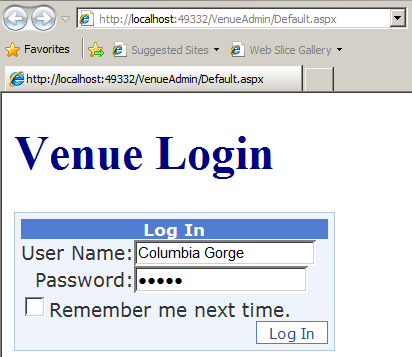
I am linking to a zip file of the VenueAdmin Application. The application uses LINQ to log in to the VenueTracker database with the VenueLogin and using the VenueRole. The login page gets the venue name and password. the password is hashed to not be in plain text. If the login is successful the venueid is stored in a Session variable, and the user is redirected to a second web page that retrieves and displays the information about their particular venue on the page using a datalist and an xml control.

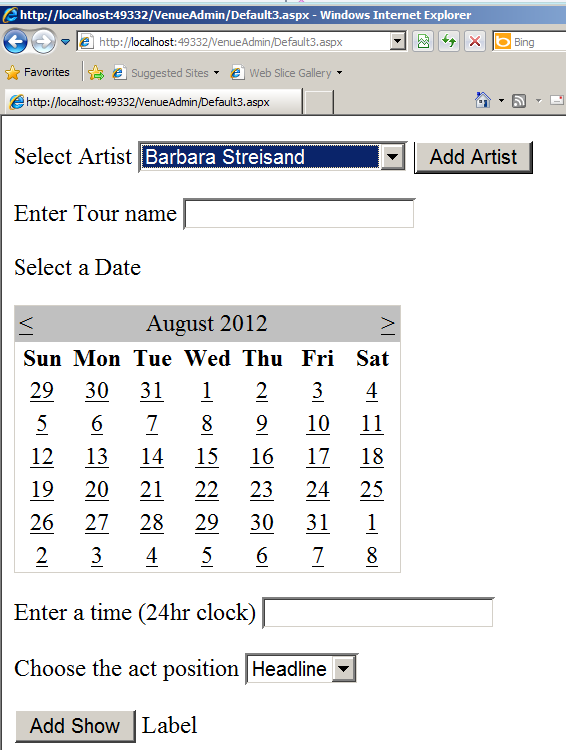
There is a button on this web page that allows them to add a show. This redirects them to the add show form. On this form they can enter the show information and submit it. If the artist is not in the dropdown list they can click the add artist button and be directed to the form for entering a new artist. when the artist is submitted it returns them to the show page so that they can complete that form

Before I could get it to run I needed to suspend the trigger we had made earlier. That was the source of the no create table permission error. I also had to grant execute on the schema dbo. Here is the SQL for doing that

Use VenueTracker
Go
disable trigger tr_NotifyCustomers on Show
Go
Select * from Show

Grant exec on schema::dbo to VenueRole

It is also quite possible that you will need to edit the webconfig file to change the connection string. I mistyped "venulogin" for "VenueLogin" when I created the database login. Also substitute your password for mine and change the server name if you are not using localhost.

Here are pictures of the site running