 --functions
 --scalar functions operate on one row at time
 --table valued function
 --aggregate functions

 use automart
 go

 --here is an a very simple function
 Create function fx_Cube
 (@number int ) --parameters, provided by the user
 returns int --return type for the function note the s
 As
 Begin -- begin function
 Declare @Cube int --declare a variable
 Set @Cube = @number * @number * @number
 return @cube --value to return
 End
 Go

 --using the function
 Select dbo.fx_Cube(37) as Cube

 go
 --altering the function to change the data type
  alter function fx_Cube
 (@number money )
 returns money
 As
 Begin
 Declare @Cube money
 Set @Cube = @number * @number * @number
 return @cube
 End

 Go
 ---use the changed function
 Select ServicePrice, dbo.fx_cube(ServicePrice) as increase
 From Customer.AutoService

Go
--this uses an if statement
Create function fx_GetPercent
(@number decimal(10,2), @percent decimal(3,2))
Returns decimal(10,2)
As
Begin
Declare @percentage decimal(10,2)
Set @Percentage = @number * @Percent
Return @Percentage
End
Go
Select ServicePrice, dbo.fx_GetPercent(ServicePrice, .05) Discount,
ServicePrice -dbo.fx_GetPercent(ServicePrice, .05) DiscountedPrice
From Customer.AutoService
Go
--added an if statement
Alter function fx_GetPercent
(@number decimal(10,2), @percent decimal(3,2))
Returns decimal(10,2)
As
 Begin --begin function
 Declare @percentage decimal(10,2)
  if @Percent > 1
   Begin --begin if
   Set @Percent=@Percent /100
  End --end if
 Set @Percentage = @number * @Percent
 Return @Percentage
End --end function

--- price is the autoservice table
-- in employee service detail discount percent and tax percent
--0's have
Go
Alter function fx_Percentages
(@amount decimal(10,2), @percent decimal(3,2))
returns decimal(10,2)
AS
Begin --begin function
 Declare @result decimal(10,2)
  if @amount != 0
   Begin
    Set @result =@Amount-(@amount * @Percent)
   End --end if
  Else
   Begin --begin else
    Set @result=@amount
   End --end else
return @Result
End --end function

Go
Select * From Employee.VehicleServiceDetail
-- Here are a couple of fairly complex queries to figure out
--the totals for a service

Select VehicleServiceID, ServiceName, ServicePrice, DiscountPercent,
dbo.fx_Percentages(ServicePrice, DiscountPercent) as [Discount Price],
dbo.fx_GetPercent(ServicePrice, TaxPercent) as Tax
From Customer.AutoService a
inner join Employee.VehicleServiceDetail vsd
on a.AutoServiceID=vsd.AutoServiceID
Where VehicleServiceID=3

Select VehicleServiceID,
Sum(dbo.fx_Percentages(ServicePrice, DiscountPercent)) as SubTotal,
Sum(dbo.fx_GetPercent(ServicePrice, TaxPercent)) as Tax,
Sum(dbo.fx_Percentages(ServicePrice, DiscountPercent) +
 dbo.fx_GetPercent(ServicePrice, TaxPercent)) as Total
From Customer.AutoService a
inner join Employee.VehicleServiceDetail vsd
on a.AutoServiceID=vsd.AutoServiceID
Where VehicleServiceID=3
Group by VehicleServiceID
Wednesday, February 19, 2014
Home made Functions

Wednesday, February 12, 2014
Indexes and Views
Use MagazineSubscription

--adding a column
Alter table Customer
Add Email Nvarchar(255)

Select * from Customer

--dropping a column
Alter Table Customer
Drop column Email


--drop a foreign key constrain
Alter table MagazineDetail
Drop constraint FK1_MagazineDetails

--use a system table to see foreign keys in current database
Select * from sys.foreign_keys

--create a table to test default
Create table test
(
 testID int identity(1,1) primary key,
 testState nvarchar(10) default 'finished'
)
--add a column
Alter table test
add testDate date

--insert some records
Insert into test (TestDate) Values (GetDate())

Select * from Test

/**********************************
*Indexes and views
***********************************/
Use Automart

--noclustered is optional
Create nonclustered index ix_LastName on Person(LastName)

Drop index [UQ__Register__A9D105341CAB755D] on Customer.RegisteredCustomer

--uique index
Create unique index ix_Email on Customer.RegisteredCustomer(Email)
--filtered index
Create index ix_filtered on Employee.VehicleService(ServiceDate)
Where ServiceDate > '1/1/2012'

--composite index
Create index ix_service on Employee.vehicleService(ServiceDate, ServiceTime)

Create table testtable
(
 testKey int identity,
 TestName nvarchar(255) not null,
 Constraint PK_TestTable  primary key nonclustered(testKey)
)
--clustered index
Create clustered index ix_testname on TestTable(testName)

Insert into testTable(testName)
values('FirstTest'),
('a test'),
('third test')

Insert into testTable(testName)
values('alpha')


Select * from testTable
\--forcing an index
Select LastName, firstName, email, LicenseNumber, VehicleMake, VehicleYear
From Person p with (NoLock, Index(ix_lastName))
inner join customer.RegisteredCustomer rc
on p.Personkey=rc.PersonKey
inner join Customer.Vehicle v
on p.Personkey =v.PersonKey
Where LastName='Smith'

Go --go seperates batches
--views
Create view vw_Customer
As
Select LastName [Last Name]
, firstName [first Name]
, email Email
, LicenseNumber [License Number]
, VehicleMake Make
, VehicleYear [Year]
From Person p
inner join customer.RegisteredCustomer rc
on p.Personkey=rc.PersonKey
inner join Customer.Vehicle v
on p.Personkey =v.PersonKey
go
Select * from vw_customer

--using a view
Select [Last Name], Email from vw_Customer
Where [Last Name] ='Smith'
order by Email
go

Create view vw_simple
As
Select * from Person
Order by LastName
--can't order a view

Go
--altering a view
Alter view vw_customer
As
Select LastName [Last Name]
, firstName [first Name]
, email Email
, LicenseNumber [License Number]
, VehicleMake Make
, VehicleYear [Vehicle Year]
From Person p
inner join customer.RegisteredCustomer rc
on p.Personkey=rc.PersonKey
inner join Customer.Vehicle v
on p.Personkey =v.PersonKey
Monday, February 10, 2014
Creating and altering Tables
Create DataBase PetPals

Use PetPals

Create table Pet
(
   PetKey int identity(1,1) primary key,
   PetName nvarchar(255) not null,
   PetSpecies nvarchar(255) not null,
   PetSex nchar(1),
   PetCondition nvarchar(255),
   PetAge int,
   PetDateAdded Date default GetDate()
)

alter table Pet
Add Constraint chk_Sex Check (PetSex in ('F', 'M'))


Insert into Pet(PetName, PetSpecies, PetSex, PetCondition, PetAge)
Values('Skittles','Cat','F', 'Good', 2)

Select * from Pet


Create Table CareTakers
(
 CareTakerKey int identity(1,1),
 CaretakerName nvarchar(255) not null,
 CareTakerStreet nvarchar(255) not null,
 CareTakerCity nvarchar(255) default 'Seattle',
 careTakerState nchar(2) default 'WA',
 CareTakerZip nchar(10) not null,
 CareTakerPhone nchar(13),
 Constraint PK_CareTakers primary key(CareTakerKey)
)

Create table Services
(
 ServiceKey int identity(1,1),
 ServiceName Nvarchar(255) not null,
 ServicePrice Decimal(10,2) not null
)
 Alter table Services
 add Constraint PK_Service primary Key (ServiceKey)

 Alter table Services
 Add Constraint unique_name Unique(ServiceName)

Create Table CareTakerPet
(
 CareTakerPetKey int identity(1,1),
 PetKey int Foreign key references Pet(PetKey),
 CareTakerKey int,
 CareTakerPetDate Date not null,
 Constraint FK_CareTaker Foreign Key (CareTakerKey)
  references CareTakers(CareTakerKey),
 Constraint PK_CareTakerPet Primary Key (CareTakerPetKey)


)

Create Table CareTakerPetDetail
(
 CareTakerPetKey int,
 ServiceKey int,
 Constraint PK_CareTakerPetDetail Primary Key (CareTakerPetKey, ServiceKey),
 Constraint FK_CareTakerPetKey Foreign Key (CareTakerPetKey)
  References CaretakerPet(CareTakerPetKey),
 Constraint FK_Service foreign key (ServiceKey)
  references Services(ServiceKey)
)
Sunday, February 9, 2014
ADO Data Entities
For this example we will do much the same thing we did for the ADO example for assignment 4, only we will do it with ADO Entities. This will require less coding since the Entities wizards will create classes for all the Tables we add to the designer. We can use the same hash class as in the previous assignment.
First we create a new Empty web site. I will call it "Assignment5Example."
Next I am going to add an App_Code folder and add the existing class "PasswordHash."

To use the ADO Entities we will need to have a Data connection in the Server window. If it is is not open, open the Server window from View. Make a new DataConnection to Automart Database. Use the AutomarLogin we created for Assignment4

It will only show you the tables you have permissions for.
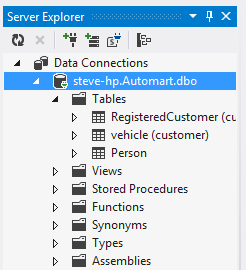
Now Let's add the ADO Data Entites. Right click on the project and select Add NewItem then ADO Data Entity Model. I am naming it "AutomartModel."

Click ADD, then YES when it tells you it needs to place these files in a special folder. Then Choose Generate from Database

Click NEXT, then make sure it has the correct connection. Click YES to include sensitive data and then NEXT

Next you need to select what you are going to add to the designer. Select all the tables under the customer and dbo schemas
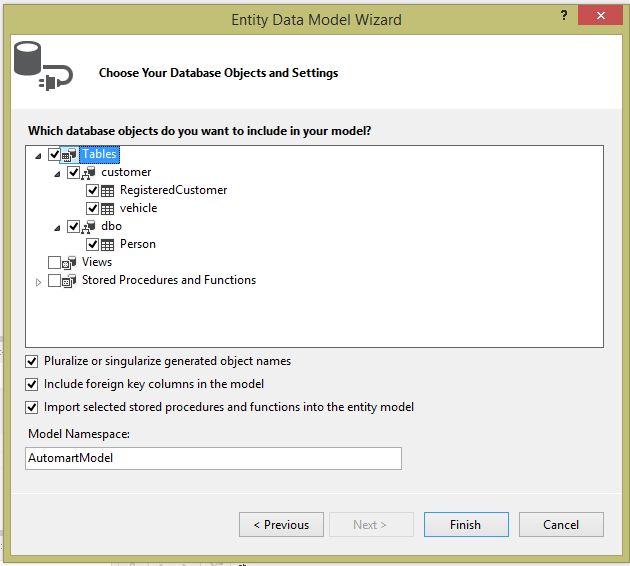
Click Finish and it will set up the designer. You may get one or more security warnings. Just click OK.
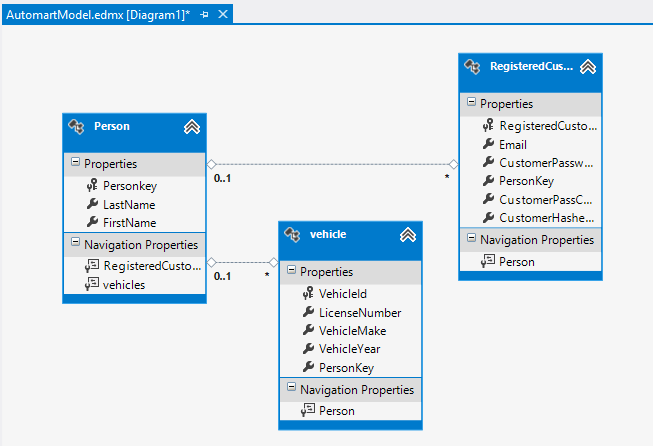
Now we set up the Web forms. The login form, the registration form and the Welcome will have exactly the same structure as the assignment four example, so I will not go over them here.
I also added the PasscodeGenerator class from the previous assignment. I realized I would need it for the registration.
Let's do the registration code first. We will do this in the page, as there is little gained by separating it into a class. Double click the submit button in design view.
first we will initialize the data entities classes
//initialize the Data Entity Data context
        AutomartEntities entites = new AutomartEntities();
Then we initialize the person class, set its properties and add it to the people collection. Next we do the same with Vehicles. The Person, property sets the relation to the person just created above and will insert that person's personkey as a foreign key.
 //initialize the person class, set the values
        //and add to People (a class that stores persons)
        Person p = new Person();
        p.FirstName = txtFirstName.Text;
        p.LastName = txtLastName.Text;

        entites.People.Add(p);

        //same for vehicle
        vehicle v = new vehicle();
        v.LicenseNumber = txtLicense.Text;
        v.Person = p;
        v.VehicleMake = txtMake.Text;
        v.VehicleYear = txtYear.Text;
        entites.vehicles.Add(v);
The Registered customer class will take a little more work because we have to get the passcode and hash the password. Once done we save changes and the values are written to the database
PasscodeGenerator pg = new PasscodeGenerator();
        int passcode = pg.GetPasscode();

        PasswordHash ph = new PasswordHash();

        RegisteredCustomer rc = new RegisteredCustomer();
        rc.Person = p;
        rc.Email = txtEmail.Text;
        rc.CustomerPassCode = passcode;
        rc.CustomerPassword = txtPassword.Text;
        rc.CustomerHashedPassword = ph.HashIt(txtPassword.Text, passcode.ToString());
        entites.RegisteredCustomers.Add(rc);

        //write to database
        entites.SaveChanges();
Now let's turn to the Login. We will create a new Login class. This one will use the entities syntax. So First add a class to the app_code called LoginClass. this class needs to take the user name and password, query the database to retrieve the passcode and then hash the password and code. If they match the existing hash then the user is authenticated. Here is the whole class with comments.
using System; using System.Collections.Generic; using System.Linq; using System.Web; ////// Summary description for LoginClass /// public class LoginClass { string user; string pass; int personkey=0; Byte[] hashed; AutomartEntities ent = new AutomartEntities(); public LoginClass(string userName, string pWord) { user = userName; pass = pWord; } //get the passcode from the database private int GetPassCode() { int passcode = 0; //this is linq syntax for a query var code = from c in ent.RegisteredCustomers where c.Email == user select new { c.PersonKey, c.CustomerPassCode, c.CustomerHashedPassword }; //we loop through the result and assign some values foreach (var v in code) { passcode = (int)v.CustomerPassCode; personkey = (int)v.PersonKey; hashed = (Byte[])v.CustomerHashedPassword; } return passcode; } // this method hashes the password and matches the database hash //to the new hash public int Authenticate() { int passcode = GetPassCode(); PasswordHash ph = new PasswordHash(); Byte[] newHash = ph.HashIt(pass, passcode.ToString()); int pk = 0; if (hashed == newHash) { pk = personkey; } return pk; } }
Finally we need to write some code for the Login button. It really doesn't need to change much from the code we wrote before.
LoginClass lc = new LoginClass(txtUser.Text, txtPassword.Text);
        int personKey = lc.Authenticate();
        if (personKey != 0)
        {
            Session["personkey"] = personKey;
            Response.Redirect("Welcome.aspx");
        }
        else
        {
            lblError.Text = "Invalid login";
        }
Now We will try a login


Monday, February 3, 2014
Ident_current function
When you insert into several tables, and when the primary key is an identity (auto number) the Ident_current function can be used to return the identity created by the insert above. In other words, if you insert a person, you will need the new personkey to insert as a foreign key in the vehicle table and the Registered customer table. Here is an example of an insert using the function.
Use Automart

Insert into Person(lastName, FirstName)
Values ('Oil', 'Caster')

Insert into Customer.vehicle (LicenseNumber, VehicleMake, VehicleYear, PersonKey)
values ('xyz123', 'Ford', '2012', ident_current('Person'))
Note that the argument for the Ident_Current function is the name of the table not the column name
Wednesday, January 29, 2014
Insert Update Delete
Use Automart
--insert update delete

Insert into Person(LastName, FirstName)
Values('Watson', 'John')

Insert into Person(LastName, FirstName)
Values('Marley', 'Bob'),
('Carrol', 'Lewis'),
('Baggins', 'Bilbo')

Create table PersonTemp
(
   PersonKey int,
   Lastname nvarchar(255),
   FirstName nvarchar(255)
)

Insert into PersonTemp(PersonKey, lastName, Firstname)
Select PersonKey, Lastname, FirstName from Person

Insert into Person(LastName, FirstName)
Values(N'στεφενοσ', N'κονγεροσ')

Insert into Person(Lastname)
values('Dedealos')

Insert into Person(firstname)
values('Dedealos')

Insert into Person(LastName,firstname)
values('Madonna', null)

Select * from Person


Select * from PersonTemp
Order by Lastname

begin tran
Update Person
Set LastName='Anders',
firstname='Jason'
Where Personkey=1


rollback tran

Commit tran

Begin tran
Delete from Employee.VehicleServiceDetail
Select * from Employee.VehicleServiceDetail
Rollback tran
Commit tran

Drop Table PersonTemp
--Drop Database Automart
Monday, January 27, 2014
Subqueries
use Automart

--basic aggregate
Select  Max(ServicePrice) from Customer.AutoService


--If you want to see which service has the max price you
--need to use a subquery in the where clause
Select ServiceName, ServicePrice From Customer.AutoService
Where ServicePrice = (Select max(ServicePrice) from Customer.AutoService)

--you can also use subqueries in the select clause
Select ServiceName, ServicePrice,
(Select Max(ServicePrice) From Customer.Autoservice) as Maximum,
(Select Max(ServicePrice) From Customer.Autoservice)-ServicePrice as [Difference]
From Customer.Autoservice

--this one goes a little crazy, the idea is that
--we will show the total count of auto's served
--the we will show the counts for each individual
--location and then what percent each represents
--of the total.
--there are three casts. The innermost cast converts
--the division to decimal to preserve the decimal part
--(count returns an integer)
--the next cast (second one in) converts the whole
--result to decimal to limit the number of decimal places
--showing. The outermost cast converst the whole expression
--to nvarchar in order to concatinate the % sign in
--
Select (Select count(*) From Employee.VehicleService) Total,
LocationName, count(*) [Number Per Location],
cast(cast(cast(count(*) as decimal(4,2)) /
(Select count(*) From Employee.VehicleService)
* 100 as decimal(4,2))as Nvarchar) + '%' [Percent]
From Employee.VehicleService vs
Inner join Customer.Location a
on a.LocationID=vs.LocationID
Group by LocationName

--the in keyword returns any value that matches
--one of the values in the result set
--here the second query
Select Distinct ServiceName from Customer.AutoService
Where autoserviceId in (Select autoServiceId from Employee.VehicleServiceDetail)

--using not with in has the same result as an outer join
Select Distinct ServiceName from Customer.AutoService
Where autoserviceId not in (Select autoServiceId from Employee.VehicleServiceDetail)

--You can link several tables with "in"
--the logic is the same as for joins
--primary key to foreign key
--follow the relationship path to get the data
--you want
Select LicenseNumber, VehicleMake, VehicleYear
From Customer.Vehicle
where VehicleId in
(Select VehicleID from Employee.VehicleService
where VehicleServiceID in
(Select VehicleServiceID from Employee.VehicleServiceDetail
 Where AutoserviceID=15))

--another example, also including a query
--in the select clause to return the name of the
--autoservice
Select (Select ServiceName from Customer.AutoService where AutoserviceID=12) ServiceName,
LicenseNumber, VehicleMake, VehicleYear
From Customer.Vehicle
where VehicleId in
(Select VehicleID from Employee.VehicleService
where VehicleServiceID in
(Select VehicleServiceID from Employee.VehicleServiceDetail
 Where AutoserviceID=12))

--in can be used with litteral sets as well
Select * from Employee.VehicleServiceDetail where AutoserviceID in (9, 11, 12)

--exits returns a boolean yes/no
Select * from Employee.VehicleServiceDetail where not exists
(Select AutoserviceID from Employee.VehicleServiceDetail where autoserviceID=12)

--I often use exists to test for the existence of an object
if exists
(Select name from sys.Databases where name = 'communityAssist')
Begin
Print 'Yep it''s there'
End
Correlated subquery
Here is a database called Magazine that the subquery is based on
--Drop Database MagazineSubscription
--create the database no options used
Create Database MagazineSubscription
Go
--use the database
Use MagazineSubscription

/*Create the tables with constraints
This needs to be done in a certain order
The primary key tables, the one side of
a relation must be done before the many
side of a relation */

Create table Magazine
(
  MagID int identity(1,1),
  MagName varchar(100) not null,
  MagType char(10) not null default 'Monthly',
  Constraint PK_Magazine Primary Key(MagID),

)

Create table SubscriptionType
(
 SubscriptTypeID int identity(1,1),
    SubscriptTypeName char(15),
    Constraint PK_SubscriptionType Primary Key (SubscriptTypeID)
)

Create table MagazineDetail
(
 MagDetID int Identity(1,1),
 MagID int not null,
    SubscriptTypeID int not null,
 SubscriptionPrice money,
    Constraint PK_MagazineDetails Primary Key(MagDetID),
    Constraint FK1_MagazineDetails Foreign key(MagID)
  References Magazine(magID),
    Constraint FK2_MagazineDetails Foreign Key(SubscriptTypeID)
  References SubscriptionType(subscriptTypeID)
)

Create Table Customer
(
 CustID int identity(1,1),
 CustLastName varchar(30) not null,
 CustFirstName varchar(25)null,
 CustAddress varchar(100) not null,
 CustCity varchar(50) not null,
 CustState char(2) not null,
 CustZipcode char(11) not null,
 CustPhone char(10),
 Constraint PK_Customer Primary Key (custID)
)

Create Table Subscription
(
 SubscriptionID int identity(1,1),
 CustID int not null,
 MagDetID int not null,
 SubscriptionStart DateTime not null,
 SubscriptionEnd Datetime,
    Constraint PK_Subscription Primary Key (subscriptionID),
 Constraint FK1_Subscription Foreign Key (CustID)
  References Customer(custID),
 Constraint FK2_Subscription Foreign Key(MagDetID)
  References MagazineDetail(MagDetID)
)

--insert into magazine

Insert into Magazine(MagName, MagType)
Values('Procastinators Anonymous','Monthly')

Insert into Magazine(MagName, MagType)
Values('IT Toys','Monthly')

Insert into Magazine(MagName, MagType)
Values('FireEaters Quarterly','Quarterly')

Insert into Magazine(MagName, MagType)
Values('Waste Not Want Not, A hoarders guide','Monthly')

Insert into Magazine(MagName, MagType)
Values('SQL Server','Monthly')

Insert into Magazine(MagName, MagType)
Values('Extreme Programming','Monthly')

Insert into Magazine(MagName, MagType)
Values('Insurance Actualization algorythms','Quarterly')

Insert into Magazine(MagName, MagType)
Values('Doctor Who Magazine','Weekly')

Insert into Magazine(MagName, MagType)
Values('XBox Anonymous','Monthly')

Insert into Magazine(MagName, MagType)
Values('Beer bottle Target Practice','Quarterly')


--Inserts for subscription types

Insert into SubscriptionType (subscriptTypeName)
Values('Six Month')

Insert into SubscriptionType (subscriptTypeName)
Values('Yearly')

Insert into SubscriptionType (subscriptTypeName)
Values('Three Month')

Insert into SubscriptionType (subscriptTypeName)
Values('Two Year')

Insert into SubscriptionType (subscriptTypeName)
Values('five Year')

Insert into SubscriptionType (subscriptTypeName)
Values('Three Year')

--Inserts into MagazineDetail

Insert into MagazineDetail(MagID, SubscriptTypeID, subscriptionPrice)
Values(1, 1, 23.99)

Insert into MagazineDetail(MagID, SubscriptTypeID, subscriptionPrice)
Values(1, 2, 38.50)

Insert into MagazineDetail(MagID, SubscriptTypeID, subscriptionPrice)
Values(1, 5, 74.29)

Insert into MagazineDetail(MagID, SubscriptTypeID, subscriptionPrice)
Values(2, 1, 35.99)

Insert into MagazineDetail(MagID, SubscriptTypeID, subscriptionPrice)
Values(2, 2, 52.50)

Insert into MagazineDetail(MagID, SubscriptTypeID, subscriptionPrice)
Values(2, 4, 77.50)

Insert into MagazineDetail(MagID, SubscriptTypeID, subscriptionPrice)
Values(2, 5, 99.29)

Insert into MagazineDetail(MagID, SubscriptTypeID, subscriptionPrice)
Values(3, 2, 40.50)

Insert into MagazineDetail(MagID, SubscriptTypeID, subscriptionPrice)
Values(3, 5, 200.50)

Insert into MagazineDetail(MagID, SubscriptTypeID, subscriptionPrice)
Values(4, 1, 25.00)

Insert into MagazineDetail(MagID, SubscriptTypeID, subscriptionPrice)
Values(4, 3, 15.50)

Insert into MagazineDetail(MagID, SubscriptTypeID, subscriptionPrice)
Values(4, 4, 40.50)

Insert into MagazineDetail(MagID, SubscriptTypeID, subscriptionPrice)
Values(4, 5, 75.50)

Insert into MagazineDetail(MagID, SubscriptTypeID, subscriptionPrice)
Values(4, 6, 55.50)

Insert into MagazineDetail(MagID, SubscriptTypeID, subscriptionPrice)
Values(5, 2, 38.75)

Insert into MagazineDetail(MagID, SubscriptTypeID, subscriptionPrice)
Values(5, 6, 78.50)

Insert into MagazineDetail(MagID, SubscriptTypeID, subscriptionPrice)
Values(6, 2, 40.50)

Insert into MagazineDetail(MagID, SubscriptTypeID, subscriptionPrice)
Values(6, 6, 99.50)

Insert into MagazineDetail(MagID, SubscriptTypeID, subscriptionPrice)
Values(7, 5, 134.99)

Insert into MagazineDetail(MagID, SubscriptTypeID, subscriptionPrice)
Values(8, 1, 15.50)

Insert into MagazineDetail(MagID, SubscriptTypeID, subscriptionPrice)
Values(8, 2, 21.50)

Insert into MagazineDetail(MagID, SubscriptTypeID, subscriptionPrice)
Values(8, 3, 8.50)

Insert into MagazineDetail(MagID, SubscriptTypeID, subscriptionPrice)
Values(8, 4, 35.50)

Insert into MagazineDetail(MagID, SubscriptTypeID, subscriptionPrice)
Values(9, 2, 38.50)

Insert into MagazineDetail(MagID, SubscriptTypeID, subscriptionPrice)
Values(10, 5, 78.50)

Insert into MagazineDetail(MagID, SubscriptTypeID, subscriptionPrice)
Values(10, 6, 58.50)

--Inserts into Customer

Insert into customer(CustLastName, CustFirstName, CustAddress,
CustCity, CustState, CustZipcode, CustPhone)
Values('Jordan','Mary','2002 South Mercer Street','Seattle','WA',
'98190','2065558828')

Insert into customer(CustLastName, CustFirstName, CustAddress,
CustCity, CustState, CustZipcode, CustPhone)
Values('Danner','Thomas','100 Boardwalk South','Seattle','WA',
'98190','2065551001')

Insert into customer(CustLastName, CustFirstName, CustAddress,
CustCity, CustState, CustZipcode, CustPhone)
Values('Terrance','Sarah','202 Rt 3','Bellevue','WA',
'98120','3605550128')

Insert into customer(CustLastName, CustFirstName, CustAddress,
CustCity, CustState, CustZipcode, CustPhone)
Values('Camlin','Lenny','Somewhere Ave','Olympia','WA',
'98199','2535551010')

Insert into customer(CustLastName, CustFirstName, CustAddress,
CustCity, CustState, CustZipcode, CustPhone)
Values('Sanderson','Lewis','101 Elsewhere Avenue','Seattle','WA',
'98190','2065550987')

Insert into customer(CustLastName, CustFirstName, CustAddress,
CustCity, CustState, CustZipcode, CustPhone)
Values('Able','Tina','1000 West Blv','Bellingham','WA',
'98180','3605552020')

Insert into customer(CustLastName, CustFirstName, CustAddress,
CustCity, CustState, CustZipcode, CustPhone)
Values('Evans','Karl','11 North Hill street','Tacoma','WA',
'98100','2535558998')

Insert into customer(CustLastName, CustFirstName, CustAddress,
CustCity, CustState, CustZipcode, CustPhone)
Values('Zukof','Bob','WaterFront Blvd.','Bellevue','WA',
'98120','3605552435')

Insert into customer(CustLastName, CustFirstName, CustAddress,
CustCity, CustState, CustZipcode, CustPhone)
Values('Martinez','Patrick','EastLake Blvd.','Seattle','WA',
'98220','2065553679')

Insert into customer(CustLastName, CustFirstName, CustAddress,
CustCity, CustState, CustZipcode, CustPhone)
Values('Patterson','Lisa','1010 Binary Drive','Redmond','WA',
'98130','3605551100')

Insert into customer(CustLastName, CustFirstName, CustAddress,
CustCity, CustState, CustZipcode, CustPhone)
Values('Franklin','Bernice','222 ITC Road','Olympia','WA',
'98199','3605552221')

Insert into customer(CustLastName, CustFirstName, CustAddress,
CustCity, CustState, CustZipcode, CustPhone)
Values('Kim','Susan','111 Martin Luther King Way','Seattle','WA',
'98122','2065550742')

--Insert into subscription

Insert into subscription(CustID, MagDetID, SubscriptionStart, SubscriptionEnd)
Values (1, 4, '1/15/2006', '7/15/2006')

Insert into subscription(CustID, MagDetID, SubscriptionStart, SubscriptionEnd)
Values (1, 14, '1/15/2006', '1/15/2007')

Insert into subscription(CustID, MagDetID, SubscriptionStart, SubscriptionEnd)
Values (2, 7, '1/15/2006', '1/15/2007')

Insert into subscription(CustID, MagDetID, SubscriptionStart, SubscriptionEnd)
Values (3, 8, '1/2/2006', '1/01/2011')

Insert into subscription(CustID, MagDetID, SubscriptionStart, SubscriptionEnd)
Values (4, 11, '2/01/2006', '2/01/2008')

Insert into subscription(CustID, MagDetID, SubscriptionStart, SubscriptionEnd)
Values (4, 4, '2/01/2006', '9/01/2006')

Insert into subscription(CustID, MagDetID, SubscriptionStart, SubscriptionEnd)
Values (5, 16, '1/05/2006', '1/05/2007')

Insert into subscription(CustID, MagDetID, SubscriptionStart, SubscriptionEnd)
Values (6, 5, '2/15/2006', '2/15/2008')

Insert into subscription(CustID, MagDetID, SubscriptionStart, SubscriptionEnd)
Values (6, 12, '2/15/2006', '2/15/2011')

Insert into subscription(CustID, MagDetID, SubscriptionStart, SubscriptionEnd)
Values (6, 18, '2/15/2006', '2/15/2011')

Insert into subscription(CustID, MagDetID, SubscriptionStart, SubscriptionEnd)
Values (7, 18, '3/01/2006', '3/01/2011')

Insert into subscription(CustID, MagDetID, SubscriptionStart, SubscriptionEnd)
Values (8, 20, '3/01/2006', '3/01/2007')

Insert into subscription(CustID, MagDetID, SubscriptionStart, SubscriptionEnd)
Values (9, 22, '3/10/2006', '3/10/2007')

Insert into subscription(CustID, MagDetID, SubscriptionStart, SubscriptionEnd)
Values (10, 4, '3/15/2006', '10/15/2006')

Insert into subscription(CustID, MagDetID, SubscriptionStart, SubscriptionEnd)
Values (10, 23, '3/15/2006', '3/15/2011')

Insert into subscription(CustID, MagDetID, SubscriptionStart, SubscriptionEnd)
Values (11, 11, '3/20/2006', '3/20/2008')

Insert into subscription(CustID, MagDetID, SubscriptionStart, SubscriptionEnd)
Values (12, 17, '4/01/2006', '4/01/2011')

Insert into subscription(CustID, MagDetID, SubscriptionStart, SubscriptionEnd)
Values (1, 18, '4/01/2006', '4/01/2011')

Insert into subscription(CustID, MagDetID, SubscriptionStart, SubscriptionEnd)
Values (4, 4, '4/15/2006', '10/15/2006')

Insert into subscription(CustID, MagDetID, SubscriptionStart, SubscriptionEnd)
Values (6, 24, '4/15/2006', '4/15/2009')

Insert into subscription(CustID, MagDetID, SubscriptionStart, SubscriptionEnd)
Values (10, 18, '4/15/2006', '4/15/2011')

Insert into subscription(CustID, MagDetID, SubscriptionStart, SubscriptionEnd)
Values (3, 14, '4/15/2006', '4/15/2007')

Insert into subscription(CustID, MagDetID, SubscriptionStart, SubscriptionEnd)
Values (12, 22, '4/15/2006', '4/15/2007')
Here is the correlated subquery
use MagazineSubscription

 --a correlated subquery is when the subquery uses a value in the
 --outer query as part of its criteria
 --it results in something resembling a recursive function
 --in this case what it does is makes sure that
 --like is compared to like
 --subscription type 1 (one year) is compared only to other
 --subscription type 1's and subscription type 5 (five year)
 --is compared only to other subscription type 5's etc.

Select subscriptTypeID, MagDetID, SubscriptionPrice
From MagazineDetail md
Where subscriptionPrice >=
(Select Avg(SubscriptionPrice) from magazineDetail md2
 where md.SubscriptTypeID=md2.SubscriptTypeID)
Subscribe to:
Posts (Atom)