--scalar functions
Use CommunityAssist
Select DonationKey, [DonationAmount],[DonationDate]
From Donation

Select DonationKey, DonationAmount, DonationAmount * .8 as Charity,
DonationAmount * .2 as [Admin]
From Donation

Select 10 * 2 % (4 + 12)

Select DonationDate, DonationAmount From Donation

Select Month(DonationDate) as [Month], donationamount
From Donation
Where Month(DonationDate)=3

Select Day(donationDate) from Donation
Select Distinct Year(DonationDate) From Donation

Select Distinct DatePart(YY, DonationDate) as [Year] From Donation
Select Cast(DatePart(mm, DonationDate)as Nvarchar) + '/'
+ cast(Datepart(dd,DonationDate) as Nvarchar)
+ '/' + cast(DatePart(YY, DonationDate)as nvarchar) as [Date]
From Donation

Select Datepart(hour, GetDate()), Datepart(Minute, GetDate())
Select Datepart(Minute, GetDate())

Select DateAdd(dd, 30, GetDate())
Select DateDiff(mm, GetDate(), '3/22/2013');

Select ContactInfo, substring(ContactInfo, 1, 3) as [Area Code],
Substring (ContactInfo, 4, 3) as Exhange,
Substring (ContactInfo, 7, 4) as number
From PersonContact
Where ContactTypeKey < 6


--find a space
--charindex locates a particular character in this case
-- as space, so the following reads
--select a substring of the field street, starting with character 1
--return the number of characters up to the first space
Select Charindex(' ', Street) as [Location of first Space],
Substring(Street,1, Charindex(' ', Street)) as [first]
From PersonAddress
Wednesday, January 9, 2013
Scalar Functions Assignment 2

Tuesday, January 8, 2013
Statement Of Work
History
Sam has a video shop with some 10000 DVDs and blu rays. He keeps his inventory in Excel, but lately it has become too much to manage. He is keeping rental information in Excel also. Each time someone rents a video he gets their phone and address and so has a lot of duplicate information. He has a problem tracking who has turned in videos late. Multiple versions of the inventory. Team members often mis-enter data causing difficulties when searching for things. Sometimes they give customers unofficial discounts.
A database could help solve most of these problems.
Scope
The new database will track the inventory. It will track customer information and deposits. Track rentals and returns and fines due for late returns. It provide reports on customer preferences in order to make suggestion for rentals. It might also track customer requests and reservations.Track Employee involvement with rentals.
objectives
Better tracking of inventory and rentals
Timeline
Gather information --2 weeks
Requirements--1 week
Business rules--1 week
Design --
Normalization
Build the database --Physical design
Test the database
Monday, January 7, 2013
Selects
Use CommunityAssist;
/*
Simple Select examples
1/7/13
*/
Select FirstName, Lastname from Person;
Select * From Person;

Select LastName, FirstName
From Person
Order by LastName DESC, Firstname ASC --types of sort

--aliasing fields
Select LastName AS [Last Name],
FirstName as [First Name]
From Person

Select LastName "Last Name",
FirstName "First Name"
From Person

Select LastName Last,
FirstName First
From Person

Select Distinct PersonKey
From Donation
Order by PersonKey

Select * From PersonAddress
Where City='Kent'

Select * From PersonAddress
Where City='seattle' or City ='Kent'
Order by City

Select * From PersonAddress
Where not City = 'Seattle'

Select * From PersonAddress
Where City != 'Seattle'

Select * From PersonAddress
Where Apartment is not null

Select * From PersonAddress
Where Apartment is  null

Select * From Donation
Where DonationDate > '3/1/2010'

Select * From Donation
Where DonationAmount Between 1000 and 2000

Select * From Donation
Where DonationAmount >= 1000 and donationAmount <= 2000

Select * From Donation
Where DonationDate Between '3/1/2010' and '3/31/2010'

Select * From PersonAddress
Where Street like '%Way%'

Select * From Person
Where LastName like 'S%'
Sunday, December 23, 2012
ADO Example
ADO.Net consists of a set of objects that help you connect to, retrieve and manipulate data from databases. It the most code intensive way to do these tasks (LINQ and ADO Data Entities do most of the same things with much less code) but it does give you the most control over all the aspects of your data.
This example may seem complex, but I will guide you through it, and your assignment will parallel it very closesly.
Preparing SQL Server
For this example we will use the CommunityAssist database. We will have to do some preparation first. For one thing, CommunityAssist doesn't have a login table. First we will add one. We are going to do the passwords in plain text--a very bad idea--but there are enough complexities in this example for now. Ask me later and I will show you how to hash passwords both in Visual Studio and SQL Server.
The easiest way to do this is to open the SQL Server Management Studio and open a new query. Then enter this code.
use CommunityAssist

Create table DonorLogin
(
 loginId int identity(1,1) primary key,
 PersonKey int Foreign Key references Person(personKey),
 LastName nvarchar(255),
 DonorPassword nvarchar(255)
)
Go
Insert into DonorLogin(PersonKey, LastName, DonorPassword)
Select p.PersonKey, LastName, substring(LastName, 1,1) + 'pass'
From Person p
inner join Donation d
on p.PersonKey=d.PersonKey
You can select from DonorLogin to see what the table contains
Now we need to make some additional adjustments to the Database and the Server. We are going to add two new SQL Server Logins and then we have to change the security mode of the server to accept both SQL Server and Windows logins.
Enter the following SQL
Create login DonorsLogin with password='P@ssw0rd1', default_database=CommunityAssist
Create user DonorsLogin for Login DonorsLogin
Grant Select on DonorLogin to DonorsLogin

Create Login RegisteredDonorsLogin with password='P@ssw0rd1', default_database=CommunityAssist
create user RegisteredDonorsUser for Login RegisteredDonorsLogin
Grant Select on Person to RegisteredDonorsUser
Grant Select on Donation to RegisteredDonorsUser
Now we need to change the Server authentication mode.
1. In SQL Server Management ServerRight Click on the Server and select properties from the context menu.
2. click Security under select a page.
3. Click the radio button by SQL Server and Windows Authentication mode.
4. Click OK and then OK to the dialog that these changes will not take effect until the server is restarted.
5. Right click on the server again. Choose Restart. Say OK to all the dialog boxes..
6. When the server is restarted you can close the SQL Server Management Studio.
Writing the ADO Code
Open Visual Studio and create a new empty web site. Add Two forms:Default.aspx and Default2.aspx. Ignore them for now.
Add a class called "DonorLoginClass." Click ok on the dialog box that says you need to put it in an "app_code" folder.
First add these two using statements. They call the ADO libraries. The second statement calls the SqlClient library which is specifically designed to work with SQL Server.

In the class we will declare one private field of a SqlConnection type. A SqlConnection is an ADO object that manages connections to the database.

It takes a connection string as an argument. We will initialize it in the constructor.
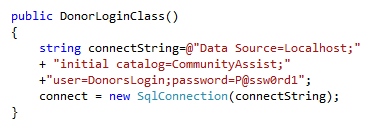
Now we will create a public method that will check to see if the login credentials match the values in the database. This method uses the SqlCommand object which is used to pass SQL to the database, and the SqlDataReader object which can be used to read data from the database. The method returns the personkey of the person who is logging in as an integer.

Now open the source view for Default1.apsx. We will add a custom login form. Here is the html, asp code:

Now double click the button in design view to get the default click event. We will add the following code to call the login class and confirm the values. If the login is good we will store the personkey in a Session variable and redirect to Default2 , if not we will put a message in the label.

I am going to put a H1 heading saying welcome on Default2. Now select Default.aspx in the Solution explorer and hit run


Now we will add another class called GetDonor. It has two public methods. The first retrieves the name of the donor and the second gets a DataSet of all the donor's donations. A dataset is an ADO object that contains tables. we will attach the DataSet as a data source for a gridview on the web form. Here is the complete code for the class:

Remember you also have to add the using statements for Data and SqlClient
Now we move to Default2. Add a label and a GridView. (the GridView is in the Data Section of the toolbox.)

We are going to use the Form Load event. First we will check to make sure that the session variable exists, if not we will send it back to the login. Next we will call the get donor class methods to get data to populate or form.
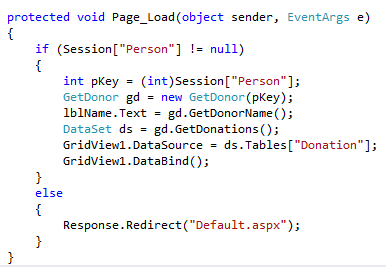
You will also have to add an using statement for System.Data to this page.
Here at last are screen shots of the program running


Thursday, November 29, 2012
Session Variables
Here is Default.aspx
<%@ Page Language="C#" AutoEventWireup="true" CodeFile="Default.aspx.cs" Inherits="_Default" %>

<!DOCTYPE html PUBLIC "-//W3C//DTD XHTML 1.0 Transitional//EN" "http://www.w3.org/TR/xhtml1/DTD/xhtml1-transitional.dtd">

<html xmlns="http://www.w3.org/1999/xhtml">
<head runat="server">
    <title></title>
</head>
<body>
    <form id="form1" runat="server">
    <div>
        <asp:Button ID="btnGetAdditionProblem" runat="server" Text="Addition"
            onclick="btnGetAdditionProblem_Click" /><br />
        <asp:Label ID="lblProblem" runat="server" Text="Label"></asp:Label><br/>
        <asp:TextBox ID="txtAnswer" runat="server"></asp:TextBox>
        <asp:Button ID="btnCheckAnswer" runat="server" Text="Check"
            onclick="btnCheckAnswer_Click" /><br />
        <asp:Label ID="lblResult" runat="server" Text="Label"></asp:Label>
    </div>
    </form>
</body>
</html>
Here is the code behind Default.aspx.cs
using System;
using System.Collections.Generic;
using System.Linq;
using System.Web;
using System.Web.UI;
using System.Web.UI.WebControls;

public partial class _Default : System.Web.UI.Page
{
    /*This class does a test for simple addition. It
     * also shows how to save a variable to session
     * variable so that it is avialable after the postback
     * (page redraw from server)
     * caused by clicking a button
     */

    //class level variables
    int number1;
    int number2;
    int answer;

    protected void Page_Load(object sender, EventArgs e)
    {
        //this event method is used to do anything that needs to
        //be done before the page is loaded for the viewer
    }
    protected void btnGetAdditionProblem_Click(object sender, EventArgs e)
    {
        //call the addition method when the button is clicked
        Addition();
    }

    protected void GetRandom()
    {
        //get random numbers
        Random rand = new Random();
        number1 = rand.Next(0, 10);
        number2 = rand.Next(0, 10);

    }

    protected void Addition()
    {
        //get the random numbers
        GetRandom();
        //make the problem visible in a label
        lblProblem.Text = number1.ToString() + "+" + number2.ToString();
        //assign an answer to the problem
        answer = number1 + number2;
        //save the answer to a server side Session variable
        Session["CurrentAnswer"] = answer;
    }
    protected void btnCheckAnswer_Click(object sender, EventArgs e)
    {
        //get the user's answer from a text box
        int guess = int.Parse(txtAnswer.Text);
        //recall the answer from the server
        //the session variable stores everything as "object"
        //so you have to cast it back to the type of object
        //that it is--in this case an integer
        answer = (int)Session["CurrentAnswer"];
        //check to see if the answer is correct
        //and display the result
        if (guess == answer)
        {
            lblResult.Text = "Congrats";
        }
        else
        {
            lblResult.Text = "Sorry";
        }
    }
}
Wednesday, November 28, 2012
Insert Update Delete
Use Automart;

Create Table test
(
 testKey int identity(1,1) primary key,
 TestName nvarchar(255)
)

Insert into test (TestName)
Values ('Test One'),
('Test Two'),
('Test Three')

Select * From Test
Select MAX(PersonKey) from Person

Insert into Person (LastName, firstname)
values('Muntz', 'Nelson')


Insert into Customer.RegisteredCustomer(Email, CustomerPassword, PersonKey)
Values ('nelson@gmail.com','nelsonpass', 53)

Insert into Customer.Vehicle(LicenseNumber,
VehicleMake,
VehicleYear,
 PersonKey)
Values('456NET', 'VW Beetle','1972', IDENT_CURRENT('Person'))

Select * From Person
Select * From Customer.RegisteredCustomer
Select * From customer.Vehicle

--updates are dangerous
Update Customer.vehicle
Set VehicleYear ='1973'
Where VehicleID =47

Begin Tran --if you explicitly begin a transaction
--you can roll it back if you make a mistake
--other wise there is no undo

Update Person
Set FirstName = 'John'
where LastName='Smith'

Select * From Person

rollback tran --undoes the explicit transaction


--you can update
Update Customer.RegisteredCustomer
Set Email='muntz@gmail.com',
CustomerPassword='muntzpass'
Where PersonKey=53

--change all the values in a table on purpose
Update Customer.AutoService
Set ServicePrice=ServicePrice * 1.05

--this actually won't delete much because
--the records in the parent table person
--have child records in other tables
--you must delete all the children before
--you can delete the parent
Delete From Person

Begin tran

--delete with a criteria
Delete from customer.RegisteredCustomer
where RegisteredCustomerID=4

Select * From customer.vehicle

commit tran--if all is good, commit the transaction
--and write to the database
Tuesday, November 27, 2012
First ASP
Here is the Default.aspx
<%@ Page Language="C#" AutoEventWireup="true" CodeFile="Default.aspx.cs" Inherits="_Default" %>

<!DOCTYPE html PUBLIC "-//W3C//DTD XHTML 1.0 Transitional//EN" "http://www.w3.org/TR/xhtml1/DTD/xhtml1-transitional.dtd">

<html xmlns="http://www.w3.org/1999/xhtml">
<head runat="server">
    <title></title>
    <link href="FirstAsp.css" rel="stylesheet" type="text/css" />
</head>
<body>
    <form id="form1" runat="server">
    <div>
        <asp:Calendar ID="Calendar1" runat="server" ></asp:Calendar>
        <asp:Label ID="Label1" runat="server" Text="Enter your name"></asp:Label>
        <asp:TextBox ID="txtName" runat="server"></asp:TextBox>

        <br />
        <asp:Button ID="btnSubmit" runat="server" onclick="Button1_Click"
            Text="Submit" />
        <asp:Label ID="lblResult" runat="server" Text=""></asp:Label>
    </div>
    </form>
</body>
</html>
Here is the Default.aspx.cs
using System;
using System.Collections.Generic;
using System.Linq;
using System.Web;
using System.Web.UI;
using System.Web.UI.WebControls;

public partial class _Default : System.Web.UI.Page
{
    protected void Page_Load(object sender, EventArgs e)
    {

    }
    protected void Button1_Click(object sender, EventArgs e)
    {
        string selectedDate =
            Calendar1.SelectedDate.ToShortDateString();
        string name = txtName.Text;
        lblResult.Text= "thank you, " + name + ",  The date you selected is "
            + selectedDate;
        if (Calendar1.SelectedDate.DayOfWeek.ToString() == "Saturday")
        {
            lblResult.CssClass = "weekend";
        }
        else
        {
            lblResult.CssClass = "weekday";
        }
    }
}
Here is the firstAsp.css
body {
}

table tr th
{
    font-weight:bold;
    background-color:Fuchsia;
    color:Lime;
}

.weekend
{
    background-color:Green;
}

.weekday
{
    background-color:White;
}
Subscribe to:
Posts (Atom)