
Tuesday, January 25, 2011

Validation Controls
Here is the aspx code:
<%@ Page Language="C#" AutoEventWireup="true" CodeFile="Default.aspx.cs" Inherits="_Default" %>
<!DOCTYPE html PUBLIC "-//W3C//DTD XHTML 1.0 Transitional//EN" "http://www.w3.org/TR/xhtml1/DTD/xhtml1-transitional.dtd">
<html xmlns="http://www.w3.org/1999/xhtml">
<head runat="server">
<title></title>
</head>
<body>
<form id="form1" runat="server">
<div>
<asp:Label ID="Label1" runat="server" Text="Last Name"></asp:Label>
<asp:TextBox ID="txtLastName" runat="server"></asp:TextBox>
<asp:RequiredFieldValidator ID="RequiredFieldValidator1" runat="server"
ControlToValidate="txtLastName" Display="None"
ErrorMessage="Last name is required"></asp:RequiredFieldValidator>
<br />
<asp:Label ID="Label2" runat="server" Text="First Name"></asp:Label>
<asp:TextBox ID="txtFirstName" runat="server"></asp:TextBox>
<br />
<asp:Label ID="Label3" runat="server" Text="Phone Number"></asp:Label>
<asp:TextBox ID="txtPhone" runat="server"></asp:TextBox>
<asp:RequiredFieldValidator ID="RequiredFieldValidator2" runat="server"
ControlToValidate="txtPhone" Display="None"
ErrorMessage="Must enter Phone Number"></asp:RequiredFieldValidator>
<br />
<asp:Label ID="Label4" runat="server" Text="Email Address"></asp:Label>
<asp:TextBox ID="txtEmail" runat="server"></asp:TextBox>
<asp:RegularExpressionValidator ID="RegularExpressionValidator2" runat="server"
ControlToValidate="txtEmail" Display="None" ErrorMessage="Not a valid email"
ValidationExpression="\w+([-+.']\w+)*@\w+([-.]\w+)*\.\w+([-.]\w+)*"></asp:RegularExpressionValidator>
<br />
<asp:Label ID="Label5" runat="server" Text="Zip code"></asp:Label>
<asp:TextBox ID="txtZipCode" runat="server"></asp:TextBox>
<br />
<asp:Label ID="Label6" runat="server" Text="Hire Date"></asp:Label>
<asp:TextBox ID="txtHireDate" runat="server"></asp:TextBox>
<asp:CompareValidator ID="CompareValidator1" runat="server"
ControlToValidate="txtHireDate" Display="None"
ErrorMessage="Must be a valid date" Operator="DataTypeCheck" Type="Date"></asp:CompareValidator>
<br />
<asp:DropDownList ID="DropDownList1" runat="server">
<asp:ListItem>Select a Dept</asp:ListItem>
<asp:ListItem>Accounting</asp:ListItem>
<asp:ListItem>IT</asp:ListItem>
<asp:ListItem>Sales</asp:ListItem>
</asp:DropDownList>
<asp:Label ID="Label7" runat="server" Text="Annual Salary $"></asp:Label>
<asp:TextBox ID="txtSalary" runat="server"></asp:TextBox>
<asp:CompareValidator ID="CompareValidator2" runat="server"
ControlToValidate="txtSalary" Display="None" ErrorMessage="CompareValidator"
Operator="DataTypeCheck" Type="Currency"></asp:CompareValidator>
<br />
<br />
<asp:Button ID="Button1" runat="server" Text="Submit" onclick="Button1_Click" />
<asp:ValidationSummary ID="ValidationSummary1" runat="server" />
</div>
</form>
</body>
</html>
Here is the code from the C#
using System;
using System.Collections.Generic;
using System.Linq;
using System.Web;
using System.Web.UI;
using System.Web.UI.WebControls;
public partial class _Default : System.Web.UI.Page
{
protected void Page_Load(object sender, EventArgs e)
{
}
protected void Button1_Click(object sender, EventArgs e)
{
string phone = txtPhone.Text;
if (phone.Length > 10)
{
Response.Write("Only use digits for phone number");
}
if (DropDownList1.SelectedIndex == 0)
{
Response.Write("Choose a Department");
}
}
}
<%@ Page Language="C#" AutoEventWireup="true" CodeFile="Default.aspx.cs" Inherits="_Default" %>
<!DOCTYPE html PUBLIC "-//W3C//DTD XHTML 1.0 Transitional//EN" "http://www.w3.org/TR/xhtml1/DTD/xhtml1-transitional.dtd">
<html xmlns="http://www.w3.org/1999/xhtml">
<head runat="server">
<title></title>
</head>
<body>
<form id="form1" runat="server">
<div>
<asp:Label ID="Label1" runat="server" Text="Last Name"></asp:Label>
<asp:TextBox ID="txtLastName" runat="server"></asp:TextBox>
<asp:RequiredFieldValidator ID="RequiredFieldValidator1" runat="server"
ControlToValidate="txtLastName" Display="None"
ErrorMessage="Last name is required"></asp:RequiredFieldValidator>
<br />
<asp:Label ID="Label2" runat="server" Text="First Name"></asp:Label>
<asp:TextBox ID="txtFirstName" runat="server"></asp:TextBox>
<br />
<asp:Label ID="Label3" runat="server" Text="Phone Number"></asp:Label>
<asp:TextBox ID="txtPhone" runat="server"></asp:TextBox>
<asp:RequiredFieldValidator ID="RequiredFieldValidator2" runat="server"
ControlToValidate="txtPhone" Display="None"
ErrorMessage="Must enter Phone Number"></asp:RequiredFieldValidator>
<br />
<asp:Label ID="Label4" runat="server" Text="Email Address"></asp:Label>
<asp:TextBox ID="txtEmail" runat="server"></asp:TextBox>
<asp:RegularExpressionValidator ID="RegularExpressionValidator2" runat="server"
ControlToValidate="txtEmail" Display="None" ErrorMessage="Not a valid email"
ValidationExpression="\w+([-+.']\w+)*@\w+([-.]\w+)*\.\w+([-.]\w+)*"></asp:RegularExpressionValidator>
<br />
<asp:Label ID="Label5" runat="server" Text="Zip code"></asp:Label>
<asp:TextBox ID="txtZipCode" runat="server"></asp:TextBox>
<br />
<asp:Label ID="Label6" runat="server" Text="Hire Date"></asp:Label>
<asp:TextBox ID="txtHireDate" runat="server"></asp:TextBox>
<asp:CompareValidator ID="CompareValidator1" runat="server"
ControlToValidate="txtHireDate" Display="None"
ErrorMessage="Must be a valid date" Operator="DataTypeCheck" Type="Date"></asp:CompareValidator>
<br />
<asp:DropDownList ID="DropDownList1" runat="server">
<asp:ListItem>Select a Dept</asp:ListItem>
<asp:ListItem>Accounting</asp:ListItem>
<asp:ListItem>IT</asp:ListItem>
<asp:ListItem>Sales</asp:ListItem>
</asp:DropDownList>
<asp:Label ID="Label7" runat="server" Text="Annual Salary $"></asp:Label>
<asp:TextBox ID="txtSalary" runat="server"></asp:TextBox>
<asp:CompareValidator ID="CompareValidator2" runat="server"
ControlToValidate="txtSalary" Display="None" ErrorMessage="CompareValidator"
Operator="DataTypeCheck" Type="Currency"></asp:CompareValidator>
<br />
<br />
<asp:Button ID="Button1" runat="server" Text="Submit" onclick="Button1_Click" />
<asp:ValidationSummary ID="ValidationSummary1" runat="server" />
</div>
</form>
</body>
</html>
Here is the code from the C#
using System;
using System.Collections.Generic;
using System.Linq;
using System.Web;
using System.Web.UI;
using System.Web.UI.WebControls;
public partial class _Default : System.Web.UI.Page
{
protected void Page_Load(object sender, EventArgs e)
{
}
protected void Button1_Click(object sender, EventArgs e)
{
string phone = txtPhone.Text;
if (phone.Length > 10)
{
Response.Write("Only use digits for phone number");
}
if (DropDownList1.SelectedIndex == 0)
{
Response.Write("Choose a Department");
}
}
}
Monday, January 24, 2011
Aggregate functions
--problems 8 and 9 from assignment 2
Select GrantKey, GrantAmount, PersonKey,
Case ServiceKey
When 1 then 'food'
when 2 then 'Rent'
when 3 then 'Child care'
when 4 then 'transportation'
when 5 then 'medical'
else 'other'
End
As "Service Name"
From ServiceGrant
Select EmployeeKey, HireDate,
coalesce(cast(Dependents AS Varchar), 'none') as Dependents
From Employee
Select EmployeeKey, Hiredate, ISNULL(convert ( varchar, dependents),'None') from employee
--aggregate functions
Use MagazineSubscription
--count all rows
Select COUNT(*) as total from Magazine
Select COUNT(*) from customer
--this is a way to include nulls in the count by
--converting the null to another value using coalesce
Select COUNT(Coalesce (CustPhone, 'none')) as phones from Customer
--this returns a count of all the customer ids in subscription
Select COUNT(CustID) as customers from Subscription
--this returns a count of only unique customer ids from subscription
Select COUNT(Distinct CustID) as customers from Subscription
--totals the prices, not too meaningfull
Select SUM(SubscriptionPrice) as totalPrice from MagazineDetail
-- returns the avg subscription price
Select AVG(SubscriptionPrice) as averagePrice
from MagazineDetail
Select MAX(SubscriptionPrice) as Highest
From MagazineDetail
Select MIN(SubscriptionPrice) as Highest
From MagazineDetail
--any column not a part of the aggregate function--in this case
--subscriptTypeId--must be included in a group by clause
Select SubscriptTypeID, AVG(SubscriptionPrice) as average
From MagazineDetail
Group by SubscriptTypeID
--this brings together several things
--for one it mixes scalar (row by row) functions and an aggregate
--function "count.")
--the scalar functions must be included in the group by clause just
--like regular columns not included in the aggregate function
--there is also a where clause which must come before the group by.
--it handles non-aggregate criteria
--the having clause handles aggregate criteria
--it must follow the group by clause
--the order by comes last
--the order by is one of the few places you can get away
--with using the alias of a column
Select Year(SubscriptionStart) as [Year],MONTH(subscriptionStart) as [Month], COUNT(SubscriptionID) as Number
from Subscription
Where MONTH(SubscriptionStart) between 2 and 4
Group by Year(SubscriptionStart), MONTH(SubscriptionStart)
Having COUNT(SubscriptionStart) > 5
Order by Number Desc
--to get the magazine id that has the minimum value you
--must use a subquery
Select MagID, SubscriptionPrice
From MagazineDetail
Where SubscriptionPrice=
(Select MIN(SubscriptionPrice)
From MagazineDetail)
Select GrantKey, GrantAmount, PersonKey,
Case ServiceKey
When 1 then 'food'
when 2 then 'Rent'
when 3 then 'Child care'
when 4 then 'transportation'
when 5 then 'medical'
else 'other'
End
As "Service Name"
From ServiceGrant
Select EmployeeKey, HireDate,
coalesce(cast(Dependents AS Varchar), 'none') as Dependents
From Employee
Select EmployeeKey, Hiredate, ISNULL(convert ( varchar, dependents),'None') from employee
--aggregate functions
Use MagazineSubscription
--count all rows
Select COUNT(*) as total from Magazine
Select COUNT(*) from customer
--this is a way to include nulls in the count by
--converting the null to another value using coalesce
Select COUNT(Coalesce (CustPhone, 'none')) as phones from Customer
--this returns a count of all the customer ids in subscription
Select COUNT(CustID) as customers from Subscription
--this returns a count of only unique customer ids from subscription
Select COUNT(Distinct CustID) as customers from Subscription
--totals the prices, not too meaningfull
Select SUM(SubscriptionPrice) as totalPrice from MagazineDetail
-- returns the avg subscription price
Select AVG(SubscriptionPrice) as averagePrice
from MagazineDetail
Select MAX(SubscriptionPrice) as Highest
From MagazineDetail
Select MIN(SubscriptionPrice) as Highest
From MagazineDetail
--any column not a part of the aggregate function--in this case
--subscriptTypeId--must be included in a group by clause
Select SubscriptTypeID, AVG(SubscriptionPrice) as average
From MagazineDetail
Group by SubscriptTypeID
--this brings together several things
--for one it mixes scalar (row by row) functions and an aggregate
--function "count.")
--the scalar functions must be included in the group by clause just
--like regular columns not included in the aggregate function
--there is also a where clause which must come before the group by.
--it handles non-aggregate criteria
--the having clause handles aggregate criteria
--it must follow the group by clause
--the order by comes last
--the order by is one of the few places you can get away
--with using the alias of a column
Select Year(SubscriptionStart) as [Year],MONTH(subscriptionStart) as [Month], COUNT(SubscriptionID) as Number
from Subscription
Where MONTH(SubscriptionStart) between 2 and 4
Group by Year(SubscriptionStart), MONTH(SubscriptionStart)
Having COUNT(SubscriptionStart) > 5
Order by Number Desc
--to get the magazine id that has the minimum value you
--must use a subquery
Select MagID, SubscriptionPrice
From MagazineDetail
Where SubscriptionPrice=
(Select MIN(SubscriptionPrice)
From MagazineDetail)
Wednesday, January 19, 2011
Scalar Functions
Use MagazineSubscription;
--concatenate
Select CustLastName + ', ' + CustFirstName As [Name],
CustPhone
From Customer
--substring
Select magname, SUBSTRING(magname,1,5) As "First 5"
From
Magazine
Select * from Customer
Select CustPhone, SUBSTRING(Custphone,1,3) + '.'
+ SUBSTRING(custphone,4,3)
+ '.' + SUBSTRING(CustPhone,7,4) as Phone
From Customer
Select UPPER(CustLastName) From Customer
Select LOWER(custLastName) + '@' + 'gmail.com' as Email
From Customer
Select Substring(magname, 1,CHARINDEX(' ',magname, 1)) From Magazine
Select * From Subscription
Select YEAR(SubscriptionStart) as [Year] from Subscription
Select Month(SubscriptionStart) as [Month] from Subscription
Select Day (SubscriptionStart) as [Day] from Subscription
Select DATEPART(M, SubscriptionStart) as [month] from subscription
Select DATEPART(D, SubscriptionStart) as [Day] from subscription
Select DATEPART(YYYY, SubscriptionStart) as [Year] from subscription
Select DATEDIFF(YYYY,SubscriptionStart, subscriptionEnd) as [subscription length] from subscription
Select SubscriptionStart, DATEADD(M,6,SubscriptionStart)
as [End Date] From Subscription
Select CAST(SubscriptionStart as Varchar(11)) As "Start Date"
From Subscription
Select magID, SubscriptionPrice from MagazineDetail
Select magId, '$' + CAST(SubscriptionPrice as Varchar(7))
From MagazineDetail
Select Magname, MagType,
Case MagType
When 'Monthly' Then 'Six Months'
When 'Quarterly' Then 'One Year'
When 'Weekly' Then 'Three months'
Else 'Unknown'
End
As "Minimum Subscription"
From Magazine
Order by MagName
--Nulls, Coalesce
--First insert a customer with no phone
Insert into Customer (custLastName, CustfirstName, CustAddress, CustCity,CustState,Custzipcode)Values('Ansi', 'Norm','1000 Coop Blvd','Olympia','WA','98320')
Select * from customer
Select CustLastName, custcity, Coalesce(custPhone, 'Unknown')"Phone" From Customer Where custcity ='Olympia'
use CommunityAssist
Select * From PersonContact
Declare @Employee4 DateTime
Declare @Employee1 Datetime
Select @Employee1=hireDate from Employee where EmployeeKey=1
Select @Employee4=hireDate from Employee where EmployeeKey=4
Select DATEDIFF(M,@Employee1,@Employee4) As [Months Difference]
Select * From employee
Select DATEDIFF(M,'2001-02-21' ,'2003-03-10' )
--concatenate
Select CustLastName + ', ' + CustFirstName As [Name],
CustPhone
From Customer
--substring
Select magname, SUBSTRING(magname,1,5) As "First 5"
From
Magazine
Select * from Customer
Select CustPhone, SUBSTRING(Custphone,1,3) + '.'
+ SUBSTRING(custphone,4,3)
+ '.' + SUBSTRING(CustPhone,7,4) as Phone
From Customer
Select UPPER(CustLastName) From Customer
Select LOWER(custLastName) + '@' + 'gmail.com' as Email
From Customer
Select Substring(magname, 1,CHARINDEX(' ',magname, 1)) From Magazine
Select * From Subscription
Select YEAR(SubscriptionStart) as [Year] from Subscription
Select Month(SubscriptionStart) as [Month] from Subscription
Select Day (SubscriptionStart) as [Day] from Subscription
Select DATEPART(M, SubscriptionStart) as [month] from subscription
Select DATEPART(D, SubscriptionStart) as [Day] from subscription
Select DATEPART(YYYY, SubscriptionStart) as [Year] from subscription
Select DATEDIFF(YYYY,SubscriptionStart, subscriptionEnd) as [subscription length] from subscription
Select SubscriptionStart, DATEADD(M,6,SubscriptionStart)
as [End Date] From Subscription
Select CAST(SubscriptionStart as Varchar(11)) As "Start Date"
From Subscription
Select magID, SubscriptionPrice from MagazineDetail
Select magId, '$' + CAST(SubscriptionPrice as Varchar(7))
From MagazineDetail
Select Magname, MagType,
Case MagType
When 'Monthly' Then 'Six Months'
When 'Quarterly' Then 'One Year'
When 'Weekly' Then 'Three months'
Else 'Unknown'
End
As "Minimum Subscription"
From Magazine
Order by MagName
--Nulls, Coalesce
--First insert a customer with no phone
Insert into Customer (custLastName, CustfirstName, CustAddress, CustCity,CustState,Custzipcode)Values('Ansi', 'Norm','1000 Coop Blvd','Olympia','WA','98320')
Select * from customer
Select CustLastName, custcity, Coalesce(custPhone, 'Unknown')"Phone" From Customer Where custcity ='Olympia'
use CommunityAssist
Select * From PersonContact
Declare @Employee4 DateTime
Declare @Employee1 Datetime
Select @Employee1=hireDate from Employee where EmployeeKey=1
Select @Employee4=hireDate from Employee where EmployeeKey=4
Select DATEDIFF(M,@Employee1,@Employee4) As [Months Difference]
Select * From employee
Select DATEDIFF(M,'2001-02-21' ,'2003-03-10' )
Monday, January 17, 2011
Notes For Assignment Three
This assignment is mostly about using Master Pages. A Master page is essentially a template for giving your web site a consistent formatting. The structure of a site with a master page is a little different. The master page is a frame and all the other pages are content pages.
I am going to go through a simplified version of the computer sale example. Here is the Master page source.
MasterPage.master
************************************
<%@ Master Language="C#" AutoEventWireup="true" CodeFile="MasterPage.master.cs" Inherits="MasterPage" %>
<!DOCTYPE html PUBLIC "-//W3C//DTD XHTML 1.0 Transitional//EN" "http://www.w3.org/TR/xhtml1/DTD/xhtml1-transitional.dtd">
<html xmlns="http://www.w3.org/1999/xhtml">
<head runat="server">
<title></title>
<link href="StyleSheet.css" rel="stylesheet" type="text/css" />
<asp:ContentPlaceHolder id="head" runat="server">
</asp:ContentPlaceHolder>
</head>
<body>
<form id="form1" runat="server">
<h1>Master Computer Sales</h1>
<p><a href="Default.aspx">Home</a>|<a href="Default2.aspx">Order form</a></p>
<div>
<asp:ContentPlaceHolder id="ContentPlaceHolder1" runat="server">
</asp:ContentPlaceHolder>
</div>
</form>
</body>
</html>
*************************************************
Anything you put on the master page will show on the other pages. On the master page, you never put anything in the contentPlaceHolder. Note the simple menu.
Here is the Stylesheet used with the master page. It is very simple. It is just intended to give the idea of how you would use a style sheet with the Master page.
Stylesheet.css
*****************************************
body
{
font-family:Verdana;
}
h1
{
background-color:Navy;
color:White;
font-weight:bold;
text-align:center;
}
h2
{
color:Navy;
}
*******************************************
To add other pages you need to have the focus on the Master page. That means it must be in the text editor window. Go to Website on the Menu and choose "Add Content Page".
Here is the Default.aspx content page. It contains the overview. It is also the page that will show up when the site is launched.
Default.aspx
*****************************************
<%@ Page Title="Overview" Language="C#" MasterPageFile="~/MasterPage.master" AutoEventWireup="true" CodeFile="Default.aspx.cs" Inherits="_Default" %>
<asp:Content ID="Content1" ContentPlaceHolderID="head" Runat="Server">
</asp:Content>
<asp:Content ID="Content2" ContentPlaceHolderID="ContentPlaceHolder1" Runat="Server">
<h2>Overview</h2>
<p>Master computer is the main purveyor of laptops in the world.</p>
</asp:Content>
******************************************************
Note that the content must be between the contentPlaceHolder tags. The first place holder section is for header elements like scripts or alternate style sheets. The title is specified in the page header.
Here is the Default2.aspx source. It contains a simplified version of the order form.
Default2.aspx
*****************************************
<%@ Page Title="Order" Language="C#" MasterPageFile="~/MasterPage.master" AutoEventWireup="true" CodeFile="Default2.aspx.cs" Inherits="Default2" %>
<asp:Content ID="Content1" ContentPlaceHolderID="head" Runat="Server">
</asp:Content>
<asp:Content ID="Content2" ContentPlaceHolderID="ContentPlaceHolder1" Runat="Server">
<asp:SiteMapPath ID="SiteMapPath1" runat="server">
</asp:SiteMapPath>
<p>Choose your computer</p>
<asp:DropDownList ID="DropDownList1" runat="server">
<asp:ListItem Value="400">14 inch</asp:ListItem>
<asp:ListItem Value="500">15 inch</asp:ListItem>
<asp:ListItem Value="600">17 inch</asp:ListItem>
</asp:DropDownList>
<p>Pick hard disk size</p>
<asp:RadioButtonList ID="RadioButtonList1" runat="server">
<asp:ListItem Value="300">350 gigabytes</asp:ListItem>
<asp:ListItem Value="450">500 gigabytes</asp:ListItem>
<asp:ListItem Value="500">750 gigabytes</asp:ListItem>
</asp:RadioButtonList>
<asp:Button ID="Button1" runat="server" Text="Submit" onclick="Button1_Click" />
</asp:Content>
************************************************
Here is the code behind for the form page.
Default2.aspx.cs
**********************************************
using System;
using System.Collections.Generic;
using System.Linq;
using System.Web;
using System.Web.UI;
using System.Web.UI.WebControls;
public partial class Default2 : System.Web.UI.Page
{
protected void Page_Load(object sender, EventArgs e)
{
}
protected void Button1_Click(object sender, EventArgs e)
{
Computer comp = new Computer();
comp.Size = DropDownList1.SelectedItem.ToString();
comp.SizePrice = double.Parse(DropDownList1.SelectedValue.ToString());
comp.Harddrive = RadioButtonList1.SelectedItem.ToString();
comp.HarddrivePrice = double.Parse(RadioButtonList1.SelectedValue.ToString());
Session["MyComputer"] = comp;
Response.Redirect("Default3.aspx");
}
}
*****************************************************
Here is the Computer Class
Computer.cs
using System;
using System.Collections.Generic;
using System.Linq;
using System.Web;
///
/// Summary description for Computer
///
public class Computer
{
public Computer()
{
}
private string size;
public string Size
{
get { return size; }
set { size = value; }
}
private double sizePrice;
public double SizePrice
{
get { return sizePrice; }
set { sizePrice = value; }
}
private string harddrive;
public string Harddrive
{
get { return harddrive; }
set { harddrive = value; }
}
private double harddrivePrice;
public double HarddrivePrice
{
get { return harddrivePrice; }
set { harddrivePrice = value; }
}
public double CalculatePrice()
{
return HarddrivePrice + SizePrice;
}
}
****************************************************
Here is the source for the Confirmation page
Default3.aspx
******************************************************
<%@ Page Title="Confirmation" Language="C#" MasterPageFile="~/MasterPage.master" AutoEventWireup="true" CodeFile="Default3.aspx.cs" Inherits="Default3" %>
<asp:Content ID="Content1" ContentPlaceHolderID="head" Runat="Server">
</asp:Content>
<asp:Content ID="Content2" ContentPlaceHolderID="ContentPlaceHolder1" Runat="Server">
<asp:SiteMapPath ID="SiteMapPath1" runat="server">
</asp:SiteMapPath>
<h2>Confirmation</h2>
<p>Please confirm the following information</p>
<asp:Label ID="lblSize" runat="server" Text=""></asp:Label><asp:Label ID="lblSizePrice"
runat="server" Text="Label"></asp:Label><br />
<asp:Label ID="lblHardDrive" runat="server" Text="Label"></asp:Label><asp:Label ID="lblHardDrivePrice"
runat="server" Text="Label"></asp:Label><br />
<asp:Label ID="Label1" runat="server" Text="Total: "></asp:Label><asp:Label ID="lblTotal"
runat="server" Text=""></asp:Label><br />
<asp:Button ID="Button1" runat="server" Text="Confirm"
onclick="Button1_Click" />
</asp:Content>
*********************************************************
Here is the code behind for the confirmation page.
Default3.aspx.cs
**********************************************************
using System;
using System.Collections.Generic;
using System.Linq;
using System.Web;
using System.Web.UI;
using System.Web.UI.WebControls;
public partial class Default3 : System.Web.UI.Page
{
protected void Page_Load(object sender, EventArgs e)
{
Computer comp = (Computer)Session["MyComputer"];
lblSize.Text = comp.Size;
lblSizePrice.Text = comp.SizePrice.ToString();
lblHardDrive.Text = comp.Harddrive;
lblHardDrivePrice.Text = comp.HarddrivePrice.ToString();
lblTotal.Text = comp.CalculatePrice().ToString();
}
protected void Button1_Click(object sender, EventArgs e)
{
Response.Redirect("Default4.Aspx");
}
}
*********************************************************
Finally, here is the source for the Thank you page
Default4.aspx
************************************************************
<%@ Page Title="Thank You" Language="C#" MasterPageFile="~/MasterPage.master" AutoEventWireup="true" CodeFile="Default4.aspx.cs" Inherits="Default4" %>
<asp:Content ID="Content1" ContentPlaceHolderID="head" Runat="Server">
</asp:Content>
<asp:Content ID="Content2" ContentPlaceHolderID="ContentPlaceHolder1" Runat="Server">
<asp:SiteMapPath ID="SiteMapPath1" runat="server">
</asp:SiteMapPath>
<h2>Thanks</h2>
<p>Thank you for your order</p>
</asp:Content>
************************************************************
Here are some screen shots of the web page running:


I am going to go through a simplified version of the computer sale example. Here is the Master page source.
MasterPage.master
************************************
<%@ Master Language="C#" AutoEventWireup="true" CodeFile="MasterPage.master.cs" Inherits="MasterPage" %>
<!DOCTYPE html PUBLIC "-//W3C//DTD XHTML 1.0 Transitional//EN" "http://www.w3.org/TR/xhtml1/DTD/xhtml1-transitional.dtd">
<html xmlns="http://www.w3.org/1999/xhtml">
<head runat="server">
<title></title>
<link href="StyleSheet.css" rel="stylesheet" type="text/css" />
<asp:ContentPlaceHolder id="head" runat="server">
</asp:ContentPlaceHolder>
</head>
<body>
<form id="form1" runat="server">
<h1>Master Computer Sales</h1>
<p><a href="Default.aspx">Home</a>|<a href="Default2.aspx">Order form</a></p>
<div>
<asp:ContentPlaceHolder id="ContentPlaceHolder1" runat="server">
</asp:ContentPlaceHolder>
</div>
</form>
</body>
</html>
*************************************************
Anything you put on the master page will show on the other pages. On the master page, you never put anything in the contentPlaceHolder. Note the simple menu.
Here is the Stylesheet used with the master page. It is very simple. It is just intended to give the idea of how you would use a style sheet with the Master page.
Stylesheet.css
*****************************************
body
{
font-family:Verdana;
}
h1
{
background-color:Navy;
color:White;
font-weight:bold;
text-align:center;
}
h2
{
color:Navy;
}
*******************************************
To add other pages you need to have the focus on the Master page. That means it must be in the text editor window. Go to Website on the Menu and choose "Add Content Page".
Here is the Default.aspx content page. It contains the overview. It is also the page that will show up when the site is launched.
Default.aspx
*****************************************
<%@ Page Title="Overview" Language="C#" MasterPageFile="~/MasterPage.master" AutoEventWireup="true" CodeFile="Default.aspx.cs" Inherits="_Default" %>
<asp:Content ID="Content1" ContentPlaceHolderID="head" Runat="Server">
</asp:Content>
<asp:Content ID="Content2" ContentPlaceHolderID="ContentPlaceHolder1" Runat="Server">
<h2>Overview</h2>
<p>Master computer is the main purveyor of laptops in the world.</p>
</asp:Content>
******************************************************
Note that the content must be between the contentPlaceHolder tags. The first place holder section is for header elements like scripts or alternate style sheets. The title is specified in the page header.
Here is the Default2.aspx source. It contains a simplified version of the order form.
Default2.aspx
*****************************************
<%@ Page Title="Order" Language="C#" MasterPageFile="~/MasterPage.master" AutoEventWireup="true" CodeFile="Default2.aspx.cs" Inherits="Default2" %>
<asp:Content ID="Content1" ContentPlaceHolderID="head" Runat="Server">
</asp:Content>
<asp:Content ID="Content2" ContentPlaceHolderID="ContentPlaceHolder1" Runat="Server">
<asp:SiteMapPath ID="SiteMapPath1" runat="server">
</asp:SiteMapPath>
<p>Choose your computer</p>
<asp:DropDownList ID="DropDownList1" runat="server">
<asp:ListItem Value="400">14 inch</asp:ListItem>
<asp:ListItem Value="500">15 inch</asp:ListItem>
<asp:ListItem Value="600">17 inch</asp:ListItem>
</asp:DropDownList>
<p>Pick hard disk size</p>
<asp:RadioButtonList ID="RadioButtonList1" runat="server">
<asp:ListItem Value="300">350 gigabytes</asp:ListItem>
<asp:ListItem Value="450">500 gigabytes</asp:ListItem>
<asp:ListItem Value="500">750 gigabytes</asp:ListItem>
</asp:RadioButtonList>
<asp:Button ID="Button1" runat="server" Text="Submit" onclick="Button1_Click" />
</asp:Content>
************************************************
Here is the code behind for the form page.
Default2.aspx.cs
**********************************************
using System;
using System.Collections.Generic;
using System.Linq;
using System.Web;
using System.Web.UI;
using System.Web.UI.WebControls;
public partial class Default2 : System.Web.UI.Page
{
protected void Page_Load(object sender, EventArgs e)
{
}
protected void Button1_Click(object sender, EventArgs e)
{
Computer comp = new Computer();
comp.Size = DropDownList1.SelectedItem.ToString();
comp.SizePrice = double.Parse(DropDownList1.SelectedValue.ToString());
comp.Harddrive = RadioButtonList1.SelectedItem.ToString();
comp.HarddrivePrice = double.Parse(RadioButtonList1.SelectedValue.ToString());
Session["MyComputer"] = comp;
Response.Redirect("Default3.aspx");
}
}
*****************************************************
Here is the Computer Class
Computer.cs
using System;
using System.Collections.Generic;
using System.Linq;
using System.Web;
///
/// Summary description for Computer
///
public class Computer
{
public Computer()
{
}
private string size;
public string Size
{
get { return size; }
set { size = value; }
}
private double sizePrice;
public double SizePrice
{
get { return sizePrice; }
set { sizePrice = value; }
}
private string harddrive;
public string Harddrive
{
get { return harddrive; }
set { harddrive = value; }
}
private double harddrivePrice;
public double HarddrivePrice
{
get { return harddrivePrice; }
set { harddrivePrice = value; }
}
public double CalculatePrice()
{
return HarddrivePrice + SizePrice;
}
}
****************************************************
Here is the source for the Confirmation page
Default3.aspx
******************************************************
<%@ Page Title="Confirmation" Language="C#" MasterPageFile="~/MasterPage.master" AutoEventWireup="true" CodeFile="Default3.aspx.cs" Inherits="Default3" %>
<asp:Content ID="Content1" ContentPlaceHolderID="head" Runat="Server">
</asp:Content>
<asp:Content ID="Content2" ContentPlaceHolderID="ContentPlaceHolder1" Runat="Server">
<asp:SiteMapPath ID="SiteMapPath1" runat="server">
</asp:SiteMapPath>
<h2>Confirmation</h2>
<p>Please confirm the following information</p>
<asp:Label ID="lblSize" runat="server" Text=""></asp:Label><asp:Label ID="lblSizePrice"
runat="server" Text="Label"></asp:Label><br />
<asp:Label ID="lblHardDrive" runat="server" Text="Label"></asp:Label><asp:Label ID="lblHardDrivePrice"
runat="server" Text="Label"></asp:Label><br />
<asp:Label ID="Label1" runat="server" Text="Total: "></asp:Label><asp:Label ID="lblTotal"
runat="server" Text=""></asp:Label><br />
<asp:Button ID="Button1" runat="server" Text="Confirm"
onclick="Button1_Click" />
</asp:Content>
*********************************************************
Here is the code behind for the confirmation page.
Default3.aspx.cs
**********************************************************
using System;
using System.Collections.Generic;
using System.Linq;
using System.Web;
using System.Web.UI;
using System.Web.UI.WebControls;
public partial class Default3 : System.Web.UI.Page
{
protected void Page_Load(object sender, EventArgs e)
{
Computer comp = (Computer)Session["MyComputer"];
lblSize.Text = comp.Size;
lblSizePrice.Text = comp.SizePrice.ToString();
lblHardDrive.Text = comp.Harddrive;
lblHardDrivePrice.Text = comp.HarddrivePrice.ToString();
lblTotal.Text = comp.CalculatePrice().ToString();
}
protected void Button1_Click(object sender, EventArgs e)
{
Response.Redirect("Default4.Aspx");
}
}
*********************************************************
Finally, here is the source for the Thank you page
Default4.aspx
************************************************************
<%@ Page Title="Thank You" Language="C#" MasterPageFile="~/MasterPage.master" AutoEventWireup="true" CodeFile="Default4.aspx.cs" Inherits="Default4" %>
<asp:Content ID="Content1" ContentPlaceHolderID="head" Runat="Server">
</asp:Content>
<asp:Content ID="Content2" ContentPlaceHolderID="ContentPlaceHolder1" Runat="Server">
<asp:SiteMapPath ID="SiteMapPath1" runat="server">
</asp:SiteMapPath>
<h2>Thanks</h2>
<p>Thank you for your order</p>
</asp:Content>
************************************************************
Here are some screen shots of the web page running:


Tuesday, January 11, 2011
Sample Code for Assignment 2
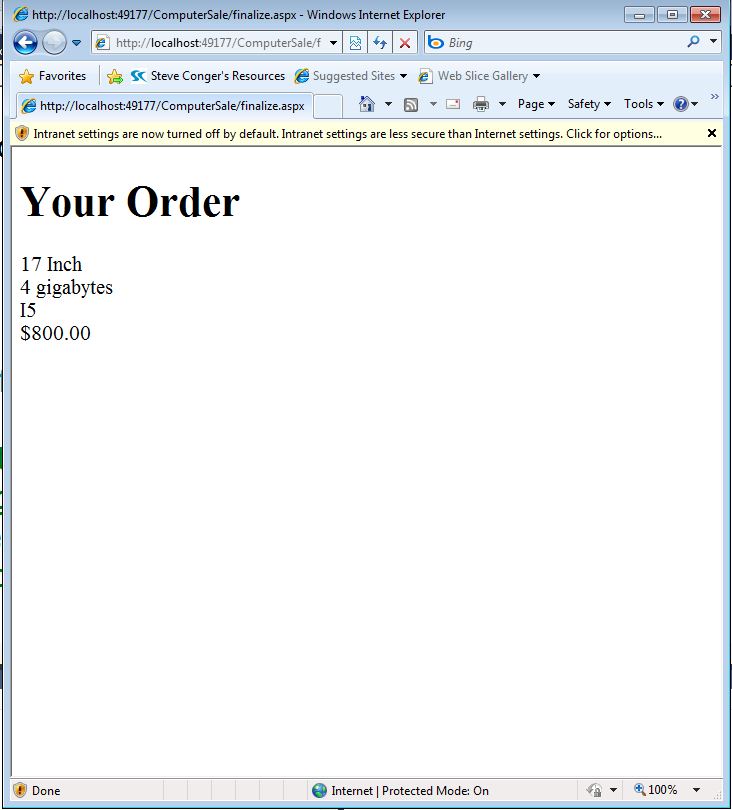
This sample program collects basic information about a computer sale, loads that information into a computer class, saves the computer class in a Session variable and then opens a second page, which calls the class from the Session variable and displays its contents.
Here is a picture of the form running:

Here is a picture of the second page:

Here is the source for Default.aspx
<%@ Page Language="C#" AutoEventWireup="true" CodeFile="Default.aspx.cs" Inherits="_Default" %>
<!DOCTYPE html PUBLIC "-//W3C//DTD XHTML 1.0 Transitional//EN" "http://www.w3.org/TR/xhtml1/DTD/xhtml1-transitional.dtd">
<html xmlns="http://www.w3.org/1999/xhtml">
<head runat="server">
<title>Computer Sale</title>
<link href="Computer.css" rel="stylesheet" type="text/css" />
</head>
<body>
<form id="form1" runat="server">
<h1>Select Your LapTop components</h1>
<p>Choose your size</p>
<asp:RadioButtonList ID="rdoSize" runat="server" cssclass="myList">
<asp:ListItem Value="400">15 Inch</asp:ListItem>
<asp:ListItem Value="500">17 Inch</asp:ListItem>
</asp:RadioButtonList>
<p>Choose Ram</p>
<asp:RadioButtonList ID="rdoRam" runat="server" CssClass="myList">
<asp:ListItem Value="100">3 gigabytes</asp:ListItem>
<asp:ListItem Value="150">4 gigabytes</asp:ListItem>
<asp:ListItem Value="250">8 gigabytes</asp:ListItem>
</asp:RadioButtonList>
<p>Choose Processor</p>
<asp:RadioButtonList ID="rdoProcessor" runat="server">
<asp:ListItem Value="100">I3</asp:ListItem>
<asp:ListItem Value="150">I5</asp:ListItem>
<asp:ListItem Value="200">I7</asp:ListItem>
</asp:RadioButtonList>
<br /><asp:Button ID="Button1" runat="server" Text="Submit"
onclick="Button1_Click" />
</form>
</body>
</html>
Here is the code behind for Default.aspx
using System;
using System.Collections.Generic;
using System.Linq;
using System.Web;
using System.Web.UI;
using System.Web.UI.WebControls;
/*this is the code for the default aspx page. It gets the values from the radio buttons on the form and then initilizes the Computer class and assigns the selected values to the class properties. It saves the class to a session variable and then redirects the user to a second page*/
public partial class _Default : System.Web.UI.Page
{
protected void Page_Load(object sender, EventArgs e)
{
}
protected void Button1_Click(object sender, EventArgs e)
{
//this code executes when the button is clicked
//declare and instantiate the Computer class
Computer comp = new Computer();
//assign the selected values to class properties
comp.Size = rdoSize.SelectedItem.ToString();
comp.SizePrice = double.Parse(rdoSize.SelectedValue.ToString());
comp.Ram = rdoRam.SelectedItem.ToString();
comp.RamPrice = double.Parse(rdoRam.SelectedValue.ToString());
comp.Processor = rdoProcessor.SelectedItem.ToString();
comp.ProcessorPrice = double.Parse(rdoProcessor.SelectedValue.ToString());
//Save the object to a session variable
Session["myOrder"] = comp;
//redirect to the second page
Response.Redirect("finalize.aspx");
}
}
Here is the Computer.cs class
using System;
using System.Collections.Generic;
using System.Linq;
using System.Web;
///
/// Summary description for Computer
///
public class Computer
{
/*this class stores all the values associated
* with the purchased computer and a method
* to calculate the price*/
//empty constructor
public Computer()
{
//
// TODO: Add constructor logic here
//
}
//private fields and public properties
private string size;
public string Size
{
//get allows a user of the class to
// see the value
get { return size; }
//set allows a user of the class to
//change the value
set
{
size = value;
}
}
private double sizePrice;
public double SizePrice
{
get { return sizePrice; }
set { sizePrice = value; }
}
private string ram;
public string Ram
{
get { return ram; }
set { ram = value; }
}
private double ramPrice;
public double RamPrice
{
get { return ramPrice; }
set { ramPrice = value; }
}
private string processor;
public string Processor
{
get { return processor; }
set { processor = value; }
}
private double processorPrice;
public double ProcessorPrice
{
get { return processorPrice; }
set { processorPrice = value; }
}
//public method to calculate price
public double CalculatePrice()
{
//uses the properties rather than the
//private fields in case any validation
//was done in the property
return SizePrice + RamPrice + ProcessorPrice;
}
}
Here is the source for Finalize.aspx
<%@ Page Language="C#" AutoEventWireup="true" CodeFile="finalize.aspx.cs" Inherits="finalize" %>
<!DOCTYPE html PUBLIC "-//W3C//DTD XHTML 1.0 Transitional//EN" "http://www.w3.org/TR/xhtml1/DTD/xhtml1-transitional.dtd">
<html xmlns="http://www.w3.org/1999/xhtml">
<head runat="server">
<title></title>
</head>
<body>
<form id="form1" runat="server">
<div>
<h1>Your Order</h1>
<asp:Label ID="lblSize" runat="server" Text="Label"></asp:Label>
<br />
<asp:Label ID="lblRam" runat="server" Text="Label"></asp:Label>
<br />
<asp:Label ID="lblProcessor" runat="server" Text="Label"></asp:Label>
<br />
<asp:Label ID="lblPrice" runat="server" Text="Label"></asp:Label>
</div>
</form>
</body>
</html>
Here is the code behind for Finalize.aspx.cs
using System;
using System.Collections.Generic;
using System.Linq;
using System.Web;
using System.Web.UI;
using System.Web.UI.WebControls;
public partial class finalize : System.Web.UI.Page
{
/*this class is attached to the second web page
* it uses the page load event to load the saved
* class from the session variable and populate
* the labels on the form with the class contents*/
protected void Page_Load(object sender, EventArgs e)
{
//if somebody accidentally navigates to this page
//without going through the form
//redirect them to the form on default.aspx
if ((Session["myOrder"] != null))
{
//declare an object of the computer type
//assign it the object stored in the session
//variable. It has to be cast to the type
//computer because it is stored simply as an
//object
Computer comp2 = (Computer)Session["myOrder"];
//assign values from the class properties
//to the text property of the labels
lblSize.Text = comp2.Size;
lblRam.Text = comp2.Ram;
lblProcessor.Text = comp2.Processor;
//call the calcualteprice method and
//assign its results to lblprice
lblPrice.Text = comp2.CalculatePrice().ToString("C");
}
else
{
Response.Redirect("Default.aspx");
}
}
}
Here is the Computer.css stylesheet
body
{
font-size:large;
}
h1
{
color:Navy;
}
.myList
{
color:Green;
}
Here is a picture of the form running:

Here is a picture of the second page:
Here is the source for Default.aspx
<%@ Page Language="C#" AutoEventWireup="true" CodeFile="Default.aspx.cs" Inherits="_Default" %>
<!DOCTYPE html PUBLIC "-//W3C//DTD XHTML 1.0 Transitional//EN" "http://www.w3.org/TR/xhtml1/DTD/xhtml1-transitional.dtd">
<html xmlns="http://www.w3.org/1999/xhtml">
<head runat="server">
<title>Computer Sale</title>
<link href="Computer.css" rel="stylesheet" type="text/css" />
</head>
<body>
<form id="form1" runat="server">
<h1>Select Your LapTop components</h1>
<p>Choose your size</p>
<asp:RadioButtonList ID="rdoSize" runat="server" cssclass="myList">
<asp:ListItem Value="400">15 Inch</asp:ListItem>
<asp:ListItem Value="500">17 Inch</asp:ListItem>
</asp:RadioButtonList>
<p>Choose Ram</p>
<asp:RadioButtonList ID="rdoRam" runat="server" CssClass="myList">
<asp:ListItem Value="100">3 gigabytes</asp:ListItem>
<asp:ListItem Value="150">4 gigabytes</asp:ListItem>
<asp:ListItem Value="250">8 gigabytes</asp:ListItem>
</asp:RadioButtonList>
<p>Choose Processor</p>
<asp:RadioButtonList ID="rdoProcessor" runat="server">
<asp:ListItem Value="100">I3</asp:ListItem>
<asp:ListItem Value="150">I5</asp:ListItem>
<asp:ListItem Value="200">I7</asp:ListItem>
</asp:RadioButtonList>
<br /><asp:Button ID="Button1" runat="server" Text="Submit"
onclick="Button1_Click" />
</form>
</body>
</html>
Here is the code behind for Default.aspx
using System;
using System.Collections.Generic;
using System.Linq;
using System.Web;
using System.Web.UI;
using System.Web.UI.WebControls;
/*this is the code for the default aspx page. It gets the values from the radio buttons on the form and then initilizes the Computer class and assigns the selected values to the class properties. It saves the class to a session variable and then redirects the user to a second page*/
public partial class _Default : System.Web.UI.Page
{
protected void Page_Load(object sender, EventArgs e)
{
}
protected void Button1_Click(object sender, EventArgs e)
{
//this code executes when the button is clicked
//declare and instantiate the Computer class
Computer comp = new Computer();
//assign the selected values to class properties
comp.Size = rdoSize.SelectedItem.ToString();
comp.SizePrice = double.Parse(rdoSize.SelectedValue.ToString());
comp.Ram = rdoRam.SelectedItem.ToString();
comp.RamPrice = double.Parse(rdoRam.SelectedValue.ToString());
comp.Processor = rdoProcessor.SelectedItem.ToString();
comp.ProcessorPrice = double.Parse(rdoProcessor.SelectedValue.ToString());
//Save the object to a session variable
Session["myOrder"] = comp;
//redirect to the second page
Response.Redirect("finalize.aspx");
}
}
Here is the Computer.cs class
using System;
using System.Collections.Generic;
using System.Linq;
using System.Web;
///
/// Summary description for Computer
///
public class Computer
{
/*this class stores all the values associated
* with the purchased computer and a method
* to calculate the price*/
//empty constructor
public Computer()
{
//
// TODO: Add constructor logic here
//
}
//private fields and public properties
private string size;
public string Size
{
//get allows a user of the class to
// see the value
get { return size; }
//set allows a user of the class to
//change the value
set
{
size = value;
}
}
private double sizePrice;
public double SizePrice
{
get { return sizePrice; }
set { sizePrice = value; }
}
private string ram;
public string Ram
{
get { return ram; }
set { ram = value; }
}
private double ramPrice;
public double RamPrice
{
get { return ramPrice; }
set { ramPrice = value; }
}
private string processor;
public string Processor
{
get { return processor; }
set { processor = value; }
}
private double processorPrice;
public double ProcessorPrice
{
get { return processorPrice; }
set { processorPrice = value; }
}
//public method to calculate price
public double CalculatePrice()
{
//uses the properties rather than the
//private fields in case any validation
//was done in the property
return SizePrice + RamPrice + ProcessorPrice;
}
}
Here is the source for Finalize.aspx
<%@ Page Language="C#" AutoEventWireup="true" CodeFile="finalize.aspx.cs" Inherits="finalize" %>
<!DOCTYPE html PUBLIC "-//W3C//DTD XHTML 1.0 Transitional//EN" "http://www.w3.org/TR/xhtml1/DTD/xhtml1-transitional.dtd">
<html xmlns="http://www.w3.org/1999/xhtml">
<head runat="server">
<title></title>
</head>
<body>
<form id="form1" runat="server">
<div>
<h1>Your Order</h1>
<asp:Label ID="lblSize" runat="server" Text="Label"></asp:Label>
<br />
<asp:Label ID="lblRam" runat="server" Text="Label"></asp:Label>
<br />
<asp:Label ID="lblProcessor" runat="server" Text="Label"></asp:Label>
<br />
<asp:Label ID="lblPrice" runat="server" Text="Label"></asp:Label>
</div>
</form>
</body>
</html>
Here is the code behind for Finalize.aspx.cs
using System;
using System.Collections.Generic;
using System.Linq;
using System.Web;
using System.Web.UI;
using System.Web.UI.WebControls;
public partial class finalize : System.Web.UI.Page
{
/*this class is attached to the second web page
* it uses the page load event to load the saved
* class from the session variable and populate
* the labels on the form with the class contents*/
protected void Page_Load(object sender, EventArgs e)
{
//if somebody accidentally navigates to this page
//without going through the form
//redirect them to the form on default.aspx
if ((Session["myOrder"] != null))
{
//declare an object of the computer type
//assign it the object stored in the session
//variable. It has to be cast to the type
//computer because it is stored simply as an
//object
Computer comp2 = (Computer)Session["myOrder"];
//assign values from the class properties
//to the text property of the labels
lblSize.Text = comp2.Size;
lblRam.Text = comp2.Ram;
lblProcessor.Text = comp2.Processor;
//call the calcualteprice method and
//assign its results to lblprice
lblPrice.Text = comp2.CalculatePrice().ToString("C");
}
else
{
Response.Redirect("Default.aspx");
}
}
}
Here is the Computer.css stylesheet
body
{
font-size:large;
}
h1
{
color:Navy;
}
.myList
{
color:Green;
}
Tuesday, December 7, 2010
Show and Tell Form for writing data with ADO
the xaml
<Window x:Class="Personform.MainWindow"
xmlns="http://schemas.microsoft.com/winfx/2006/xaml/presentation"
xmlns:x="http://schemas.microsoft.com/winfx/2006/xaml"
Title="MainWindow" Height="350" Width="525">
<Grid>
<Label Content="Enter Last Name" Height="28" HorizontalAlignment="Left" Margin="53,35,0,0" Name="label1" VerticalAlignment="Top" />
<TextBox Height="23" HorizontalAlignment="Left" Margin="189,35,0,0" Name="txtLastName" VerticalAlignment="Top" Width="120" />
<Label Content="Enter First Name" Height="28" HorizontalAlignment="Left" Margin="53,83,0,0" Name="label2" VerticalAlignment="Top" />
<TextBox Height="23" HorizontalAlignment="Left" Margin="189,83,0,0" Name="txtFirstName" VerticalAlignment="Top" Width="120" />
<Button Content="Save" Height="23" HorizontalAlignment="Left" Margin="61,167,0,0" Name="button1" VerticalAlignment="Top" Width="75" Click="button1_Click" />
</Grid>
</Window>
The Windows1.xaml.cs
using System;
using System.Collections.Generic;
using System.Linq;
using System.Text;
using System.Windows;
using System.Windows.Controls;
using System.Windows.Data;
using System.Windows.Documents;
using System.Windows.Input;
using System.Windows.Media;
using System.Windows.Media.Imaging;
using System.Windows.Navigation;
using System.Windows.Shapes;
namespace Personform
{
///
/// Interaction logic for MainWindow.xaml
///
public partial class MainWindow : Window
{
public MainWindow()
{
InitializeComponent();
}
private void button1_Click(object sender, RoutedEventArgs e)
{
try
{
Person person = new Person(txtLastName.Text, txtFirstName.Text);
PersonWrite personWrite = new PersonWrite(person);
txtFirstName.Clear();
txtLastName.Clear();
}
catch (Exception ex)
{
MessageBox.Show(ex.Message);
}
}
}
}
The person class
using System;
using System.Collections.Generic;
using System.Linq;
using System.Text;
namespace Personform
{
class Person
{
private string first;
private string last;
public Person(string fName, string lName)
{
FirstName = fName;
LastName = lName;
}
public string FirstName
{
get { return first; }
set { first = value; }
}
public string LastName
{
get { return last; }
set { last = value; }
}
}
}
the Person Class
using System;
using System.Collections.Generic;
using System.Linq;
using System.Text;
using System.Data;
using System.Data.SqlClient;
namespace Personform
{
class PersonWrite
{
private SqlConnection connect;
private Person pers;
public PersonWrite(Person p)
{
connect = new SqlConnection
("Data Source=localhost;initial catalog=CommunityAssist;integrated security=true");
pers = p;
WritePerson();
}
private void WritePerson()
{
try
{
string Sql = "Insert into Person(LastName, FirstName) Values (@last, @first)";
SqlCommand cmd = new SqlCommand(Sql, connect);
cmd.Parameters.AddWithValue("@last", pers.LastName);
cmd.Parameters.AddWithValue("@first", pers.FirstName);
connect.Open();
cmd.ExecuteNonQuery();
}
catch(SqlException)
{
Exception ex = new Exception("Your sql sucks");
throw ex;
}
catch (Exception ex)
{
throw ex;
}
finally
{
connect.Close();
}
}
}
}
<Window x:Class="Personform.MainWindow"
xmlns="http://schemas.microsoft.com/winfx/2006/xaml/presentation"
xmlns:x="http://schemas.microsoft.com/winfx/2006/xaml"
Title="MainWindow" Height="350" Width="525">
<Grid>
<Label Content="Enter Last Name" Height="28" HorizontalAlignment="Left" Margin="53,35,0,0" Name="label1" VerticalAlignment="Top" />
<TextBox Height="23" HorizontalAlignment="Left" Margin="189,35,0,0" Name="txtLastName" VerticalAlignment="Top" Width="120" />
<Label Content="Enter First Name" Height="28" HorizontalAlignment="Left" Margin="53,83,0,0" Name="label2" VerticalAlignment="Top" />
<TextBox Height="23" HorizontalAlignment="Left" Margin="189,83,0,0" Name="txtFirstName" VerticalAlignment="Top" Width="120" />
<Button Content="Save" Height="23" HorizontalAlignment="Left" Margin="61,167,0,0" Name="button1" VerticalAlignment="Top" Width="75" Click="button1_Click" />
</Grid>
</Window>
The Windows1.xaml.cs
using System;
using System.Collections.Generic;
using System.Linq;
using System.Text;
using System.Windows;
using System.Windows.Controls;
using System.Windows.Data;
using System.Windows.Documents;
using System.Windows.Input;
using System.Windows.Media;
using System.Windows.Media.Imaging;
using System.Windows.Navigation;
using System.Windows.Shapes;
namespace Personform
{
///
/// Interaction logic for MainWindow.xaml
///
public partial class MainWindow : Window
{
public MainWindow()
{
InitializeComponent();
}
private void button1_Click(object sender, RoutedEventArgs e)
{
try
{
Person person = new Person(txtLastName.Text, txtFirstName.Text);
PersonWrite personWrite = new PersonWrite(person);
txtFirstName.Clear();
txtLastName.Clear();
}
catch (Exception ex)
{
MessageBox.Show(ex.Message);
}
}
}
}
The person class
using System;
using System.Collections.Generic;
using System.Linq;
using System.Text;
namespace Personform
{
class Person
{
private string first;
private string last;
public Person(string fName, string lName)
{
FirstName = fName;
LastName = lName;
}
public string FirstName
{
get { return first; }
set { first = value; }
}
public string LastName
{
get { return last; }
set { last = value; }
}
}
}
the Person Class
using System;
using System.Collections.Generic;
using System.Linq;
using System.Text;
using System.Data;
using System.Data.SqlClient;
namespace Personform
{
class PersonWrite
{
private SqlConnection connect;
private Person pers;
public PersonWrite(Person p)
{
connect = new SqlConnection
("Data Source=localhost;initial catalog=CommunityAssist;integrated security=true");
pers = p;
WritePerson();
}
private void WritePerson()
{
try
{
string Sql = "Insert into Person(LastName, FirstName) Values (@last, @first)";
SqlCommand cmd = new SqlCommand(Sql, connect);
cmd.Parameters.AddWithValue("@last", pers.LastName);
cmd.Parameters.AddWithValue("@first", pers.FirstName);
connect.Open();
cmd.ExecuteNonQuery();
}
catch(SqlException)
{
Exception ex = new Exception("Your sql sucks");
throw ex;
}
catch (Exception ex)
{
throw ex;
}
finally
{
connect.Close();
}
}
}
}
Subscribe to:
Posts (Atom)