use Automart;

Select Firstname, Lastname from Person;

Select * From Person;

--Distinct applies to whole row
Select Distinct locationID from Employee.VehicleService;

--calculations and scalar functions (operates on each row)
Select serviceName, servicePrice,
cast((ServicePrice * 1.15)as Decimal(7,2)) as [New Price]
From Customer.AutoService;

Select * from Person
Order by Lastname Desc, Firstname;

Select * from Person
Where LastName= 'Smith';

--=, >, <, >=, <= ,!=, <>,
Select * From Customer.AutoService
Where ServicePrice > 100;

Select * from Employee.VehicleService
Where ServiceDate >='4/1/2010'

Select * From Employee.VehicleServiceDetail
where ServiceDate Between '3/1/2010' and '3/31/2010'
--equivalent of ServiceDate >= '3/1/2010' and ServiceDate <= '3/31/2010'

 --and, or, not

Use CommunityAssist

Select * From PersonAddress
Where Apartment is Not null

--scalar function
use Automart
Select GETDATE()
Select Distinct MONTH(ServiceDate) From Employee.VehicleService

--aggregate functions

Select COUNT(Distinct VehicleID) From Employee.VehicleService

Select AVG(ServicePRice) From Customer.AutoService

Select MAX(ServicePrice) From Customer.Autoservice

Select MIN (ServicePrice) From customer.AutoService

Select AVG(ServicePrice) From Customer.AutoService
where ServicePrice <
(Select MAX(ServicePrice) from Customer.Autoservice)
and ServicePrice >
(Select MIN(ServicePRice) from Customer.Autoservice)

Select Servicename, ServicePrice From Customer.Autoservice
Where ServicePrice = (Select MIN(ServicePrice) from Customer.AutoService)
--
Select MONTH(ServiceDate) as [Month],
COUNT(VehicleID) as [Vehicles]
From Employee.VehicleService
Group by MONTH(ServiceDate) --any field that isn't a part of the aggregate
Having COUNT(VehicleID) >10


Select LastName, Firstname,Email, licenseNumber, VehicleMake
From Person
inner join Customer.RegisteredCustomer
on Person.Personkey=Customer.RegisteredCustomer.PersonKey
inner join Customer.vehicle
on Person.Personkey=Customer.vehicle.PersonKey

Select LastName, rc.PersonKey
From Person as p
left outer join Customer.RegisteredCustomer as rc
on p.Personkey=rc.PersonKey
Where rc.PersonKey is null
Monday, November 26, 2012
SQL

Wednesday, November 21, 2012
More Validation and Error Trapping
Here is an example of a program that validates the user choices with TryParse instead of Parse. It also shows the use of try catch blocks and how to throw an exception.
The program consists of three classes. The Program class which contains the Main() method, and nothing else. The Display class which calls the SimpleMath class which does simple integer addition, subtraction, multiplication and division
We will start with the validation of the inputs in the Display class.
First we set up a menu. (The menu, by the way, uses a switch structure which tests each "case" of the variable "choice." If choice is equal to 1 it call the the GetNumbers() method and the GetAddition() method. The break keeps it from sliding down to the next case.
Here is the basic menu:

Notice the menu loops until the user chooses 5 to exit. Also note the validation of the user choice. It uses a TryParse method to test the value. The TryParse value returns a boolean--true of false. If the input can be parsed as an integer it is passed out to the variable "choice". If not, it just returns false. In this instance I don't have to do anything else. It will keep looping until the user enters 5 to exit.
In the GetNumbers() method the user input is again tested with TryParse(). Here the input is inside a while loop that won't let the user out until they have entered a valid number.
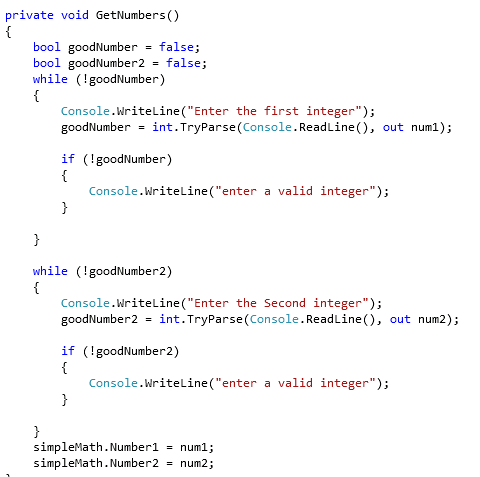
After the numbers are validated they are assigned to properties in the SimpleMath class. Lets look at the SimpleMath class. I am going to focus on just the Division method. With integer division it is an error to divide by zero. I am going to put the division in a try catch block and look explicitly for the Division by zero error. I am going to throw the error back to the Display class which called the method. It is always best if your classes are as agnostic about the display modes as possible. The same class could be used in a console application such as this one, or with a web form or a window's form.

I did the same thing with the Remainder method
If you throw an error you must catch it somewhere. I put a try catch block around the code in the Display class that calls the divide method. It will catch and display the error.

Here is a picture of the console app running. I chose 4 for divide, and put 0 as the second integer. The error message, thrown from the SimpleMath class and caught by the Display class is shown

So here is all the code in a form you can cut and paste
SimpleMath
using System;
using System.Collections.Generic;
using System.Linq;
using System.Text;

namespace tryCatchExamples
{
    class SimpleMath
    {
        ///
        /// This class just does simple arithmetic.
        /// Its main point is in the Divide method.
        /// There it has a try catch that catches the
        /// DivideByZeroException. It throws this to the
        /// calling class which is Display
        ///
        ///
        // private fields
        private int number1;
        private int number2;

        //default constructor
        public SimpleMath()
        {
            number1 = 0;
            number2 = 0;
        }

        //overloaded constructor
        public SimpleMath(int num1, int num2)
        {
            number1 = num1;
            number2 = num2;
        }

        //public properties
        public int Number1
        {
            set { number1 = value; }
            get { return number1; }
        }

        public int Number2
        {
            set { number2 = value; }
            get { return number2; }
        }

        //public methods

        public int Add()
        {
            return number1 + number2;
        }

        public int Subtract()
        {
            return number1 - number2;
        }

        public int Multiply()
        {
            return number1 * number2;
        }


        public int Divide()
        {
            int quotient=0;
            //here we try the division if number2
            //is 0 it will throw an error
            //backt to the calling class
            try //try the following code
            {
                quotient = number1 / number2;
            }
            catch (DivideByZeroException) //catch the Divide by zero error
            {
                throw new DivideByZeroException();
            }

            return quotient;
        }

        public int Remainder()
        {
            int remain = 0;
            {
                try //try the following code
                {
                    remain = number1 % number2;
                }
                catch (DivideByZeroException) //catch the Divide by zero error
                {
                    throw new DivideByZeroException();
                }

                return remain;
            }
        }
    }
}
Display
using System;
using System.Collections.Generic;
using System.Linq;
using System.Text;

namespace tryCatchExamples
{
    class Display
    {
        private SimpleMath simpleMath;
        private int num1;
        private int num2;

        public Display()
        {
            simpleMath = new SimpleMath();
            menu();
        }

        private void menu()
        {
            int choice = 1;
            while (choice !=5)
            {
                Console.Clear();
                Console.WriteLine("Choose which operation you wish to do:"
                    +"\n1: Add"
                    +"\n2: Subtract"
                    +"\n3: Multiply"
                    +"\n4: divide"
                    +"\n5: Exit");

                bool menuitem= int.TryParse(Console.ReadLine(), out choice);
                switch (choice)
                {
                    case 1:
                        GetNumbers();
                        GetAdd();
                        break;
                    case 2:
                        GetNumbers();
                        GetSubtract();
                        break;
                    case 3:
                        GetNumbers();
                        GetMultiply();
                        break;
                    case 4:
                        GetNumbers();
                        GetDivide();
                        break;
                    default:
                        break;
                }
            }
        }

        private void GetNumbers()
        {
            bool goodNumber = false;
            bool goodNumber2 = false;
            while (!goodNumber)
            {
                Console.WriteLine("Enter the first integer");
                goodNumber = int.TryParse(Console.ReadLine(), out num1);

                if (!goodNumber)
                {
                    Console.WriteLine("enter a valid integer");
                }

            }

            while (!goodNumber2)
            {
                Console.WriteLine("Enter the Second integer");
                goodNumber2 = int.TryParse(Console.ReadLine(), out num2);

                if (!goodNumber2)
                {
                    Console.WriteLine("enter a valid integer");
                }

            }
            simpleMath.Number1 = num1;
            simpleMath.Number2 = num2;
        }

            private void GetAdd()
            {
                Console.WriteLine("The sum is {0}", simpleMath.Add() );
                PauseIt();
            }

            private void GetSubtract()
            {
                Console.WriteLine("The Difference is {0}", simpleMath.Subtract());
                PauseIt();
            }

            private void GetMultiply()
            {
                Console.WriteLine("The product is {0}", simpleMath.Multiply());
                PauseIt();
            }

            private void GetDivide()
            {
                int quotient;
                int remainder;
                try
                {
                    quotient = simpleMath.Divide();
                    remainder = simpleMath.Remainder();
                    Console.WriteLine("the quotient is {0}", quotient);
                    Console.WriteLine("The remainder is {0}", remainder);
                    PauseIt();
                }
                catch(Exception ex)
                {
                    Console.WriteLine(ex.Message);
                    PauseIt();
                }
            }

            private void PauseIt()
            {
                Console.WriteLine("Press any key to continue");
                Console.ReadKey();
            }

    }
}
Program
using System;
using System.Collections.Generic;
using System.Linq;
using System.Text;

namespace tryCatchExamples
{
    class Program
    {
        static void Main(string[] args)
        {
            Display d = new Display();
        }
    }
}
Thursday, November 8, 2012
Class example from Class
Here is the CalculateCubicYards class
using System;
using System.Collections.Generic;
using System.Linq;
using System.Text;

namespace ClassExample
{
    class CubicYardCalculator
    {
        //Fields
        private int width; //feet
        private int depth;//inches
        private int length;//feet
        //36 * 36 * 36
        const int CUBICYARDININCHES = 46656;
        const int FOOT=12;

        public CubicYardCalculator()
        {
            Width = 0;
            Length = 0;
            Depth = 0;
        }

        public CubicYardCalculator(int w, int l, int d)
        {
            Width = w;
            Length = l;
            Depth = d;
        }

        //public properties
        public int Width
        {
            set
            {

                width = value;
                WidthInInches();
            }
            get { return width; }
        }

        public int Length
        {
            get { return length; }
            set
            {
                length = value;
                LengthInInches();
            }
        }

        public int Depth
        {
            get { return depth; }
            set { depth = value; }
        }

        //methods
        private void WidthInInches()
        {
            width=width * FOOT;
        }

        private void LengthInInches()
        {
            length=length * FOOT;
        }

        public int GetCubicYards()
        {
            int cubicYards=(Length * Width * Depth) / CUBICYARDININCHES;
            if((Length * Width * Depth) % CUBICYARDININCHES !=0)
                cubicYards+=1;
            return cubicYards;
        }
    }
}
Here is the Program class
using System;
using System.Collections.Generic;
using System.Linq;
using System.Text;

namespace ClassExample
{
    class Program
    {
        static void Main(string[] args)
        {
            Program p = new Program();
            //p.DefaultConstructor();
            p.AlternateConstructor();
            Console.ReadKey();
        }

        private void DefaultConstructor()
        {
            CubicYardCalculator cubic = new CubicYardCalculator();
            cubic.Length = 80;
            cubic.Width = 60;
            cubic.Depth = 6;
            Console.WriteLine("You need {0} Cubic Yards", cubic.GetCubicYards());
        }

        private void AlternateConstructor()
        {
            CubicYardCalculator cubic = new CubicYardCalculator(80, 20, 6);
            Console.WriteLine("You need {0} Cubic Yards", cubic.GetCubicYards());
        }
    }
}
Wednesday, November 7, 2012
Creating and using a class
This example creates a user defined class called CubicYardCalculator. First Add a new Class to the project and name it "CubicYardCalculator."

This gives you an empty class:

First we add the class level fields. These are class level variables that describe the object. In our case the cubic yards needs three variables to describe it, height, width and depth. I also have added a constant to store the value of a cubic yard in terms of inches (36 * 38 * 36). We will need this later when doing the calculations since we convert everything into inches to do the math and then back to cubic yards.

The fields are private to protect them. This is a part of the object oriented principle called Encapsulation. We will expose them to other classes through special methods called properties. Properties let you set the value and get the value returned. You can use properties to validate the input. You can also let people "get" the value of a field, but not "set" it, or visa versa. We will modify the Width and Length properties shortly.

Properties are different from other methods in that they don't take parameters. Therefore they don't have a () at the end of the declaration
Next we will enter the class methods. I make three of them. One to convert Width to inches, another to convert Length to inches and a third to get the cubic yards. The first two are private, meaning they can only be accessed internally in this class. The last method is public. That means we can call it from another class.

So, what are we going to do with those private methods? I am going to call them from the properties so that we can guarantee that they will be converted to inches. Here are the modified properties.

We are almost done with this class. The last things I am going to add are two constructors. Constructors "construct" a class. They set it up by initializing any variables and calling any methods that should be called.
If you don't create a constructor, the compiler creates a default constructor that initializes every thing to 0 or null. If you make your own constructors the compiler will no longer create a default constructor and it is up to you to initialize your variables.
Constructors can be overloaded. That means you can have multiple constructors as long as they can be clearly distinguished from each other. It is important to note that no matter how many constructors you have only one at a time is used for any particular instance of a class.
Constructors always have the same name as the class, and unlike other methods, they have no return type.

Why have multiple constructors? It gives the user of the class choices. Now they have two ways to initialize the class. They can choose the way that works best in their context.
Next we will instantiate and call our new class from the program class. First I will make a method to use the default constructor--the one that doesn't take arguments. When I use it, I have to use the properties directly to set the values. For brevity I am simply giving it literal values. You could, and should of course, get user input for these values. Here is the first method and the result when it is run.


No here is the code for using the overloaded constructor. Again I am just passing it literal values.


Thursday, November 1, 2012
Validating user Input
Here is a brief example that shows how to validate user input
using System;
using System.Collections.Generic;
using System.Linq;
using System.Text;

namespace ConsoleApplication4
{
    class Program
    {
        ///
        /// This program uses the quadratic equation
        /// to produce a a prime number
        /// with a seed of any integer between 1 and 41
        /// The main purpose is to show you how you
        /// can validate the users input.
        /// the TryParse makes sure that the number
        /// is an integer without crashing the program
        /// the while loop keeps repeating the user prompt
        /// until they enter an integer in the valid range
        /// Steve Conger 11/1/2012
        ///

        static void Main(string[] args)
        {
            Program p = new Program();
            p.HowToTestUserEntry();
            Console.ReadKey();
        }

        private void HowToTestUserEntry()
        {
            //you want them to enter an integer between 1 and 41
            //declare the variabe to test
            int number = 0;
            //create a loop that won't stop until
            //they enter a proper number
            while (number < 1 || number > 41)
            {
                Console.WriteLine("Enter an integer between 1 and 41");
                //if it parses correctly it will assign the integer to the
                //variable number, otherwise it returns false
                bool entry = int.TryParse(Console.ReadLine(), out number);
                //if it is false or the number is not between
                //1 and 41 prompt them to enter a correct number
                if (!entry || number < 1 || number > 41)
                {
                    Console.WriteLine("Please make sure you entered an integer between 1 and 41");
                }//end if
            }//end while

            //this equation is a mathematical oddity
            //that returns 41 prime numbers in sequence
            //for numbers between 1 and 41
            int prime = number * number - number + 41;
            Console.WriteLine("The prime number is {0}", prime);
        }
    }
}
Random Numbers
here is the code for a random number
using System;
using System.Collections.Generic;
using System.Linq;
using System.Text;

namespace ConsoleApplication4
{
    class Program
    {
        static void Main(string[] args)
        {
            //instantiate the program class
            Program p = new Program();
            //call the DisplayRandom method
            p.DisplayRandom();
            Console.ReadKey();
        }

        private int GetRandom()
        {
            //instantiate the Random class
            //rand is the local name of our Random
            //object
            Random rand = new Random();
            //this sets the minimum random number
            //at 1 and the
            int number = rand.Next(1, 100);
            return number;
        }

        private void DisplayRandom()
        {
            //get fifteen random numbers
            for (int i = 1; i <= 15; i++)
            {
                //the prompt just slows it down enough
                //to make it do different randoms
                Console.WriteLine("Press any key for next number");
                Console.ReadKey();
                Console.WriteLine(GetRandom());
            }
        }
    }
}
Monday, October 29, 2012

Subscribe to:
Posts (Atom)